
RunLoyal release notes
No versions match your search.
V1.159.20261103.0111/03/202637 updates
We've launched new features, enhancements, and reporting improvements this sprint. Please review the updates below.
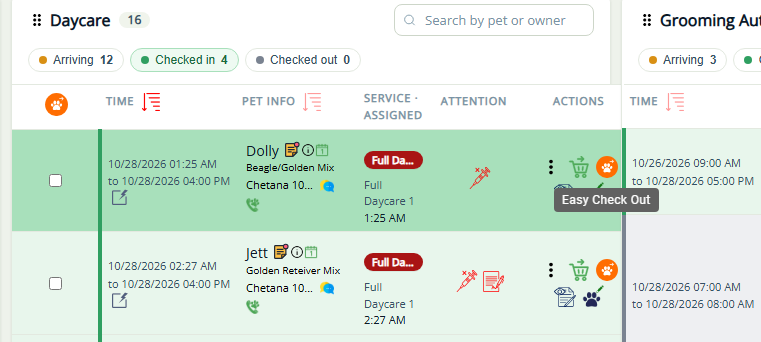
Easy Check-Out for Fully Paid Pets/Appointments - Daily Snapshot, Appointments-In House, Membership In House 
Staff can now quickly check out pets with a $0.00 invoice balance without opening invoices or processing payments, streamlining pickup for service-based appointments such as capacity and staff based. Bulk checkout is also available for all service types, including boarding. This functionality is accessible from Daily Snapshot, Appointments and Membership In-House screens.
- Easy Check-Out Indicator: Identifies eligible checked-in appointments with zero balances.
- Flexible Check-Out: Check out pets individually, by pet owner, or in bulk using multi-select or More → Easy Check-Out.
- Quick Filtering: Filter appointments to display only those eligible for Easy Check-Out.
- Automatic Updates: Appointments move to Checked Out, when the invoices are closed.
- Payment Validation: Appointments with outstanding balances are skipped, with reasons displayed during bulk checkout.
- Additional Info: Packages or Membership entitlement is applied and balance due is zero then the appointments will be eligible for easy check out.
📝 Note: Existing checkout permissions, notifications, and financial tracking remain unchanged.
Daily Snapshot: Improved Visibility & Customization
RunLoyal’s Daily Snapshot now provides clearer appointment details, easier navigation, and customizable status colors to help staff manage daily operations.
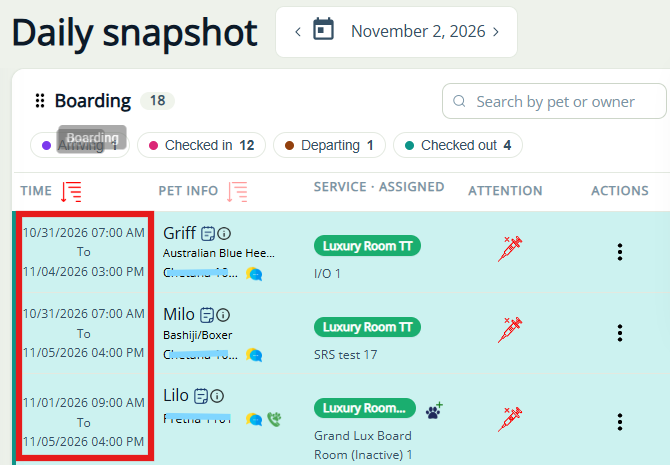
Boarding Visibility: Shows arriving, in-house, and departing boarding pets with dates and times.
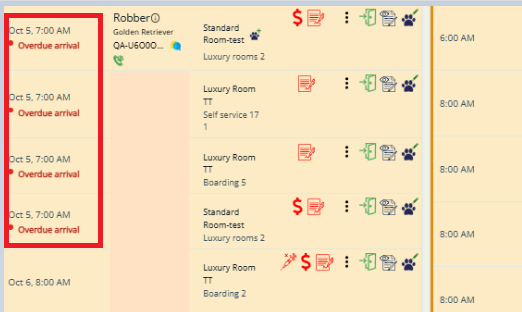
Overdue Arrivals: Highlights boarding pets overdue for check-in with a red indicator.
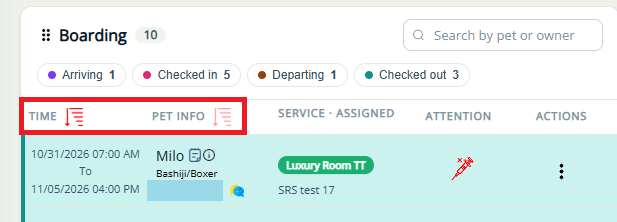
Flexible Sorting: Sort each service list by Time or Pet Info.
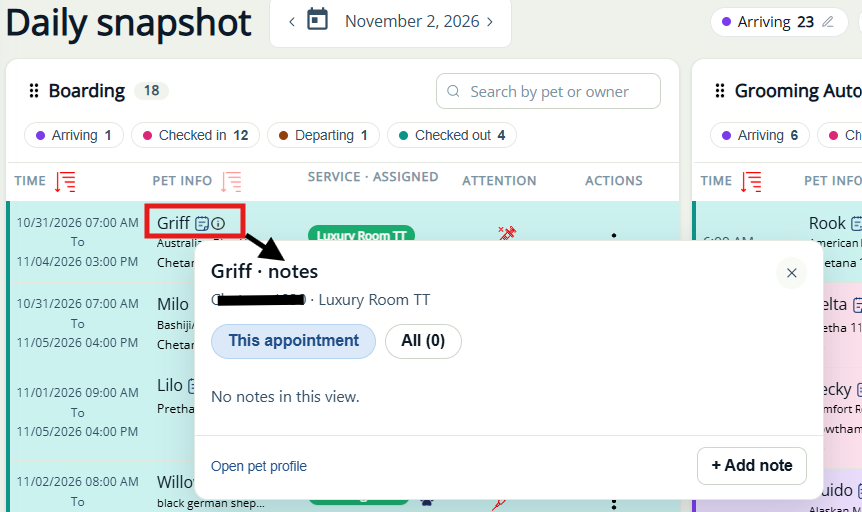
Quick Access to Pet Notes: View pet notes directly from the Snapshot without leaving the screen.
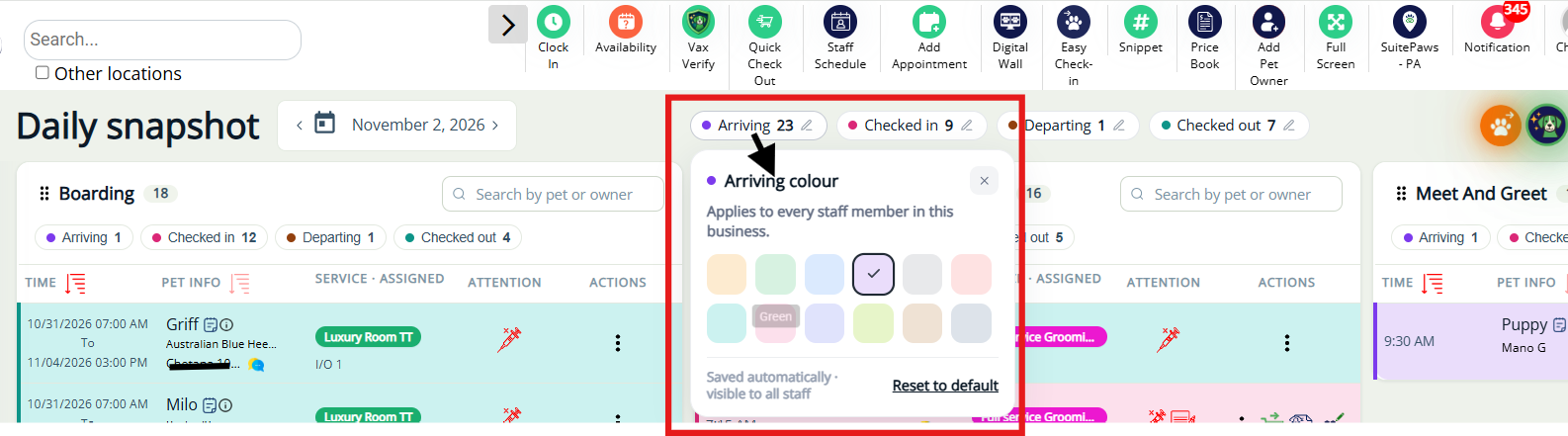
Custom Status Colors: Admins and managers can customize colors for Arriving, Checked In, In House, Departing, and Checked Out, with options to reset defaults.
📝 Note: This enhancement for StaffApp+ for Kennels will be available by the Mid of November 2026.
Quick Checkout: Apply Partial Credits & Rewards
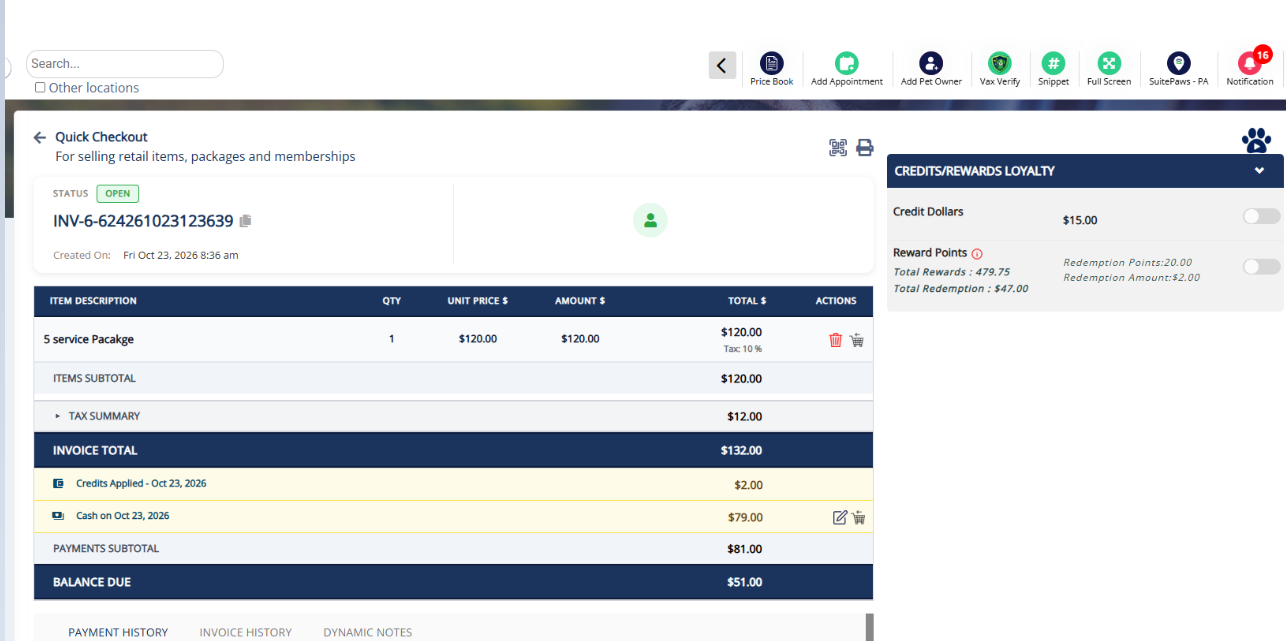
Staff can now apply partial credits toward Quick Checkout invoices (for purchasing non-recurring packages, non-recurring memberships, retail products and training classes) and collect the remaining balance using another payment method.
- Partial Payments: Apply available credits or rewards without requiring them to cover the full invoice balance. Available only when the deposit % meets the credit criteria. If not kindly proceed with other payment methods
- Flexible Payment Options: Collect the remaining balance through cash, card, or other supported payment methods.
- Purchase Support: Available for memberships, training, and packages.
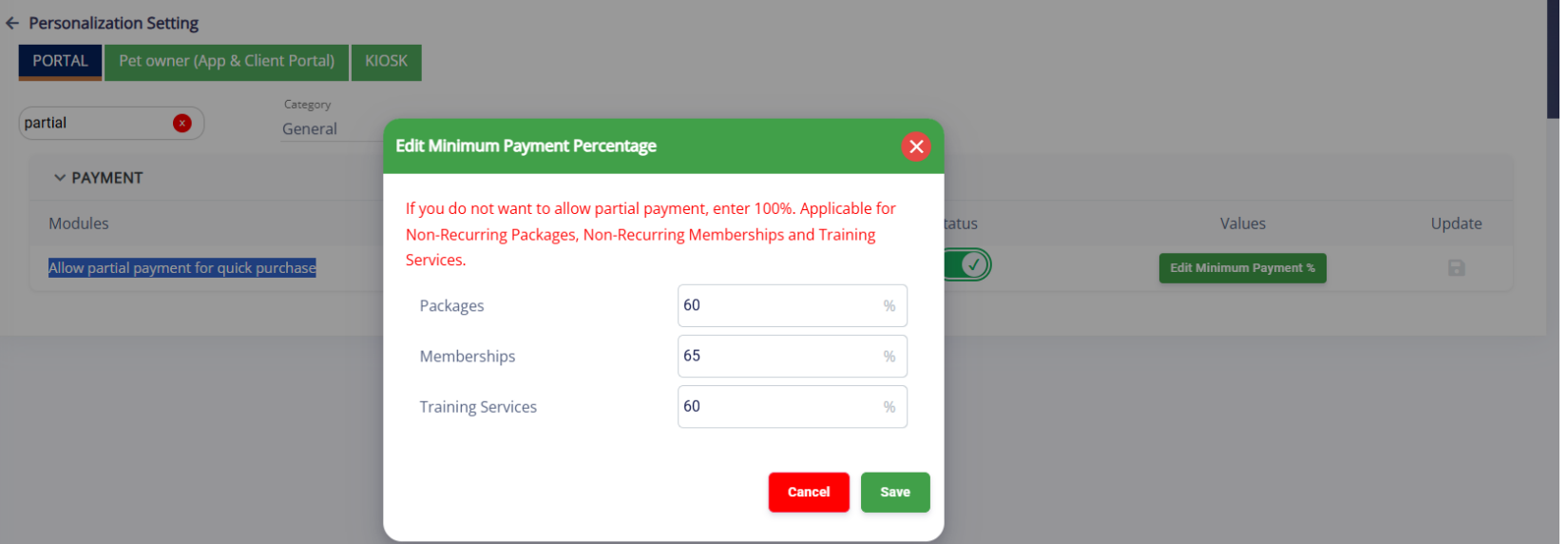
- Minimum Payment Requirement: Staff can now apply available credits or rewards toward a Quick Checkout invoice, even when the available amount does not cover the full balance. The remaining balance can be collected using another supported payment method.
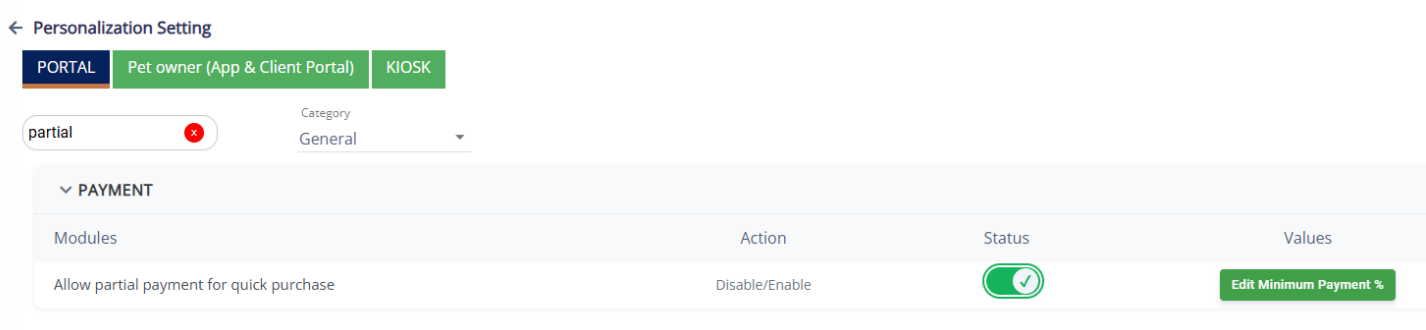
- Enable: Turn on “Allow partial payment for quick purchase” under Settings → Operations → Personalization. Default: Off
📝 Note: When this setting is disabled, the existing full-balance payment requirement remains unchanged.
📝 Note: This enhancement for Pet Owner App and Client Portal will be available by the End of November 2026.
Family Member Notifications
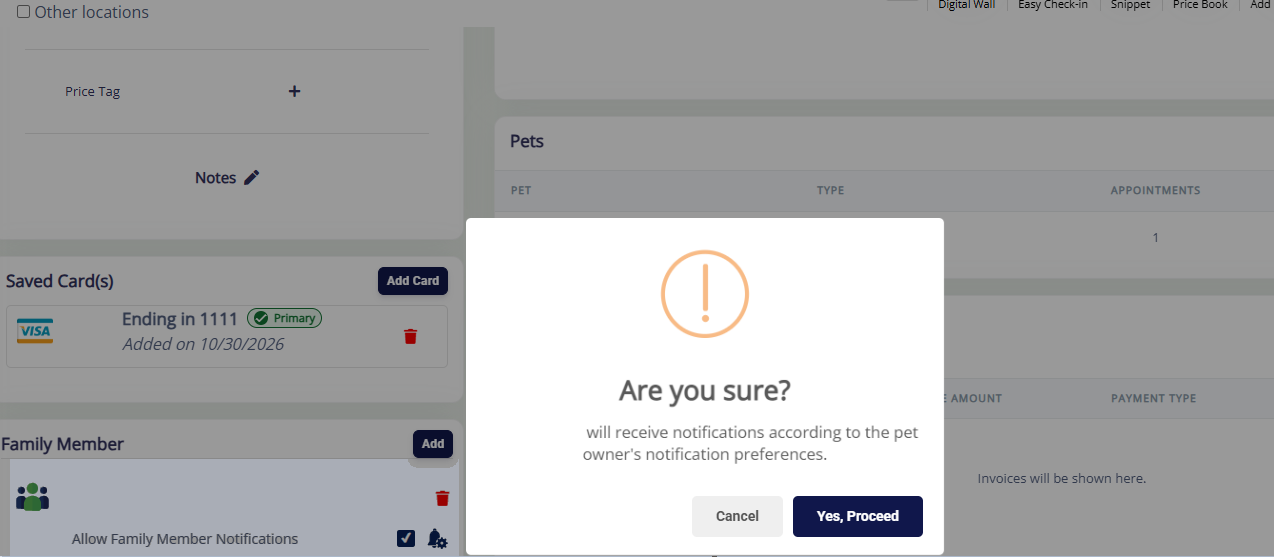
RunLoyal now allows businesses to send pet owner notifications, including report cards and appointment updates, to multiple family members instead of only the primary pet owner.
- Family Member Selection: Staff can enable notifications for individual family members using a checkbox under Pet Owner Profile → Family Members.
- Primary Pet Owner: Always receives notifications and cannot be deselected.
- Notification Preferences: Respects existing SMS, email, and app notification settings, including pet owner opt-outs.
📝 Note: Notifications are disabled for additional family members by default. Staff must enable them individually.
Pricing: Retain Last-Paid Price for Repeat Customers
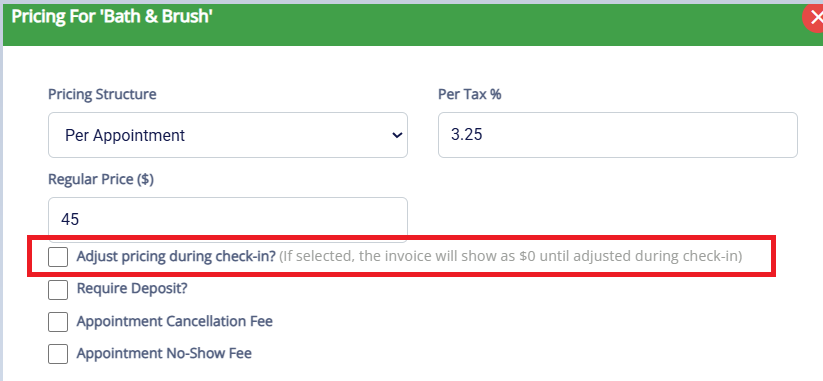
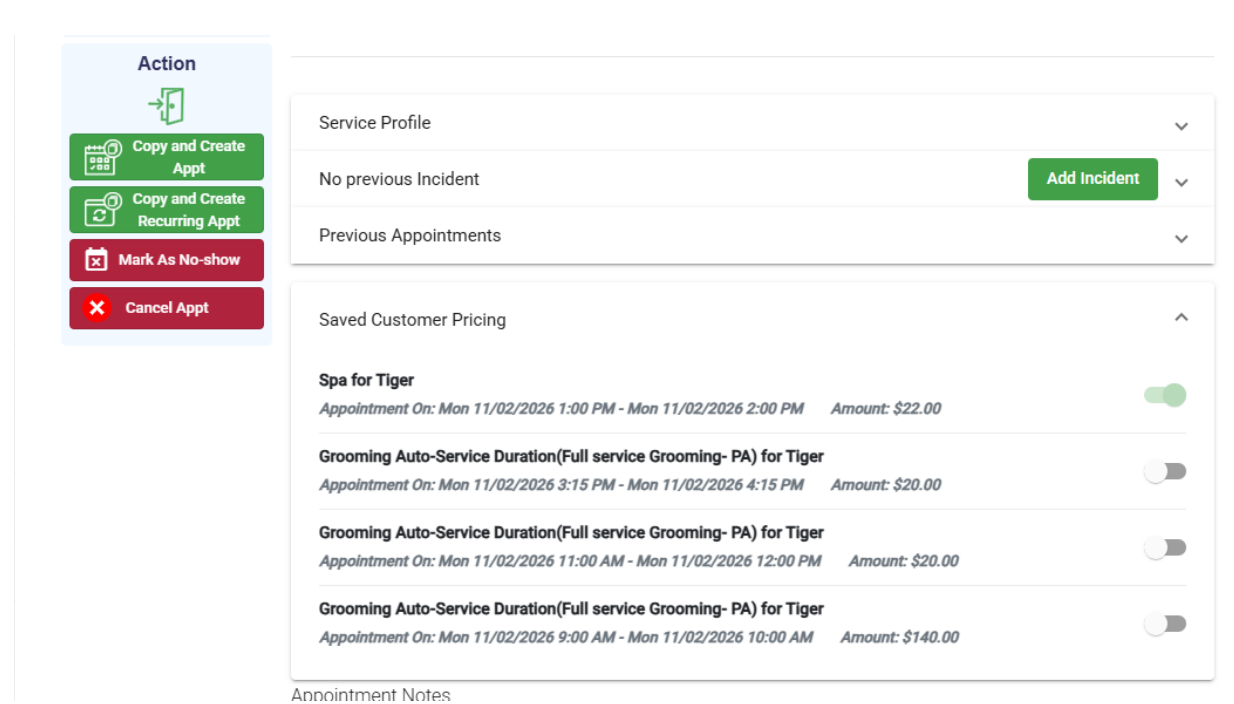
RunLoyal now helps staff retain previously charged service prices for repeat customers through the Adjust Price option during check-in. Available from the Advanced Staff Calendar
- Automatic Pricing: Applies the previously charged price during booking and check-in, respecting pet-level pricing
- Price Visibility: Staff can view the retained price in appointments and invoices.
- Flexible Adjustments: Staff can keep the previous price, use the current Price List rate, or enter a custom amount.
- Save for Future: Updated prices can optionally be saved for future appointments.
📝 Note: New customers continue to receive the current active Price List rate.
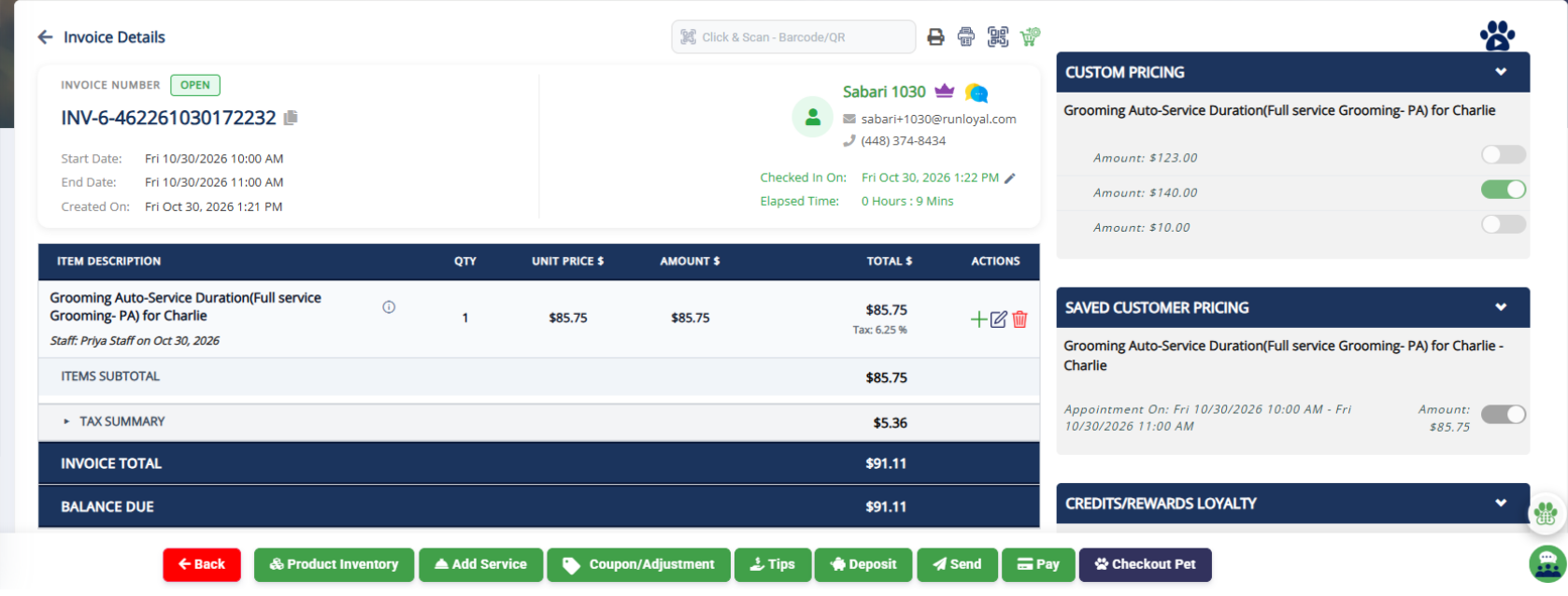
Manage Tips: Configure Fixed Dollar Amounts
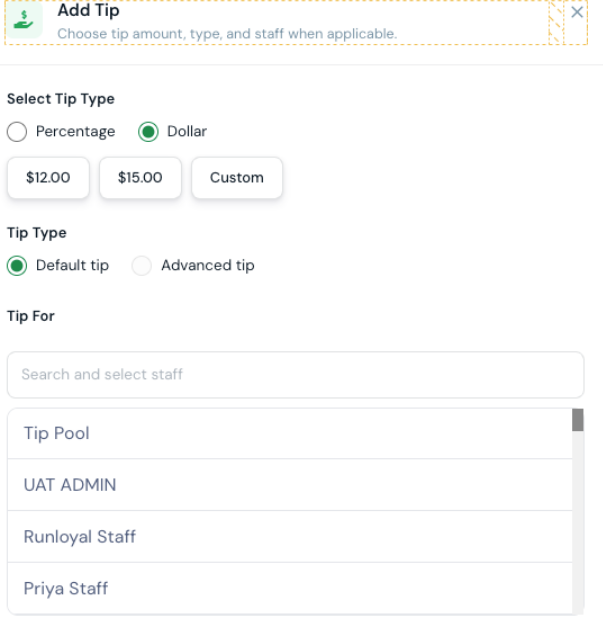
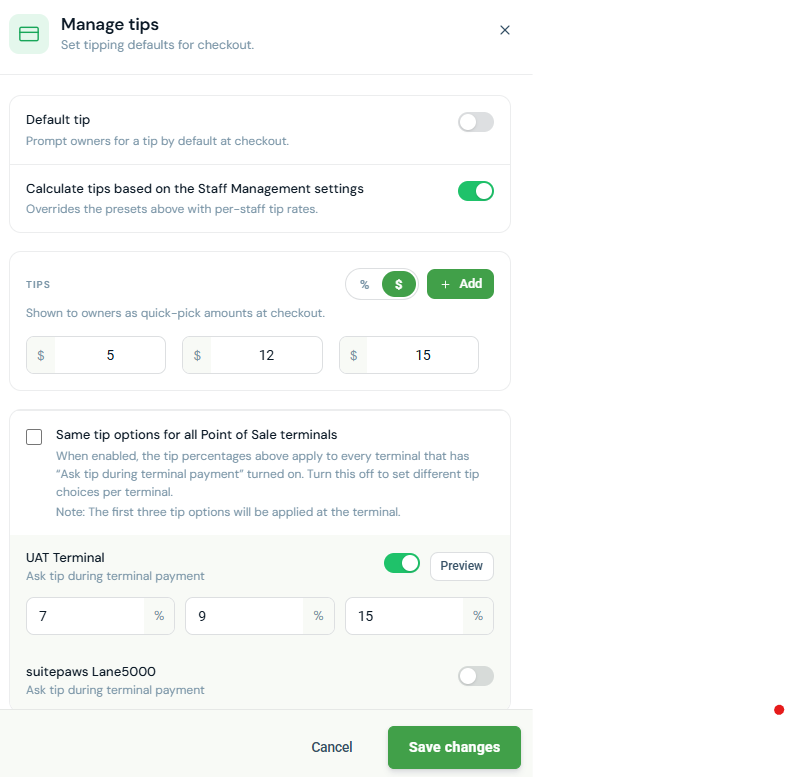
Businesses can now configure tip presets as fixed dollar amounts instead of percentages, providing greater flexibility for different service types. Defaulted by $ settings
- Tip Configuration: Choose % or $ under Settings → Pricing → Manage Tips.
- Fixed Amounts: Set predefined tip amounts (e.g., $3, $5, $8) with up to two decimal places.
- Checkout Support: Fixed tips display correctly across POS terminals, Pet Owner App checkout, invoices, and receipts.
- Terminal Settings: Percentage-based terminal tip presets and Calculate from Staff Management are hidden in dollar mode.
- Location-Based: Each location can configure its preferred tip mode independently.
📝 Note: Existing locations remain in percentage mode by default, with current tip calculations unchanged.
📝 Note: This enhancement for Pet Owner App, Client Portal, StaffApp+ for Kennels, Front Desk Kiosk, and StaffApp+ for Groomers will be available by the Mid of November 2026.
Allow Tips on Membership Invoices and Route to Tip Pool
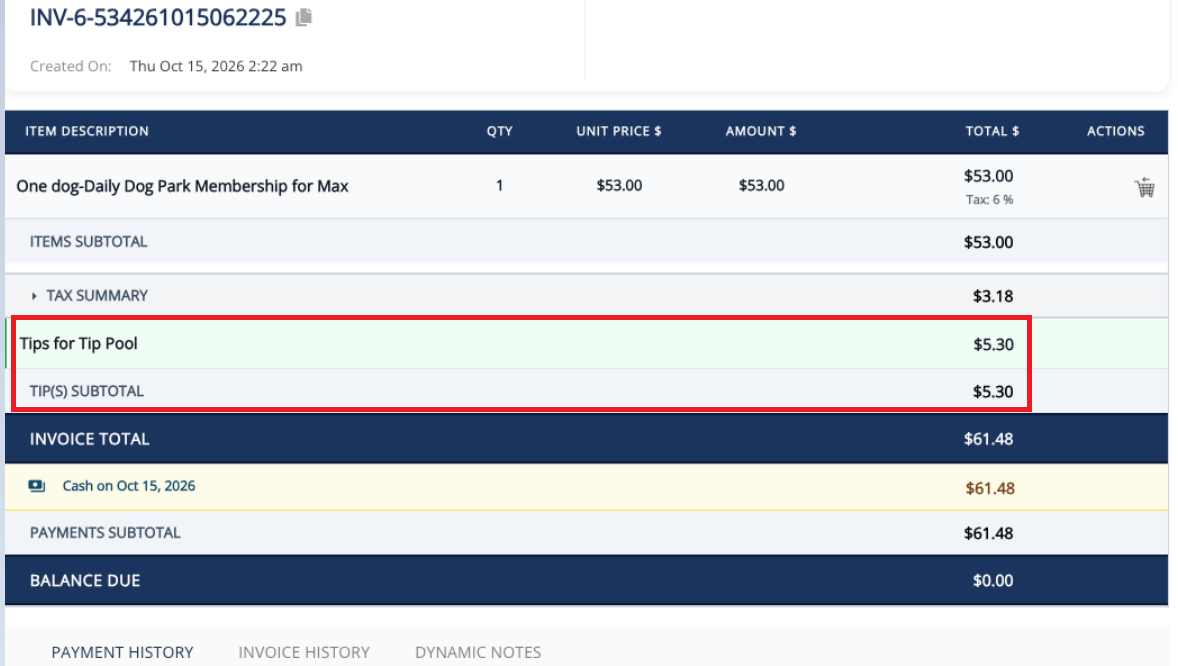
Tips can now be collected on membership purchases and automatically routed to the Tip Pool.
- Add Tip at membership checkout in the Business Portal, using the business’s existing Manage Tips configuration (fixed-dollar or percentage presets).
- Tips route to the Tip Pool automatically, with existing staff attribution and distribution rules applied.
- Clear Invoice Breakdown: Membership amount, tax, and tip appear as separate line items.
- Tips are now allowed for both Recurring and Non-recurring membership charges.
Payments: Credit Card Service Fee Visibility
Pet owners can now view credit card service fees as a separate line item on estimates and invoices, ensuring transparency before payment.
- Multi-Platform Visibility: Available on estimates and invoices across the Pet Owner App, Client Portal during booking and in Business portal
- Automatic Recalculation: Updates the fee when the invoice amount changes.
- Refunds & Reporting: Keeps service fees separately identifiable for refunds, adjustments, and reporting.
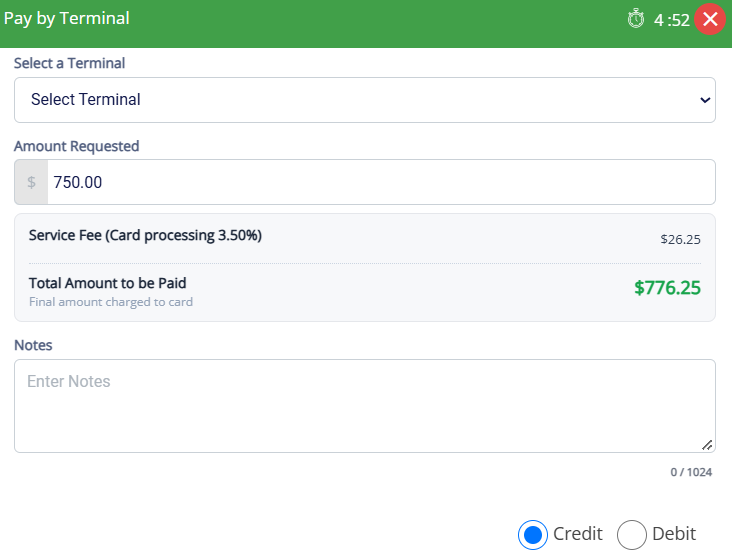
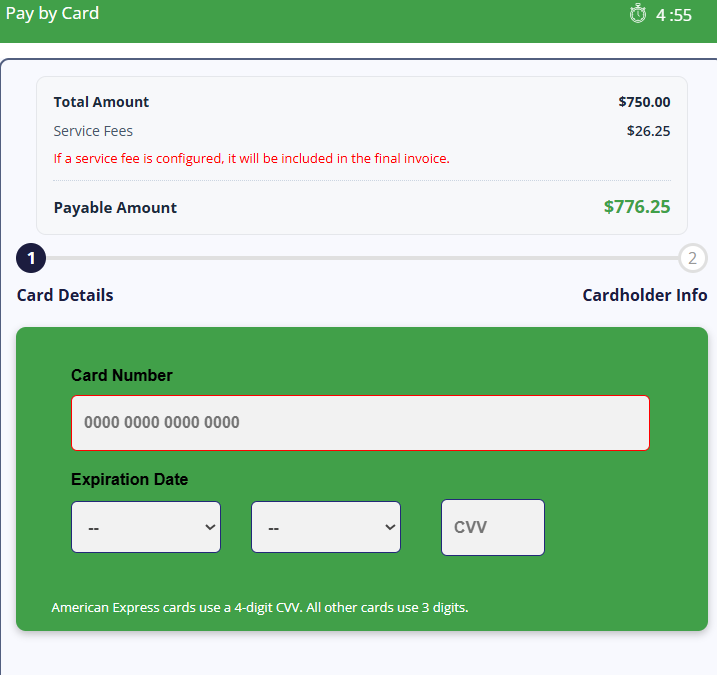
📝 Note: This enhancement for Pet Owner App and Client Portal will be available by the End of November 2026.
Send Agreements & Invoices to Front Desk Kiosk Directly from the Portal
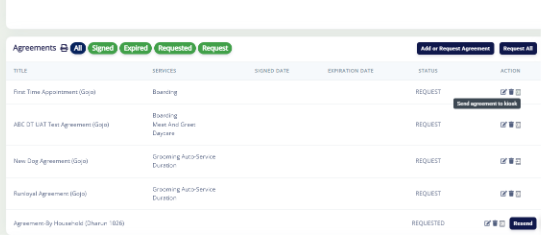
Staff can now send agreements and invoices directly to a selected Front Desk Kiosk, allowing pet owners to sign documents or complete payments on-site.
- Send to Kiosk: Available from the Daily Snapshot, Pet Owner Profile, Pet Profile, Appointments, Calendar, Invoices, and Invoice List.
- Manage Kiosks: Navigate to Settings → Operations → Manage Kiosk to view registered devices and assign recognizable display names.
- Agreements & Payments: Pet owners can review and sign agreements or pay invoices directly through the Front Desk Kiosk.
- Device Selection: Staff can select the specific Front Desk Kiosk where the agreement or invoice should appear.
📝 Note: Sending an invoice to the Front Desk Kiosk does not trigger appointment check-in or check-out.
Bookings: Enforce Holidays and Closures for Capacity-based Primary add-ons
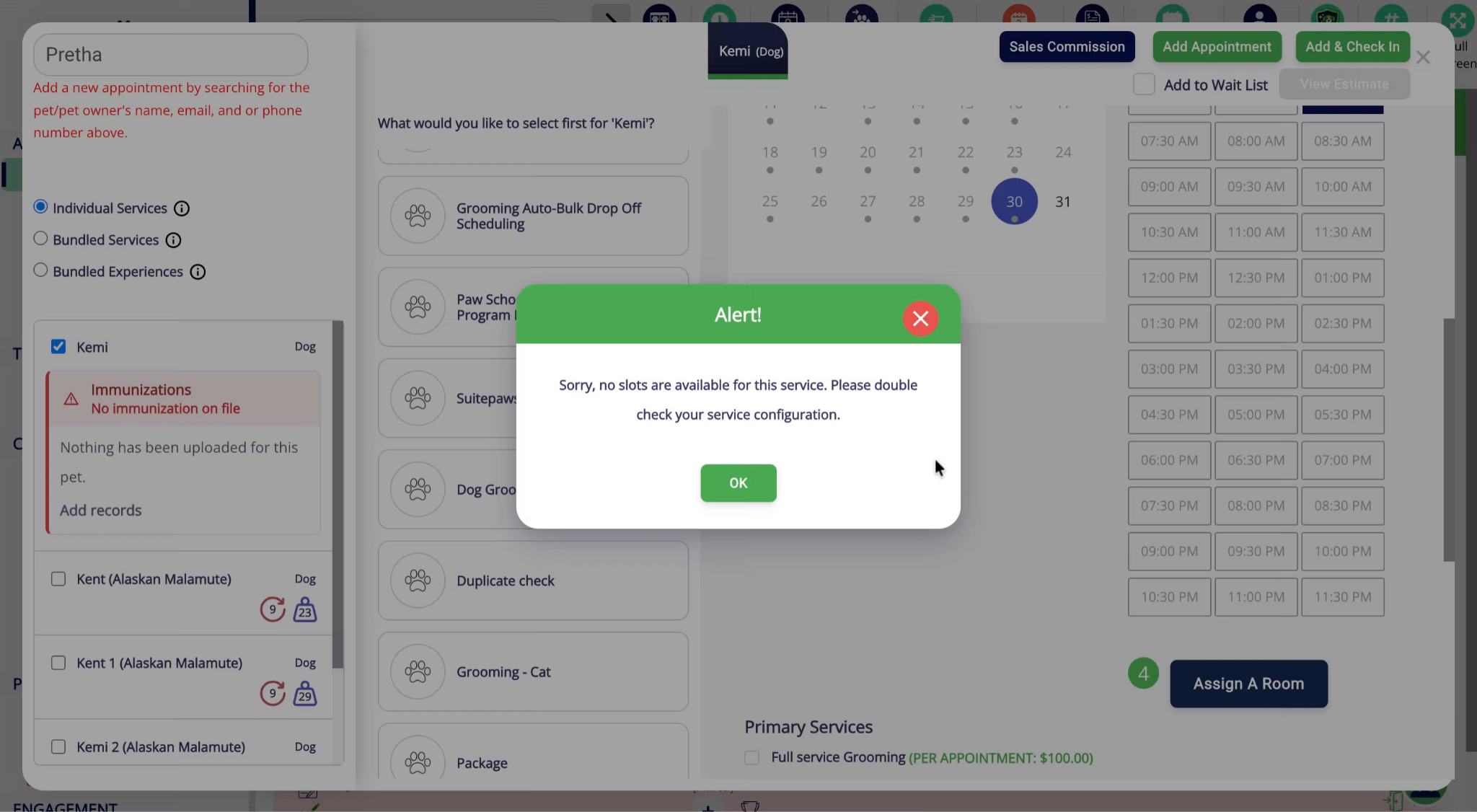
RunLoyal now prevents capacity based appointments and add-on services from being booked on holidays, business closure days, or when the service is unavailable.
- Daycare Bookings: Blocks appointments on holidays and business closure days.
- Add-On Services: Prevents booking add-ons when the service or assigned staff member is unavailable.
- Multi-Day Boarding: Blocks unavailable days while keeping eligible dates bookable.
📝 Note: Booking availability automatically follows the business's configured holiday, closure, and service availability settings.
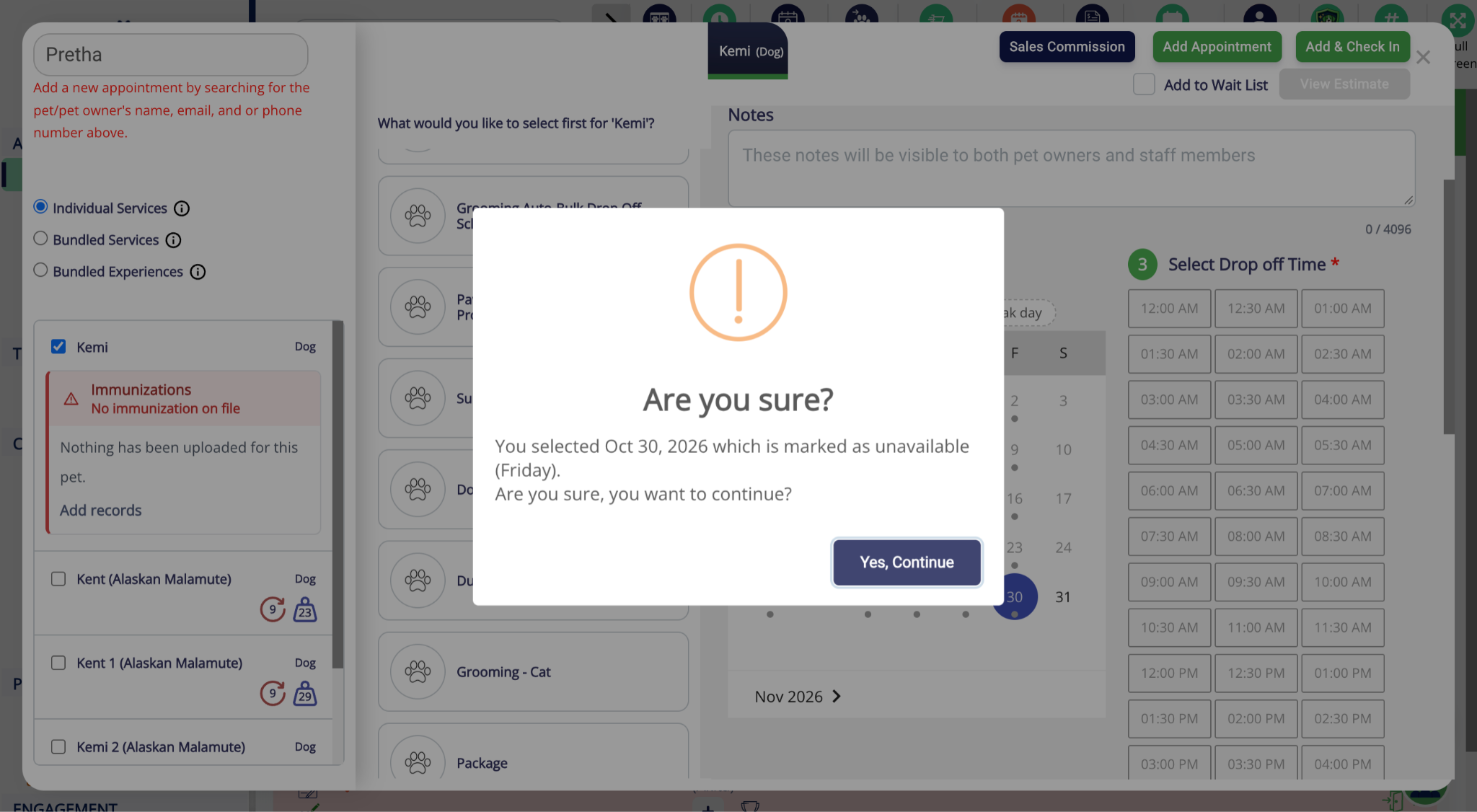
📝 Note: This enhancement for Pet Owner App and Client Portal will be available by the End of November 2026.
Agreements: Send Agreements to Pet Parents During Booking in the Portal
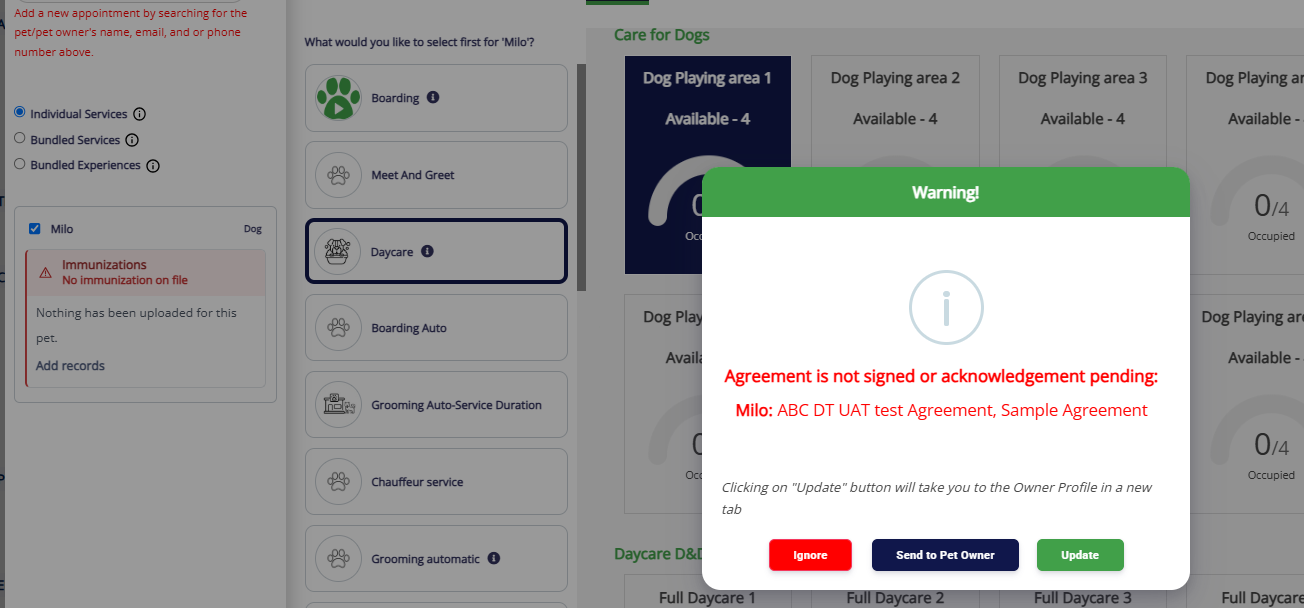
Staff can now send unsigned agreements directly to pet owners during appointment booking without leaving the booking flow.
- Send to Pet Parent: A new option in the unsigned agreement warning popup emails outstanding agreements to the pet owner for e-signature.
- Multiple Agreements: All unsigned agreements are sent in a single action.
- Seamless Booking: Staff can continue booking without losing entered information.
- Email Validation: The send option is disabled if the pet owner has no email address on file. Notification will be sent only when it's enabled for App.
- App message: A message is received on the Pet Owner App/ Client prompt asking for e-signature.
Vax Verify: Partial Match Alerts for Vaccination Records
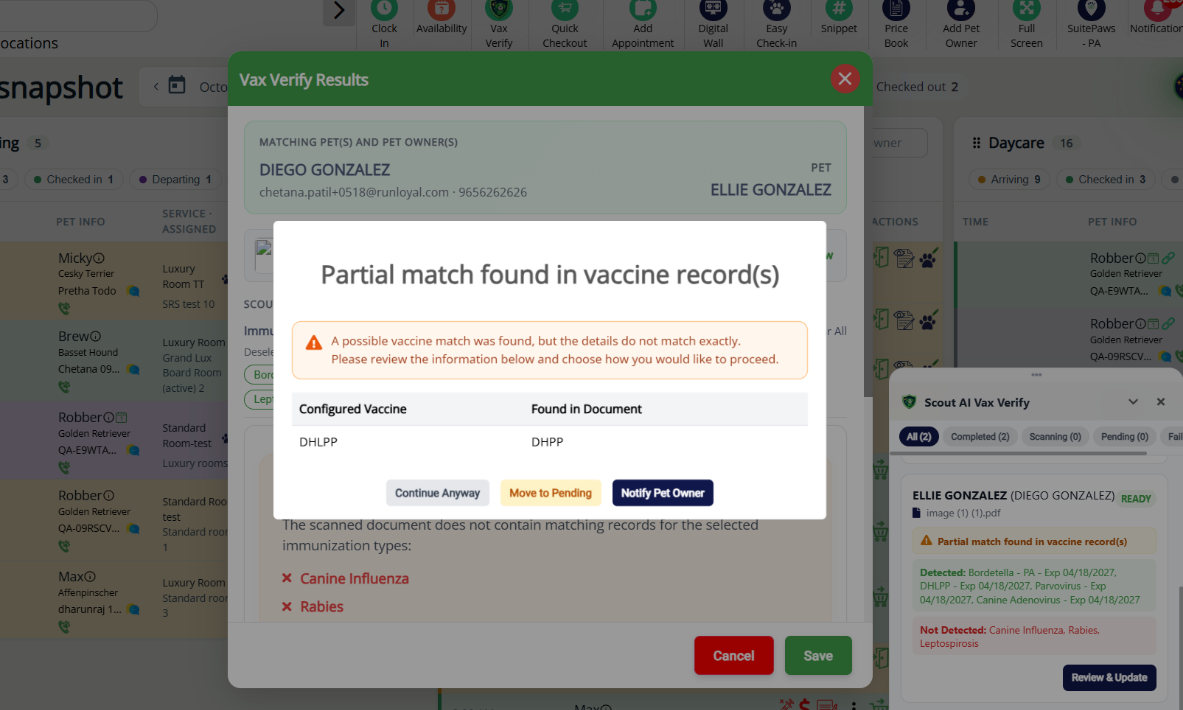
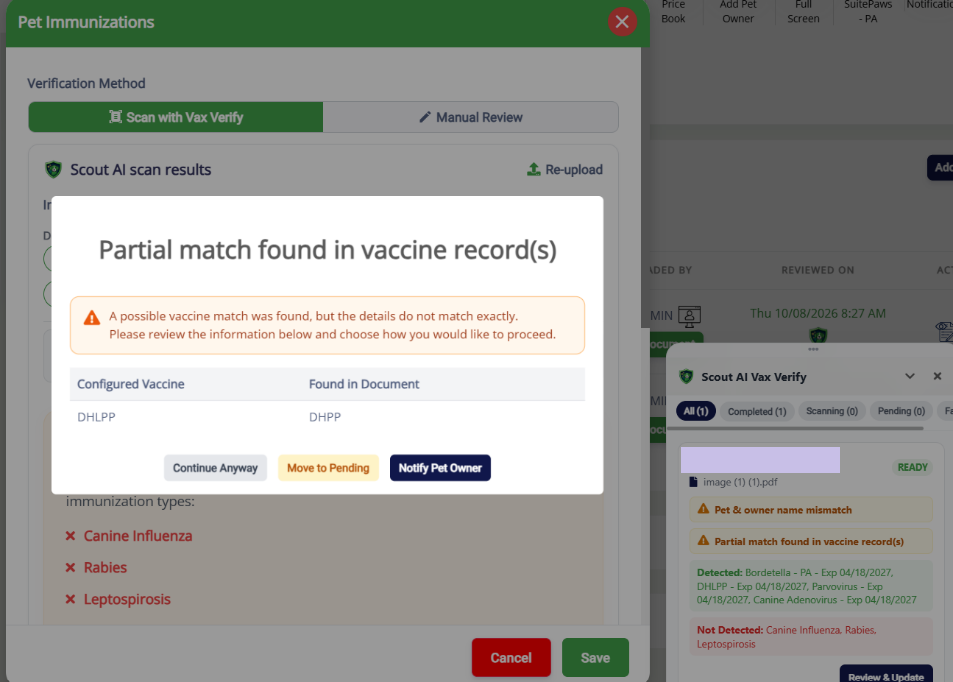
Staff can now identify and review partially matched vaccination records before accepting them.
- Partial Match Alert: Displays a popup when the detected vaccine name doesn't exactly match the facility's required vaccine.
- Review Details: Shows the required vaccine alongside the vaccine detected in the uploaded record.
- Staff Actions: Choose Notify Pet Owner to request an updated record or Continue Anyway to accept the existing record.
- Pet Owner Notification: Informs owners about the mismatch and prompts them to upload a corrected record.
- Availability: Supported across Pet Details → Immunizations, Vax Verify, and the Immunization List.
📝 Note: This enhancement for StaffApp+ for Kennels will be available by the Mid of November 2026.
SMS Scout Agent Beta for RunLoyal
Introduces an AI-powered SMS agent that automatically responds to inbound customer SMS messages.
- Supports daycare appointment availability checks and appointment booking through SMS conversations.
- Provides pricing information for requested services.
- On-demand enablement: The feature will be enabled upon request.
Gallery: Redesigned Experience with Social Media Integration (Beta Version)
RunLoyal introduces a refreshed Gallery with improved photo management, editing tools, and direct social media sharing.
- Social Media Sharing: Post photos and videos directly to connected Facebook and Instagram accounts without leaving RunLoyal.
- Scout AI Captions: Generate engaging social media captions using Scout AI.
- Saved Views & Filters: Quickly find photos and save frequently used filter combinations for easy access.
- Enhanced Photo Editing: Customize watermarks, enhance photos with Scout AI, and create Before & After collages.
- Improved Interface: Enjoy a more intuitive experience for managing, editing, and sharing pet photos.
Run Cards: Pet Immunizations & Expiration Dates
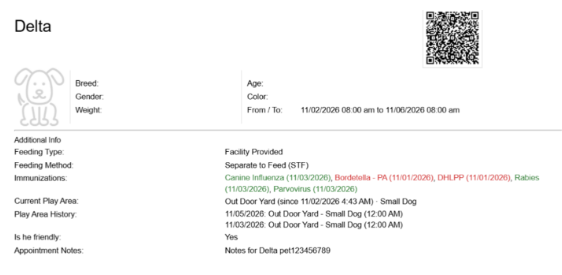
Staff can now view pet immunizations and expiration dates directly on To-Do and Full Run Cards, including printed and PDF versions.
- Immunizations: Displays each pet's vaccine name and expiration date, or a Pending status when applicable, in the Additional Info section of the Run Card.
- Print Options: An Immunizations checkbox, checked by default, allows staff to include or exclude vaccination details. The selection is remembered.
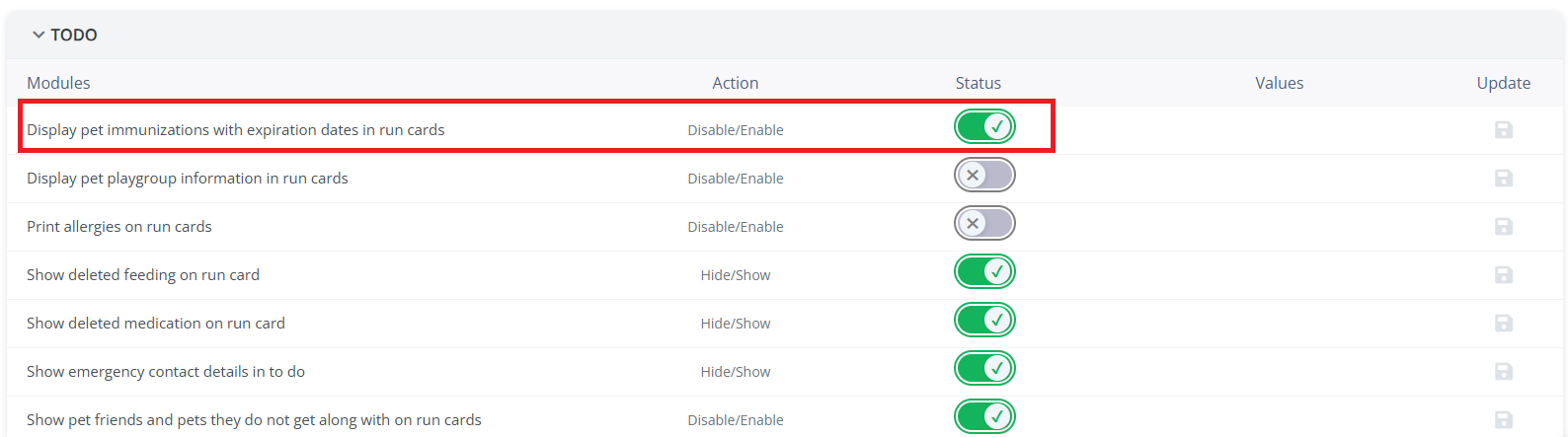
- Enable: Turn on “Display pet immunizations with expiration dates in run cards” under Portal Personalization.
📝 Note: This setting is off by default. When disabled, immunization details and print options remain hidden.
📝 Note: This enhancement for Pet Owner App, Client Portal, StaffApp+ for Kennels, and StaffApp+ for Groomers will be available by the Mid of November 2026.
Run Card: Customize Lodging Questions
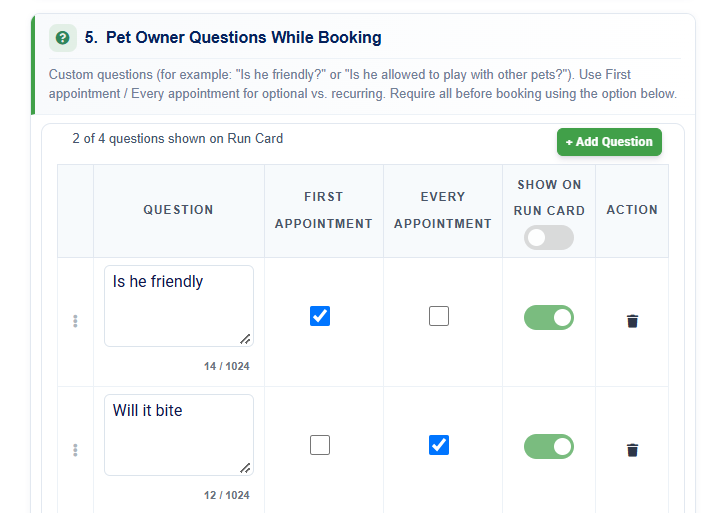
You can now choose which lodging questions and answers appear on Run Cards, keeping only relevant information visible to staff.
Question Visibility: Enable “Show on Run Card” under Settings → Lodging → Pet Owner Questions → Add/Edit Question.
- Select All: Show or hide all lodging questions at once.
- Print Support: Selected questions and answers appear on Run Cards, including printed/PDF versions.
📝 Note: Existing question visibility settings are preserved during migration. New questions default to OFF.
Pet Owner Profile: Agreements at a Glance
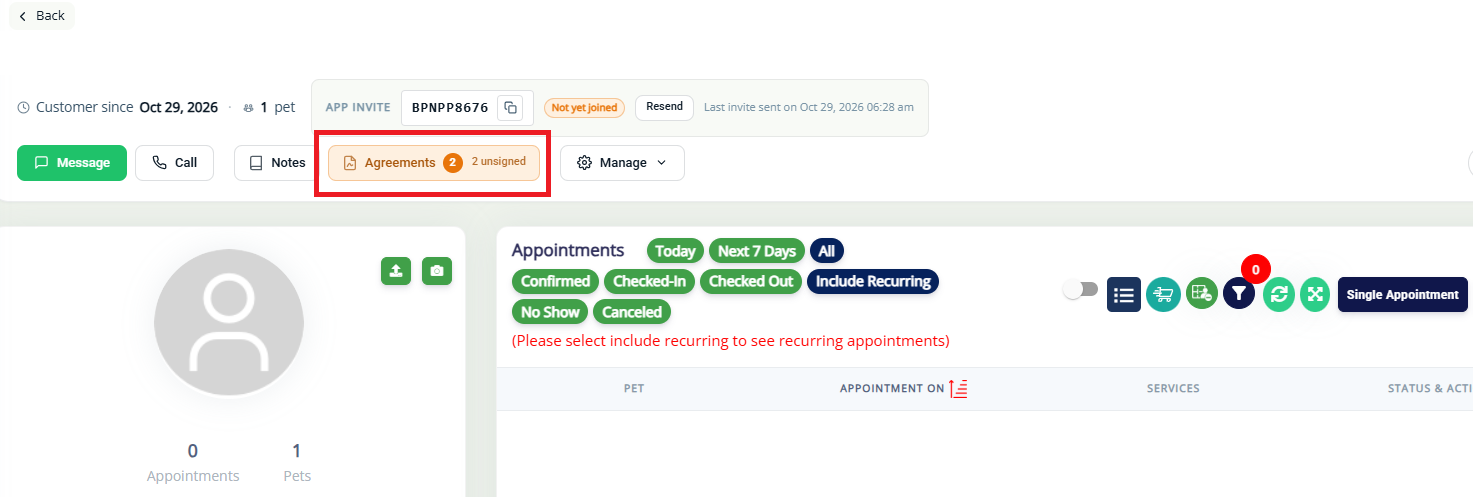
Staff can now quickly identify unsigned agreements directly from the Pet Owner Profile header without opening the Agreements section.
- Agreement Summary: Displays the total number of assigned agreements and how many remain unsigned.
- Quick Access: Click the Agreements button to navigate directly to the Agreements section.
- Attention Indicator: Highlights outstanding agreements that require action.
📝 Note: The Agreements button remains hidden when no agreements are outstanding.
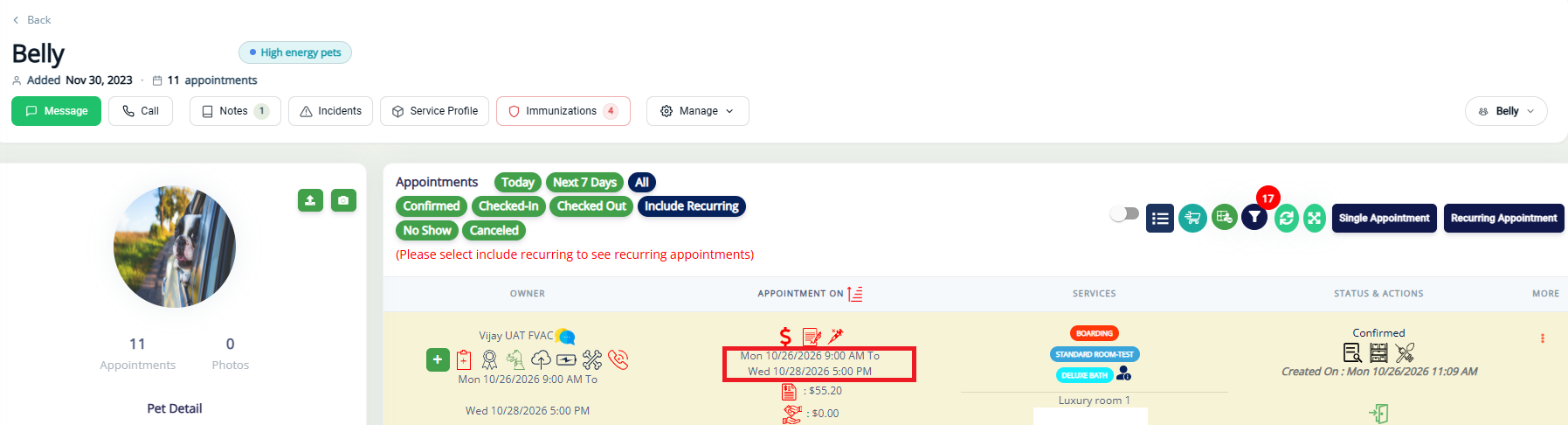
Automatic Appointments Removal for Deceased & Deleted Pets
RunLoyal now automatically removes deceased or deleted pets from upcoming appointments, eliminating the need for manual appointment cancellations with a warning.
- Multi-Pet Appointments: Removes the affected pet and updates the invoice for the remaining pets.
- Single-Pet Appointments: Automatically cancels the appointment without cancellation fees.
- Payment Handling: Unpaid invoices are removed, while invoices with payments or deposits remain available for refunds.
📝 Note: Only upcoming Draft, Pending, Confirmed, and Waiting List appointments are affected.
Memberships & Packages: Edit Dates on Non-Recurring Plans & Future Purchases
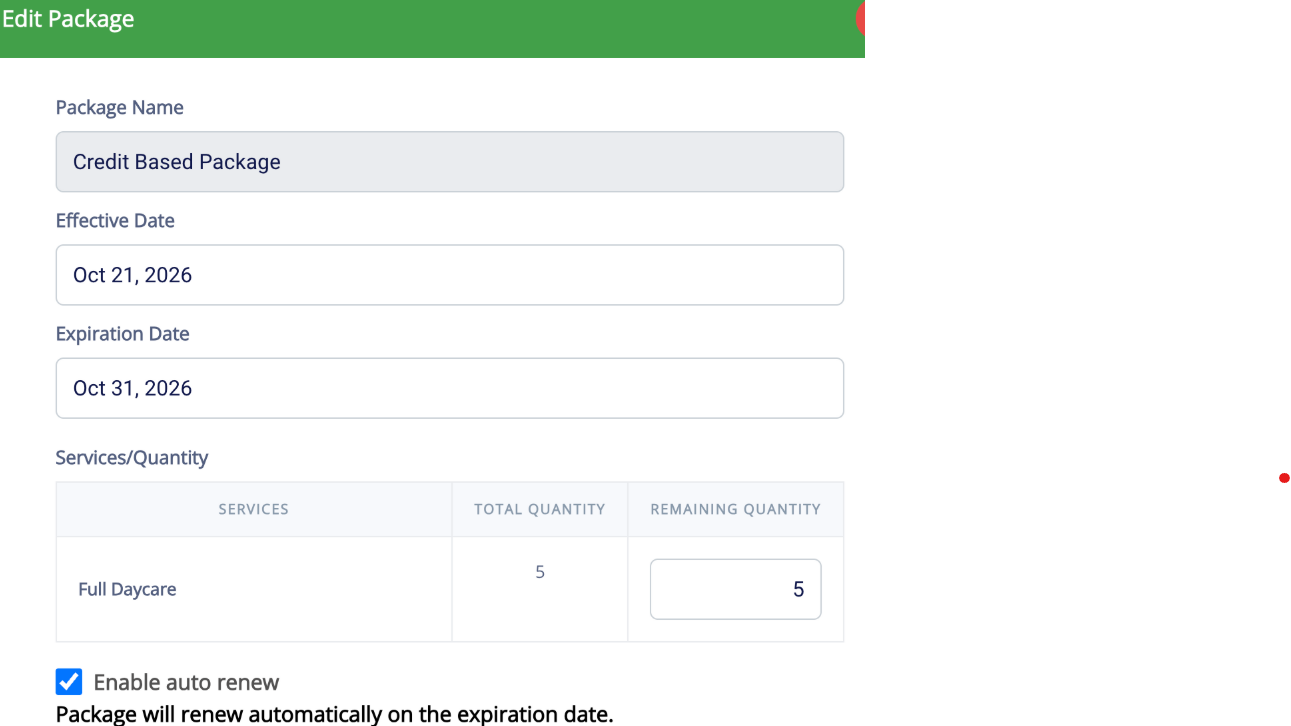
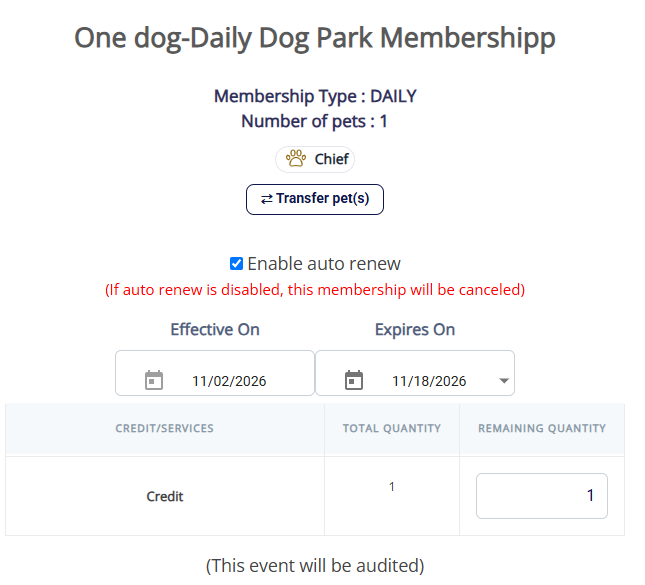
You can now update the start and end dates of non-recurring memberships and packages without canceling and repurchasing.
- Edit Dates: Navigate to Pet Owner Profile → Memberships/Packages → Edit Details to modify start and end dates.
- Non-Recurring Only: Start Date editing is unavailable for recurring plans.
- Date Validation: The end date must be on or after the start date and comply with subscription rules.
- Automatic Updates: Changes are reflected across the Pet Owner App, Client Portal, Business Portal, and balance tracking.
📝 Note: Historical payments and invoices remain unchanged. Start dates cannot be edited once a package or membership has started.
📝 Note: This enhancement for Staff App+ Kennels will be available by the End of November 2026.
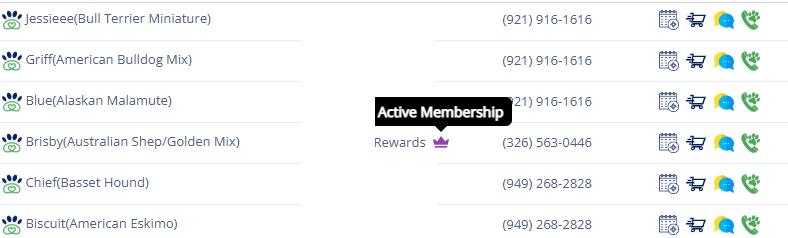
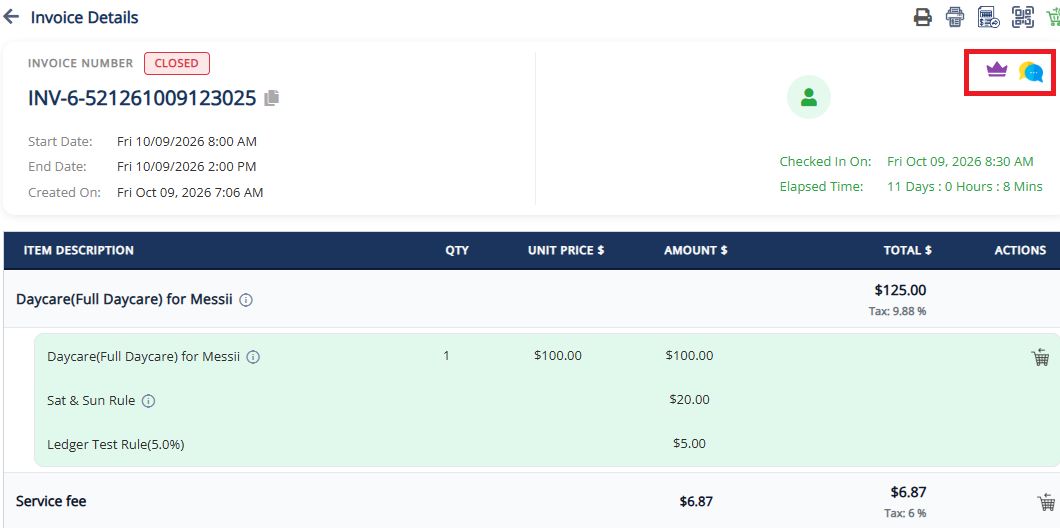
Membership Icon: Visible in Search and Invoices
Staff can now quickly identify pet owners with active memberships through the membership crown icon in global search results and invoice headers.
- Membership Indicator: Displays a crown icon next to the pet owner's name in global search and invoices.
- Color-Coded: Crown colors reflect membership types, consistent with the Pet Owner Profile.
- Quick Details: Hover over the crown to view the membership name.
- Active Members Only: The icon appears only for active memberships.
📝 Note: The icon is display-only and does not affect search behavior, filtering, sorting, or invoice functionality.
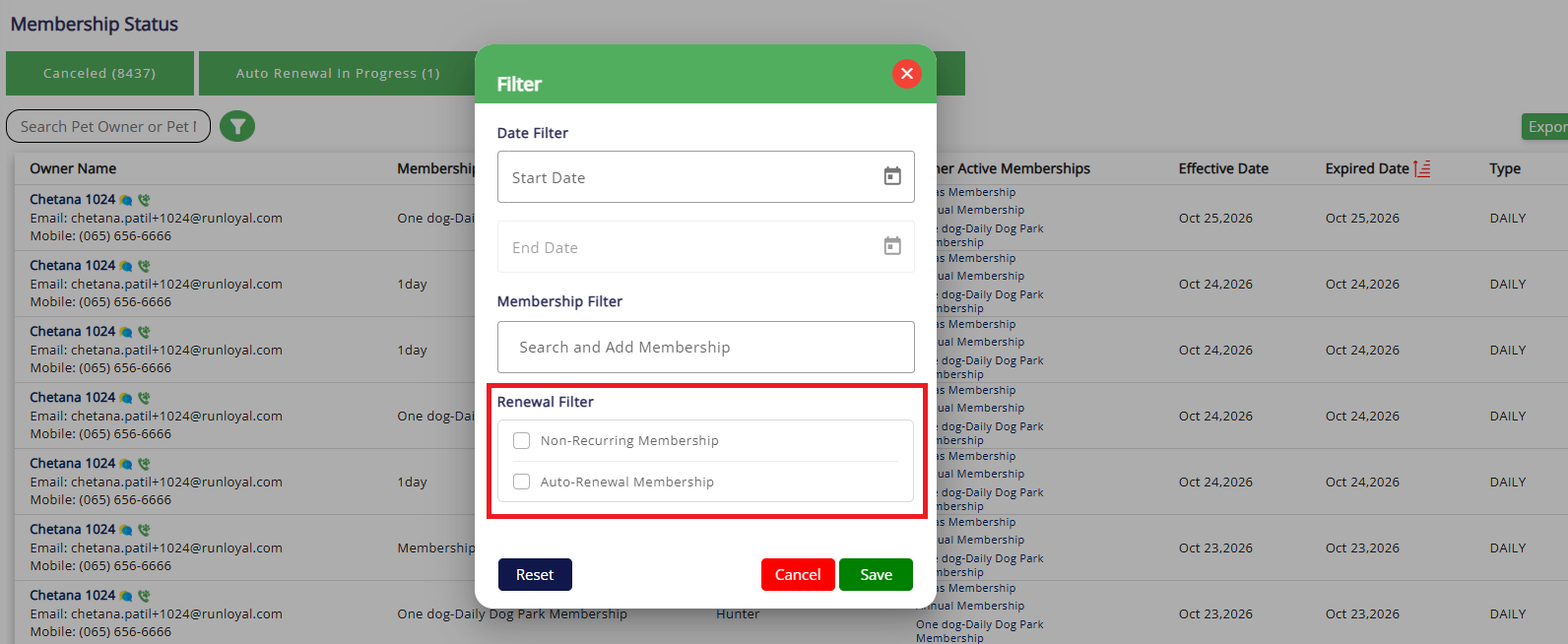
Membership Status: Expired Tab-Renewal Filter and Status Tooltips
The Expired tab now accurately displays expired memberships, excluding memberships with renewals scheduled. This improvement provides more reliable membership counts and reporting.
- Renewal Filter: Filter expired memberships by auto-renewal status, between auto-renew and non-recurring (one-time purchase) memberships. It works alongside the existing Date, Membership and Cancellation filters.
Memberships & Packages: Cancellation Reasons
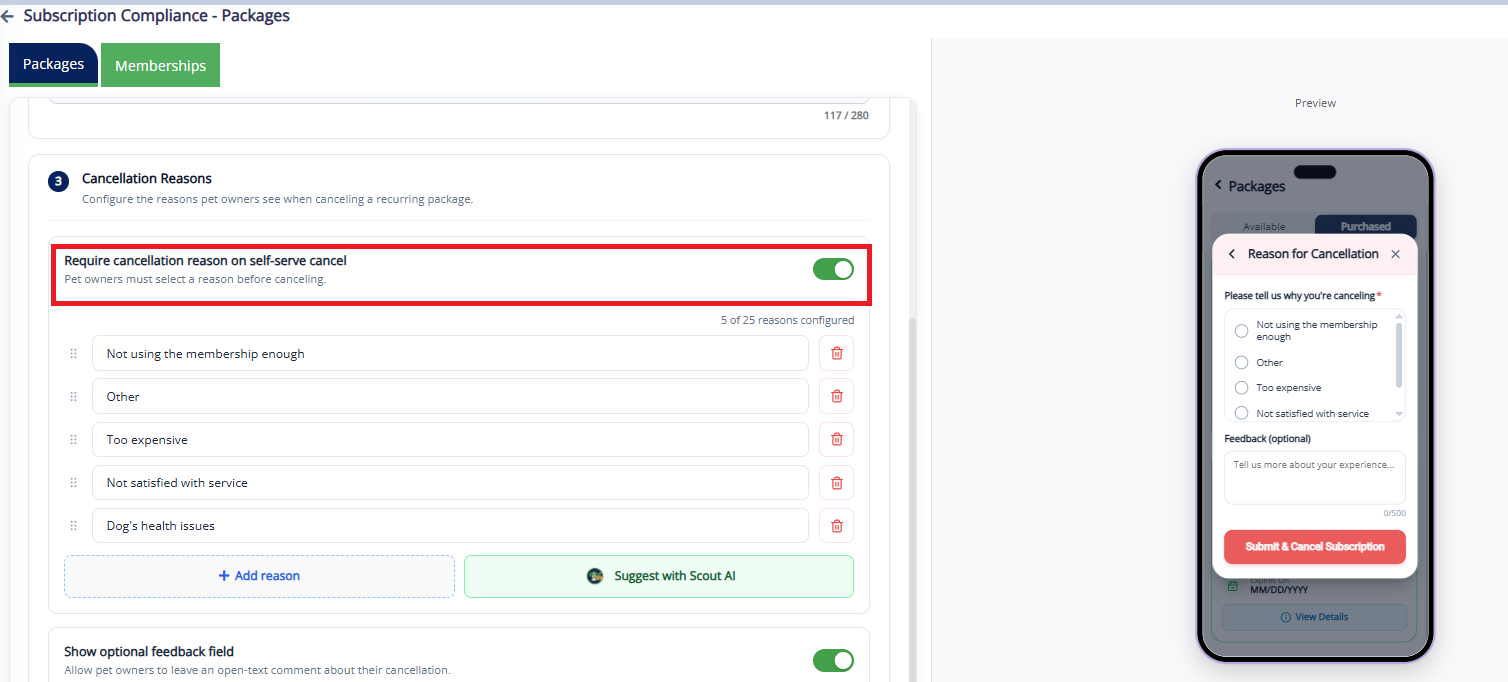
You can now add reasons manually / generate using Scout AI for recurring membership/packages cancellation along with feedback.
- Customizable Reasons: Add, edit, reorder, or deactivate cancellation reasons for memberships and packages independently.
- Optional Feedback: Allow pet owners to provide additional comments during cancellation.
- Easy Configuration: Enable Cancellation Reasons under Settings → Operations → Subscription Compliance.
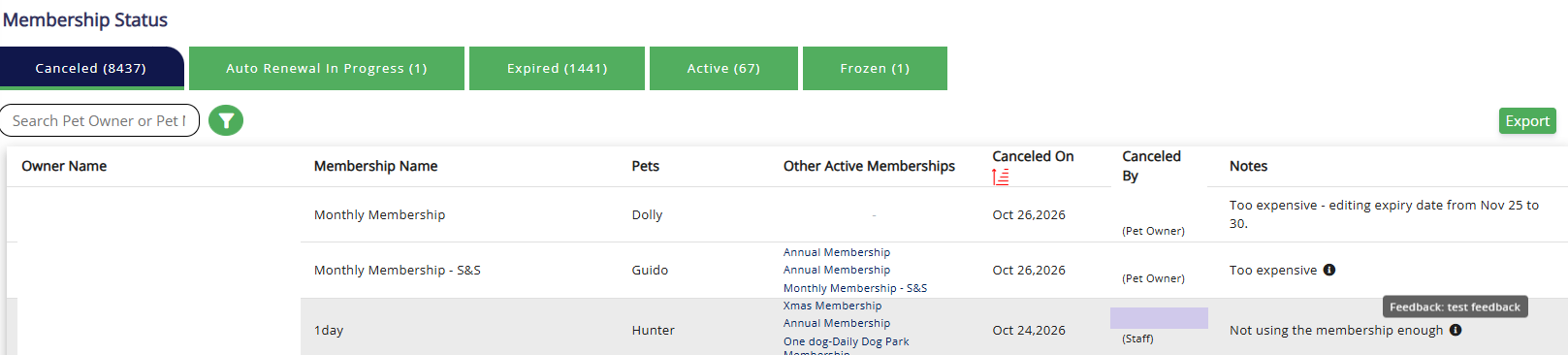
- Cancellation Tracking: View recorded reasons and feedback in the Pet Owner Profile and Membership Status → Canceled tab.
- Business-Wide Settings: Configured reasons apply across all platforms.
📝 Note: Providing a reason is optional and never prevents pet owners from completing a cancellation. Existing cancellation workflows remain unchanged.
📝 Note: This enhancement for Pet Owner App and Client Portal will be available by the End of November 2026.
Memberships: Transfer Between Pets
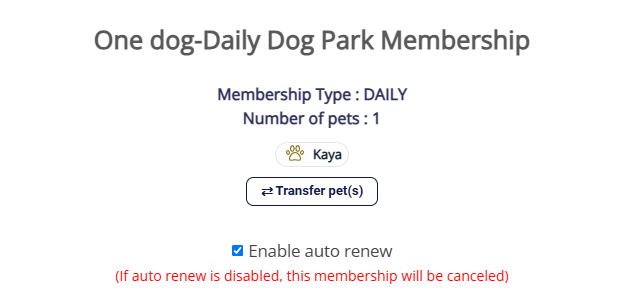
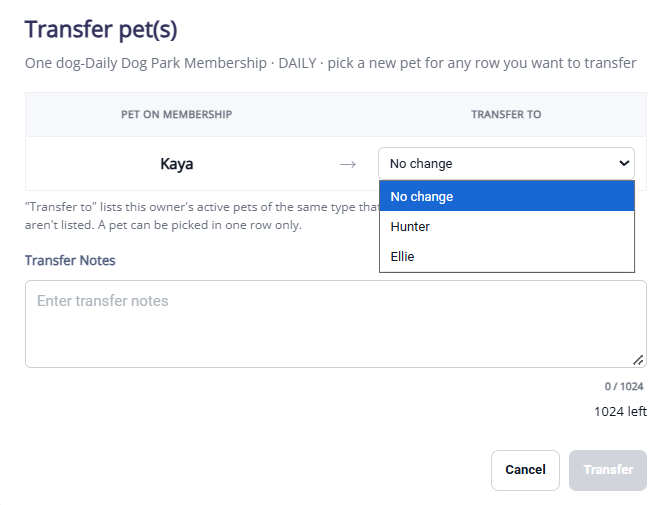
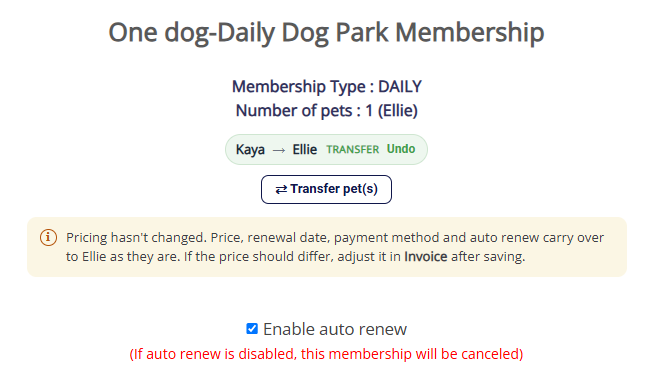
Staff can now transfer an active membership from one pet to another under the same pet owner, preserving existing membership benefits.
- Easy Transfer: When removing a pet with an active membership, staff are prompted to transfer it to another active pet under the same owner.
- Benefits Retained: Membership plan, remaining credits, renewal dates, payment settings, and auto-renewal preferences remain unchanged.
- Transfer Restrictions: Transfers are unavailable for expired or canceled memberships and inactive, deleted, or unrelated pets.
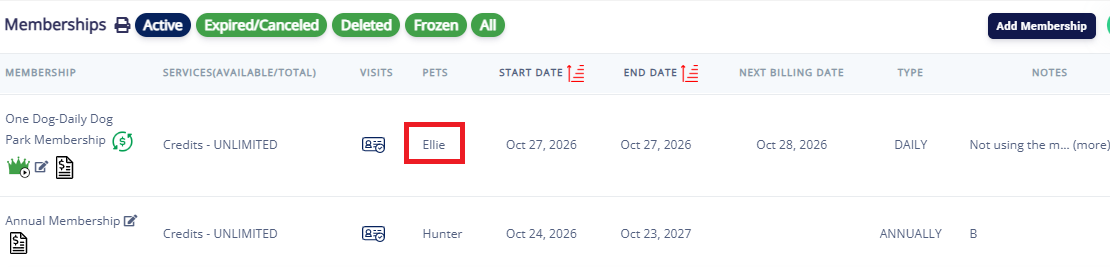
Staff Group Permissions – Inline Descriptions
Staff administrators can now view helpful descriptions for each permission under Settings → Business Setup → Staff Group.
- Permission Details: Hover over the ℹ️ icon to understand what access each permission provides.
- Enabled: Staff can access the corresponding features and perform permitted actions.
- Disabled: Staff cannot access the corresponding sections.
- Easier Management: Simplifies permission configuration and helps administrators assign appropriate access.
📝 Note: Existing permissions remain unchanged.
Credit Details Report
Reward points and store credit now appear in separate columns. Points no longer show a $ sign, and the two are no longer added together.
Notes Report
New Note Category column and filter. Service Profile and To-Do (Staff/Owner) notes now appear in the report.
Pet Transfer Report
Now shows actual night-by-night room moves, labeled Transfer, Initial Assignment or Room Assigned.
QuickBooks Sales Receipts (By Line)
lists each service, add-on, product, tax and tip as its own line with its amount, plus the transaction total once per invoice, ready for QuickBooks import.
Customer Report
One table with every pet and their owner across all tenants — one row per pet. Customer details, address, pet details, and appointment history (total visits, first/last visit, days since last visit) in one place. Replaces: Pet Owner Details · Pet Details · Appointment Log / Customer History.
Upcoming Feature
- Employee Report - One row per staff member per service, showing what each person worked on — service, pet, owner, appointment time, status, and invoice status.
New Features & Enhancements — Now Available
- Cut-Off Time Management - Allow businesses to configure booking cut-off times for better scheduling control.
- Manage Tips - Tipping can now be switched off in the Pet Owner App and Client Portal, matching the existing POS setting.
- Training Service Questions - Pet owners can now answer training service intake questions when booking in the Pet Owner App, with required and optional questions clearly marked.
- Add-ons for holiday and closure settings - Add-on services are now blocked on holidays and days the linked service isn’t available, so pet owners can’t request them when staff aren’t working
- Feeding and Medication - Feeding and medication can now be set independently to Not required, Optional or Required for pet owners — without affecting what staff can enter or print on run cards.
Upcoming Features & Enhancements
- Subscription Cancellation with Reason and Feedback - Pet owners can now cancel an auto-renewing membership or package themselves in the Pet Owner App, choosing a cancellation reason and leaving feedback as they go.
- Smarter matching for vaccination uploads - Vaccination uploads with a partial name match are now confirmed against date of birth and gender, with a prompt to confirm the name, instead of failing.
📝 Note: These features are expected to be available by mid of November 2026. If you would like to prioritize this, please contact puppylove@runloyal.com.
- Recurring Appointments from Pet Owner App - Pet owners can book recurring appointments in the app, following your existing manual or automatic approval setting.
- Appointment Cancellation by Pet Owner - Pet owners can request an appointment cancellation from the pet owner app and client portal.
📝 Note: These features are expected to be available by early January 2027. If you would like to prioritize this, please contact puppylove@runloyal.com.
New Features & Enhancements — Now Available
- Direct links to specific items — Links can now open a specific membership, package, service or product directly, instead of landing on the list.
- Location switcher in sign-up — The location selector has been moved up in the sign-up flow so users pick their location before going further.
- Shop Page Access via Tenant URL — Customers can access the shop directly using the tenant-specific URL
- Loyal Cart Added to the Login Flow — Loyal Cart is now available as part of the customer login flow, allowing logged-in customers to access the cart during their shopping experience.
- Loyal Cart Added to the Guest Flow — Loyal Cart is now integrated into the guest flow, allowing guest customers to access and use the cart without needing to log in first.
Upcoming Features & Enhancements
- Partial credits at Quick Checkout - Credits can be applied to a Quick Checkout invoice even when they don’t cover the full balance, with the remainder collected by any payment method.
- Business hours for linked add-ons - Add-on services now follow the business hours and closure dates of their linked primary service, so they can’t be booked when the primary isn’t available.
- Manage Tips ($) - Tip options can now be configured as fixed dollar amounts, not just percentages.
- Service fee on invoices - A configurable service fee can now be applied to invoices.
- Tips on membership invoices - Pet owners can add a tip when paying a membership invoice, and it routes to the tip pool like any other tip.
- Smarter matching for vaccination uploads - Vaccination uploads with a partial name match are now confirmed against date of birth and gender, with a prompt to confirm the name, instead of failing.
- Subscription Cancellation - Pet owners can now cancel an auto-renewing membership or package in the Client Portal, choosing a cancellation reason and leaving feedback as they go.
- Membership-gated booking - Businesses can restrict appointment booking to members only, or block bookings for pets without an active membership.
📝 Note: These features are expected to be available by mid of November 2026. If you would like to prioritize this, please contact puppylove@runloyal.com.
Upcoming Features & Enhancements
- Language Support - Staff App+ for Kennels will be available in French and Spanish.
- Multi-quantity and bundled add-ons - Book multiples of an add-on, and apply bundled add-ons, when creating or editing an appointment.
- Report card Smart Update - Edit, update, and send report cards in bulk, with the help of Scout AI to enhance text and image attachment.
- Smart Reply in Message Hub - Suggested replies allow staff to respond to common pet owner messages with a single tap.
- Message hub navigation - Appointment and invoice-related messages now include direct links, allowing staff to open the associated appointment or invoice directly from the conversation.
- Photos on report cards - Upload gallery images and attach them to the tagged pet’s report card.
- Filter report cards by membership - Pull up report cards only for pets whose owners hold a selected membership.
- VAX on To-Do Run Card: Show each pet’s vaccine name and expiration date on the To-Do Run Card so staff can check compliance at a glance.
- Membership-based booking restriction (Pawradise Park): Block bookings for pet owners who don’t have an active, qualifying membership.
- Quick checkout allows partial credit for purchase: Let staff apply part of a customer’s credit balance to a Quick Checkout invoice instead of all or nothing.
- Membership icon in search: Show a membership badge in Pet and Pet Owner search results so members stand out.
- Social Media & Gallery enhancements: Improve gallery management and social media sharing of pet photos.
- Agreements button on Pet Owner: Add a button on the Pet Owner profile to view and send agreements quickly.
- Send to Pet Owner on booking: Add a button to send appointment details or a booking request to the pet owner from the booking screen.
- Tips on membership invoices: Accept tips on membership invoices and route them to the tip pool.
- Report cards to all family members: Send report cards to every family member on the account, not just the parent linked to the pet.
- Easy check-out for zero balance: Check out appointments with a $0 balance in one step, with no payment step.
📝 Note: These features are expected to be available by mid of November 2026. If you would like to prioritize this, please contact puppylove@runloyal.com.
Upcoming Features & Enhancements
The following features and enhancements will be available in Staff App+ for Groomers in an upcoming release:
- Multi-quantity add-on: Let staff add more than one of the same add-on to an appointment, such as 2 extra walks.
- Repeat customers keep previous pricing: Returning customers automatically get the price they paid for a service last time instead of the current rate.
- Manage Tips ($): Allow fixed dollar tip amounts alongside percentage options.
- Unassigned grooming add-ons: Flag grooming add-ons on boarding appointments that have no groomer assigned. The flag shows in the appointment list and on the Pet and Pet Owner pages.
- Report card image from Gallery: Attach a photo to a report card straight from the Gallery instead of uploading it again.
- Quick Checkout partial credit: Let staff apply part of a customer’s credit balance to a Quick Checkout invoice instead of all or nothing.
- Membership-based booking restriction: Block bookings for pet owners who don’t have an active, qualifying membership.
- Vax Verify partial match: Handle vaccine records that only partly match, so staff can review and confirm them instead of having them rejected or misread.
📝 Note: These features are expected to be available by mid of November 2026. If you would like to prioritize this, please contact puppylove@runloyal.com.
Upcoming Features & Enhancements
The following features and enhancements will be available in Kiosk in an upcoming release:
- Training Check-In & Check-Out - Pets attending training classes can now check in and out directly through the Kiosk, with session statuses automatically updated and actions tracked.
- Sending Agreements and Invoices from Portal - Staff can now send pet owners’ agreements and invoices directly from the RunLoyal Business Portal to a selected Kiosk for convenient on-site e-signatures and payments.
- Add-on Toggles for Appointment Check-in and Walk-ins - RunLoyal now allows pet care businesses to independently manage add-on services offered during Kiosk appointment check-ins and walk-ins, providing greater flexibility for pet parents.
📝 Note: These features are expected to be available by mid of November 2026. If you would like to prioritize this, please contact puppylove@runloyal.com.
V1.158.20260924.0109/24/202630 updates
We've launched new features, enhancements, and reporting improvements this sprint. Please review the updates below.
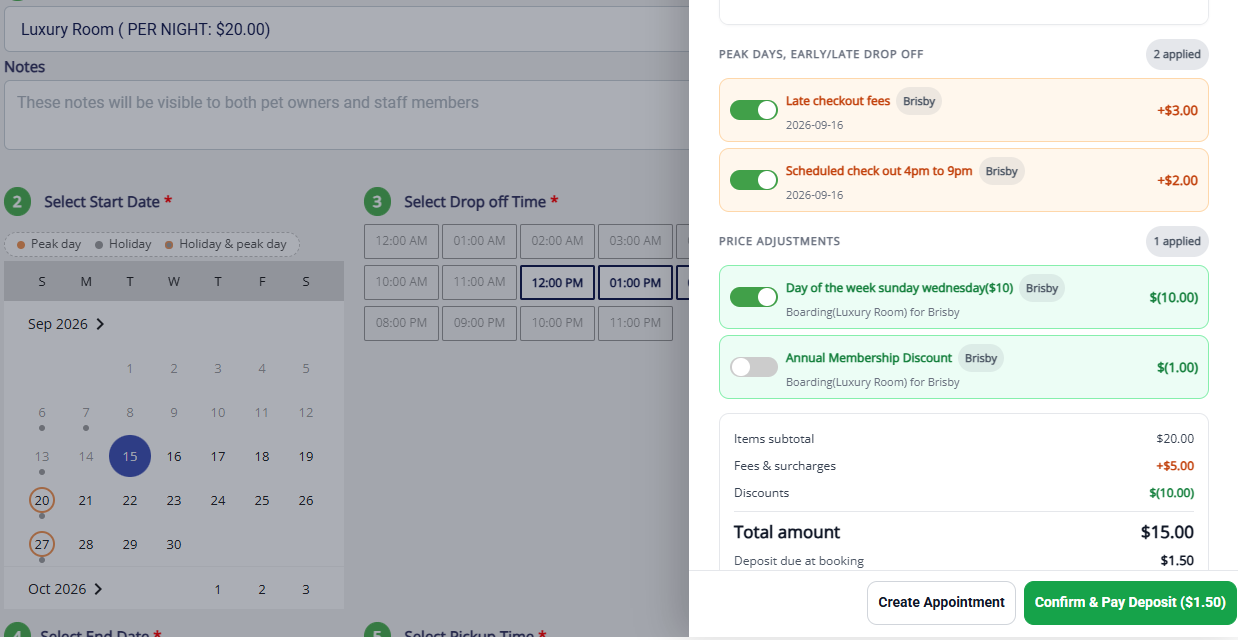
View Estimate — Create Appointment flow
When creating an appointment, the estimate now includes the same discounts, surcharges, and breed-based pricing that used to only show up on the final invoice.
- What's new: Pricing rules (multi-night discounts, holiday/weekend surcharges, breed-based rates) used to be calculated only at check-in, so the booking estimate could differ from the final invoice. Now appointment booking uses the same pricing engine as the final invoice — once services, dates, and pets are selected, a View Estimate shows the adjusted total matching what check-out will produce (assuming the booking doesn't change).
- Why it matters: Now the number a pet owner sees when they book is the number they should expect to pay, which means fewer surprises and fewer conversations spent explaining the difference.
- How it works:
- Select services and dates — An Estimate button appears in the header as you add pets, services, and dates; it may take a few seconds to calculate.
- Open the Estimate — Breaks the total down pet by pet and service by service, showing each discount/surcharge in plain language, plus tax per line and rolled into a total.
- Adjust if needed, then book — Toggle any pricing rule on/off with the total recalculating live, then Create Appointment or collect a deposit/payment immediately.
- Currently applicable only on Create Appointment flow. Future options are planned for implementations later
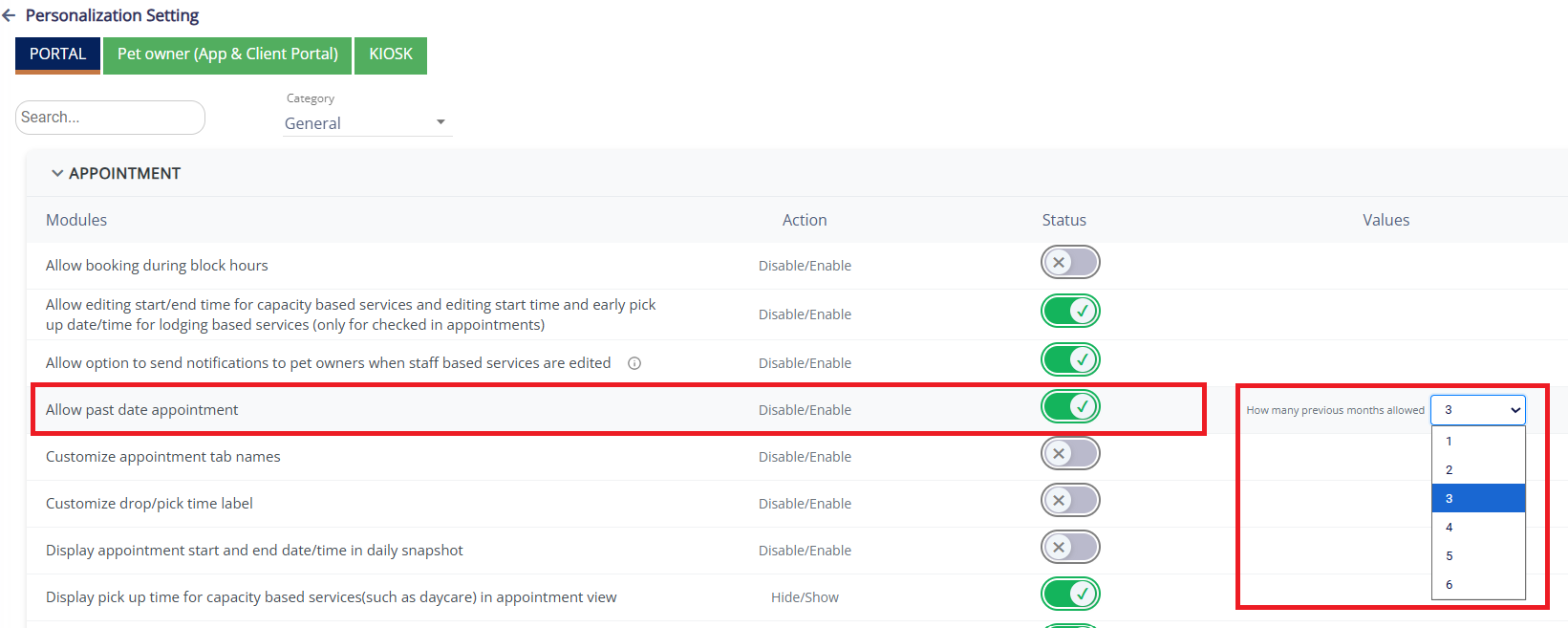
Allow Past-Date Appointment Booking
Staff can now log an appointment for a date that's already passed — great for catching up on walk-ins, phone bookings, or anything entered after the fact.
- What's new: The calendar previously only allowed booking today or future, so past visits had no clean way to be recorded. Now past-date booking can be turned on per business, with a configurable lookback window.
- Why it matters: Front-desk and daycare teams often need to record a booking after the fact rather than in the moment. This gives you an accurate, on-the-books way to do that — instead of a workaround, a sticky note, or a gap in your records.
- How it works:
- Turn on the setting — In Personalization settings, switch on "Allow past date appointments" (off by default).
- Choose your lookback window — Set how many months back staff can book (1–6 months).
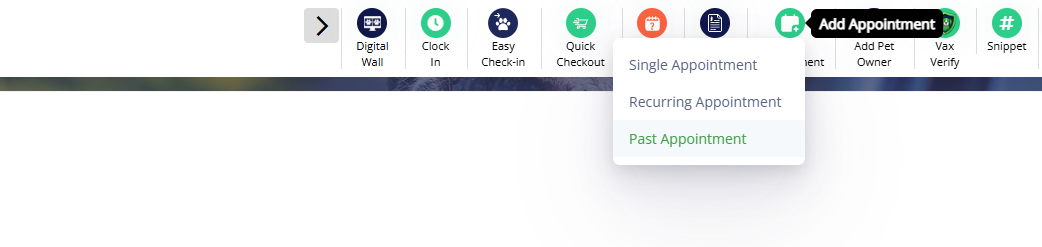
- Book a past appointment — A new "Past Appointment" option appears in the Add Appointment menu, using the same booking form with past dates selectable within your limit set on the personalization settings
- Can be created only from Top Quick Action Menu Icon (Add Appointment)
- Where to find it: Settings → Operations → Personalization → Allow Past Date Appointments, where Default value is OFF in the same rule builder you already use today
Tip Selection (Manage Tips)
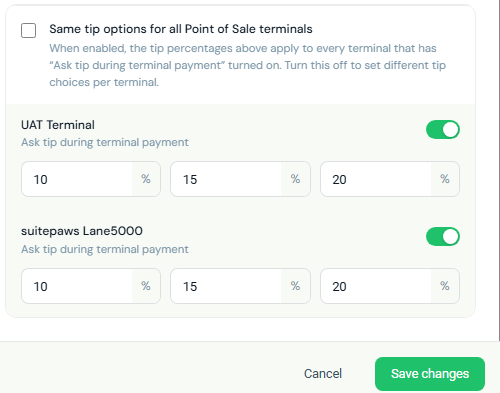
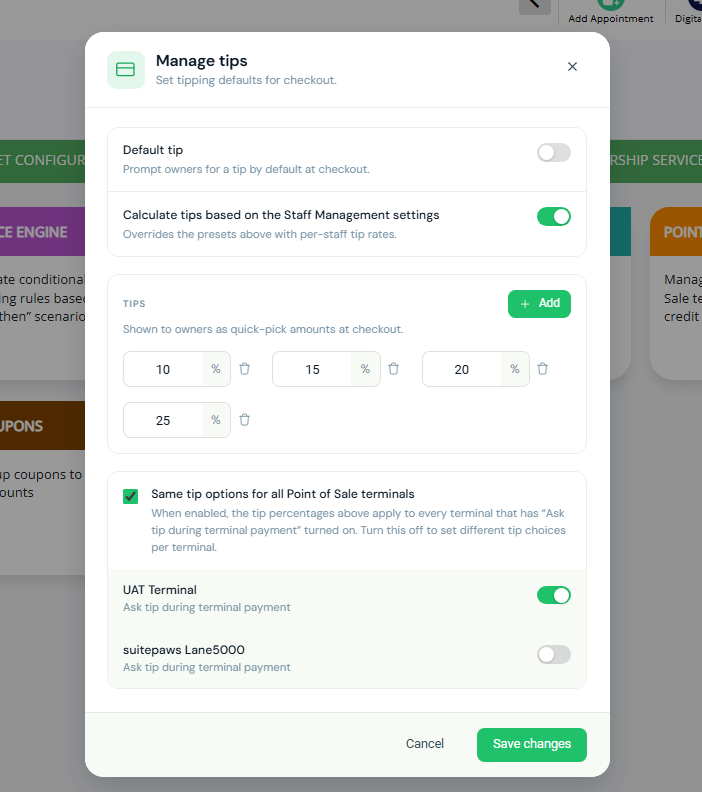
This update brings the same quick-pick tip experience used on payment terminals to every other place a tip can be added — invoices, the point-of-sale app, kiosks, and more — all controlled from one backend setting instead of being hardcoded per platform.
- What's new: Previously only the physical terminal let customers pick a tip percentage; everywhere else tipping wasn't customizable or required typing a flat dollar amount. Now all platforms share the terminal's tip experience via the same configuration.
- Why it matters: Staff and customers get a consistent, fast tipping experience everywhere, and presets only need to be configured once.
- How it works:
- Go to Settings → Pricing → Manage Tips
- Set default tip presets (up to three percentages) or have tips follow Staff Management per-staff rates.
- Presets automatically appear anywhere else a tip is added (POS invoices, kiosks, etc.).
- Staff now see the dollar amount next to each percentage (e.g., "15% ($5.90)") — the separate "Dollar" entry mode was removed.
- A "Custom" option remains available for one-off amounts.
- Where to find it: Settings → Pricing → Manage Tips for configuration; the "Add Tip" option wherever you already add a tip today. Default value as ON Same tip options for all Point of Sale terminals set
- 📝 Note: This enhancement for Pet Owner App, Client Portal, StaffApp+ for Kennels, Kiosk, and StaffApp+ for Groomers will be available by the Mid of October 2026.
Staff Group Permissions and Access for Report Card
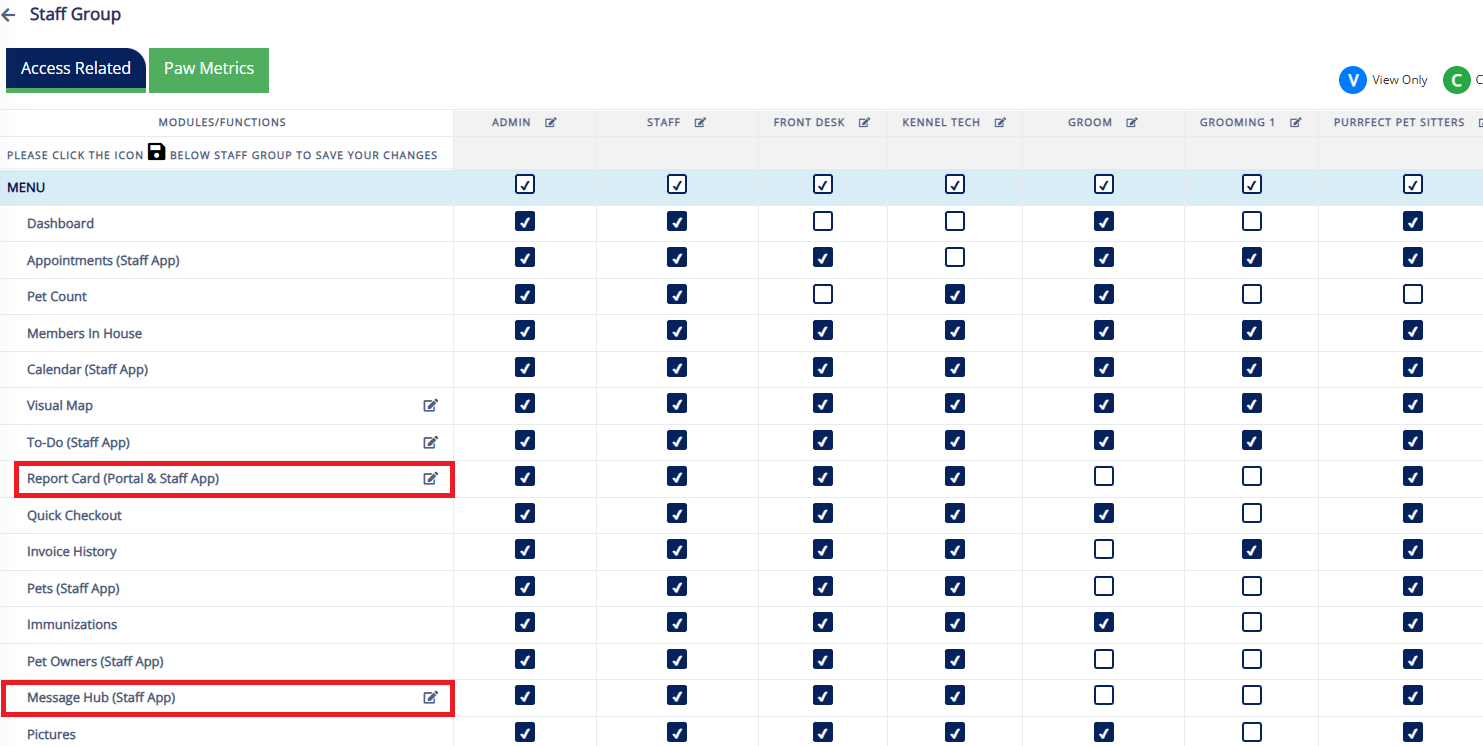
Report Card access can now be managed per Staff Group with granular permissions, instead of one on/off toggle.
- What’s New: You can now allow a Staff Group to, for example: view Report Cards, add/update Report Card info, upload images/videos, mark Report Cards ready to send, and send them to pet owners.
For example, you can allow a team member to:- View Report Cards
- Add or update Report Card information
- Upload images or videos
- Mark Report Cards as ready to send
- Send Report Cards to pet owners
- Where to Find It: Go to: Settings → Staff Group → Access Related → Report Card (portal & Staff App) → Pencil Icon
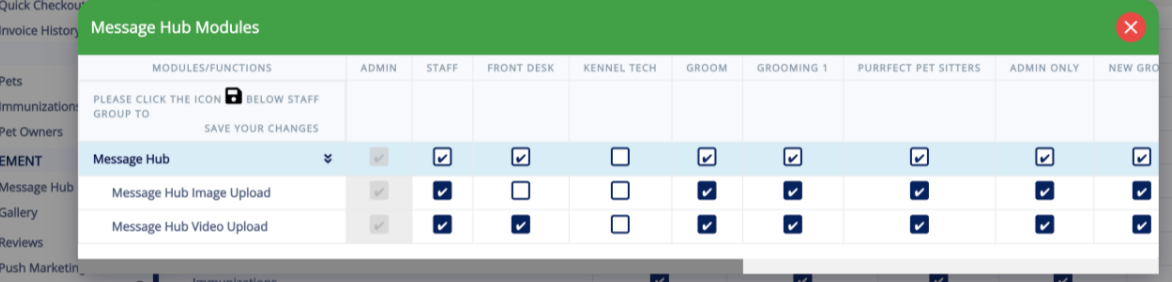
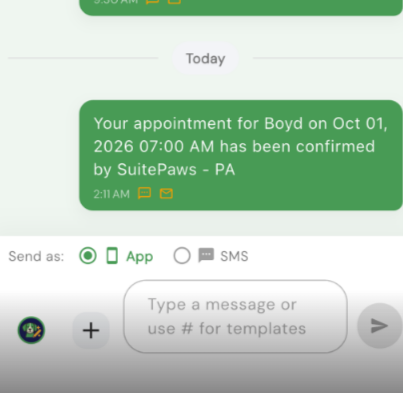
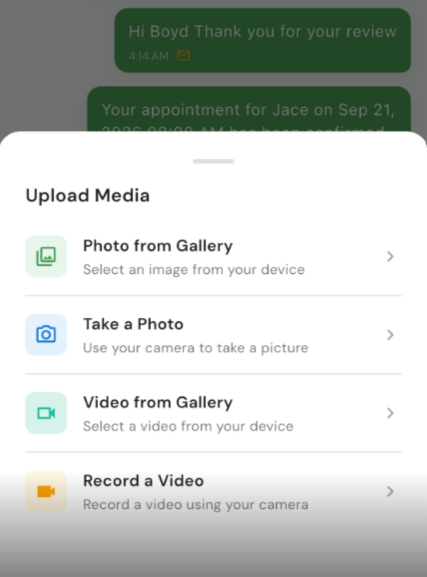
- 📝 Note: Message Hub (Staff App) functionality will be released on Staff App + by Beginning of October 2026
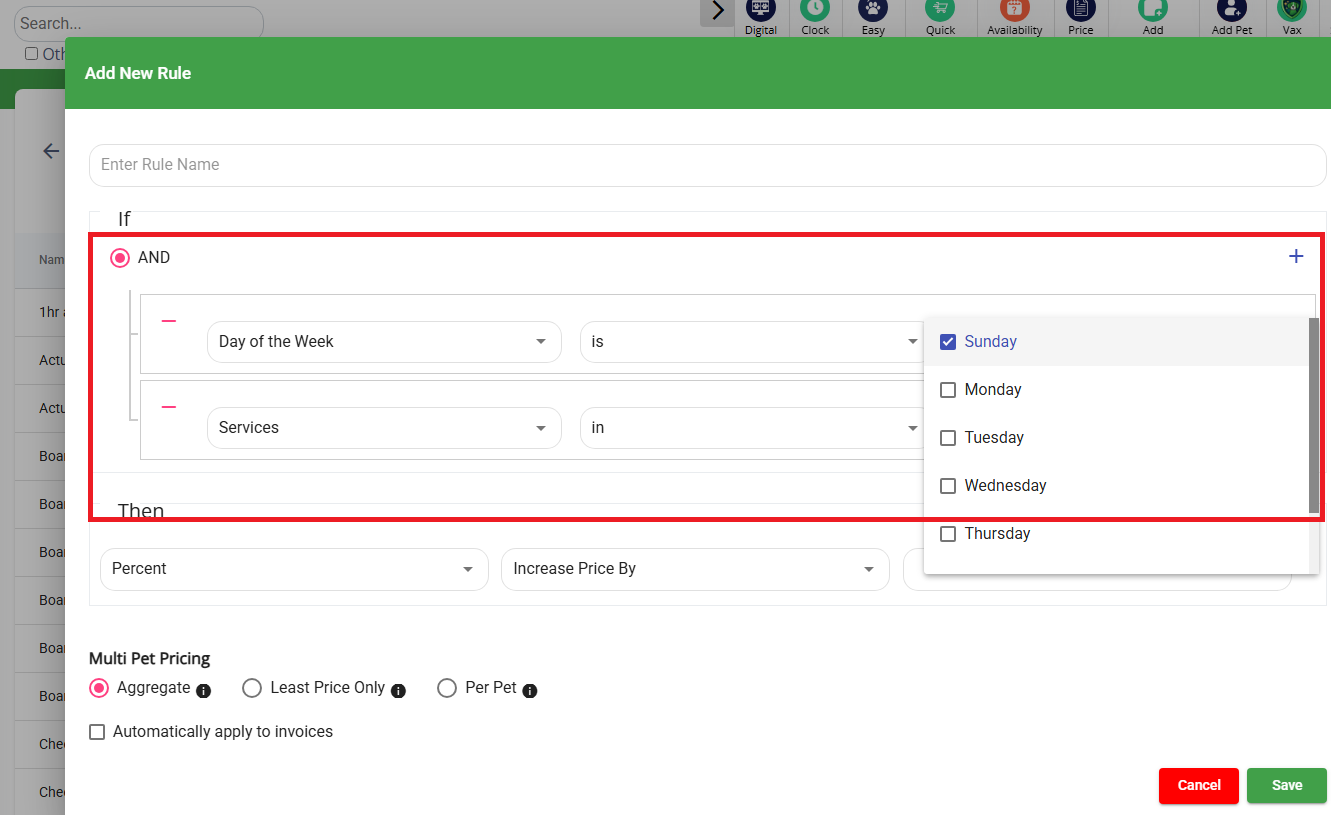
Day-of-Week Pricing Rules (Weekday & Weekend Pricing)
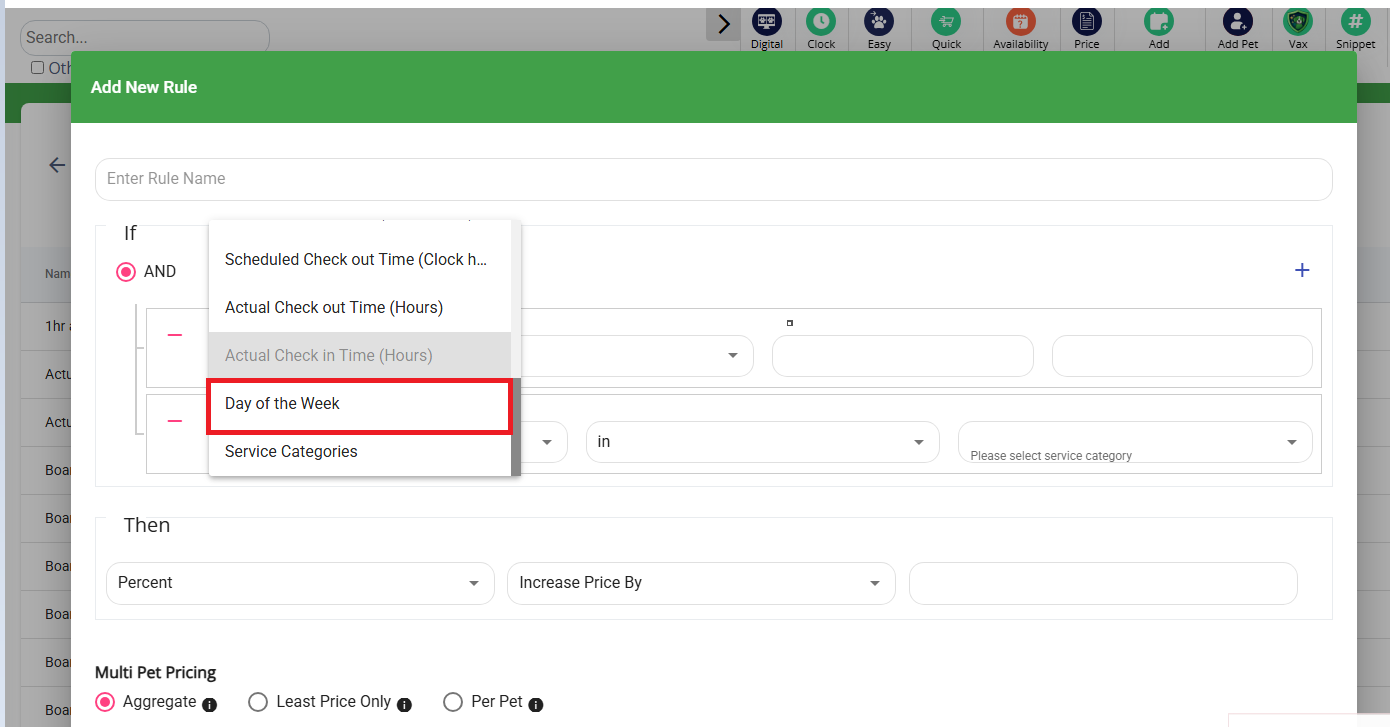
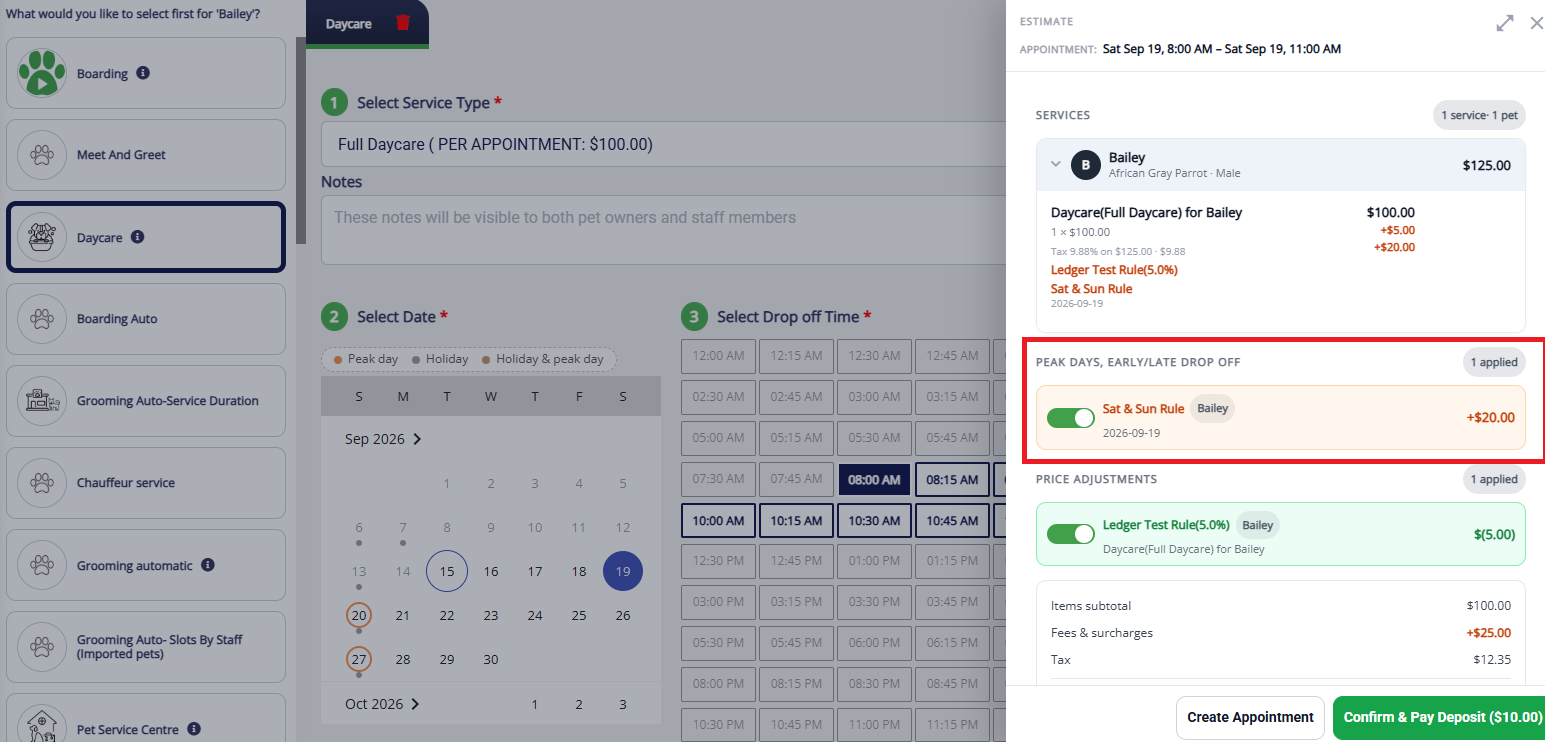
The pricing rules engine now supports day-of-week conditions, so businesses can apply different pricing — such as different after-hours surcharges — on weekdays versus weekends.
- What's new: Pricing rules previously couldn't react to the day of the week (e.g., "charge differently on weekends"). That gap is now closed.
- Why it matters: Many businesses want different rates on busy weekends or extra fees on certain days — this is now built into pricing rules and applied automatically instead of requiring manual adjustment.
- How it works:
- Pricing rules can evaluate the day of the reservation, in addition to existing conditions.
- Enables layered rules like a weekend-only after-hours charge.
- In Settings → Pricing → Peak Days / Early-Late Fees Pricing Rules, add "Day of the Week" as a condition (single day or combination) alongside other conditions, and set the price adjustment as usual.
- Where to find it: Settings → Pricing → Peak Days / Early-Late Fees Pricing Rules, in the same rule builder you already use — "Day of the Week" just appears as a new condition option.
Timesheet — Overlapping Entry Validation
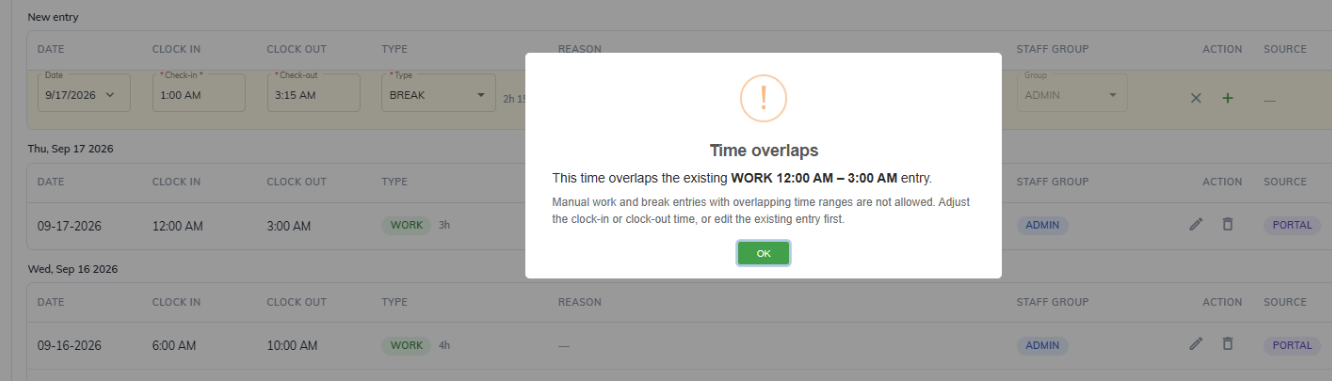
Manual timesheet entries are now validated against overlapping work/break time, with the system offering to auto-split the entry instead of blocking it.
- What's new: Previously, adding a break inside an existing work entry wasn't supported — staff had to manually split the entry first. Now the system detects the overlap and offers to split it automatically.
- Why it matters: Removes a confusing dead end for anyone entering timesheets by hand — staff get a clear explanation and a one-click fix, with entries guaranteed to line up correctly.
- How it works:
- Add or edit a break that falls inside an existing work shift.
- A message explains the overlap and previews the three resulting entries (work before, break, work after).
- Choose Split Shift to apply automatically, or Cancel.
- The timesheet shows the three separate entries in place of the original.
- Where to find it: Timesheet entry, the same place work and break times are already added or edited today — no new screen to learn.
Package & Membership Management (Purchase Packages)
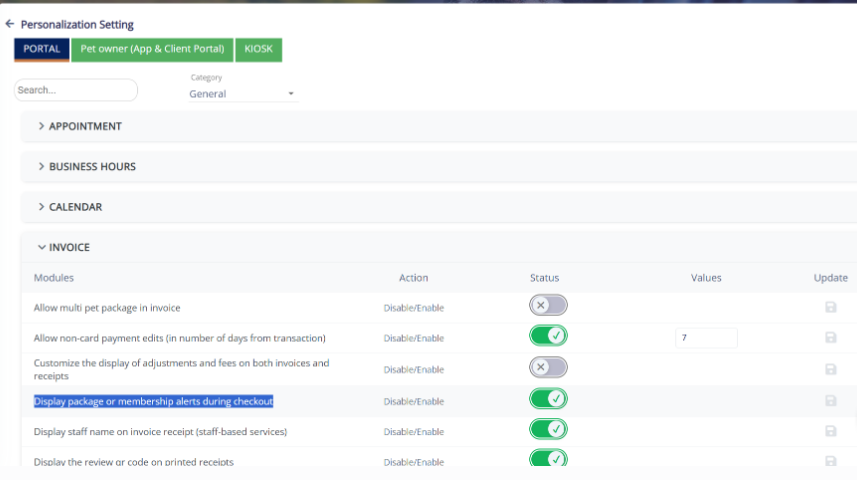
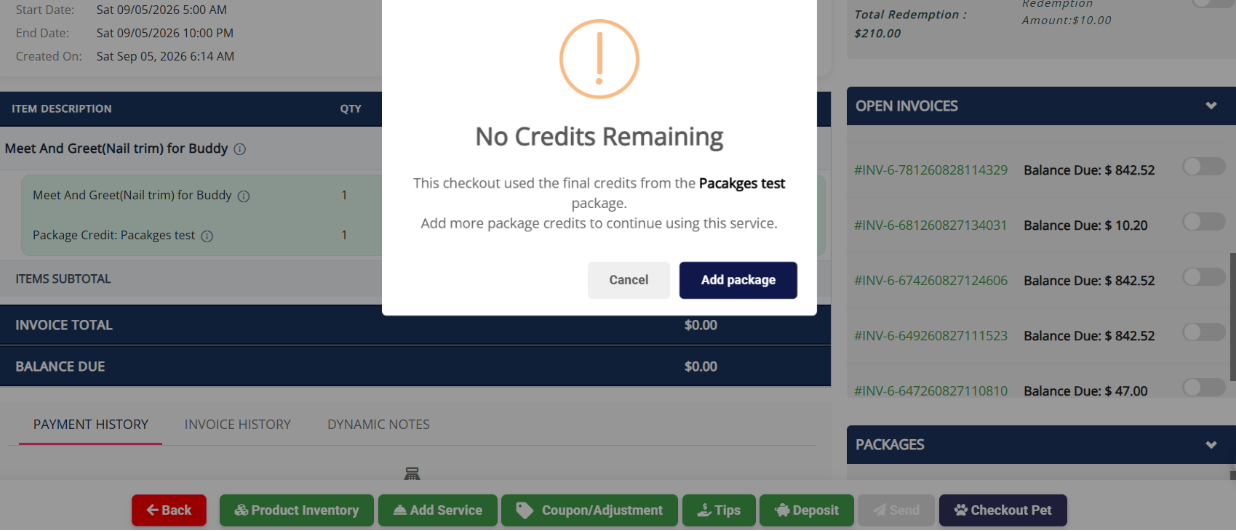
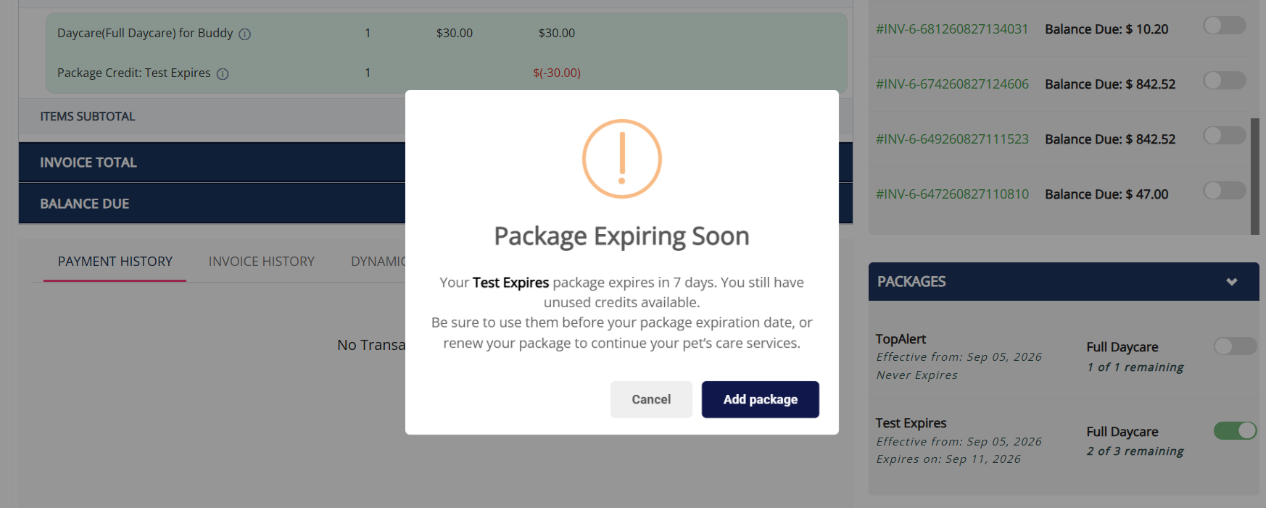
Adds automatic alerts during checkout when a package or membership is running low or has run out, so staff can offer a renewal or top-up in the moment.
- What's new:
- Checkout now automatically detects and messages three situations: no credits remaining (offers to add a new package), auto-renewal active (heads-up only), and expiring within 7 days (reminder to use or renew).
- Why it matters: Turns a missed conversation into an easy upsell moment, instead of a package quietly running out or lapsing unnoticed.
- How it works:
- During checkout, the system checks the status of any package/membership on the invoice.
- The matching message appears automatically — no per-checkout setup needed.
- Staff can act immediately or dismiss and continue.
- Where to find it: Automatically during checkout; the on/off switch is in Personalization Settings → Invoice. Default : Disabled
Subscription Compliance — Membership & Package (Auto Renewal Cancellation)
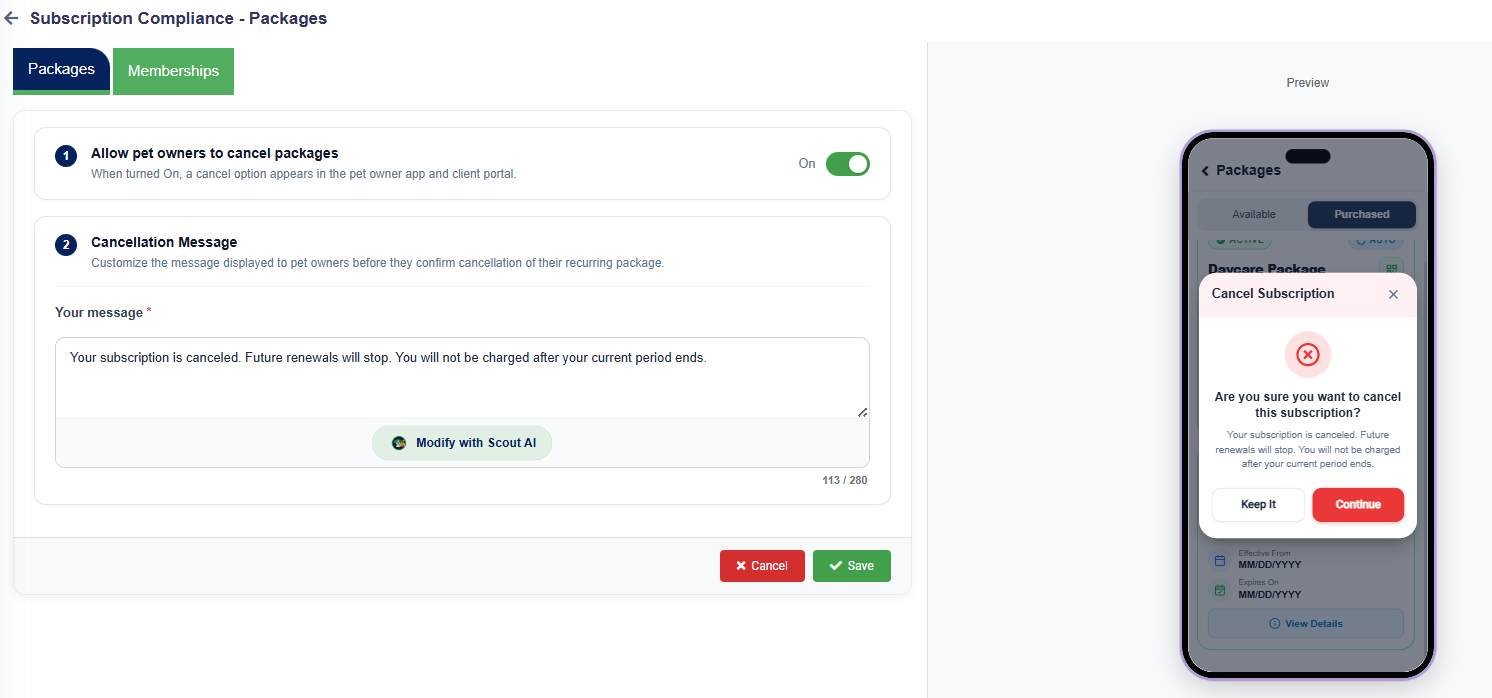
Gives pet owners a self-service way to cancel recurring packages and memberships, with a confirmation message you control, from the Pet Owner App and Client Portal.
- What's new: Cancelling used to require contacting your team directly. Now pet owners can cancel it themselves, and packages/memberships are controlled by separate toggles.
- Why it matters: Cancellation requests that used to mean a call or front-desk visit can now be self-served, while you retain control over the message and which subscription types allow it.
- How It Works:
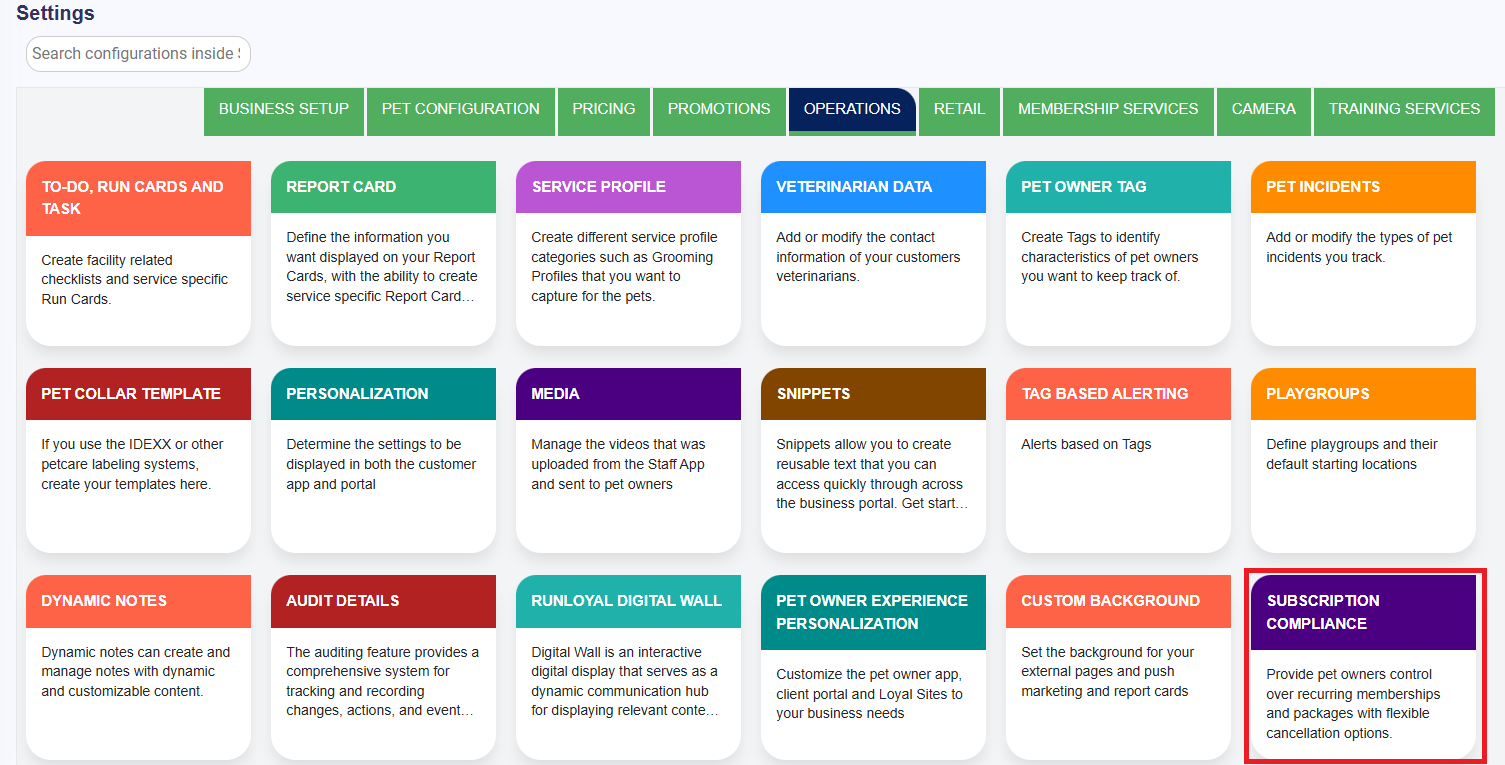
- Turn it on, one type at a time — In Settings → Operations → Subscription Compliance, switch on "Allow pet owners to cancel packages" and/or "...memberships" independently.
- Write your cancelation message — Set the confirmation message shown right before cancellation.
- Preview it before you save — A live preview shows exactly what pet owners will see.
- Where to find it: Settings → Operations → Subscription Compliance, where the Default value for Allow Pet Owner to Cancel is set as OFF
- 📝 Note: This enhancement is currently available in the Business Portal. Support for Pet Owner App and Client Portal is expected by the end of September 2026. If you’d like to prioritize contact puppylove@runloyal.com
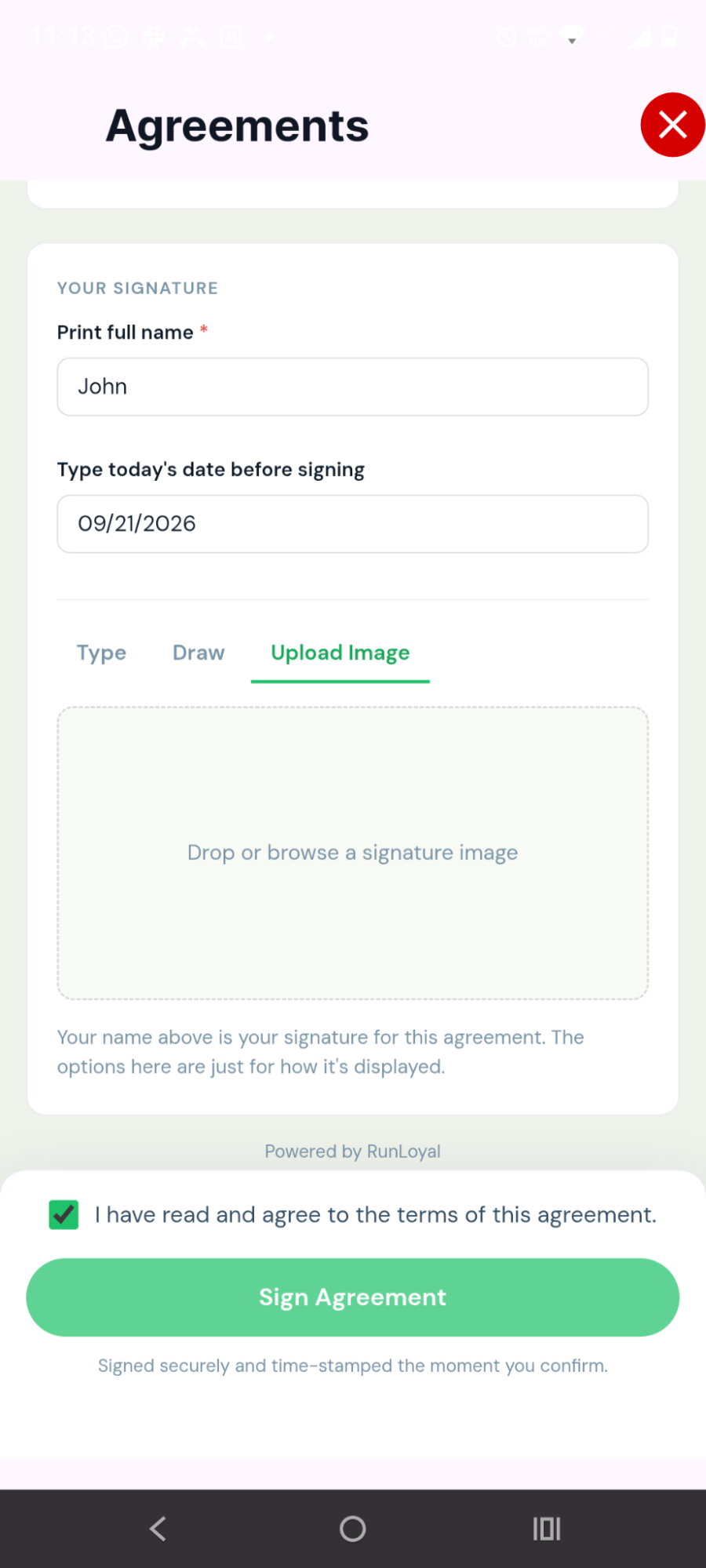
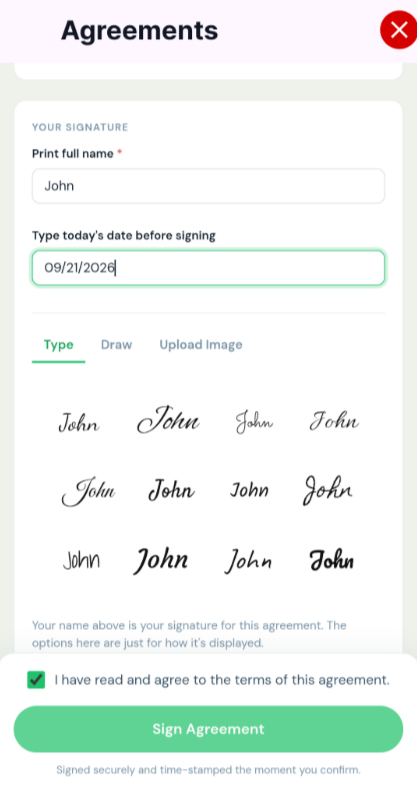
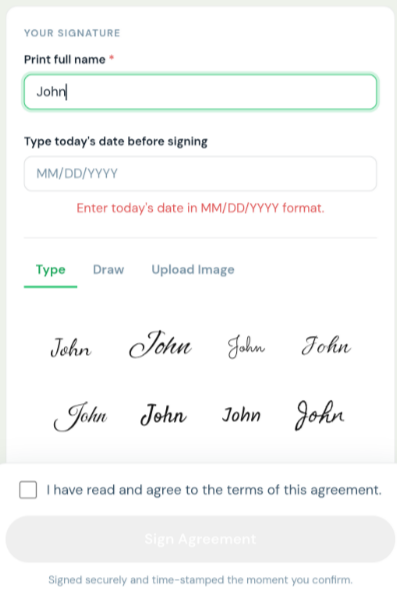
Agreements — Signing Date & Timestamp
Agreement records now capture a precise, permanent record of exactly when — and from where — a pet owner's agreement was signed.
- What's new: Signed agreements previously didn't show when the signature occurred. Now the system automatically records the date, time, and IP address at signing.
- Why it matters: Gives staff a reliable record for confirming signatures and resolving timing questions; the timestamp is locked in at signing and doesn't change if the record is later edited.
- How it works:
- The exact date/time is recorded when an agreement is signed (by pet owner or staff-assisted).
- The timestamp is immutable.
- Visible in the Agreement list/report view, the pet owner's profile → Agreements section, and agreement-status reports.
- Unsigned agreements show a clear empty state.
- Where to find it: Wherever agreement status already appears.
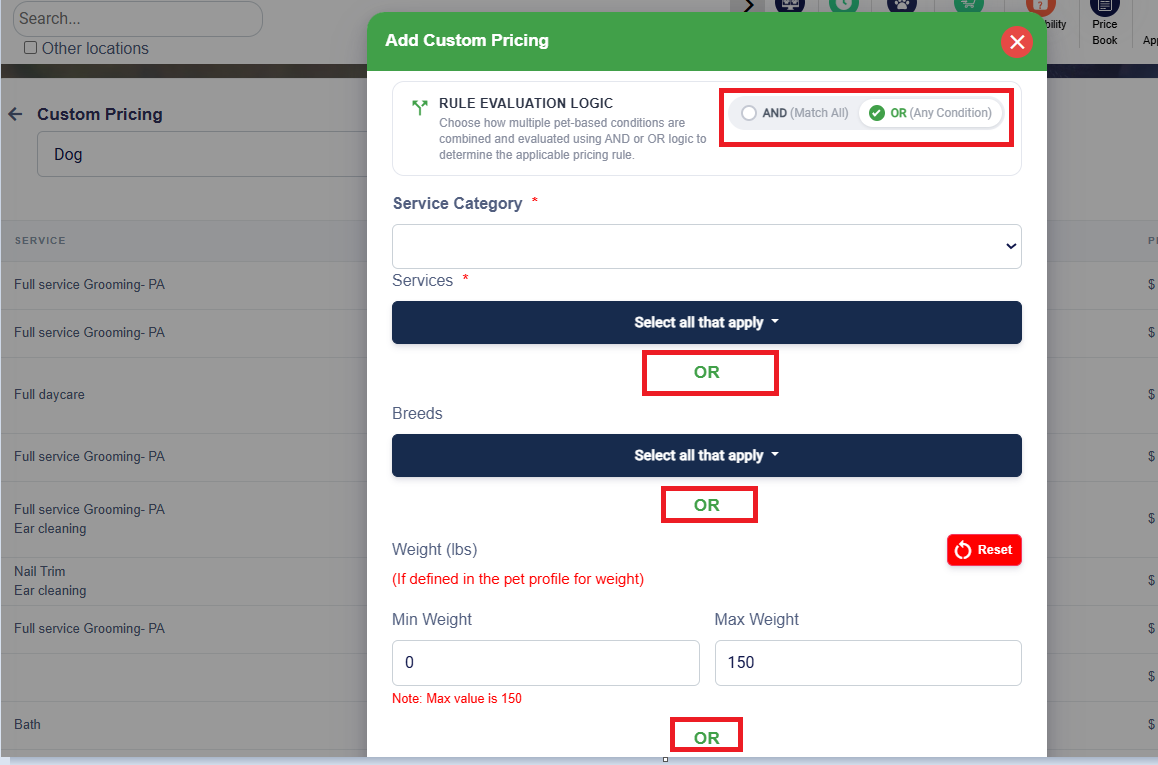
Custom Breed Pricing — OR Condition Logic
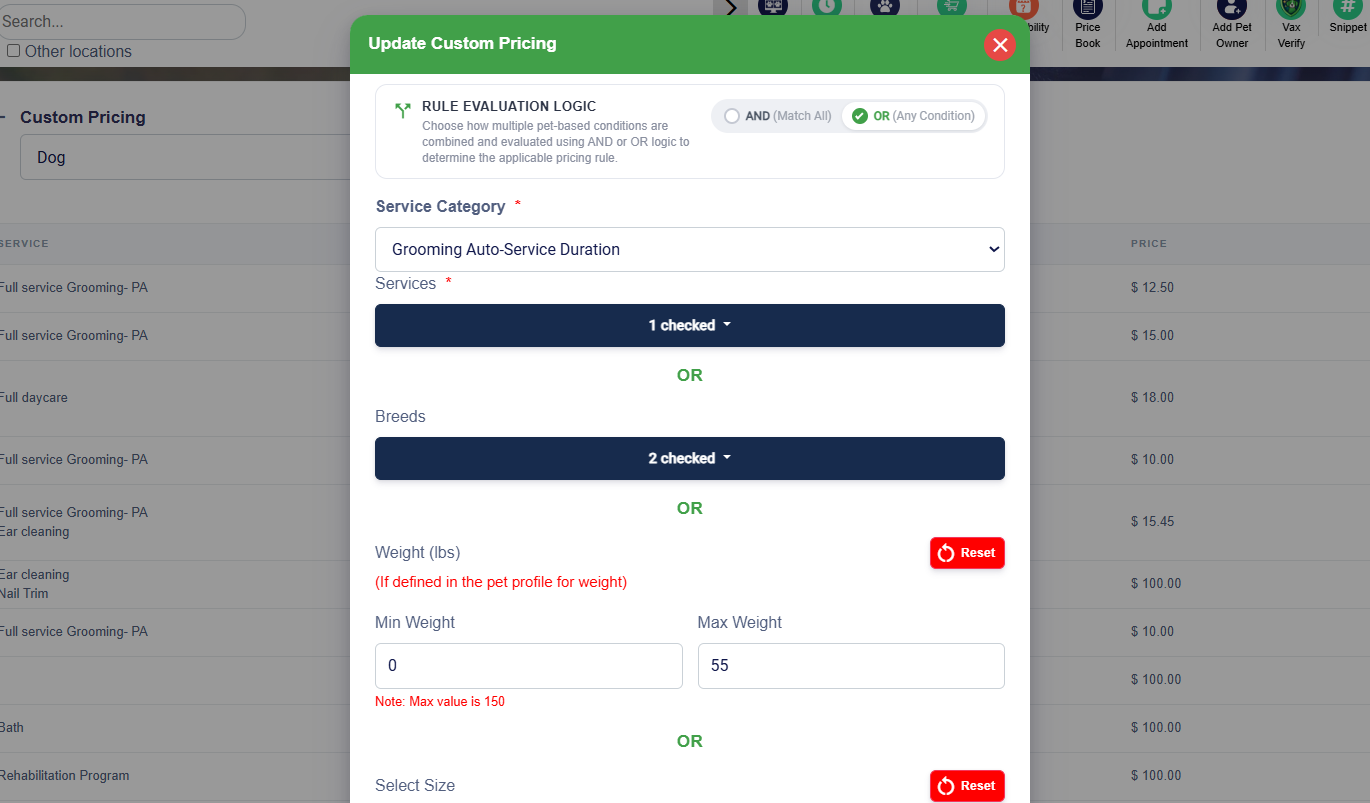
Kennel Owners can now choose AND/OR logic when configuring Custom Breed Pricing rules, so one rule can apply if any of several breeds match.
- What's new: Previously all conditions in a rule had to match, requiring a separate rule per breed for the same price. Now you can choose AND (all match, previous behavior) or OR (any one matches) — e.g., one OR rule can cover Poodles, Doodles, and Labradoodles together.
- Why it matters: Cuts down on repetitive rule-building — set it up once with OR logic instead of maintaining a rule per breed.
- How it works:
- Choose AND or OR condition logic when creating/editing a Custom Breed Pricing rule.
- Example: an OR rule for Labrador or Golden Retriever applies the same price to either, with no separate rules needed.
- Applies wherever Custom Pricing is used: Settings → Pricing → Custom Pricing, the estimated step when creating an appointment, and the invoice.
- Where to find it: Settings → Pricing → Custom Pricing, in the same rule builder you already use today.
Separate Food & Medication Details for Staff vs. Pet Owner
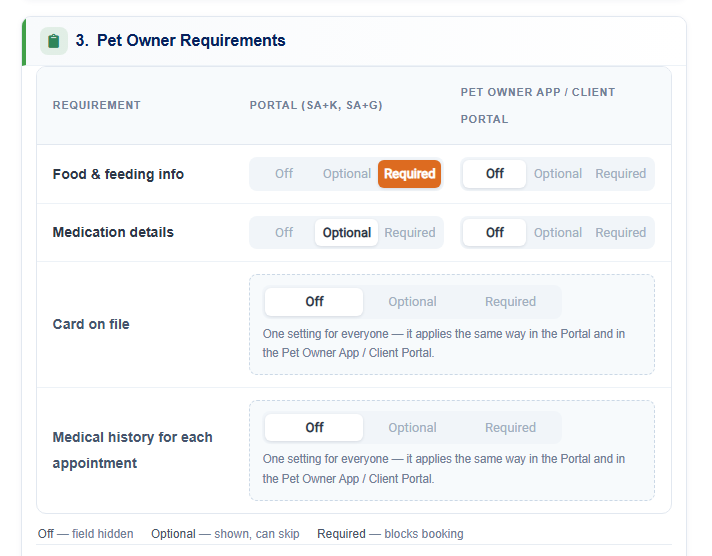
Food & Feeding and Medication Details can now be controlled independently for the Client Portal/Pet Owner App versus the Business Portal.
- What's new: Previously one setting controlled visibility everywhere, so turning it off for pet owners also hid it from staff/run cards. The renamed Guest Requirements section now has two independent columns — one for your Portal, one for the Pet Owner app/Client Portal.
- How it works:
- Open Guest Requirements — In Service Configuration → Edit a Service, find the renamed Guest Requirements section.
- Set each side independently — For food & feeding, medication details, card on file, and medical history, choose Off/Optional/Required for each side separately.
- Know what each option does — Off hides the field; Optional allows skipping; Required blocks booking until filled in.
- 📝 Note: This enhancement is currently available in the Business Portal. Support for Pet Owner App and Client Portal is expected by the end of September 2026. This requires Pet Owner App and Client Portal release
Minimum Advance Booking Window by Service Category
Kennel Owners can set a minimum advance booking (cut-off) window per service category in the Pet Owner App.
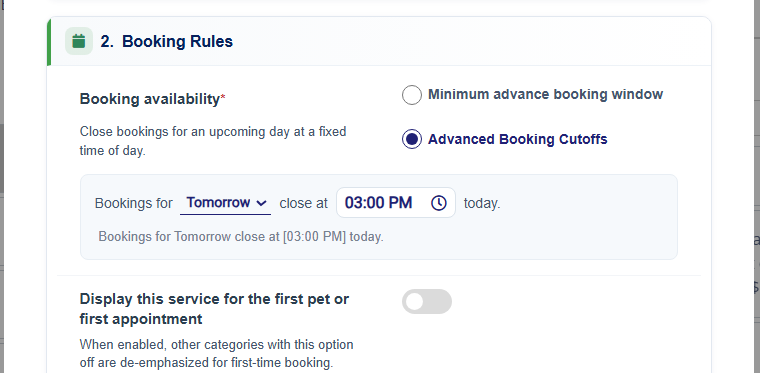
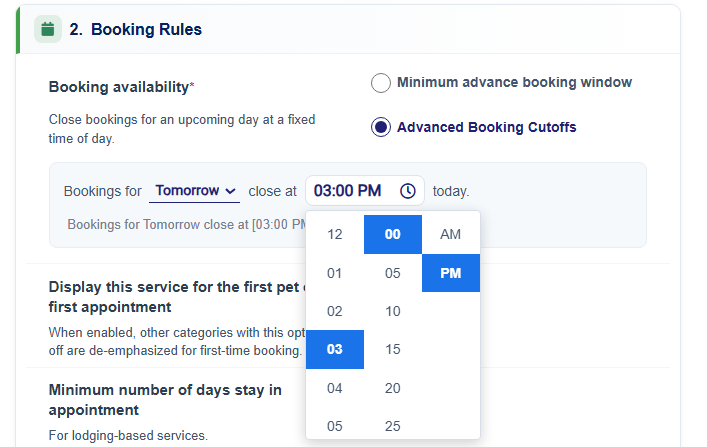
- What's new: Previously a single minimum-advance-notice setting applied per category. Now an Advanced Booking Cutoffs option can close bookings for a specific day at an exact time (e.g., "Bookings for Tomorrow close at 9:00 PM today").
- How it works:
- Open Booking Rules for a service category — In Service Configuration, go to a category's Booking Rules section.
- Pick how to control availability — Minimum advance booking window (simple) or Advanced Booking Cutoffs (exact time).
- Set the cutoff — Choose Today's or Tomorrow's bookings and an exact close time in 5-minute increments.
- 📝 Note: This requires Pet Owner App and Client Portal release which is expected by the end of September 2026. If you’d like to prioritize contact puppylove@runloyal.com
Applying Multiple Coupons on the Same Invoice
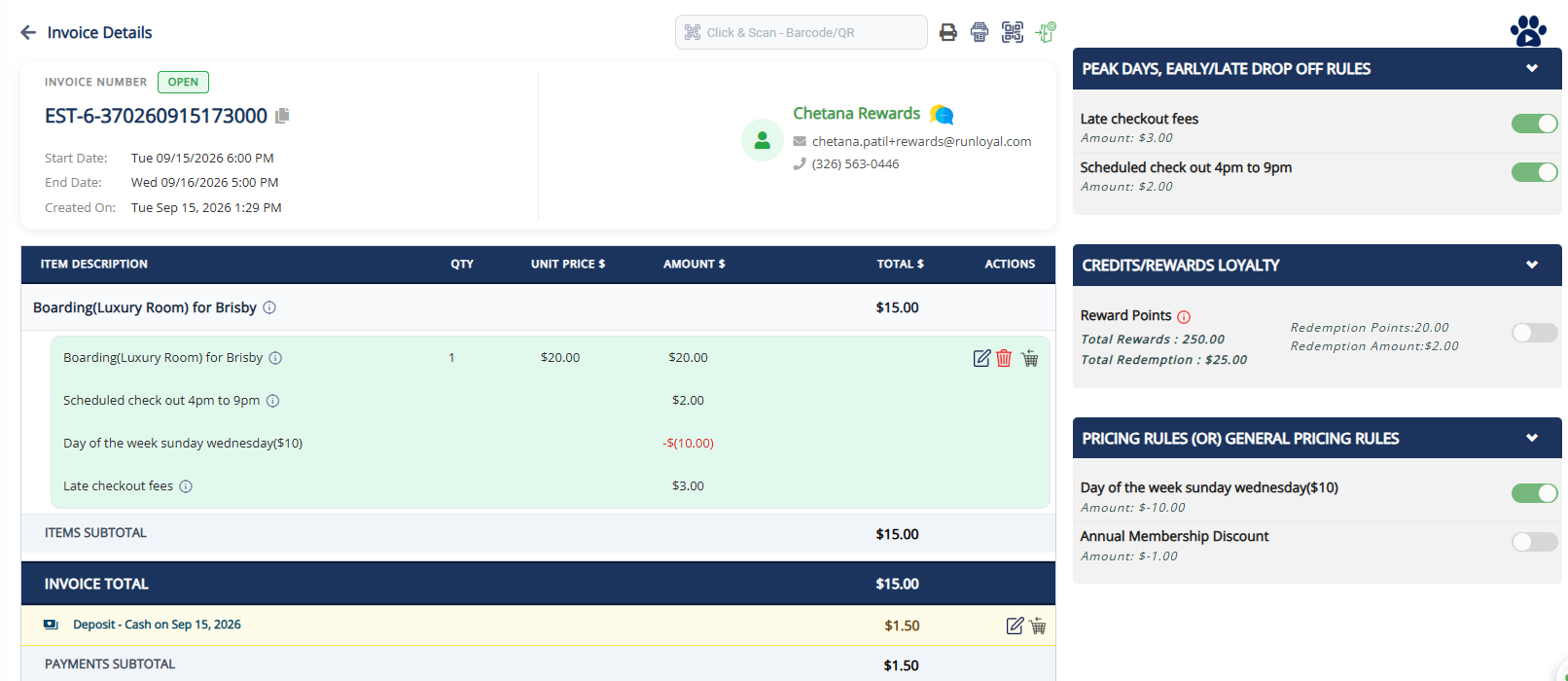
Kennel Owners can now apply more than one coupon or discount to the same invoice or line item.
- What's new: Previously only one coupon could be applied at a time. Now multiple different coupons can be applied to the same invoice/item, each listed separately with the total reflecting all combined.
- Why it matters: Lets customers combine a general discount with a specific promotion, as promotions were designed to work, instead of being forced to pick one.
- How it works:
- Open the invoice or item — Choose Coupon/Adjustment on the item (works for both new V2 and legacy invoices).
- Apply a coupon as usual — Search by name/code and select; discount shows below the price.
- Apply another one if it qualifies — Choose "Apply another coupon" to add a second; both discounts apply and the total updates.
Training Services — Custom Intake Question
Kennel Owners and Admins can now configure intake questions per individual Training Service.
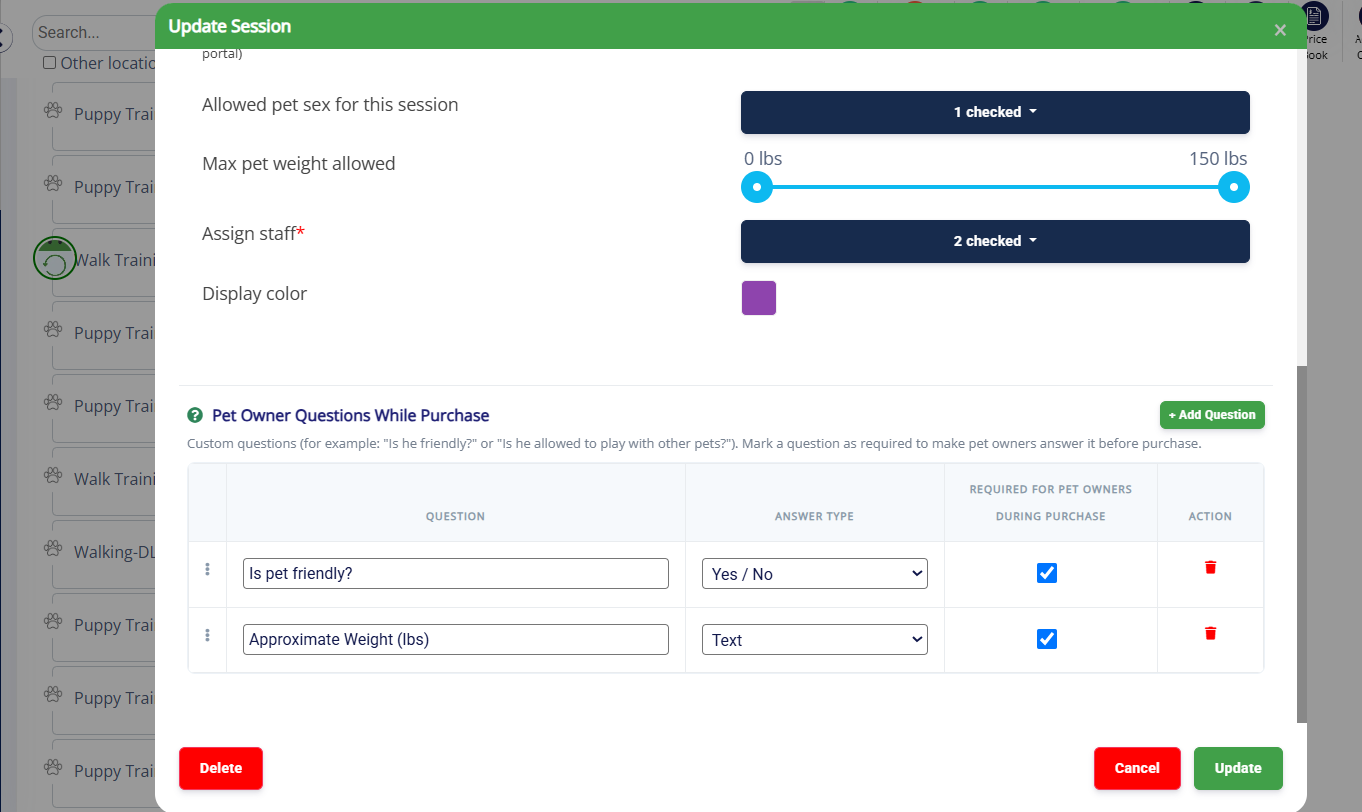
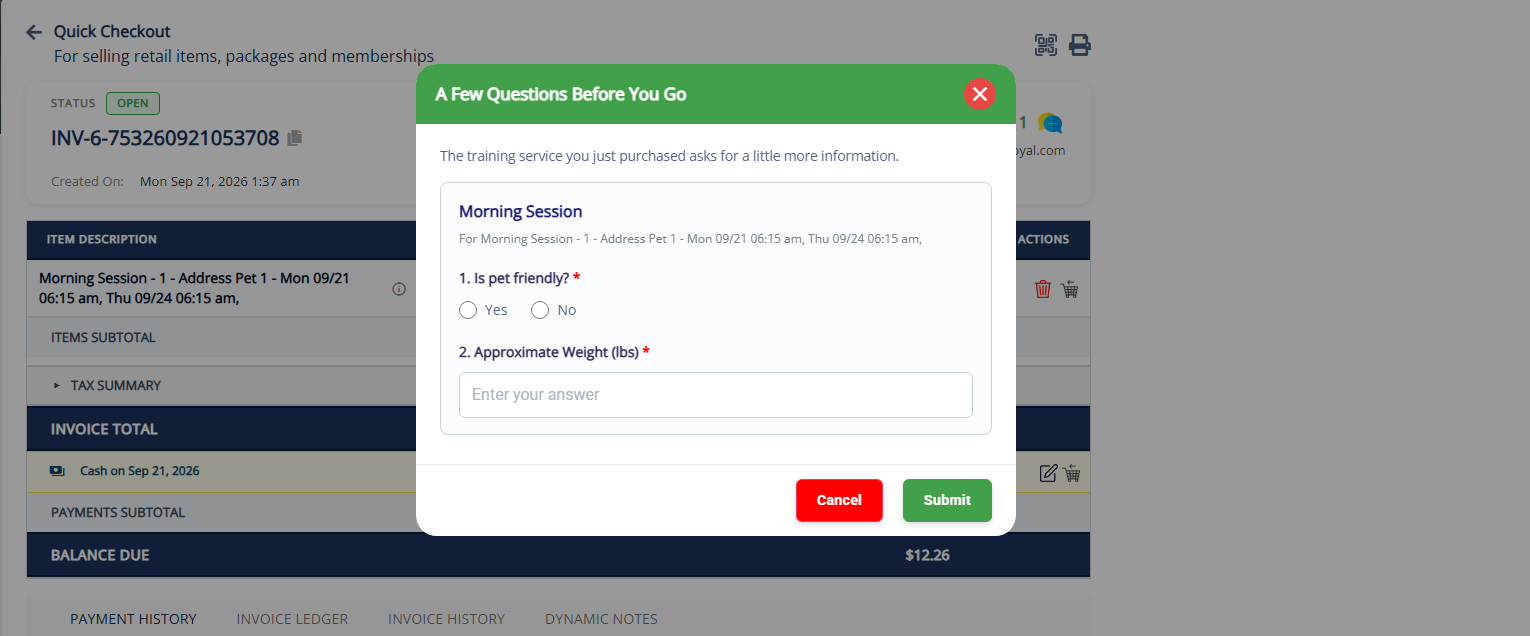
- What's new: Previously there was no way to ask training-specific questions during enrollment. Now each session within a Training Service can have its own intake questions, answered as part of enrollment and saved against that enrollment.
- Why it matters: Trainers often need specific info before a session — built-in intake questions mean that context arrives with the enrollment itself.
- How it works:
- Add questions to a session — In Training Service Configuration, use the new Questions section to add questions marked Required or Optional.
- Pet owners answer at enrollment — Required questions must be answered before submitting; optional ones can be skipped.
- Review the answers — Each enrollment request shows the pet owner's answers.
- How to Configure: Settings - Training Services - Training Service Configuration - Training Services - Session - Edit - And add Training Questionnaire
- 📝 Note: This enhancement is currently available in the Business Portal. Support for Pet Owner App and Client Portal is expected by the end of September 2026.
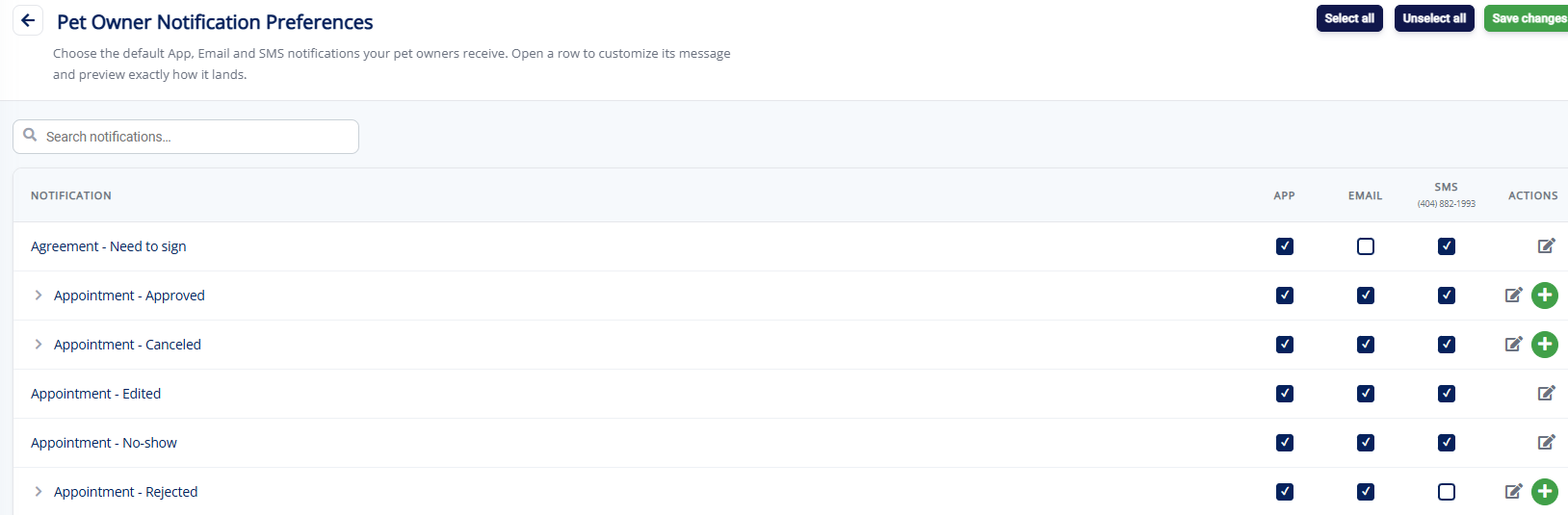
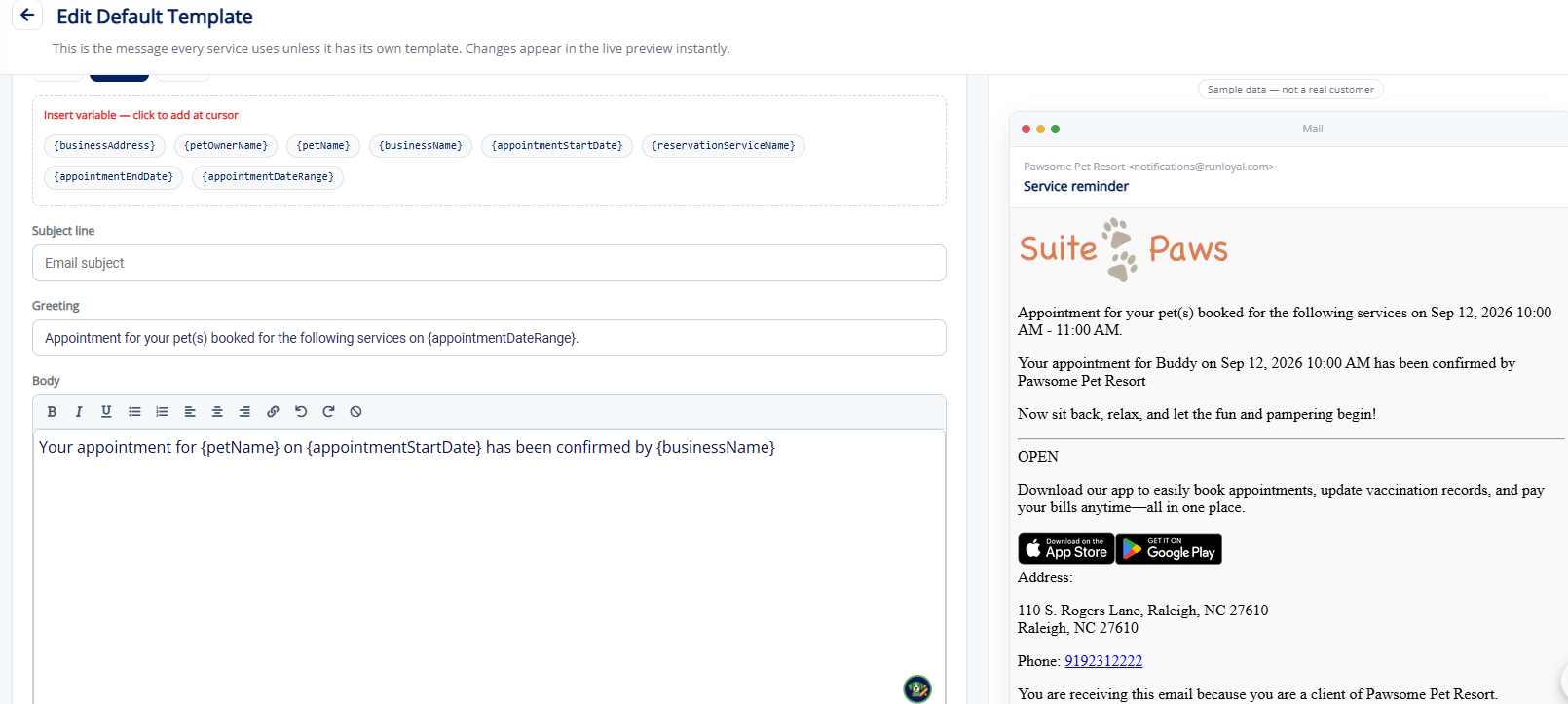
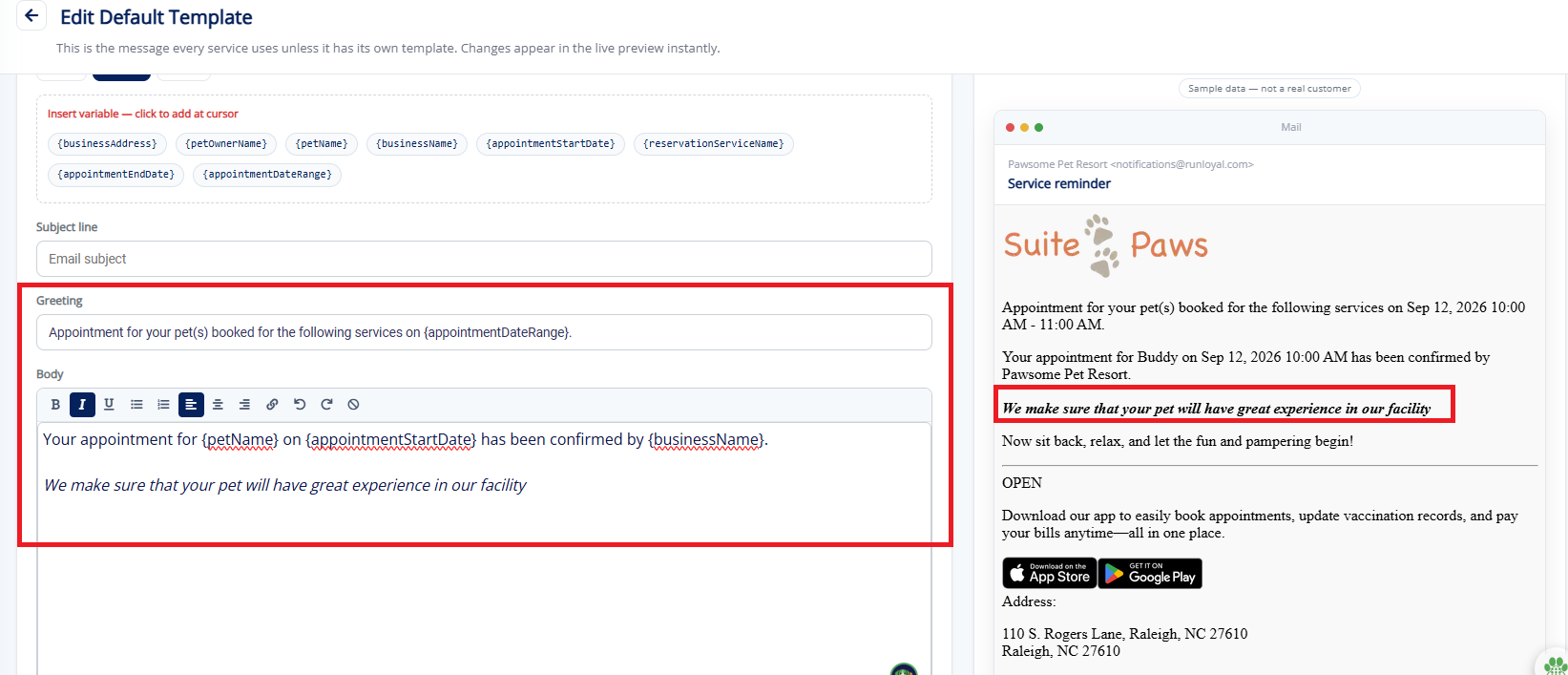
Email Templates Per Service - Pet Owner Notification Preference (Coming Soon!)
Custom notification templates now extend beyond the original program to additional service types.
- How It Works:
- Custom Notifications (under Pet Owner Notification Preferences) now extend to more service types/programs, each with its own content and attachments.
- The correct notification fires automatically based on the pet owner's booked service/program; unconfigured programs fall back to default behavior.
- 📝 Note: Notification Preferences for Training Services can be expected in upcoming releases. This will be available is near future !!
Improved Country Code Handling for Phone Numbers in Portal
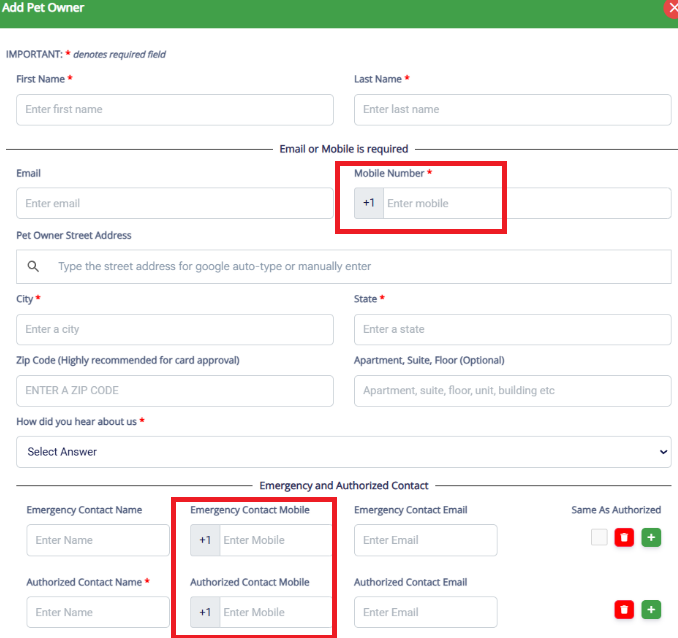
Phone numbers in the Portal now support proper country code handling, ensuring accurate formatting, validation, and communication across different regions based on tenant location
- What's New: We have improved phone number handling across the Portal by adding better support for country codes. Phone numbers are now stored, displayed, and processed with the correct country code format to ensure consistent communication across regions.
- Why It Matters: Previously, phone numbers without proper country code handling could cause issues when managing customers from different countries, including incorrect formatting and potential communication failures.
This update ensures a more reliable experience when adding, editing, and using phone numbers throughout the Portal.
Monthly Sales Report — Tip Distribution by Staff (New Section)
The Monthly Sales Report now breaks tips down by staff members instead of showing them as one unattributed line.
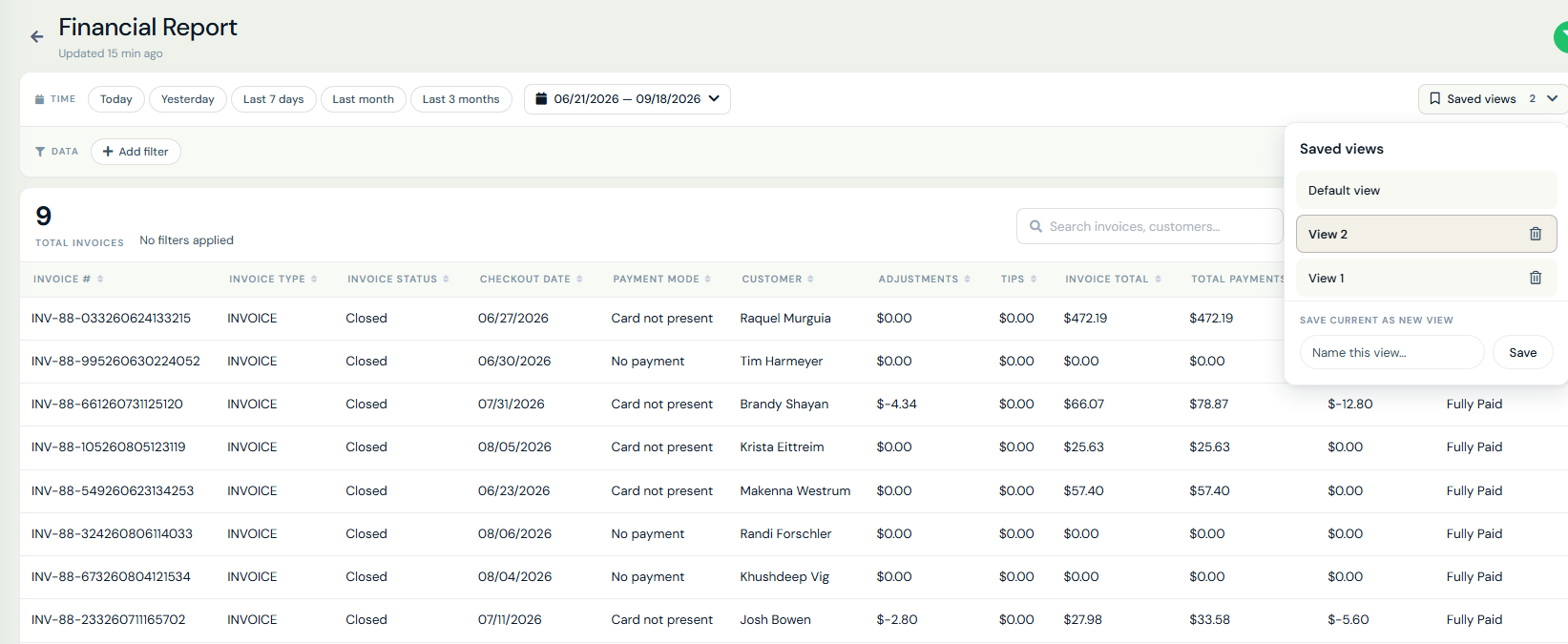
Financial Details Report (New) (Paw Metrics 2.0)
A new Financial Details report is being added to Paw Metrics 2.0, giving a searchable, invoice-level view of your practice's financials in one place.
- Filter by Date Range, Invoice Status, Invoice Type, Payment Status, and Payment Mode
- A searchable table with invoice, customer, payment, adjustment, tips, and balance details, with proper currency and date formatting, plus export support
- The date filter defaults to Checkout Date and switches to Payment Date when filtering by Payment Status
- Customizable columns, so users can show only the fields they care about
- A new Show/Hide Filters toggle collapses the filter bar to give the table more screen space, then brings it back with one click
Saved Views (Paw Metrics 2.0)
Filter and column setups can now be saved as a named view and shared tenant-wide, so the whole team sees the same saved layouts instead of rebuilding them individually.
- What's new:
- Save any configuration — Capture your current filters, column selection, sort order, and grouping as a single named view with one click.
- Share tenant-wide — Mark a view as shared so it's instantly available to everyone in your tenant, eliminating duplicate setup work across the team.
- Quick switching — Jump between saved views from a dropdown without manually reapplying filters each time.
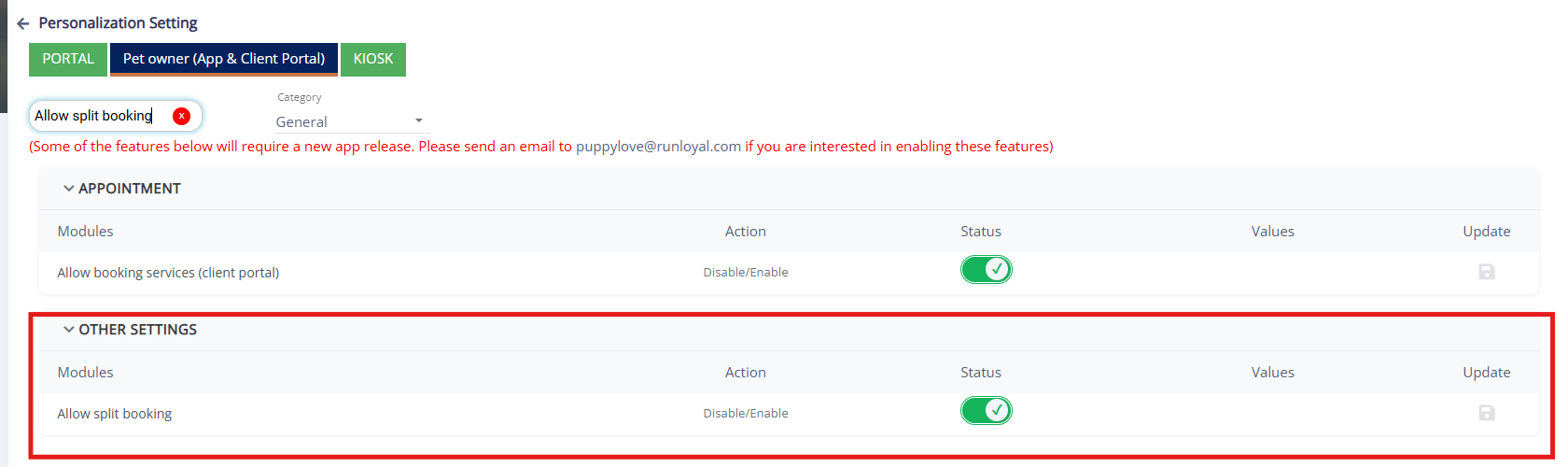
Split Booking & Smart Room Allocation (Now available)
Simplify multi-service bookings with flexible split booking and intelligent room assignment. Now available.
- Simplify multi-service bookings with flexible split booking and intelligent room assignment. You can split eligible multi-service bookings into separate appointments, controlled through Personalization settings. Split Booking is available for Auto-Approval services only.
- Smart Room Allocation automatically assigns available rooms based on booking requirements, reducing manual effort and helping staff efficiently manage pet stays.
- 📝 Note: This requires a Pet Owner App release, which is expected by early October. If you'd like to prioritize this, please contact puppylove@runloyal.com
Direct App Support for Pet Owners — Pet Owner App
A "Having App Issues?" option lets pet owners contact RunLoyal Support directly for app-related issues, without needing to reach out to their kennel.
- To reduce unnecessary support overhead for kennel owners, we're introducing a "Having App Issues?" option in the Pet Owner App that allows pet owners to contact RunLoyal Support directly for app-related issues — such as login problems, app crashes, or performance errors — without needing to reach out to their kennel.
- How It Works: Once available, pet owners will be able to access the Having App Issues? option from within the app, which will present the following support options:
- Call Support — Reach RunLoyal Support directly during business hours.
- Email Support — Send an email to puppylove@runloyal.com. When emailing, the following details are automatically included to help resolve issues faster:
- App logs
- Facility information
- Issue description
- Cancel — Dismiss and return to the app.
Upcoming Features & Enhancements
Cut-off times, subscription cancellation, estimates, and single-select add-ons are coming to the Pet Owner App.
- Cut-Off Time Management — Allow businesses to configure booking cut-off times for better scheduling control.
- Cancel Subscription — Enable pet owners to manage and cancel active subscriptions directly from the app.
- View Estimate — Allow pet owners to review appointment estimates before confirming services.
- Single Select Add-On Services — Simplify add-on selection with a radio button-based single-choice option.
- 📝 Note: These features are expected to be available by early October 2026. If you would like to prioritize this, please contact puppylove@runloyal.com.
New Features & Enhancements — Now Available
Bundled services, staff multi-slot validation, and a 30-day Remember Me login.
- Bundled Experience and Bundled Service Enhancements — Improved system functionality and business configuration workflows.
- Staff Multiple Slot Check — Added validation to ensure staff availability across multiple assigned time slots.
- Remember Me (30 Days) — Allows users to stay signed in for 30 days for a more convenient login experience.
Upcoming Features & Enhancements
SMS validation, cut-off times, estimates, split booking, smart room allocation, and more are coming to the Client Portal.
- SMS Add-On Validation — Added mobile number SMS validation with support for services with or without SMS add-ons.
- Cut-Off Time Management — Configure booking cut-off times to better manage appointment availability.
- Single Select Add-On Services — Simplified add-on selection with a radio button-based single-choice option.
- View Estimate — Allow users to review appointment estimates before confirming bookings.
- Staff Slot & Auto Approval Booking — Improved booking flow with staff slot validation and automatic approval support.
- Split Booking — Enable flexible booking by splitting appointments across services or time slots.
- Smart Room Allocation — Automatically assign rooms based on availability and booking requirements.
- Vax Verify Enhancements — Improved vaccination verification accuracy with fuzzy pet name matching.
- 📝 Note: These features are expected to be available by early October 2026. If you would like to prioritize this, please contact puppylove@runloyal.com.
Major Updates — Now Available
Daily Snapshot, Vax Verify V2, and an improved login & home screen experience.
- Daily Snapshot (DSS) — Quickly view arriving, in-house, and departing pets for the day from a single snapshot view.
- Vax Verify V2 — Improved vaccination verification experience with enhanced accuracy and performance.
- Improved Login & Home Screen Experience — Enhanced UI for a smoother and more intuitive app experience.
Direct App Support for Staff App+ for Kennels
A "Having App Issues?" option lets staff contact RunLoyal Support directly for app-related issues.
- We're introducing "Having App Issues?" option in the Staff App+ for Kennels app that allows staff to contact RunLoyal Support directly for app-related issues — such as login problems, app crashes, or performance errors — without needing to reach out to their kennel.
- How It Works: Once available, staff will be able to access the Having App Issues? option from within the app, which will present the following support options:
- Call Support — Reach RunLoyal Support directly during business hours.
- Email Support — Send an email to puppylove@runloyal.com. When emailing, the following details are automatically included to help resolve issues faster:
- App logs
- Facility information
- Issue description
- Cancel — Dismiss and return to the app.
- 📝 Note: This feature is part of an upcoming Staff App+ for Kennels app release. If you would like to prioritize this, please contact puppylove@runloyal.com.
Upcoming Features & Enhancements
Scout AI, Invoice Ledger, report card controls, estimates, tips, audits, and more are coming to Staff App+ for Kennels.
- The following features and enhancements will be available in Staff App+ for Kennels in an upcoming release:
- Scout AI Integration — Access Scout AI capabilities across DSS, Report Cards, and Calendar for improved insights and workflow efficiency.
- Invoice Ledger (V2 Invoice) — View detailed invoice history and transaction records with enhanced payment visibility.
- Report Card Approval Controls (RBAC) — Configure permissions to control who can approve and send report cards.
- View Estimate Enhancements — Apply custom pricing rules during booking and estimate generation instead of at check-in.
- Manage Tips — Configure and manage tip settings across supported payment workflows.
- Appointment Audit Enhancements — Track feeding and medication updates from To-Do and Report Cards during appointment creation and individual pet updates.
- Add-On Service Date Selection — Allow pet owners and staff to select add-on services for specific dates through the Portal and App.
- Food & Medication Configuration — Configure food and medication preferences for both pet owners and staff users, including Miss Kitty and Animal Keeper workflows.
- Gallery Enhancements — Improve media management with social sharing, staff-based filtering, and a new review workflow for staff-uploaded images.
- 📝 Note: These features are expected to be available by early October 2026. If you would like to prioritize this, please contact puppylove@runloyal.com.
New Features & Enhancements — Now Available
Enhanced appointment and pet care management with package purchases, recurring bookings, appointment edits, QR check-ins, media uploads, and seamless pet owner communication.
- Purchase packages directly from the app. Which includes :
- Edit existing appointments or quickly book them again.
- Create recurring appointments easily.
- Delete appointments directly from the app.
- Upload media to service profiles and incidents.
- Send tagged pet images directly to pet owners from the Gallery.
- Check in appointments quickly using QR scanning.
Direct App Support for Staff App+ for Groomers
A "Having App Issues?" option lets staff contact RunLoyal Support directly for app-related issues.
- We're introducing "Having App Issues?" option in the Staff App+ for Groomers app that allows staff to contact RunLoyal Support directly for app-related issues — such as login problems, app crashes, or performance errors — without needing to reach out to their kennel.
- How It Works: Once available, staff will be able to access the Having App Issues? option from within the app, which will present the following support options:
- Call Support — Reach RunLoyal Support directly during business hours.
- Email Support — Send an email to puppylove@runloyal.com. When emailing, the following details are automatically included to help resolve issues faster:
- App logs
- Facility information
- Issue description
- Cancel — Dismiss and return to the app.
- 📝 Note: This feature is part of an upcoming Staff App+ for Groomers app release. If you would like this prioritized, please contact puppylove@runloyal.com.
Upcoming Features & Enhancements
Invoice Ledger, multi-pet Vax Verify, estimates, partial payments, Scout AI, and more are coming to Staff App+ for Groomers.
- The following features and enhancements will be available in Staff App+ for Groomers in an upcoming release:
- Invoice Ledger (V2 Invoice) — View detailed invoice transaction history and ledger details for better payment tracking and visibility.
- Multi-Pet Vax Verify V2 — Verify vaccination records for multiple pets with an improved and streamlined verification experience.
- View Estimate — Access and review estimates directly from the app for better appointment and billing visibility.
- Holiday & Peak Day Indicators — Easily identify holidays and peak days while selecting appointment dates in the booking calendar.
- Partial Payments & Manual Adjustments (Quick Checkout) — Support partial payments and manual invoice adjustments during quick checkout.
- Waiting List Appointments in ASC — View and manage waiting list appointments directly within ASC.
- Report Card Smart Update — Create and update report cards with intelligent suggestions for a faster documentation experience.
- Calendar Scout AI Integration — Leverage Scout AI insights directly within the calendar experience.
- Auto Assign Based on Last Appointment — Automatically assign resources based on the previous appointment assignment.
- Report Card RBAC Enhancements — Configure granular permissions for report card actions, including tabs, edit access, and send functionality.
- 📝 Note: These features are expected to be available by early October 2026. If you would like to prioritize this, please contact puppylove@runloyal.com.
V1.157.20260901.0109/01/20262 updates
Your RunLoyal portal has been updated with new features and enhancements!
Updated Headers on Pet & Pet Owner Profiles
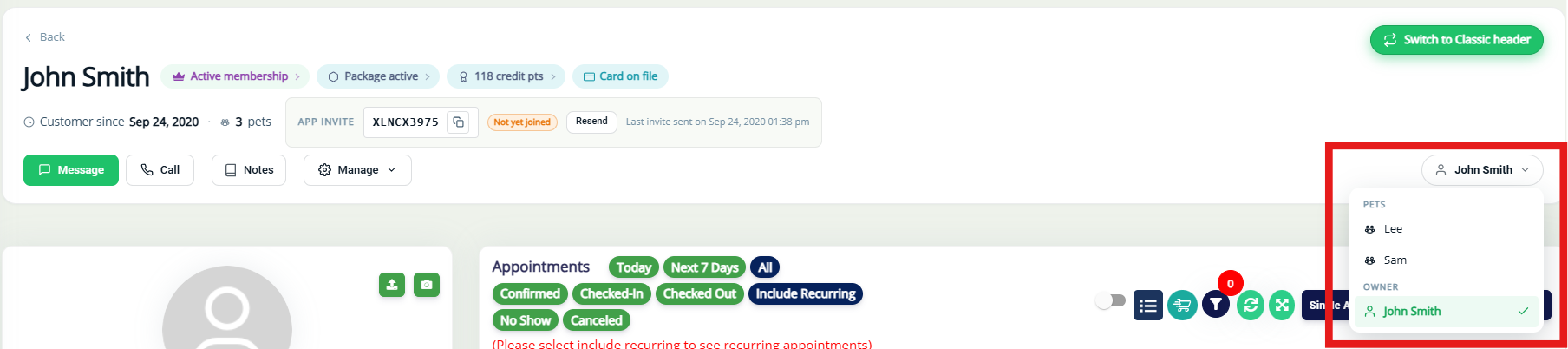
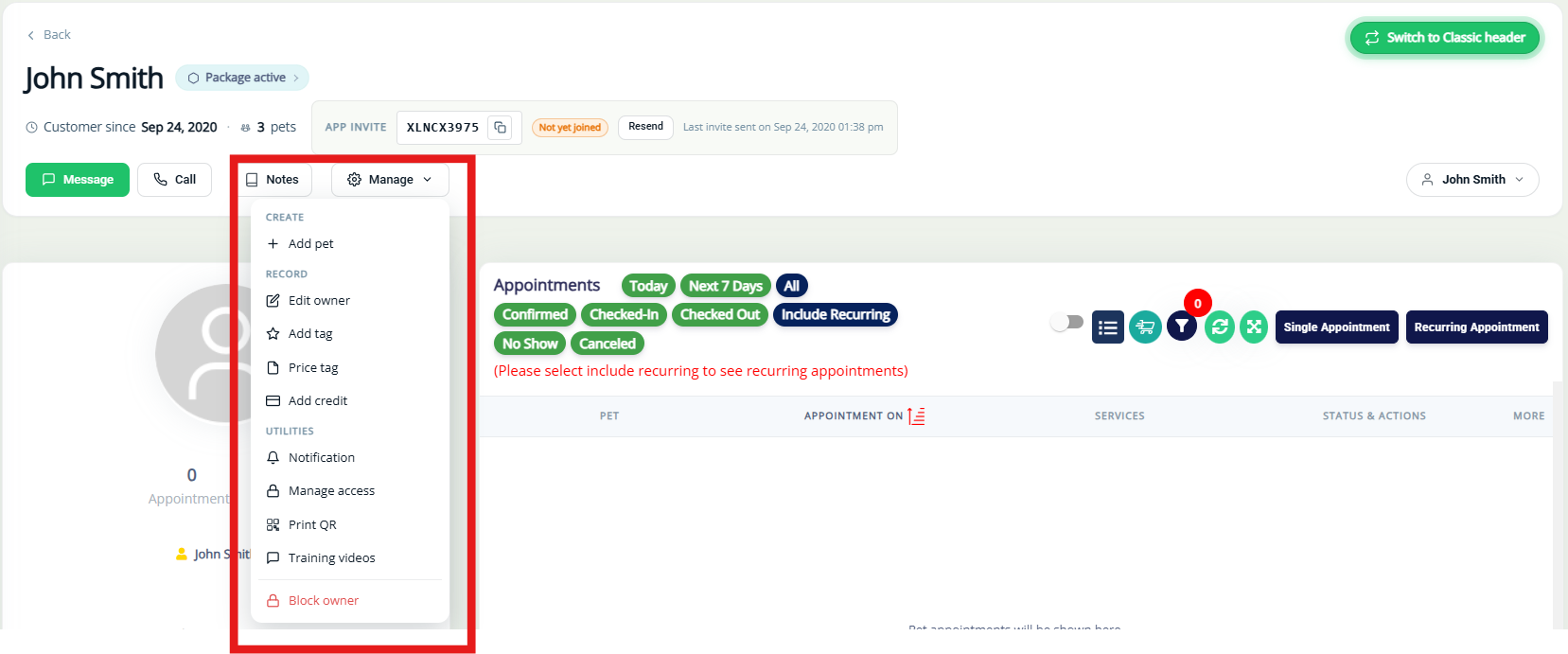
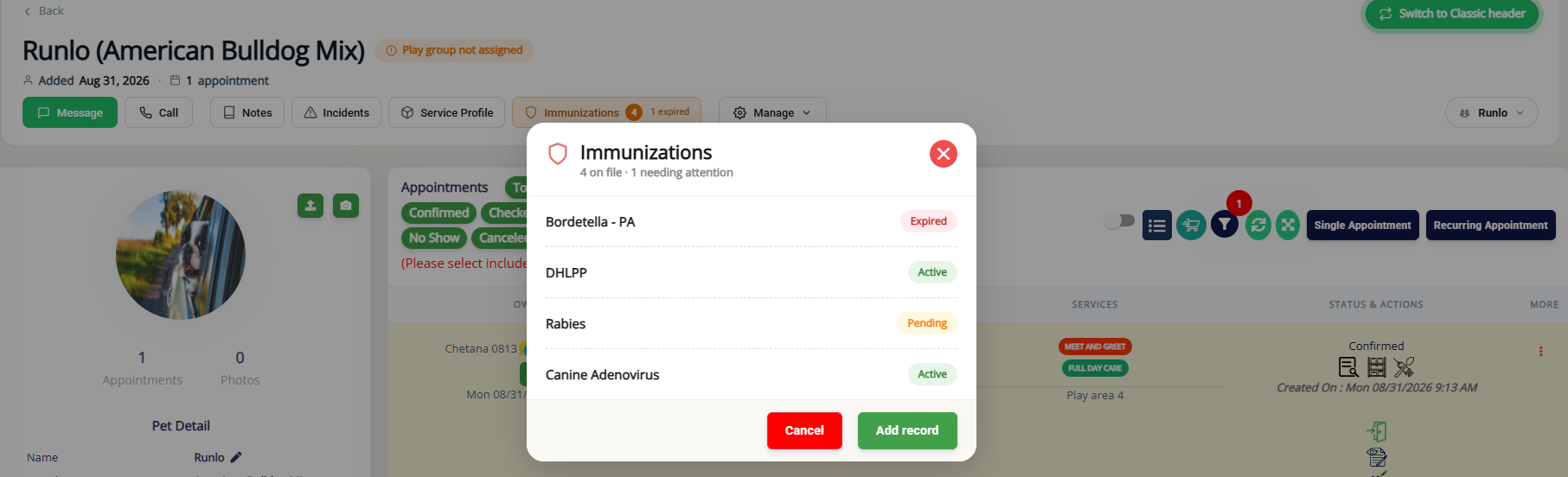
The new header bar on Pet Owner and Pet Profile pages now shows key status info at a glance — open invoices, immunization status, and incidents — so staff can spot what needs attention without digging through tabs.
- What's New :
- Open Invoice Icon (Pet Owner Profile): The new Open Invoice icon displays the current count of outstanding invoices and the total amount due at a glance. Click on the icon to view invoice details directly.
- Immunization Status Icon (Pet Profile): The Immunization Status icon now shows the overall immunization state, including any expired immunizations. Clicking it takes you straight to the detailed immunizations table.
- Incident Icon (Pet Profile): The Incident icon will now only appear if there’s actually an incident recorded for the pet. Click the icon to quickly view incident details.
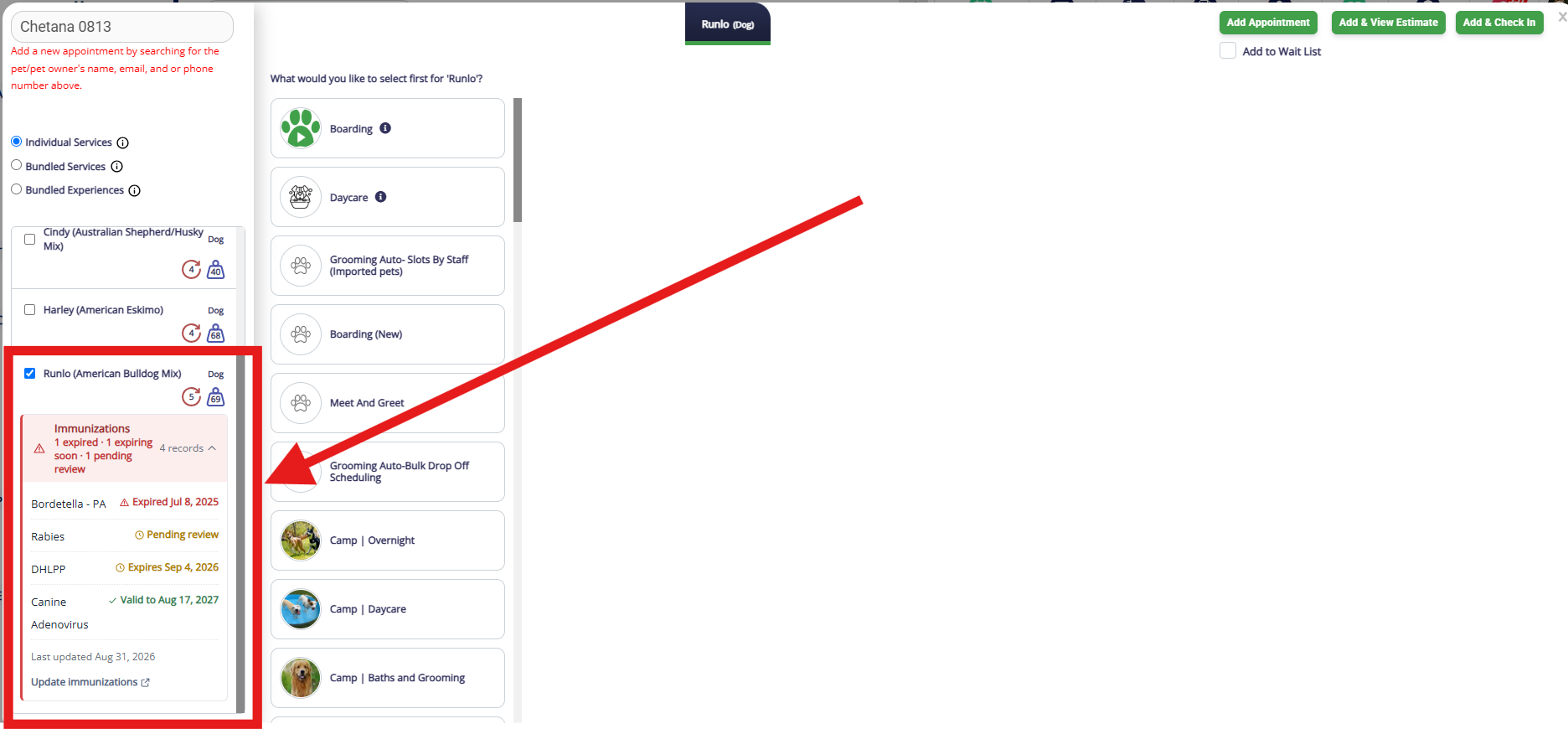
Immunization Status in Appointment Booking Screen
Immunization status is now visible directly in the appointment booking screen, so staff can catch missing, expired, expiring, or pending records before checking a pet in—no need to leave the booking screen.
- What's New: An Immunization Status card now appears for each selected pet during booking, summarizing record count and status with a color-coded header:
- Expired — expired records shown with expiry dates.
- Expiring soon — records nearing expiry; informational only, does not block booking.
- Pending review — records awaiting review.
- Not uploaded — vaccines with no record on file are each flagged "Not Uploaded."
- Up to date — all records valid, nothing to review.
- Mixed status — a pet can show any combination of the above in one summary line (e.g., 1 expired · 1 expiring soon · 1 pending review), with each vaccine listed individually and labeled by its own status.
- Each card includes an Update immunizations link for quick access to the full record, and a "last updated" timestamp where applicable.
V1.156.20260819.0108/19/202634 updates
Your RunLoyal portal has been updated with new features and enhancements!
Group Type-Based Clock-In — Time Clock & Timesheet
Staff members assigned to multiple staff groups can now select which group they are clocking in under, providing more accurate timesheet tracking by staff group.
- How It Works
- A new toggle — Allow Staff To Select A Staff Group During Clock-in — has been added under Settings → Staff Management → Edit Staff → Permission & Access → Allow Staff To Select A Staff Group During Clock-in (Default: OFF).
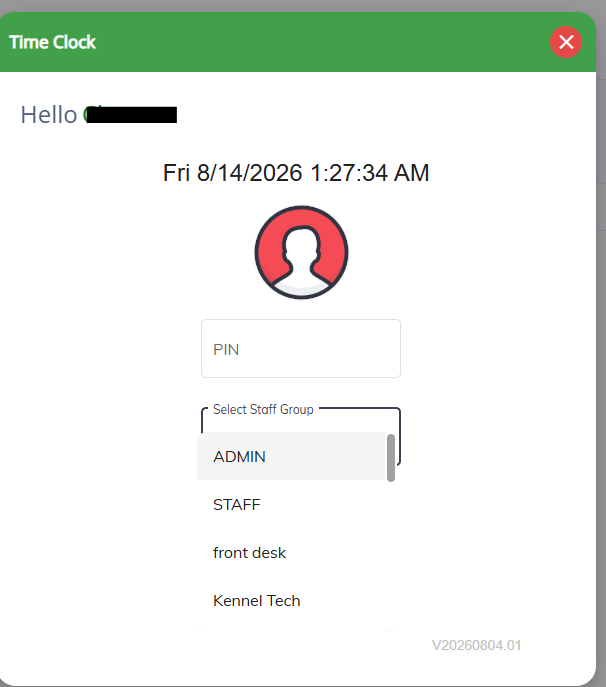
- When enabled: The Time Clock screen will display a Select Staff Group dropdown during clock-in, allowing the staff member to choose the group they are working under for that shift.
- When disabled: The staff member clocks in under their default assigned staff group automatically.
- Timesheet Updates
- The Timesheet now features a Staff Group column, clearly displaying the staff group associated with each clock-in entry.
- Each staff member’s timesheet also includes a detailed Worked Hours by Staff Group breakdown, showing the total hours and share percentage for every group they’ve clocked time in. This makes it easier to understand how work time is distributed across your different staff groups.
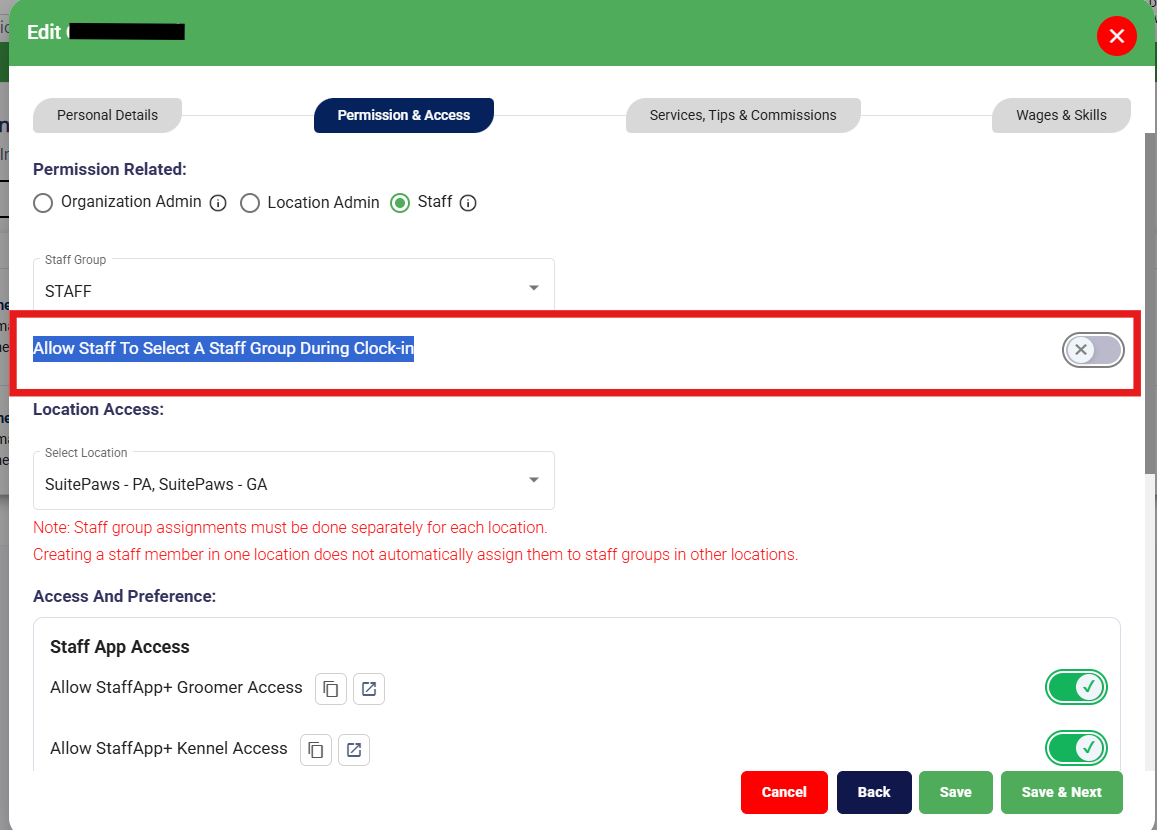
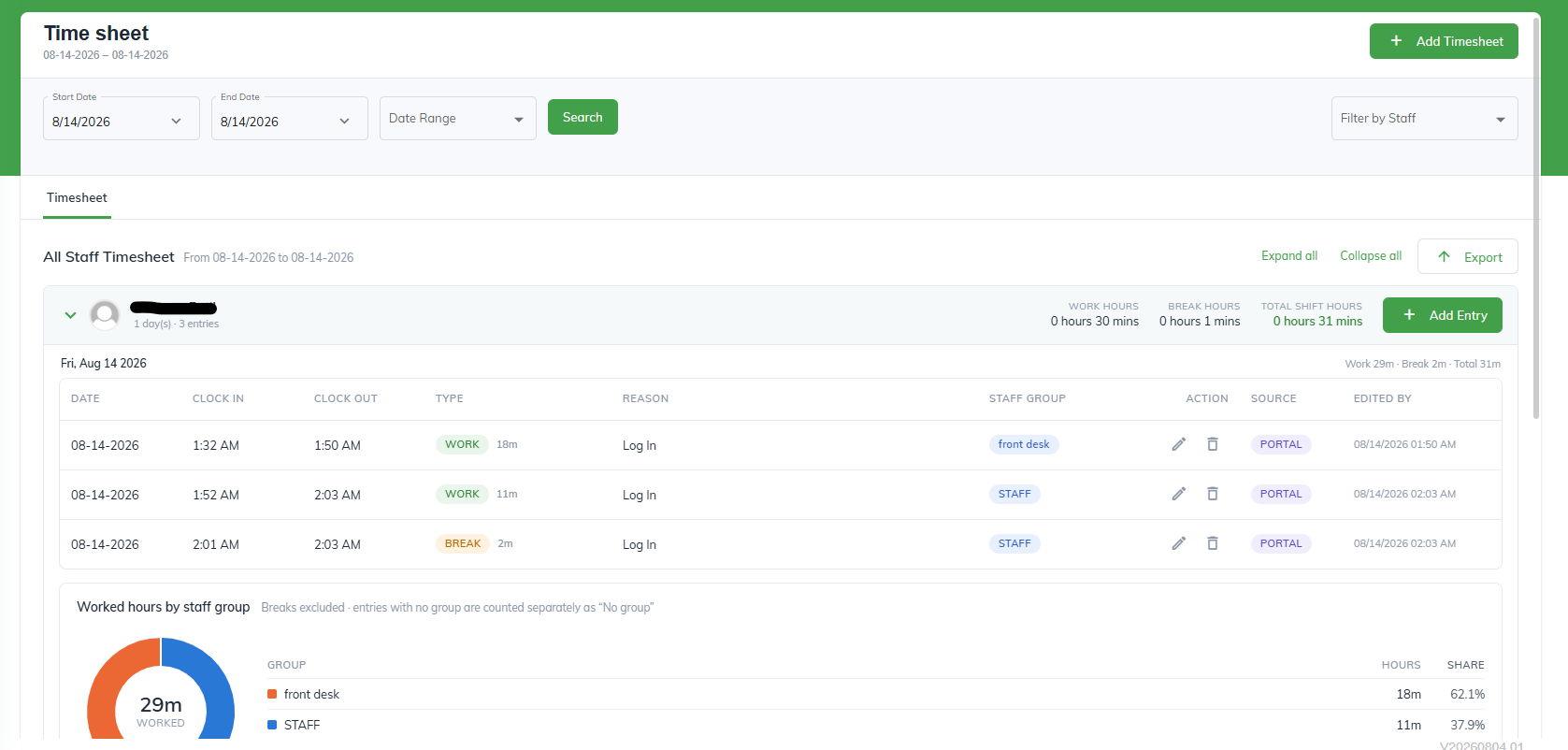
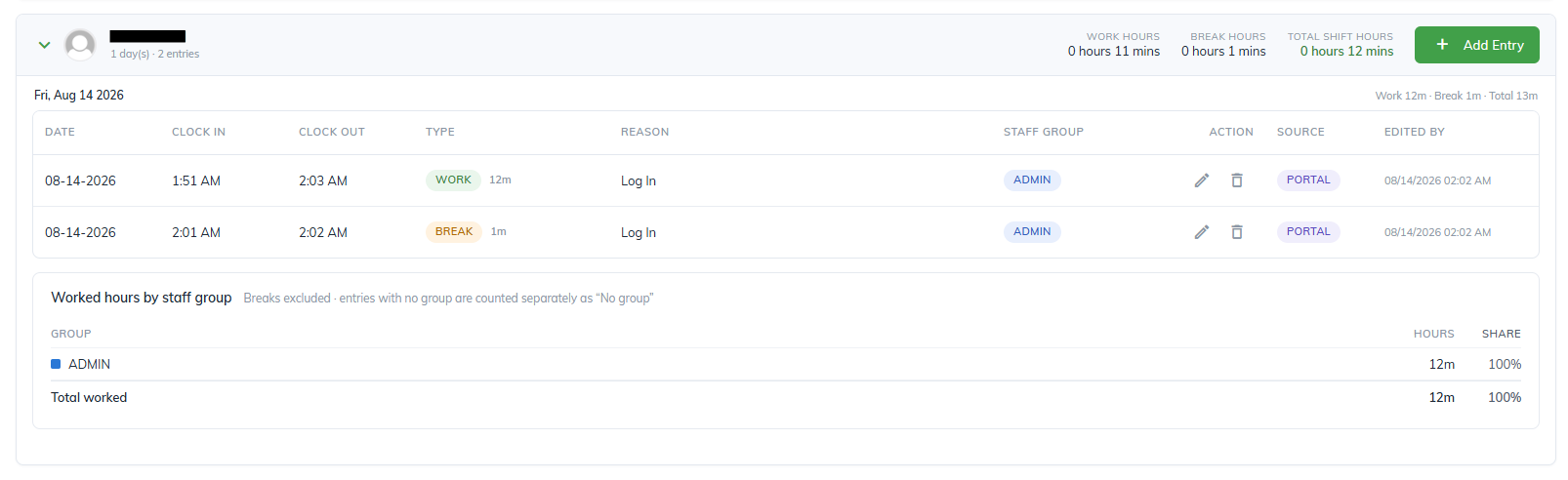
📝 Note: This setting is disabled by default and must be enabled per staff member. Staff group assignments must be done separately for each location — creating a staff member in one location does not automatically assign them to staff groups in other locations.
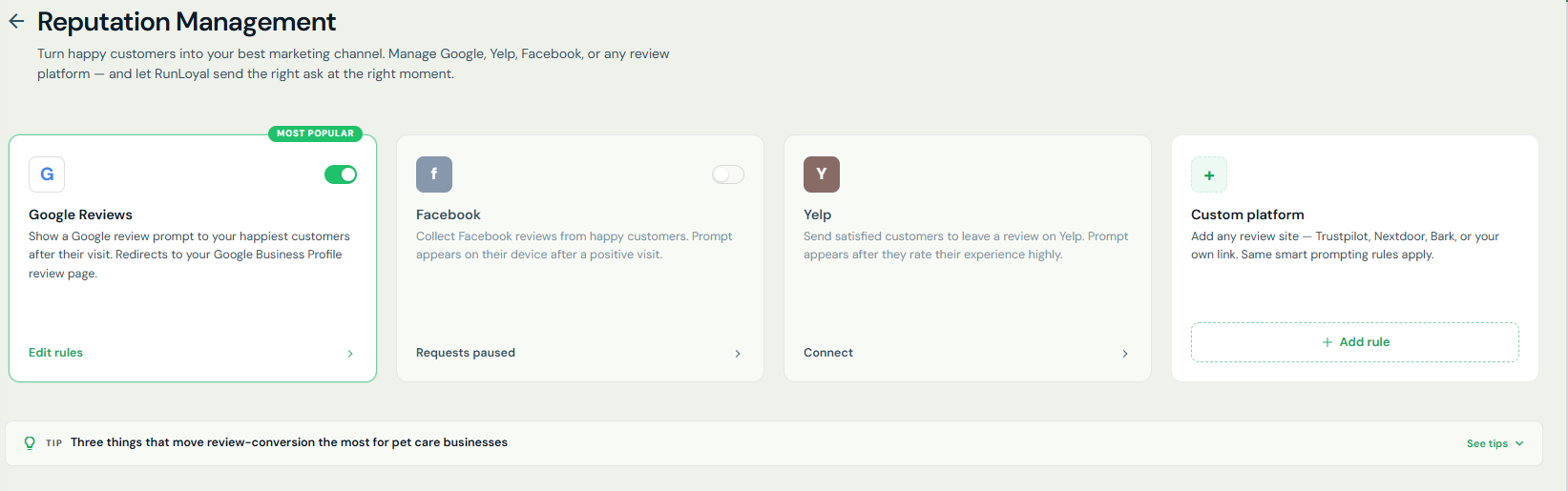
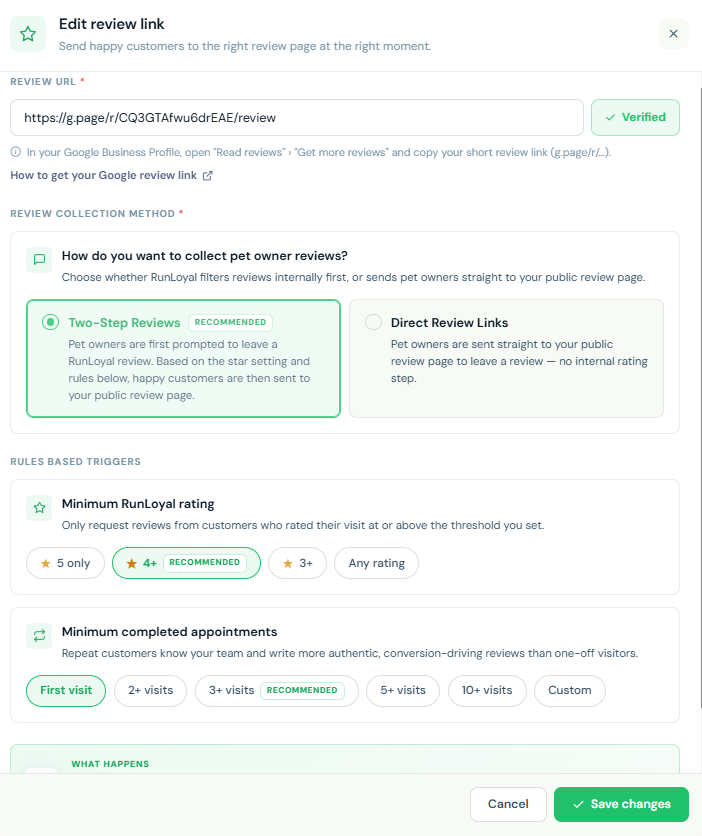
Reputation Management — Enhanced Review Collection Controls
Building on the Reputation Management feature introduced in the previous release, we've added more flexibility in how review requests are collected and routed.
- What's New:
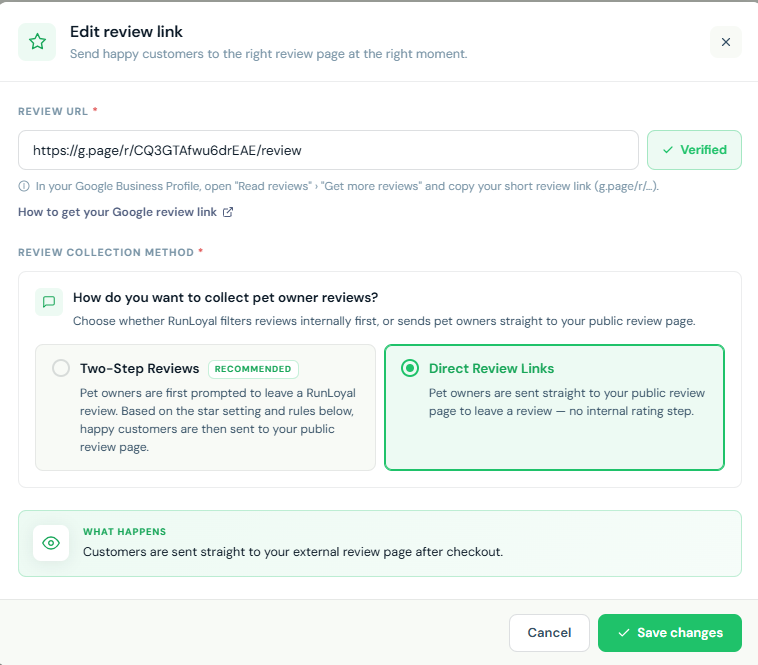
- Two Review Collection Methods
You can now choose how pet owners are directed to leave a review:- Two-Step Reviews (Recommended): Pet owners are first prompted to leave an internal RunLoyal rating. Based on the minimum star rating threshold you configure, happy customers are then automatically redirected to your public review page — quietly filtering out unhappy customers before they reach your public listing.
- Direct Review Links: Pet owners are sent straight to your public review page after checkout, with no internal rating step.
- Rules-Based Triggers (Available with Two-Step Reviews)
- Minimum RunLoyal Rating: Only request public reviews from customers who rate their visit at or above your set threshold (5 only, 4+, 3+, or any rating).
- Minimum Completed Appointments: Target customers based on visit history (first visit, 2+, 3+, 5+, 10+, or custom).
- Supported Platforms
- Google Reviews
- Yelp
- Custom Platform — Add any review site such as Trustpilot, Nextdoor, Bark, or your own link.
- Two Review Collection Methods
ScoutAI Vax Verify — Multi-Pet Document Support in Portal
Vax Verify has been enhanced to handle vaccination documents that contain records for multiple pets, reducing manual effort and improving accuracy during the verification process.
- What's New:
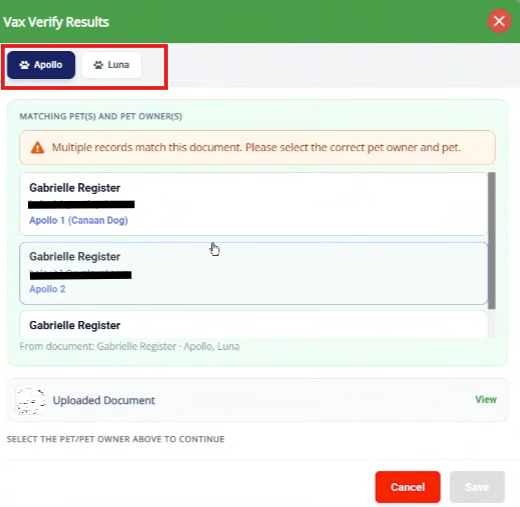
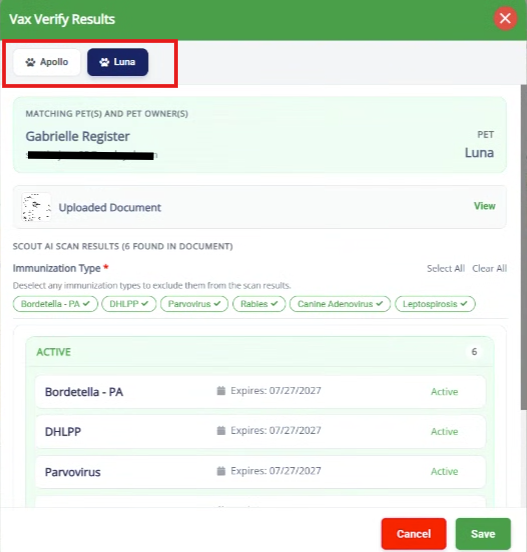
- Multi-Pet Document Support — Scout AI now detects and processes vaccination records for multiple pets within a single uploaded document.
- Pet Name Matching — Scout AI checks the pet name found in the document against the pet profile. If matched, the specific pet's vaccine details are displayed automatically.
- Pet Name Mismatch — If the pet name does not match, a Pet name mismatch alert is shown and staff are prompted to select the correct pet from the document before proceeding.
- Multi-Pet Tab View — When multiple pets are found in a document, vaccine details for each pet are displayed in separate tabs, allowing staff to review and save records for each pet individually.
📝 Note: This enhancement for Pet Owner App, Client Portal, StaffApp+ for Kennels, and StaffApp+ for Groomers will be available by the end of September 2026.
Route Optimizer — Now Available for Primary Services (Paid add-on) 
Building on the Route Optimizer introduced for transport-based Add-On Services in the previous release, the same functionality is now extended to Primary Services in the To-Do section, including support for custom start addresses and the ability to route based on service start time.
- What's New:
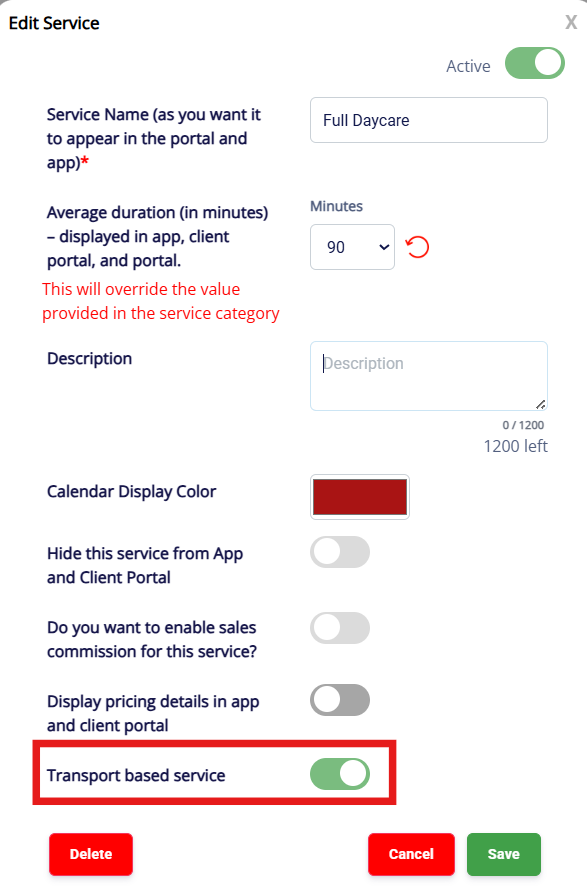
- The Transport Based Service toggle is now available for Primary Service configuration at
Settings → Business Setup → Service Configuration → Primary Services → Edit Service → Transport Based Service (Default: OFF). - Once enabled, the Route Optimizer icon appears in the To-Do section when filtering by the transport-based primary service.
- Clicking the icon opens the Route Optimizer — Primary Service map, displaying the optimized route across all pet owner addresses with the following route start and order options:
- Route Start
- Facility: Route starts from the facility address. This is fixed and cannot be changed.
- Custom address: Route can start from any location the staff enters, instead of being locked to the facility.
- Route Order
- Based on sorted distance from facility: Orders stops by proximity to the kennel.
- Based on service timing and distance: Orders stops based on scheduled service times and distance.
- Route Start
- The Transport Based Service toggle is now available for Primary Service configuration at
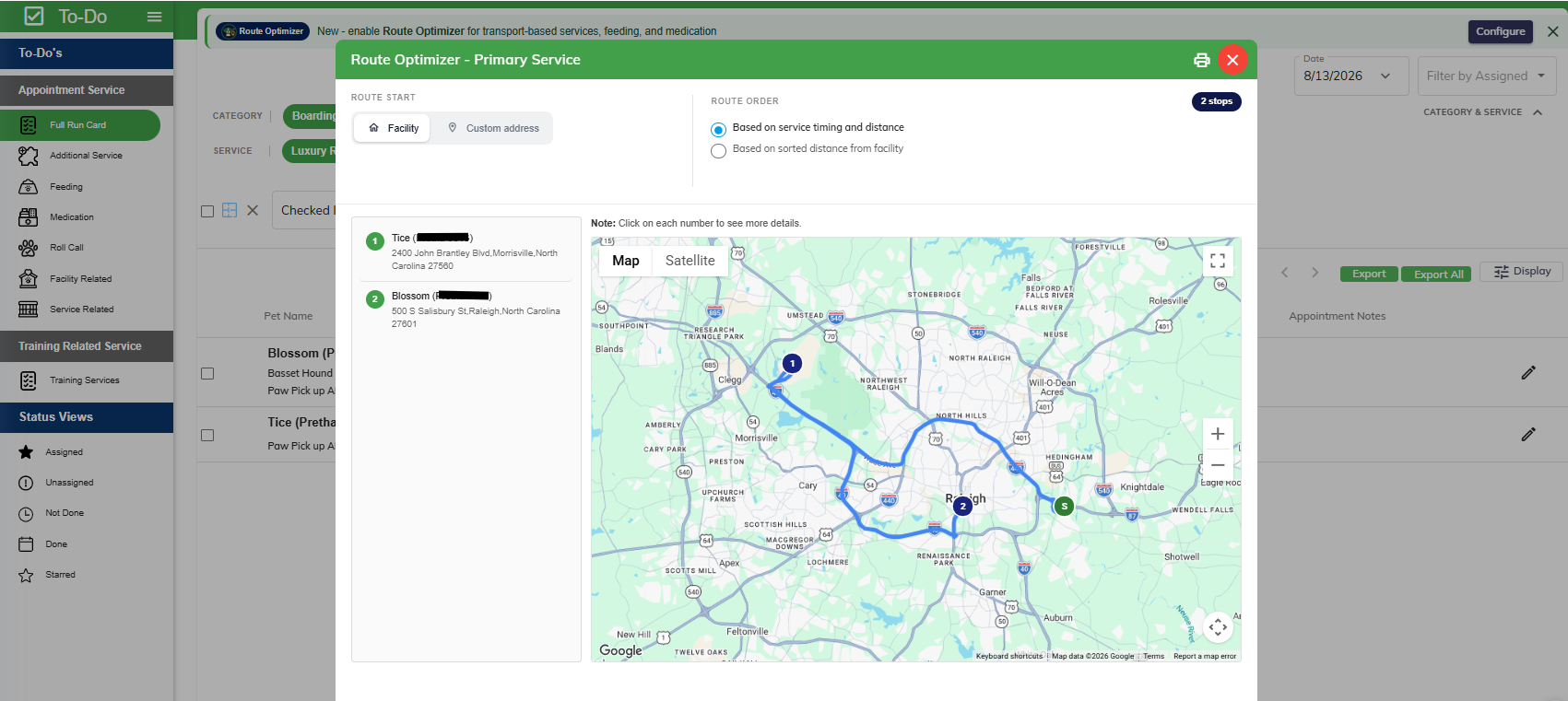
📝 Note: This enhancement is currently available in the Business Portal. Support for StaffApp+ for Kennels is expected by the end of August 2026.
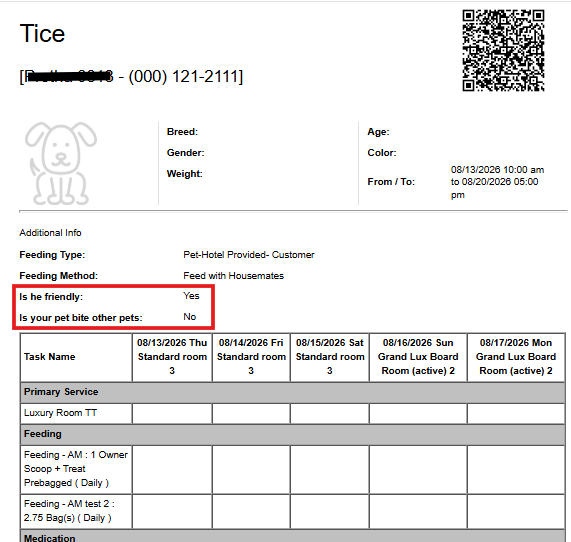
Custom Pet Profile Questions — Run Card Display
Kennel owners can now display custom pet profile question responses directly on the pet's Run Card under Additional Info, making important care details instantly accessible to staff during the pet's stay.
This feature can be enabled under Settings → Operations → Personalization → Portal → Display appointment question and answer in run cards (Default: OFF).
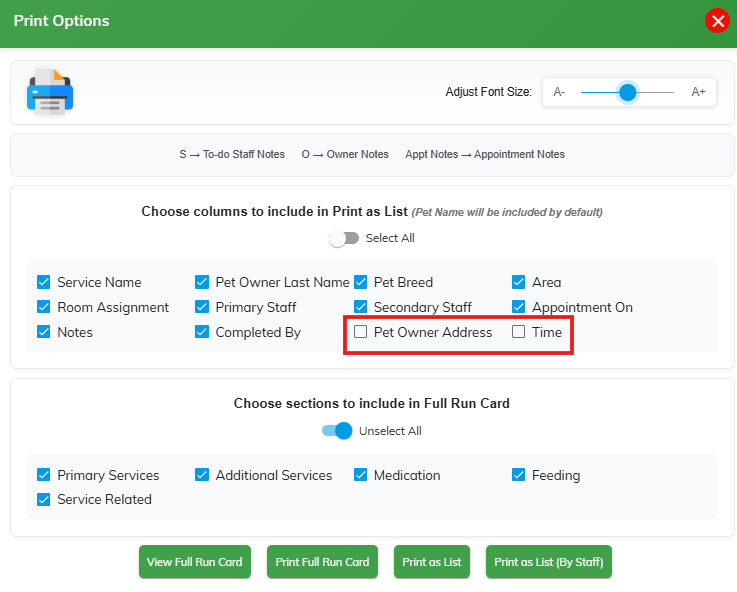
To-Do — Print as List: Address & Time Columns Added
Two new optional columns have been added to the Print as List option in the To-Do Full Run Card:
- Pet Owner Address — Displays the pet owner's address, useful for transport and delivery-related tasks.
- Time — Displays the appointment time with sorting support.
Both columns are unchecked by default and can be selected as needed before printing.
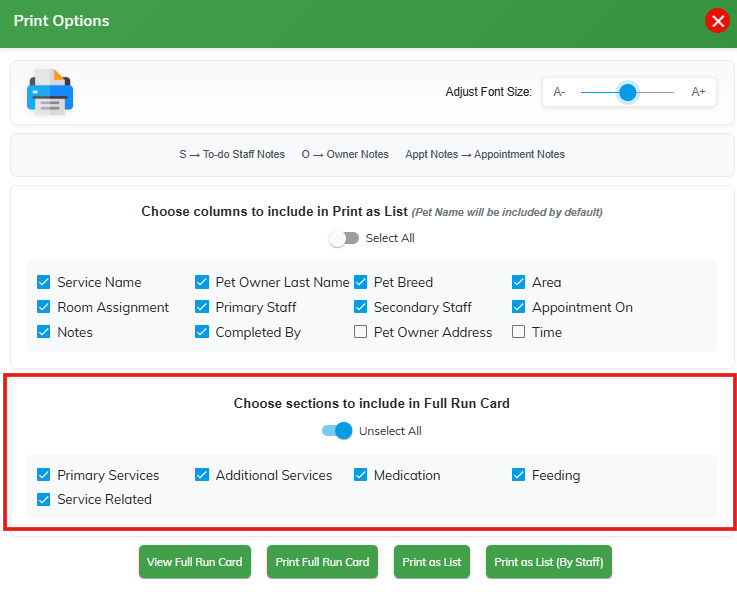
Configurable Run Card Print Options — To-Do
The Print Options in the To-Do section have been enhanced with greater flexibility, allowing staff to customize what is included when printing both the Full Run Card and the Print as List view.
What's New
- Choose Sections to Include in Full Run Card:
A new section selection panel allows staff to include or exclude specific sections when printing the Full Run Card:- Primary Services
- Additional Services
- Medication
- Feeding
- Service Related
- Unselect All Toggle:
A quick Unselect All toggle has been added to both the Print as List columns and Full Run Card sections for faster configuration before printing.
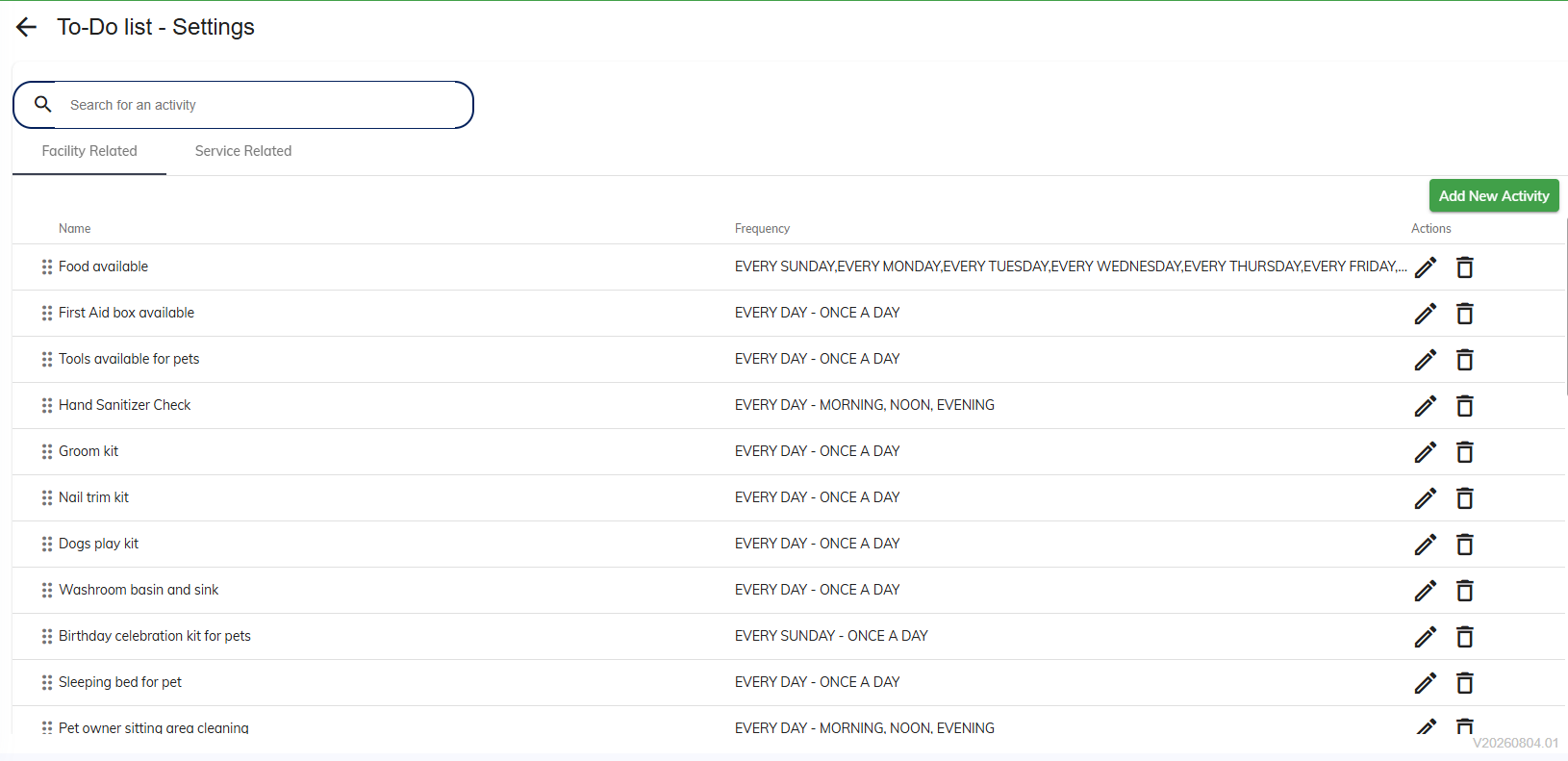
To-Do List Settings — Drag & Drop Sorting for Activities
Facility Related and Service Related activities in the To-Do List Settings can now be reordered using drag and drop, giving you full control over the display order of activities in the To-Do section.
Navigate to Settings → Operations → To-Do List Settings to reorder activities under both the Facility Related and Service Related tabs.
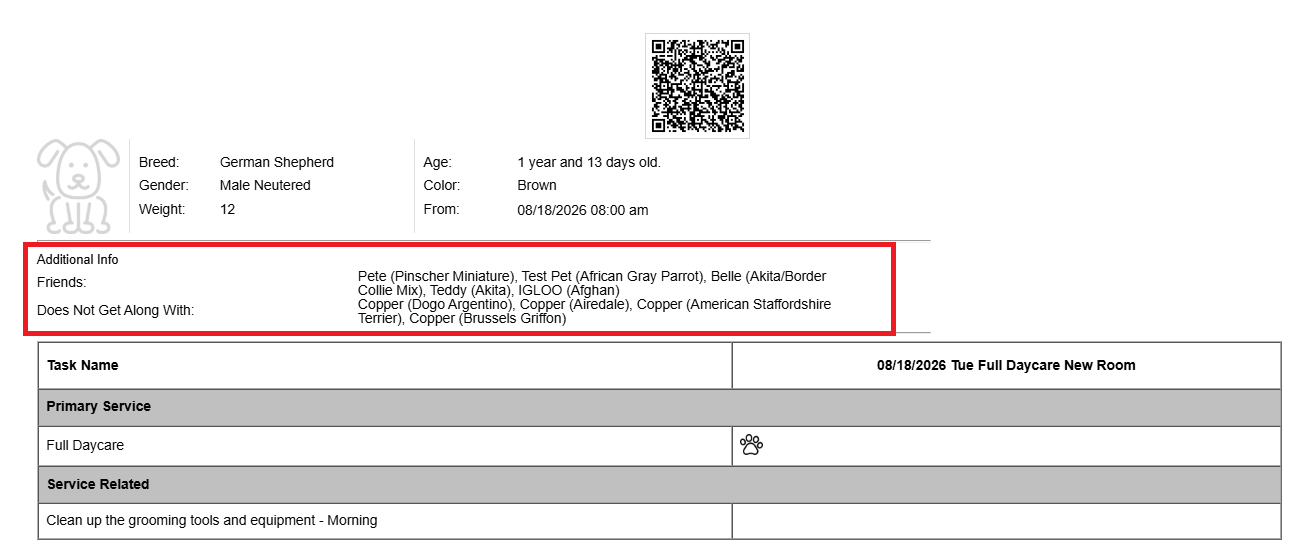
Pet Friends & Does Not Get Along With — Run Card Display — To-Do
The Full Run Card (To-Do Print View and View Run Card) now displays pet social compatibility information under Additional Info, giving staff quick access to important care details during the pet's stay.
- Friends: Lists the names and breeds of pets the current pet gets along with.
- Does Not Get Along With: Lists the names and breeds of incompatible pets.
This feature can be enabled under Settings → Operations → Personalization → Portal → Show pet friends and pets they do not get along with on run cards.
Default: OFF
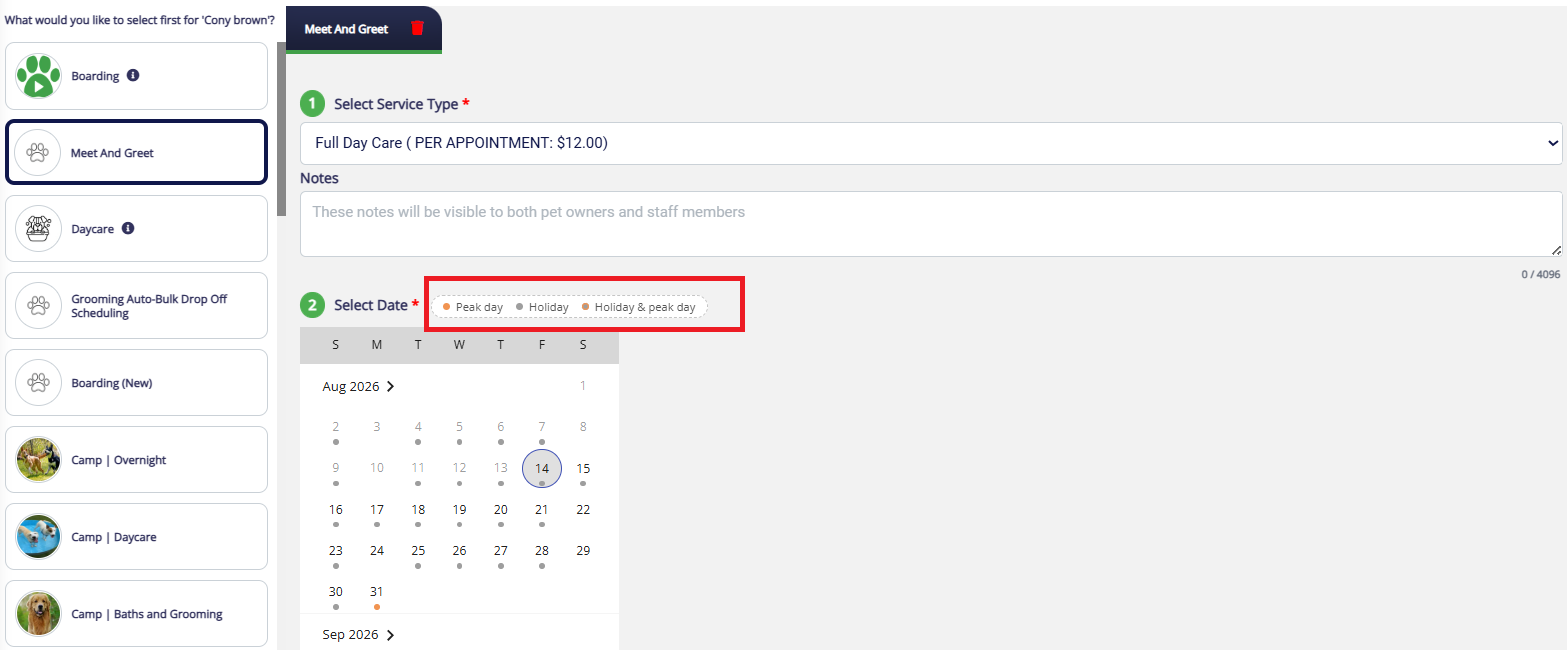
Add/Edit Appointment – Peak Day & Holiday Indicators
When adding or editing an appointment in the Portal, the date picker in the "Select Date" step now visually marks Peak Days and Holidays — matching the mobile app experience.
- What's new:
- Dates are color-coded with a small indicator dot to flag special days:
- Peak Day – shown in orange
- Holiday – shown in grey
- Holiday & Peak Day – shown in a combined/distinct color
- A legend at the top of the calendar ("Peak day", "Holiday", "Holiday & peak day") brings the Portal's scheduling experience in line with the app, helping staff quickly spot pricing or availability implications before confirming a booking.
- Dates are color-coded with a small indicator dot to flag special days:
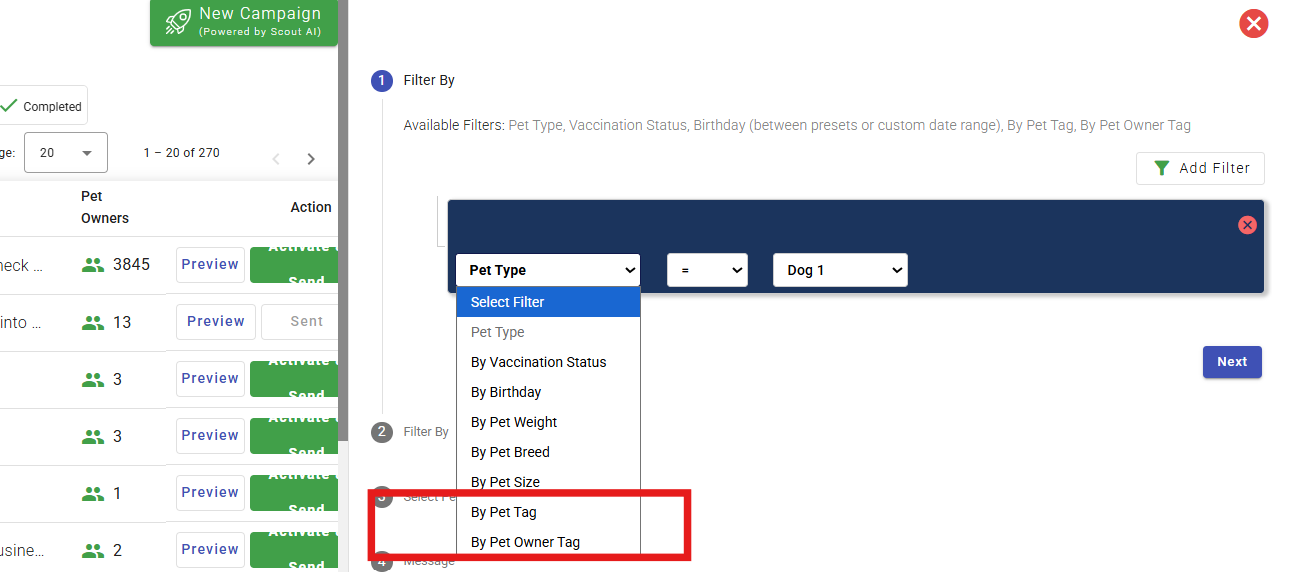
Push Marketing — Copy option and New Filter Options: Pet Tag & Pet Owner Tag
Now you can copy a previously sent campaign to easily create a new campaign along with the previously selected filters. Manual add/remove of pet owners on the existing campaign will not be saved.
Two new filters have been added to the Push Marketing campaign builder, allowing you to target pet owners more precisely:
- By Pet Tag — Filter pet owners based on tags assigned to their pets.
- By Pet Owner Tag — Filter based on tags assigned directly to the pet owner.
- To use Pet Tag or Pet Owner Tag, you must first select Pet Type as a filter, then click Add Filter again — both options will only become enabled after Pet Type has been selected.
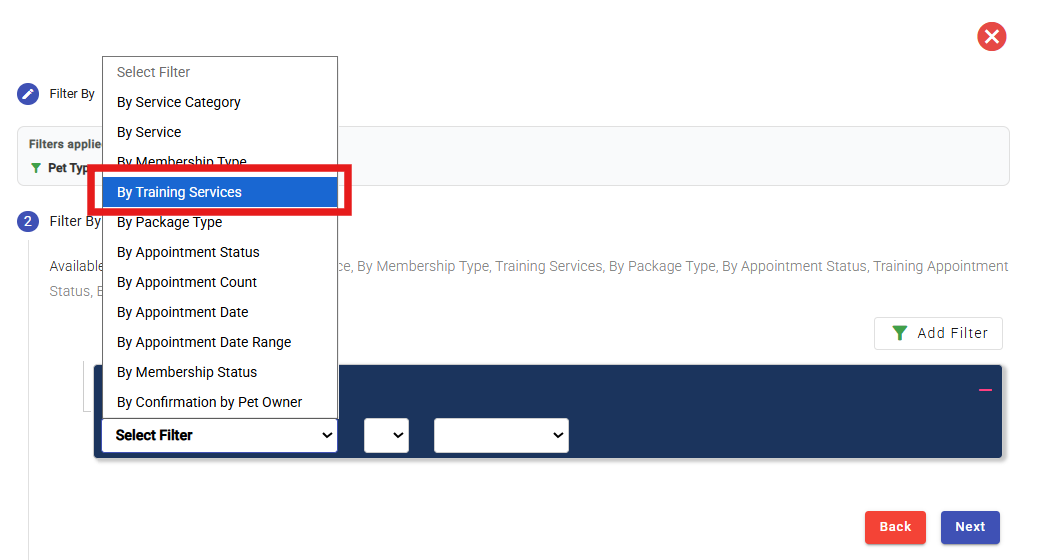
Push Marketing — New Filter: By Training Services
A new By Training Services filter has been added to the Push Marketing campaign builder, allowing you to target pet owners based on the training services their pets are enrolled in or have previously attended.
This filter is available in the second Filter By step alongside the existing filters — By Service Category, By Service, By Membership Type, By Package Type, By Appointment Status, By Appointment Count, By Appointment Date, By Appointment Date Range, By Membership Status, and By Confirmation by Pet Owner.
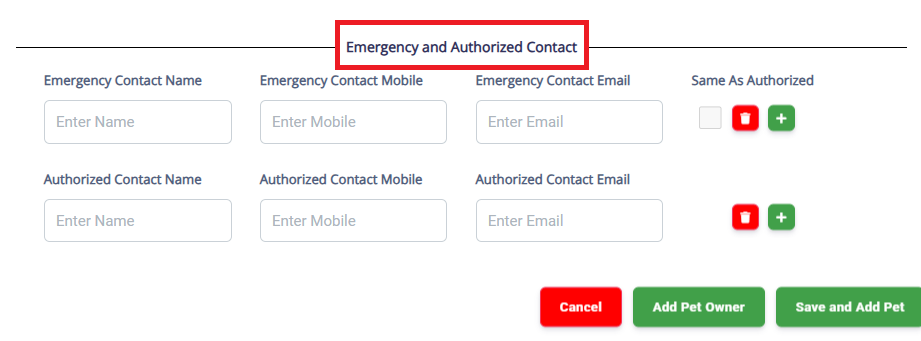
Mandatory Required Fields for Pet Owner & Pet Creation — Portal
You and your staff can now enforce required fields when creating a Pet Owner or Pet record in the Business Portal, ensuring complete and accurate records from the start and reducing missing-data issues later.
What's New
- Pet Owner Creation — Required Fields:
The following fields can now be set as required:- Authorized Contact
- Emergency Contact
- How did you hear about us?
- Pet Owner Email Address
- Pet Owner Mobile Number
- Pet Creation — Prompt & Display Field Options:
The following fields can now be configured with prompt and display options:- If Missing, Prompt For (While Creating Pet):
- Breed
- Collar Size
- Color and Markings
- Date of Birth
- Pet Weight
- Sex
- Size
- Veterinarian Name
- Veterinarian Phone
- Hide/Show (Display in Pet Detail Page):
- Allergies
- Daily Routine
- Medical History
- Pet Behavior
- Pet Training
- If Missing, Prompt For (While Creating Pet):
How to Configure
- Navigate to Settings → Operations → Personalization → Portal → Category: Pet or Category: Pet Owner to enable and configure required fields.
📝 Note: All fields are set to OFF by default and must be enabled per your business needs.
This enhancement will be available in the Client Portal by the end of August. For StaffApp+ Kennels and StaffApp+ Groomers by end of September 2026.
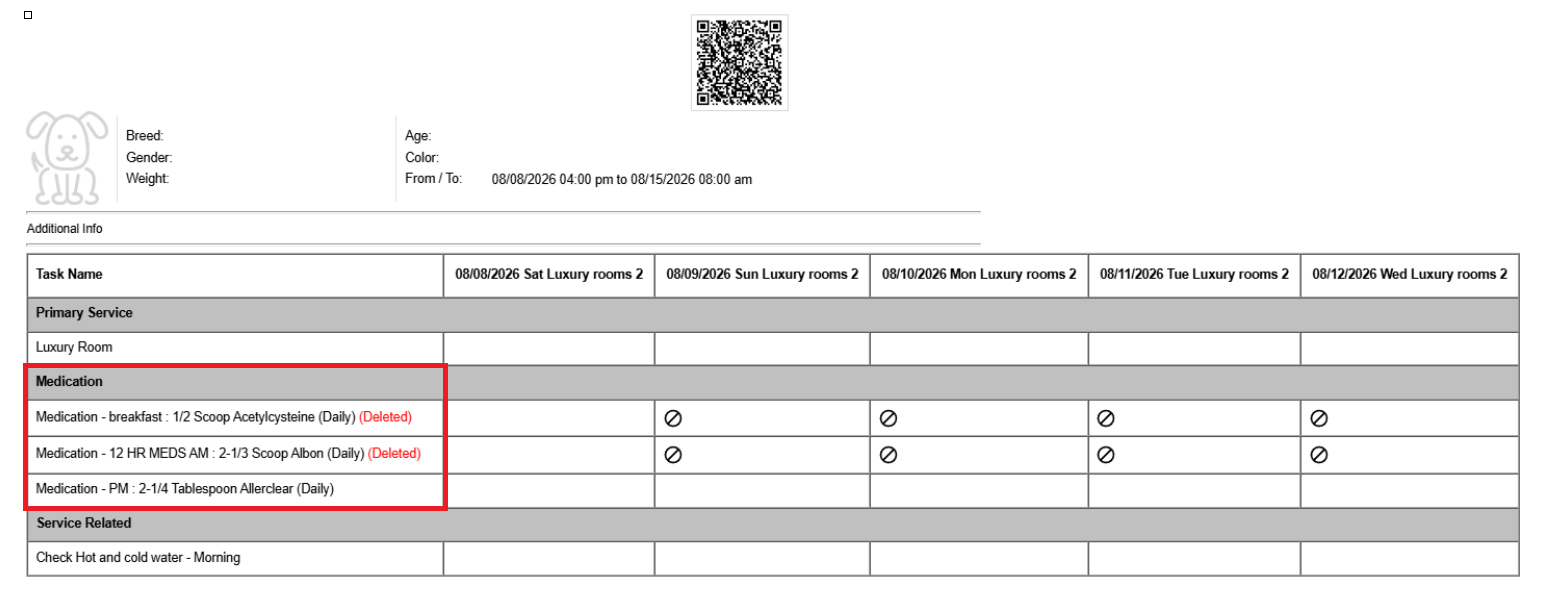
Show Deleted Medication on Run Card
Deleted medications can now be shown or hidden on the Run Card using a new personalization setting, consistent with existing behavior for deleted feedings.
- When enabled, deleted medications will appear on the Run Card marked as (Deleted) in red, including a blocked icon on the corresponding day(s).
- When disabled, deleted medications will be hidden from the Run Card.
Navigate to Settings → Operations → Personalization → Portal → Show deleted medication on run card to enable this setting. (Default: OFF)
Pet Owner Personalization — "During Sign Up" Option for Client Portal
You can now control whether key Pet Owner fields are prompted during Client Portal sign-up, giving you finer control over data collection during registration.
What's New
- A new During Sign Up (Client Portal) column has been added to the Personalization Settings for Pet Owner (App & Client Portal), in addition to the existing After Sign Up and While Purchasing Package options.
This setting is available for the following fields:- Authorized Contact
- Emergency Contact
- How did you hear about us?
- Pet Owner Address
- Pet Owner Email Address
- Pet Owner Mobile Number
Navigate to Settings → Operations → Personalization → Pet Owner (App & Client Portal) → Category: Pet Owner to configure this setting. (Default: OFF)
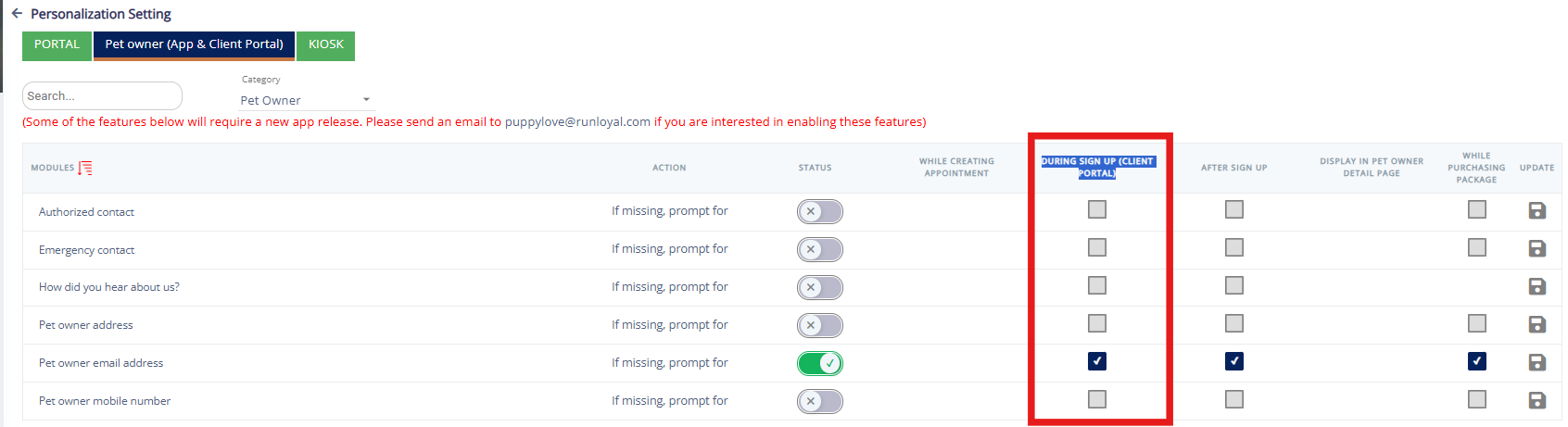
📝 Note: The During Sign Up (Client Portal) option requires a Client Portal release, expected before the end of August 2026. Contact puppylove@runloyal.com if you are interested in enabling this feature.
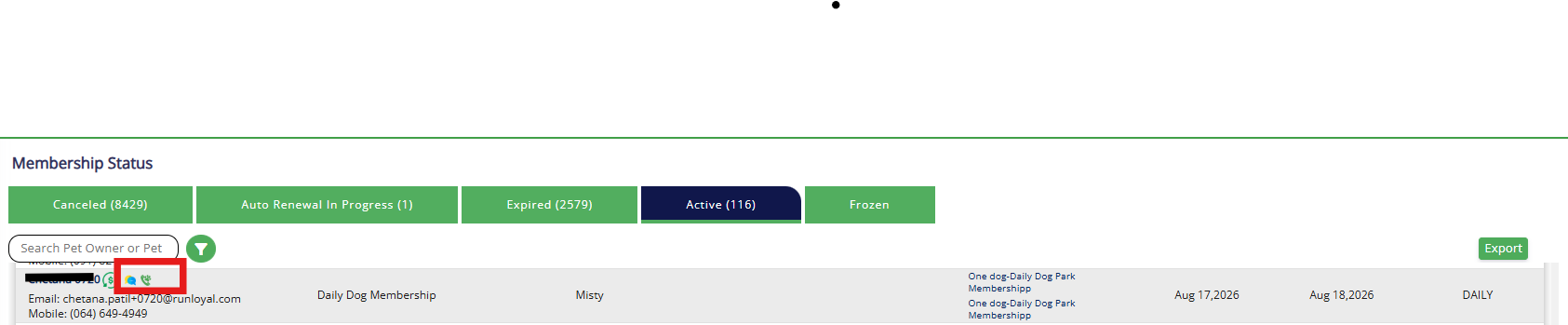
Easy access to message and call Pet Owners – MiniHub & LoyalVoice — Membership Status & Members In House
The Mini Hub and LoyalVoice icons are now available next to each pet owner's name across all tabs in the Membership Status and Members In House screens — giving staff consistent and reliable access to communication tools regardless of the pet owner's membership status.
This is available across all membership status tabs: Canceled, Auto Renewal In Progress, Expired, Active, and Frozen.

Show Confirmed Boarding Departures in Daily Snapshot
Pets with a confirmed future boarding appointment now appear under Departing in the Daily Snapshot on their scheduled checkout date — even before check-in. This provides staff with a complete and accurate view of all pets departing on a given day.
Navigate to Settings → Operations → Personalization → Portal → Show confirmed appointments under departing on checkout date in daily snapshot to enable this option. (Default: OFF)
Show/Hide Deceased Pets in Search
:
A new personalization setting allows you to control whether deceased pets appear in search results across the Business Portal.
- Toggle ON (Default) — Deceased pets appear in search results when searching by Pet Name or Pet Owner Name, clearly labeled (DECEASED) next to the pet's name.
- Toggle OFF — Deceased pets are excluded from search results entirely.
Navigate to Settings → Operations → Personalization → Portal → Show deceased pets in search to configure this setting. (Default: ON)
Customize Client Portal Welcome Text
You can now tailor the welcome message displayed on the Client Portal flash screen, replacing the previous default text with a message that matches your facility and brand.
What's New:
- A new Customize Flash Screen tab is available under Settings → Operations → Pet Owner Experience Personalization → Client Portal, alongside the Customize Display Order tab.
- The Flash Screen message field lets you edit the welcome text shown to pet owners on their first login, with a live Preview panel on the right to show exactly how the message will appear.
- A Modify with Scout AI option is available to help refine or completely rewrite your message using AI assistance.
- Changes made here are saved directly and will be reflected in the Client Portal.
Staff App+ License Usage and Enforcement
We're giving you a clearer view of your Staff App+ (Groomer and Kennel) license usage, and license limits will now be enforced at the point of activation.
What's new:
- Subscription Management is now the single place to see your Staff App+ license position — all included licenses, purchased add-ons, total licensed, total in use, and what's available, plus a plain-language summary like "You're using 25 of your 28 licenses. 3 available."
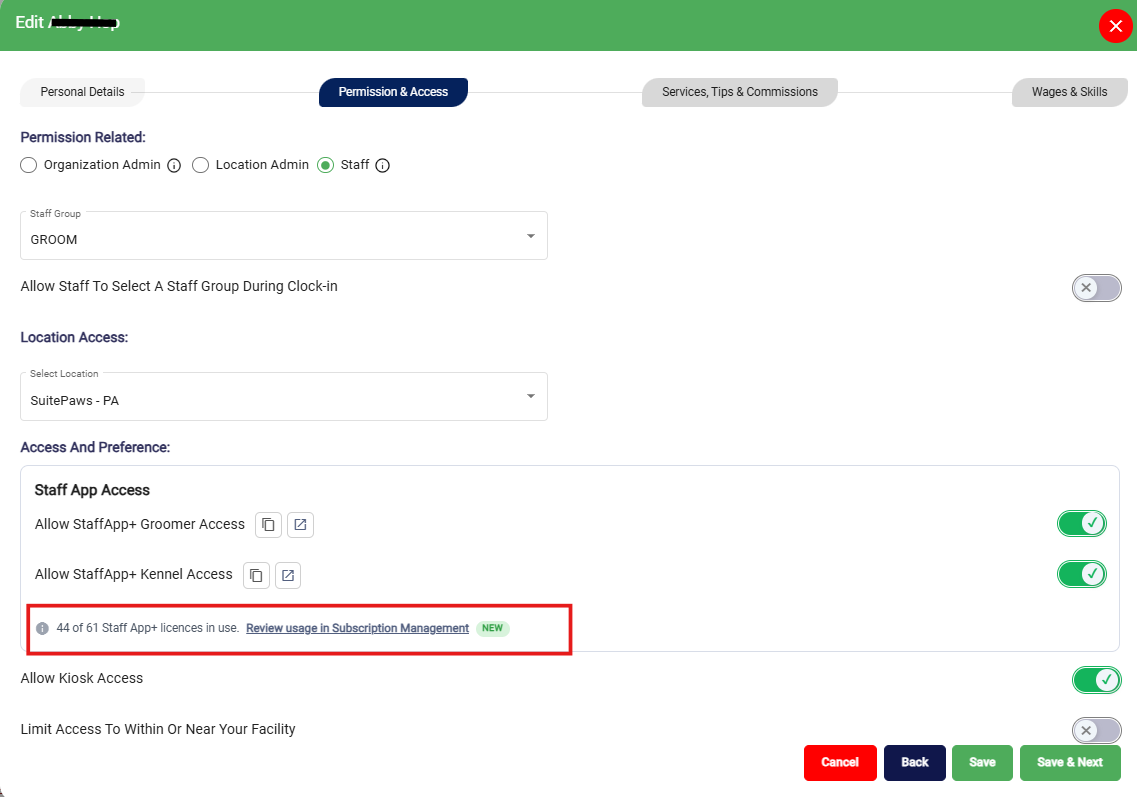
- Add Staff / Edit Staff / Manage Access screens now show a single line notice instead of the old usage panel: "8 of 10 Staff App+ licenses in use. Review usage in Subscription Management."
- License limits are now enforced. If you try to turn on Staff App+ access with no licenses available, the toggle won’t activate. You'll see: "License limit reached — you’re using all [X] of your Staff App+ licenses. Turn off access for another team member, or contact puppylove@runloyal.com to add licenses."
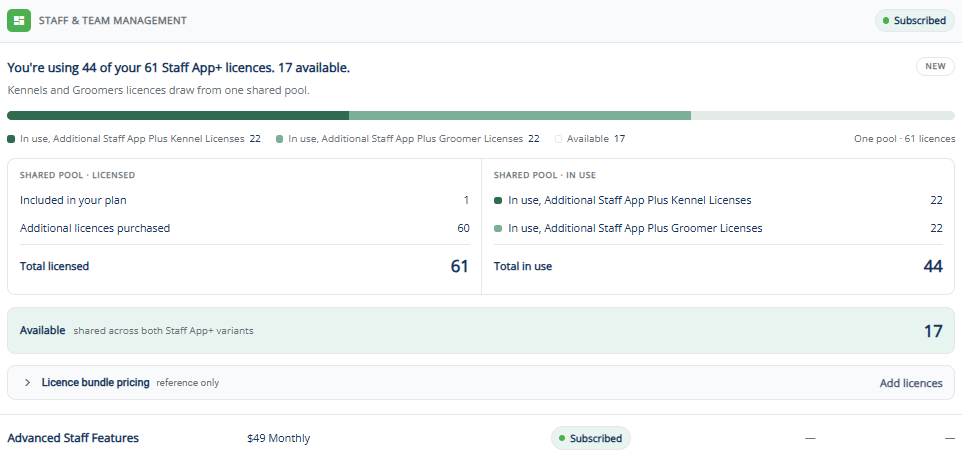
📝 Action needed: If you're over allocation, review usage in Subscription Management and free up licenses or contact puppylove.
Paw Metrics Enhancements
- Monthly Sales Report
- Income Total now separately shows payment/adjustment types such as Gift Cards, Store Credit Applied, Rewards Applied, Refunds, and Store Credit Issued.
- Credits, Deposits & Refund Summary includes:
- Rewards Applied — Pending (Open Estimate)
- Deposit breakdown by Card Present, Card Not Present, Cash, and other payment types.
- Revenue Category includes Rewards Redemption under the Credit Adjustment category.
- Daily Transaction Report
- Deposits — Deposits collected during the selected date range.
- Previous Payments — Non-deposit payments collected before the invoice was closed within the selected date range.
- Rewards Applied — Reward points redeemed toward an invoice.
- Store Credit Applied — Store credit used toward an invoice.
- Invoice Register
- Rewards Applied — Reward points redeemed toward an invoice.
- Store Credit Applied — Store credit used toward an invoice.
New Reports
- Coupon and Manual Adjustments by Service Category — Shows coupon and manual adjustment totals grouped by service category based on the payment date.
- All Pets Immunizations — Expired & Due Soon — Displays one vaccination per line for all active pets, including expired and due-soon vaccinations within the selected expiration date range, regardless of appointments.
Pawmetrics 2.0 — Unified Appointment Report
We’re excited to introduce the Unified Appointment Report — the first report launched under Pawmetrics 2.0, our next-generation analytics platform.
What’s New
The Unified Appointment Report brings together all your appointment data into a single, powerful view. Instead of running multiple separate reports, you can now access everything from one place and filter to get exactly what you need.
What This Single Report Covers
The following 16 individual reports are now available through one unified view:
- Checked In
- Checked Out
- Confirmed
- Going Home
- Arrivals
- Confirmed Appointments with Immunization Status
- Checked-In Appointments with Immunization Status
- Pets with Appointments
- Daily Appointment Details
- Membership Checked-Ins
- No-Show & Cancelled Appointments
- Rejected Appointments
- Appointments by Source
- Deleted and Archived Appointments
- Confirmed and In-House Appointments
- Recurring Appointments
What’s Better
- One report, multiple views — Filter by status, date, staff, service type, or location to get any of the 16 views above. No more switching between reports.
- Near real-time data — Updated every hour automatically. No waiting for overnight batch updates.
- Multi-location support — Single and multi-location views are built in. Filter by location or view all locations at once.
- Faster performance — Powered by our new Snowflake-based data platform, reports load significantly faster than before.
How to Access
The Unified Appointment Report is available in your Pawmetrics dashboard under the Appointments section.
What’s Not Changing
- Your data is the same — no changes to how appointments, services, or payments are recorded.
- All filters you’re used to (date range, staff, service type) are available in the new view.
- This integration enables you to send the following information from your RunLoyal system to QuickBooks in real-time:
- Customer Details: Customer Name, Email, Phone Number, and Billing Address
- Invoice Details: Invoice Number, Invoice Date, Due Date, Subtotal, Tax Amount, Total Amount, Amount Paid, and Balance Due
- Line Items: Name, Description, Quantity, Unit Price, and Amount
- Payment Details: Payment Date, Amount, and Payment Method
- RunLoyal Invoice ID
Booking & Appointments
- Room maximum capacity and pet weight validation now enforced during appointment booking.
- Enhanced capacity-based and staff-based booking with minimum and maximum date/time validation.
- Improved appointment slot-time validation and pickup-time handling for capacity-based appointments.
- First-time and returning pet identification improved through appointment history validation.
- Added first pet appointment display within the booking flow.
- Enhanced guest pet selection and first-appointment handling.
Room & Service Management
- Enhanced room allocation and multi-location handling.
- Improved service selection and display based on staff assignment.
Single Location & Multi-Location
- Improved default location selection and location handling.
- Enhanced second-location card addition and multi-location workflows.
- The Browser tab now displays the appropriate tenant/location name.
- Added location-based login with OTP verification.
Membership & Estimates
- Improved membership price list visibility and membership configuration handling.
- Enhanced estimate functionality and the request-cancellation flow.
Authentication & Onboarding
- Introduced an invite-code flow with URL support.
- Enhanced shareable invite-code and password setup flow.
- Enhanced OTP validation and login workflows.
- Added/improved the auto-approval flow.
General UX
- Improved dropdown time selection and consistency across booking flows.
- Enhanced the overall appointment, pet, location, and booking experience.
We've delivered on our planned enhancements and more. This major update brings significant improvements across appointments, staff workflows, memberships, and everyday operations.
New Features & Enhancements — Now Available
- Appointments
- Membership & Package Purchase — Sell and assign memberships and packages directly from the app.
- Edit Appointment — Edit existing appointments directly from the app.
- Book Again — Quickly rebook a previous appointment with a single tap.
- Recurring Appointments — Create and manage recurring appointment schedules from the app.
- Delete Appointment — Delete appointments directly from the app.
- QR Code Check-In — Check in appointments quickly using QR code scanning.
- Staff & Scheduling
- Advanced Staff Calendar — Improved for a smoother and more efficient scheduling experience.
- Staff Group-Based Clock In/Out — Staff can now clock in and out by staff group, providing better visibility into time tracked across different groups.
- Media & Gallery
- Multi-Image Upload — Upload multiple images to Report Cards and Gallery in a single action.
- Pet Tagging in Gallery — Tag pets in Gallery uploads and send images directly to pet owners.
- Media Upload in Appointment Belongings, Service Profile & Incident — Attach media directly within Appointment Belongings, Service Profiles, and Incident reports.
- Vaccination
- Vax Verify — PDF Support — Vax Verify now supports PDF documents with an improved portal-style experience.
Upcoming Features & Enhancements
- Appointments & Scheduling
- To-Do (Route Optimization) on Primary Services — Route Optimizer to be extended to transport-based Primary Services in the To-Do section.
- Peak Day & Holiday Indicators — Visual indicators in the Add/Edit Appointment calendar flagging peak days and holidays to support scheduling.
Run Card & Personalization
- Friends & Does Not Get Along With (Full Run Card) — Pet compatibility info to be shown on the full run card in To-Do, with personalization support.
- Deleted Medication on Run Card — Deleted medication entries to be shown on the run card, controlled via personalization settings.
- Show/Hide Deceased Pets in Search — Toggle to control whether deceased pets appear in search results, via personalization settings.
Upcoming Features & Enhancements
- Staff Group-Based Clock In/Out — Staff will be able to clock in and out based on their assigned staff groups for better timesheet visibility.
- Package Purchase — Manage and purchase packages directly from the Staff App+ for Groomers app.
- Enhanced Appointment Management — Edit appointments, Book Again, create recurring appointments, and delete appointments with ease.
- QR Code Check-In — Quickly check in appointments by scanning a QR code.
- Vax Verify Enhancements — Support for PDF documents with an improved portal-style experience.
- Multiple Media Uploads — Upload multiple images to Report Cards and Gallery in a single action.
- Gallery Pet Tagging — Tag pets in Gallery uploads and send images directly to pet owners.
- Media Attachments — Attach media to Appointment Belongings, Service Profiles, and Incidents.
📝 Note: These features are expected to be available by mid-July 2026.
Upcoming Features & Enhancements
- Centralized Staff Clock In/Out — KIOSK will serve as a centralized location for staff to clock in and clock out based on their assigned staff group — making it easier to manage staff attendance from a single point in the facility.
📝 Note: This feature is planned for the end of August 2026.
V1.155.20260714.0107/14/202611 updates
Your RunLoyal portal has been updated with new features and enhancements!
External Reviews 2.0 — Reputation Management (Opt-in Beta)
We've rebuilt External Reviews from the ground up into Reputation Management — a faster, smarter way to grow the public reviews that win bookings. Connect your review platforms in a few clicks, let RunLoyal send the right ask automatically off real checkout activity, and give pet owners a redesigned, conversion-optimised review flow.
If you'd like access to this beta, please contact us at puppylove@runloyal.com.
- Automated, rule-based review requests : Stop chasing reviews by hand. Set your rules once and RunLoyal asks the right customer at the right moment — automatically, based on real checkout activity.
- Trigger requests by visit history (e.g. after 2+ or 3+ completed visits).
- Trigger requests by star rating (e.g. a minimum in-app rating of 4★ and above).
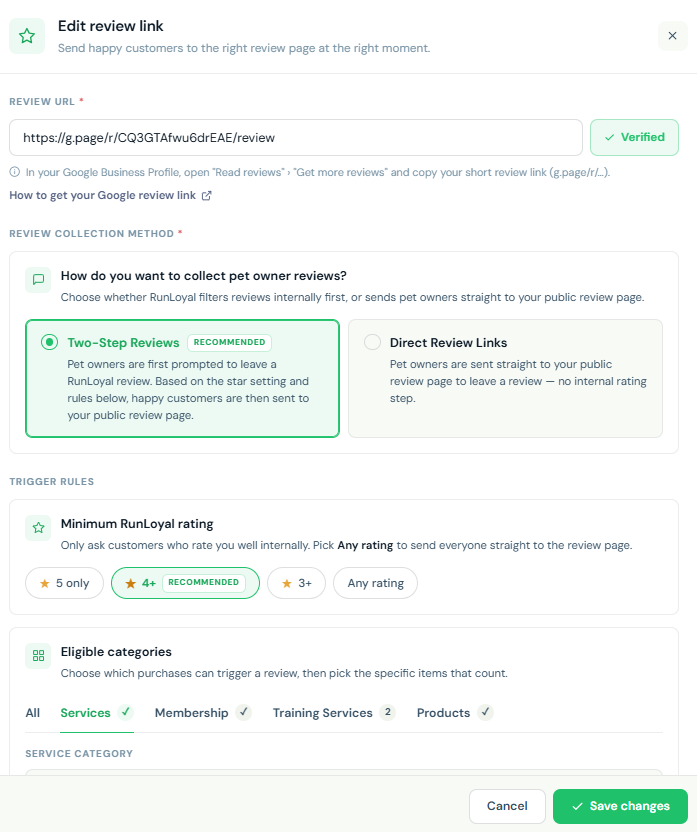
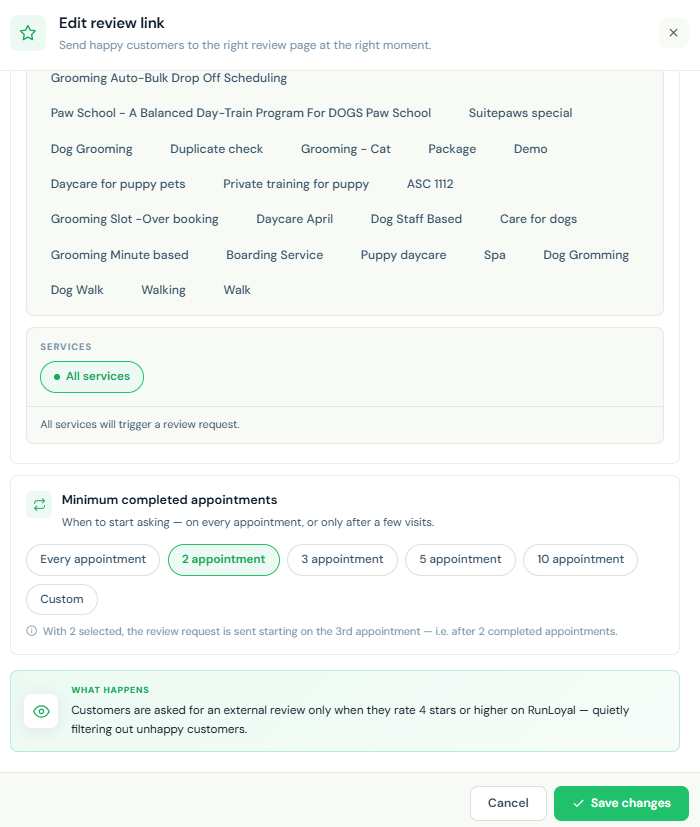
- Simpler multi-platform connection : Connect Google, Facebook, Yelp or any custom review platform in a few clicks. No developers, no URLs to hunt down.
- Paste your review link — we handle the platform-specific path for you.
- Manage all connected platforms from one place.
- Track how many free review requests remain on your plan.
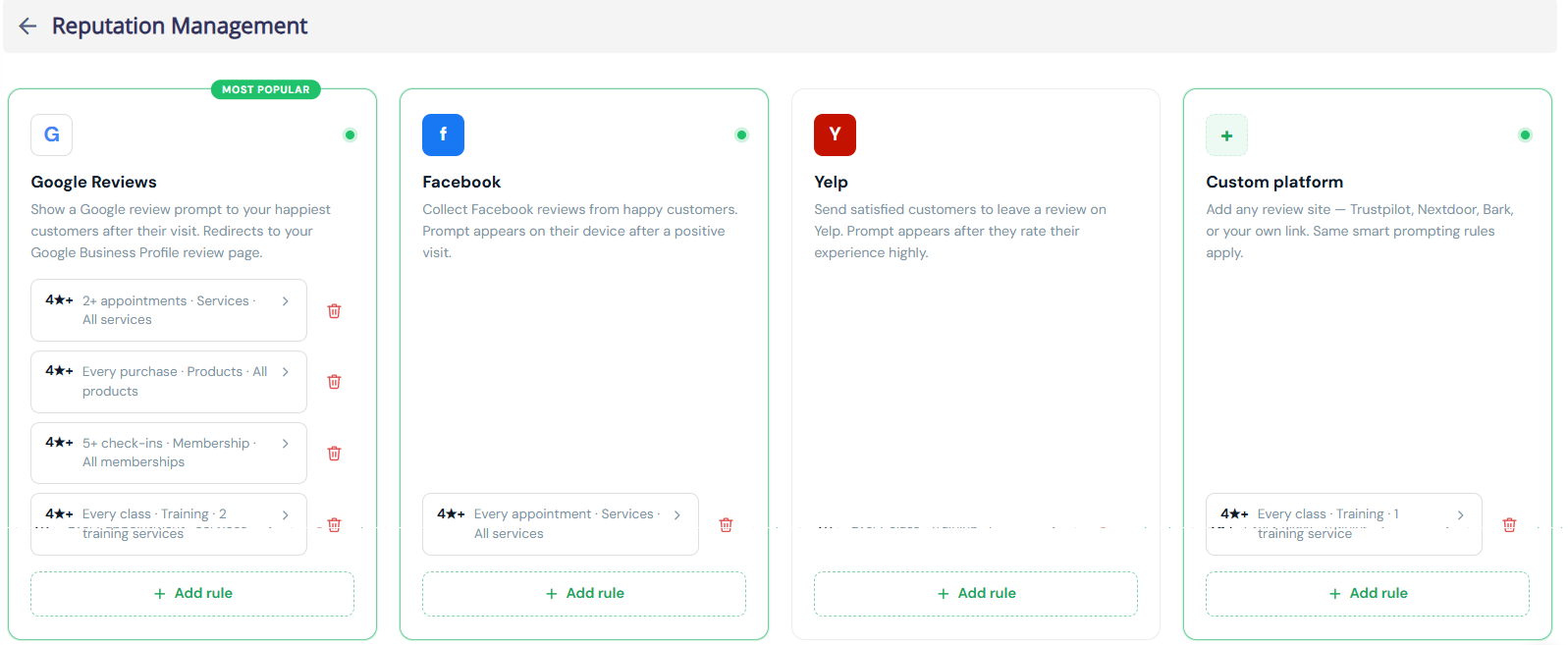
- A redesigned customer review flow : We rebuilt what your pet owners see — a clean, branded, mobile-first page tuned at every step to turn a recent visit into a posted public review.
- Step 1 — Rate the visit → Step 2 — Add a quick note → Step 3 — Share publicly → Done — Thank you
- Branded with your logo · one-tap posting to Google & Facebook · words pre-filled so owners just paste · social-proof throughout.
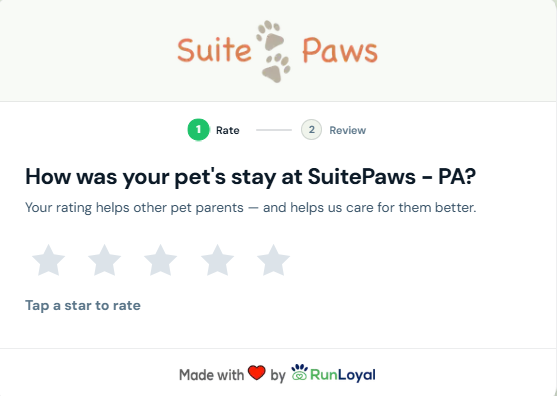
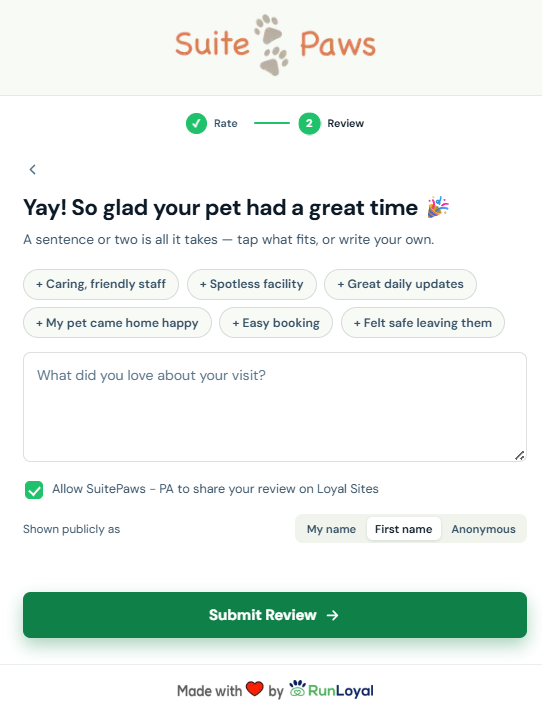
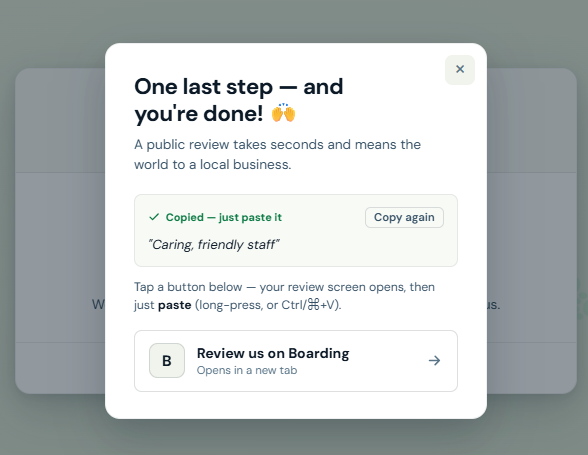
Tips Support in Quick Checkout
Staff can now add a tip directly from the Quick Checkout invoice page when processing payments for the following:
- Packages
- Training Services
- Retail Products
- Gift Cards
How It Works
A Tips option is now available in the Quick Checkout invoice action bar alongside the existing Coupon/Adjustment, Send, and Pay options. Staff can click the Tips button before processing payment to add a tip amount on behalf of the pet owner — making it easier to collect gratuity at the point of sale without navigating away from the invoice.
Tips are not currently configurable in portal settings — this enhancement is available by default at checkout without requiring any setup, consistent with the existing Tips functionality in the appointment flow.
Note:
- This enhancement is available in the Business Portal. Support for StaffApp+ for Groomers, StaffApp+ for Kennels, Pet Owner App, and Client Portal is expected by the end of July 2026.
- Tip options on other platforms (StaffApp+ for Groomers, StaffApp+ for Kennels, Pet Owner App, and Client Portal) are configurable via Settings → Pricing → Point of Sale Terminal, where up to 3 customizable tip percentages can be set — separate from the non-configurable Quick Checkout Tips button available in the Business Portal.
ScoutAI Vax Verify — Background Scanning Enhancement
Building on the Vax Verify feature introduced in the Business Portal, we've enhanced the experience with background scanning — so staff no longer need to wait for the analysis to complete before continuing their work.
What's Changed
Previously, when a staff member uploaded a vaccination document, they had to stay in the immunization modal and wait for Scout AI to finish analyzing before taking any other action. With this enhancement, the analysis now runs entirely in the background.
How It Works
- Click Scan with Vax Verify from the top navigation bar or the Immunizations section.
- Upload vaccination documents one at a time or in succession — each document is automatically added to the processing queue.
- Once uploaded, the modal can be closed — Scout AI continues scanning in the background while staff freely navigate and use other parts of the portal.
- A Scout AI Vax Verify floating panel appears, showing real-time progress — displaying counts for Completed, Scanning, Pending, and Failed documents.
- Documents are processed one at a time in the order they were uploaded.
Queue Statuses
Each document in the queue will show one of the following statuses:
- Queued — Waiting to be analyzed
- Scanning — Scout AI is actively analyzing the document
- Ready — Analysis complete, awaiting staff review
- Failed — Analysis was unsuccessful
Reviewing Results
Once scanning is complete, staff can click Review & Update on any result to:
- View the matched pet owner and pet details
- Review detected immunization types and expiry dates
- Select or deselect specific immunization records
- Edit dates if needed before saving
- Click Save to apply the records to the pet's profile
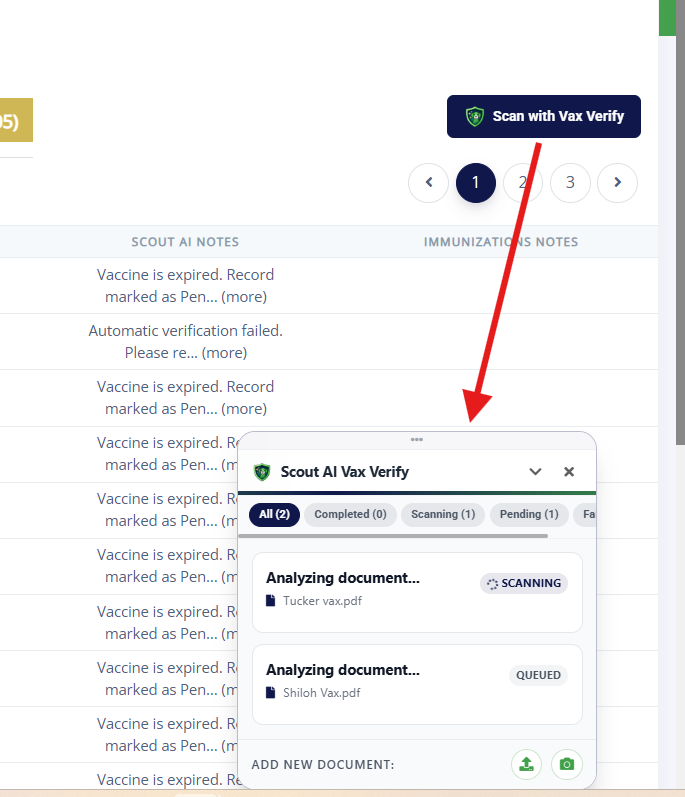
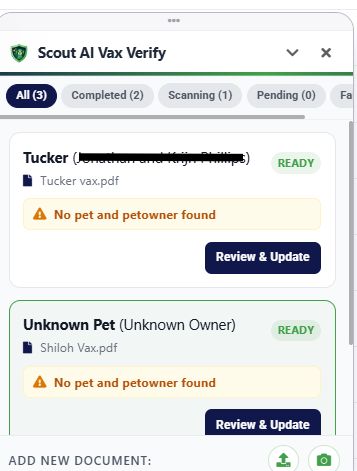
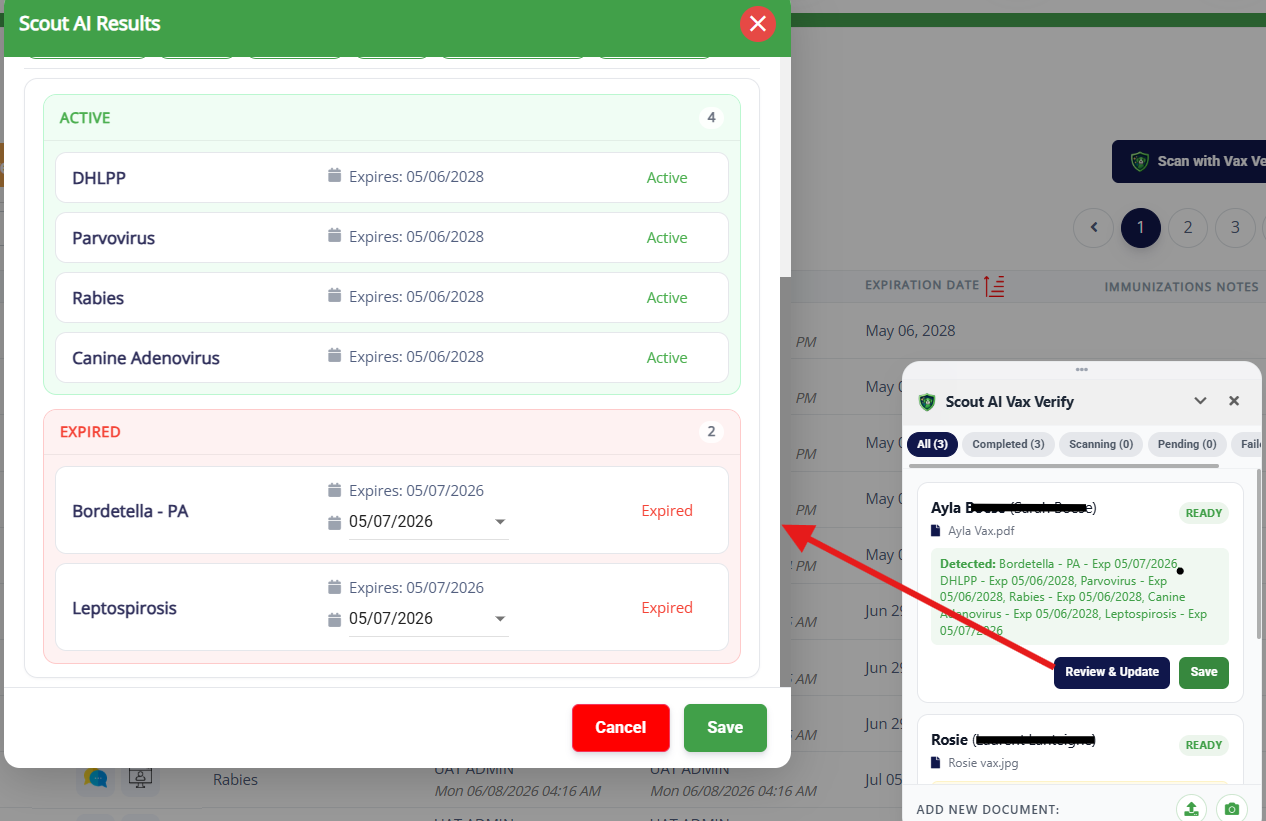
📝 Note: This enhancement is available in the Business Portal. Support for StaffApp+ for Groomers and StaffApp+ for Kennels is expected by the end of July 2026.
Easy Check-In — Background Processing
The Easy Check-In experience has been enhanced with background processing, allowing staff to continue using the portal while check-ins are completed automatically.
How It Works
- Initiate Easy Check-In for walk-in pets as usual.
- Once started, the check-in process runs in the background — staff can freely navigate and use other parts of the portal without waiting.
- A floating Easy Check-In panel appears, displaying real-time progress with counts for Completed, Checking In, Pending, and Failed.
- Each pet's check-in status is displayed individually, showing the pet name and owner name alongside their current status.
Check-In Statuses
- Checking In — Check-in is actively in progress
- Checked In — Successfully checked in
- Failed (Retry) — Waiting to be processed
Once all pets are processed, the panel displays the final X/X Completed count, confirming all check-ins are done.
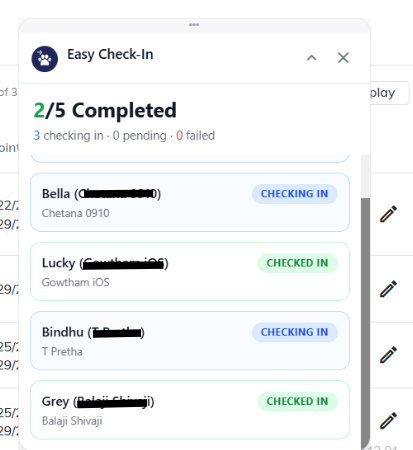
📝 Note: This enhancement is available in the Business Portal. Support for StaffApp+ for Groomers and StaffApp+ for Kennels is expected by the end of July 2026.
Service Status & Incident Notifications
We've launched a live service status page to keep you informed at all times.
Visit status.runloyal.com for:
- Real-time system status — Know instantly if any services are affected
- Incident updates — Stay informed on any ongoing issues and their resolution progress
- Maintenance notices — Get advance notice of scheduled maintenance windows
We recommend bookmarking this page for quick access whenever you need to check platform availability or stay updated on any ongoing incidents.
Multiple Unavailability Date Ranges — Visual Map Enhancement
Building on the previous release, the maximum number of unavailability date ranges per unit in the Visual Map has been increased from 5 to 10, giving you greater flexibility to plan ahead for maintenance, holidays, or other closures across more periods without needing to update the setting repeatedly.
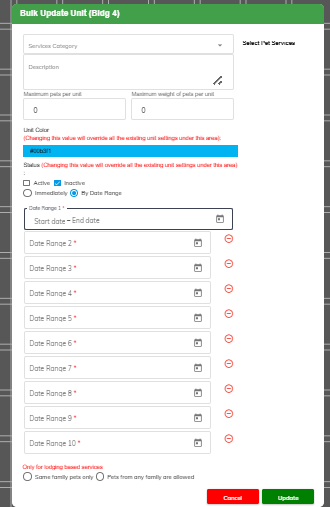
📝 Note: This requires a Pet Owner app and Client Portal release. If you would like this prioritized, please contact puppylove@runloyal.com.
Cancel Appointment Request — Pet Owner App and Client Portal
Pet owners can now submit a cancellation request directly from the Pet Owner App and Client Portal, giving them a convenient way to communicate cancellations without needing to call or message the kennel separately.
How It Works
- From the Appointments section in the Pet Owner App or My Visits in the Client Portal, pet owners can tap the Cancel button on any upcoming or checked-in appointment.
- Pet owners can choose to:
- Keep Appointment — Dismiss the popup and retain the booking.
- Request Cancellation — Submit a cancellation request to the kennel.
- Once submitted, you will receive the request and follow up with the pet owner via Messages.
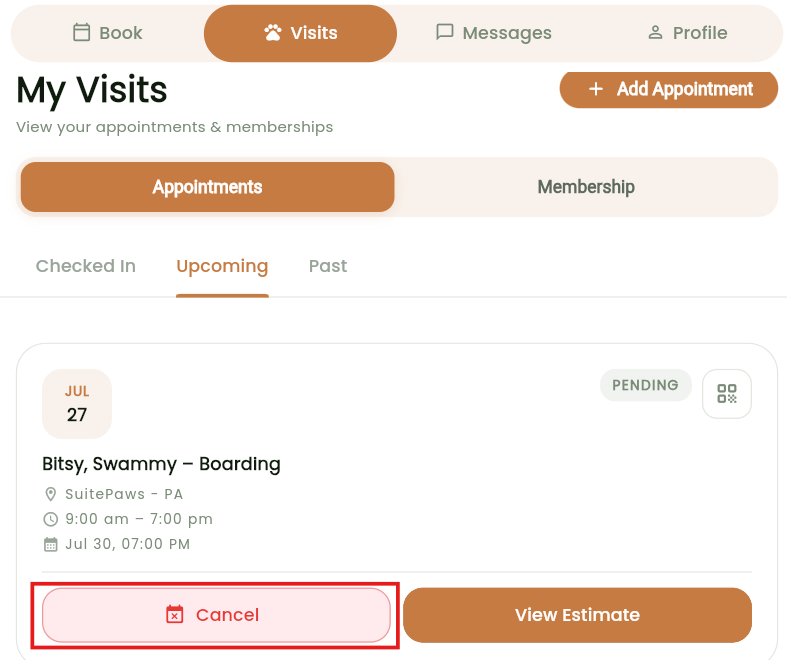
📝 Note:
- This is a cancellation request — not an instant cancellation. You or your staff can review and process the request, ensuring full control over the cancellation workflow remains with you.
- This requires a Pet Owner app and Client Portal release. If you would like this prioritized, please contact puppylove@runloyal.com.
Direct App Support for Pet Owners — Pet Owner App (Coming Soon)
To reduce unnecessary support overhead for kennel owners, we're introducing a "Having App Issues?" option in the Pet Owner App that allows pet owners to contact RunLoyal Support directly for app-related issues — such as login problems, app crashes, or performance errors — without needing to reach out to their kennel.
How It Works
Once available, pet owners will be able to access the Having App Issues? option from within the app, which will present the following support options:
- Call Support — Reach RunLoyal Support directly during business hours.
- Email Support — Send an email to puppylove@runloyal.com. When emailing, the following details are automatically included to help resolve issues faster:
- App logs
- Facility information
- Issue description
- Cancel — Dismiss and return to the app.
This ensures pet owners get the right support for app-related issues while keeping kennel owners focused on running their facility.
Note: This feature is part of an upcoming Pet Owner App release. If you would like this prioritized, please contact puppylove@runloyal.com.
Paw Metrics Enhancements
- Invoice Register Report : The Invoice Register Report has been updated with the following enhancements:
- Two new date basis options:
- Checkout Date — Recommended for accrual-basis financial reporting.
- Payment Date — Recommended for cash-basis financial reporting.
- Two new columns:
- Deposit — Shows deposits collected during the selected date range.
- Previous Payments — Shows non-deposit payments made before the invoice was closed, within the selected date range.
- Two new date basis options:
- Sales Tax Report : The Sales Tax Report now includes two date basis options for more flexible tax reporting:
- Checkout Date — Recommended for accrual-basis tax reporting.
- Payment Date — Recommended for cash-basis tax reporting.
- Discount Report : Added a new Tax column to display the sales tax amount discounted alongside the adjustment or discount amount.
- Lodging Occupancy Report :
- Added the following new columns to both the main report and linked report:
- Appointments Checked In
- Appointments Checked Out
- Appointments In House
- The main report now displays unit-level details.
- The linked report now displays pet-level details.
- Added the following new columns to both the main report and linked report:
- Checked-In Pets Report : Added a new Pet Breed column.
- Retail Inventory Report : Added a new UPC column.
We continue to expand StaffApp+ for Kennels with additional features and enhancements. Here's what's new since our last release:
New Features & Enhancements — Now Available
- Pet & Pet Owner Notes : View and add notes for pets and pet owners directly from the app.
- View/Add Belongings in Appointments : Staff can view and add belongings associated with an appointment.
- Add Vet Details for Pet : Veterinarian details can now be added directly from the pet profile.
- Pets Who Don't Get Along With : View and manage incompatible pet pairings from within the app.
- Send Deposit Request : Staff can now send deposit requests to pet owners, consistent with the existing Business Portal experience.
- Navigate to Current Date via QR Code Scan in To-Do : Scanning a QR code in the To-Do section now automatically navigates staff to the current date.
Coming Soon — Upcoming Features & Enhancements
- The following features will be available in StaffApp+ for Kennels in an upcoming release:
- Membership Purchase : Sell memberships directly from the app.
- Package Purchase : Enable package purchases from within the app.
- Edit Appointment : Edit existing appointments directly from the app.
- Book Again : Quickly rebook a previous appointment with a single tap.
- Recurring Appointments : Create and manage recurring appointment schedules from the app.
- RunLoyal Bark : Integration with RunLoyal Bark for enhanced pet activity updates.
- Dynamic Pricing : Support for dynamic pricing rules within the app.
- Multi-Image Upload : Upload multiple images at once from the app.
- Media Upload in Appointment Belongings, Service Profile & Incident : Attach media directly within Appointment Belongings, Service Profiles, and Incident reports.
- 📝 Note: The upcoming features and enhancements for StaffApp+ for Kennels are expected to be available by mid-July 2026.
V1.153.20260609.0106/09/202634 updates
Dear RunLoyaler, we’ve launched new features, enhancements, usability improvements, and bug fixes. Please review the updates below.
Personalised Websites
- Loyal Sites (powered by Scout AI)
Introducing Loyal Sites — your AI-powered microsite that gives your kennel a professional web presence without the complexity of building a website from scratch. Fully customizable and tailored to your brand, Loyal Site helps you showcase your services, share your story, and attract new pet owners — all in one place.- Gallery and About Us — Upload up to 20 gallery images and craft a compelling About Us section, with the option to generate content instantly using ScoutAI.
- Customize Display Order — Arrange your microsite sections — About Us, Scout Media Feed, Find Us/Address, Services Section, and Pet Parents Review — in the order that best represents your business.
- Navigate to Settings → Operations → Pet Owner Experience Personalization to get started.
- Built-in Analytics (Coming Soon) — Loyal Sites includes built-in analytics to help you understand how visitors are finding and navigating your web. Track which platforms are driving traffic — whether it's Facebook, Instagram, WhatsApp, or other sources — using UTM links, so you always know where your new pet owners are coming from.
- Want to see it in action? Check out a sample Loyal Sites : https://suitepaws.runloyal.vet/


- 📝 Note: Loyal Sites is coming soon. Built-in analytics will be rolling out alongside Paw Metrics.
Route Optimizer (Paid add-on)
- For Transport Based Services in To-Do :
- Introducing Route Optimizer, a new paid add-on that helps staff navigate efficiently for pet transport-related services in the To-Do section. Once enabled, the Route Optimizer calculates and displays the optimized route between the kennel address and the pet owner's address.
- How it works:
- A new Transport Based Service toggle has been added in the Add-On Service configuration underSettings → Business Setup → Service Configuration → Add-On Services → Transport Based Service. This is disabled by default and must be enabled for transport-related services.
- Once enabled, the Route Optimizer icon appears in the To-Do section when filtering by the transport-based add-on service.
- Clicking the icon opens an interactive map displaying the optimized route from the kennel to the pet owner's address.


- 📝 Note: This enhancement is currently available in the Business Portal. Support for StaffApp+ for Groomers is expected by the end of June 2026.
- For Feeding & Medication — Visual Map :
- Feeding & Medication Route Optimizer — Visual Map
- Introducing the Route Optimizer for Feeding and Medication in the To-Do section. This enhancement helps staff navigate the facility in the most efficient order when completing feeding and medication rounds, reducing time and effort spent moving between units.
- What's New:
- Optimized In-Facility Route — The Route Optimizer displays a visual layout of your facility based on the Visual Map setup, guiding staff through the most efficient path across units and buildings to complete feeding and medication tasks.
- Schedule-Based Navigation — Staff can select a specific feeding schedule (AM, Noon, PM, etc.) to load the corresponding route, map, and filters for that round.
- Route Optimizer Order Options — Choose between Based on the sorting order configured for areas and units in the visual map settings or Based on the row and column layout configured in the visual map settings to determine the order in which units are visited.
- Multi-Building Support — The optimized route is displayed by default across all buildings, with a designated start point guiding staff through each unit in sequence.
- Feeding & Medication Details — Clicking on a unit along the route displays the complete feeding and medication details for the pets in that unit — including amount, type, and method — without leaving the Route Optimizer screen.
- To-Do Updates from Route Optimizer — Staff can add notes, upload media (internal or to Report Card), and mark tasks as completed directly from the Route Optimizer screen without navigating away.
- Mark as Internal — Visual Map — Units can now be marked as Internal (staff overflow only), Unavailable (temporarily hidden from bookings), or remain Public (bookable and visible to pet owners), directly from the updated Edit Unit interface under Settings → Business Setup → Visual Map .

- Feeding & Medication Route Optimizer — Visual Map
ScoutAI Vax Verify — Now Available in Business Portal
- VAX Verify, powered by Scout AI, is now available in the Business Portal, extending the same seamless vaccination verification experience already live in the Pet Owner App and Client Portal. Staff can now scan, verify, and manage pet vaccination records directly from the Portal — saving time and reducing manual review.
- How it works:
- Scan with Vax Verify — Access VAX Verify from the top navigation bar or from the Immunizations section. Click Scan with Vax Verify to upload a vaccination document or take a photo using your device camera.


- AI-Powered Analysis — Scout AI automatically analyzes the uploaded document, extracts vaccination types and expiry dates, and matches the record to the corresponding pet owner and pet in the system.
- Review & Apply Results — Staff can review the Scout AI scan results, select or deselect specific immunization types, verify the matched pet owner and pet, and click Apply Records to update the vaccination data — with a side-by-side preview of the uploaded document available at all times.
- Manual Review Option — Staff can also switch to Manual Review mode to manually enter immunization types and expiry dates if needed.
- Add/Edit from Pet Profile — VAX Verify is also accessible from the individual pet's profile, allowing staff to add or edit only pending vaccination records using Scout AI directly.
Partial Payment Support for Packages, Memberships & Training Services — Quick Checkout
- A new enhancement has been introduced to Quick Checkout purchases, allowing you to enable partial payments for Packages, Memberships, and Training Services. Once enabled via personalization settings, a minimum payment percentage can be configured individually for each category, giving pet owners the flexibility to pay a portion upfront at the time of purchase.
- Navigate to Settings → Operations → Personalization → Portal → Allow Partial Payment for Quick Purchase → Edit Minimum Payment Percentages(Default: OFF) to configure this setting.

- 📝 Note:
- Partial payment is applicable only for non-recurring Packages and Memberships.
- This enhancement is currently available in the Business Portal. Support for Pet Owner App, Client Portal, StaffApp+ for Groomers and Front Desk KIOSK is expected by the end of June 2026.
Copy and Paste Option in Feeding and Medication Information — Business Portal
- A Copy and Paste option has been added to the Feeding Information and Medication Information sections, allowing staff to duplicate existing feeding or medication slot details and apply them to other time slots without re-entering the same information.

- This enhancement is available across all check-in screens and pet profile:
- Pet Owner Profile
- Pet Profile
- Daily Snapshot
- Appointments — Arriving Tab
- Additionally, the Feeding and Medication Information sections have been enhanced with an improved UI for a cleaner and more intuitive experience.

Staff/Kennel Owner Notification for New Pet Owner Registration
- Kennel owners/Staff will now receive a notification whenever a new pet owner registers — whether through the Pet Owner App and Client Portal. The notification appears in the Notification panel, keeping the team instantly informed of new sign-ups without needing to manually check.
- Under Settings → Business Setup → Staff Notification Preferences, you can control which roles receive these notifications.


Push Marketing
- "Missing" Vaccination Status Filter — Push Marketing :
- A new "Missing" status has been added to the Vaccination Status filter in Push Marketing, allowing you and your staff to identify and target pet owners with no vaccination records on file — making it easy to send timely reminders and ensure no pet is overlooked.

- Flexible Birthday Filter — Push Marketing :
- The Birthday filter in Push Marketing has been enhanced to support both preset date ranges (Today, Tomorrow, This Week, Next Week, This Month, Next Month, and more) and a Custom date range option. Previously limited to a single date, you can now target pet owners whose pets have birthdays within a selected period — making it easier to run timely, personalized birthday campaigns and strengthen engagement with pet owners.

- Email Subject Line — Push Marketing :
- A Subject field has been added to the campaign message editor in Push Marketing. You can now set a dedicated email subject line when composing campaigns, which will be included in outgoing emails sent.

Appointment Booking in the Business Portal
- Multiple Quantities Per Day for Add-On Services — Business Portal Only :
- You can now assign multiple quantities of the same add-on service for a single day when booking an appointment. For example, if a medication or extra service needs to be administered or charged twice a day, the quantity can be set per day directly during booking — eliminating the need to create separate service entries for different frequencies.
- To enable this, navigate to Settings → Business Setup → Service Configuration → Add-On Services → Edit Add-On Service and turn on the Allow Multiple Quantities Per Day toggle. This is disabled by default and must be enabled per service.

- This enhancement is reflected consistently across the platform:
- Appointment View — The quantity per day is visible on mouse hover over the service in the appointment summary.
- Invoice — The total quantity and corresponding charges are accurately calculated and displayed.
- To-Do — Each instance appears as a separate time-based entry, ensuring staff can track and complete each occurrence individually.

- 📝 Note: This enhancement is currently available in the Business Portal. Support for the Pet Owner App and StaffApp+ for Groomers is expected by the end of June 2026.
Multiple Unavailability Date Ranges — Visual Map
- You can now define up to 5 date ranges when marking units as unavailable for booking in the Visual Map, replacing the previous single date range limitation. This makes it easier to plan ahead for maintenance, holidays, or other closures across multiple periods without needing to update the setting repeatedly.
- This can be configured in two ways:
- Bulk Update — Navigate to Settings → Business Setup → Visual Map, click Bulk Update, set the status to Inactive, and add up to 5 unavailability date ranges to apply across all units within an area at once.
- Unit-wise Update — Select an individual unit on the Visual Map and use the Mark as Unavailable for Booking toggle to set specific date ranges for that unit.

- 📝 Note: This requires a Pet Owner app and Client Portal release. If you would like this prioritized, please contact puppylove@runloyal.com.
Text to Pay — SMS Option for Send Invoice & Request Deposit — Invoice
- The Send Invoice/Receipt to Pet Owner popup has been redesigned with an improved UI and now includes an SMS option alongside App and Email, allowing kennel owners to send invoices and deposit requests directly to pet owners via text message.
- What's New:
- Send via SMS — Invoices and deposit requests can now be sent directly to the pet owner's mobile number via text, making it faster and more convenient for pet owners to receive and act on payment requests.
- Multi-Channel Sending — Send via one or multiple channels — App, Email, and SMS — simultaneously in a single action.
- Request Deposit Option — The Action dropdown allows staff to switch between Send Invoice and Request Deposit within the same popup.

Service Fee Support for Training Services & Gift Cards
- The service fee configuration has been expanded to include Training Services and Gift Cards as eligible transaction types. You can now choose to apply service fees to these categories in addition to the existing options — Services, Packages, Memberships, and Retail Products — available under Settings → Pricing →Service fee → Edit Fee

Custom Background for Promotion Link — Web Link
- You can now set a custom background for your My Promotion Link page to better reflect your brand. Choose from a selection of solid colors or use the AI Generate option to create a custom background image — giving your public-facing booking link a unique and professional look.
- Navigate to Settings → Operations → Custom Backgrounds → Promotion Link to configure this.

Customizable Top Quick Actions — Business Portal
- You can now customize the quick action buttons displayed in the top navigation bar of the Business Portal. Enable or disable individual buttons based on your team's workflow, keeping the navigation bar clean and focused on the actions you use most.
- This can be configured under Settings → Operations → Personalization → Portal → Other Settings → Customizable Top Quick Actions → Edit Buttons(Default: ON).

- 📝 Note: My Profile, Notification, and Multi-Location Preference buttons cannot be disabled.
Configurable Attention Needed Sections — Pet Owner App
- You can now control which items appear in the Attention Needed section on the Pet Owner App home screen. A new Edit Sections option has been added to the Show Attention Needed on Home Screen setting, allowing individual sections to be enabled or disabled based on your business needs.
- The following sections can be configured:
- Open Invoices
- Unpaid Deposit
- Missing Immunization
- Unsigned Agreement
- Navigate to Settings → Operations → Personalization → Pet Owner App → Show Attention Needed on Home Screen → Edit Sections to configure this.

- 📝 Note: This requires a Pet Owner app and Client Portal release. If you would like this prioritized, please contact puppylove@runloyal.com.
Point of Sale Terminal Configuration — Self-Service Setup
- Kennel owners can now add and manage their Point of Sale terminals directly from the RunLoyal platform without needing assistance from the RunLoyal team. Simply click Add Terminal on the Terminal Configuration page to get started.
QR Code Direct External Reviews (eg, Google)— Print Receipt with External Printer
- A QR Code is now displayed at the bottom of printed receipts when you use the external receipt printer. When scanned, it directs pet owners to the kennel's Google Review page, making it easy to collect feedback and boost your online reputation at the point of checkout — no extra steps required.
- This can be configured under Settings → Operations → Personalization → Portal → Display the review qr code in the receipt print (Default:OFF).

Edit Check-In Time in Invoice
- You can now edit the Checked In On time directly from the invoice page. Clicking the edit icon next to the check-in time opens a popup displaying the appointment details, where the check-in time can be adjusted and saved as needed.


Reorder Services in Stacked View — Daily Snapshot
- Services in the Daily Snapshot can now be reordered even when the stacked view is enabled. Previously, stacking services to reduce horizontal scrolling prevented drag-and-drop reordering.
- With this enhancement, you can freely drag and reposition services while keeping the stacked view active, making it easier to group and organize related services to suit your workflow.
Birthday Pets Filter — In House Appointments
- A new "Pet's Celebrating Birthday Today" filter has been added under the Enhanced Appointment Filters in the Appointments section.
- You can now quickly filter and identify pets celebrating their birthday on the day of check-in, making it easier to select them and send personalized birthday messages — adding a special touch to every visit.

Drag & Drop Enhancements — Calendar and Advanced Staff Calendar
- "Don't Show This Again" Option in Drag & Drop Confirmation — A "Don't Show This Again" checkbox has been added to the confirmation popup that appears when dragging and dropping appointments. Once selected, the popup will no longer appear for subsequent drag-and-drop actions, streamlining the rescheduling experience.
Customizable Calendar Week/Month Start Day — Calendar and Advanced Staff Calendar
- You can now set your preferred start day of the weekend month for both the Calendar and Advanced Staff Calendar. This setting is available under Settings → Operations → Personalization → Portal → Customize the start day of the week and month view in the calendar (Default: Sunday) and supports any day from Sunday through Saturday. Once configured, the weekly and monthly calendar views will reflect the selected start day, allowing schedules to align with your business's operational week.


- 📝 Note: This enhancement in StaffApp+ for Groomers is expected to be available by the end of June 2026.
Pet Owner Address Column — To-Do Print as List
- A Pet Owner Address column has been added to the Print Options in the To-Do section. When printing the Add-on Service list, staff can now include the pet owner's address as a selectable column, making it easier to manage transport or delivery-related tasks directly from the printed list.

Category & Service Filter — To-Do
- A Category & Service filter has been added to the To-Do section, allowing you and your staff to quickly filter tasks by service category and specific services — including add-on services, primary services, and roll call.

"Don't Show Again" Option for Product Pick-Up Alert — Quick Checkout
- A "Don't Show Again" option has been added to the existing Products Not Picked Up popup that appears during payment in Quick Checkout. Once selected, the alert will no longer appear for future transactions during the current session — reducing interruptions for staff during the checkout process. The preference resets upon logout.
- Additionally, when "Don't Show Again" is selected, the product pick-up status will automatically be marked as Picked Up by default.
My Subscription — Redesigned My Subscription Page
- The My Subscription page has been redesigned with features and add-ons now grouped by product and functionality — including
- Appointments & Scheduling,
- Staff & Team Management,
- Communication & Marketing,
- In-Facility & Services,
- Scout AI & Analytics, and
- Storage & Media
- Each feature displays its pricing, subscription status, allocated limit, and current usage, giving you full visibility into your plan at a glance.

Before & After Image View — Scout AI Studio — Message Hub
- The Scout AI Studio in Message Hub now displays a Before & After comparison view when editing pet images. You and your staff can clearly see the original photo alongside the AI-enhanced version before deciding to apply or discard the changes — making it easier to review and approve image enhancements before sharing them with pet owners.

Pet Owner App Personalization
- The existing Pet Owner App Personalization section has been renamed and expanded into the new Pet Owner Experience Personalization under Settings → Operations , bringing all customer-facing platform settings into one centralized location and giving you greater control over how your brand and content appear across platforms. The settings are organized across four tabs:
- General
- Contact Information — View and manage business contact details and operating hours displayed to pet owners.
- Branding — Configure primary color, secondary color, font color, app name, display name, and app logo. A live preview reflects changes across the Pet Owner App, Client Portal, and Loyal Site.

- Pet Owner App
- Customize Flash Screen — Set a personalized welcome message displayed on the app's launch screen, with a live preview.
- Customize Display Order — Rearrange the order of sections displayed on the Pet Owner App home screen, including Attention Needed, Bundled Experiences, Make an Appointment, My Pets, and My Membership & Package.

- Client Portal
- Customize Display Order — Reorder sections shown on the Client Portal, including Book a Service, External Services, and My Pets.

- 📝 Note: Loyal Site personalization will be available by mid-June 2026.
Settings Enhancements
- Redesigned Service Category Configuration — Business Setup :
- The Add/Edit Service Category page under Settings → Business Setup has been redesigned with an improved UI for a cleaner, more organized configuration experience. The settings are now structured into clearly defined sections:
- Basic Details — Configure service category name, service type (Staff, Lodging, or Capacity Based), pet type, appointment approvals, and description.
- Booking Rules — Set the minimum advance booking window with the newly added optional cut-off time, display preferences for first-pet or first-appointment bookings, minimum stay duration, appointment reminder days, and maximum booking horizon.
- Guest Requirements — Manage requests for feeding info, medication, card on file, medical history, and required vaccines per service category. Options to make feeding and medication details mandatory before booking are also available, along with the ability to block bookings if required vaccines are missing.
- Pet Owner Questions While Booking — Add custom questions for pet owners to answer during booking, with options to mark them as required, display them in the app and web, and restrict booking if questions are left unanswered.


- The Add/Edit Service Category page under Settings → Business Setup has been redesigned with an improved UI for a cleaner, more organized configuration experience. The settings are now structured into clearly defined sections:
- Cut-Off Time in Minimum Advance Booking — Service Category :
- An optional Cut-Off Time has been added to the Minimum Advance Booking Window configuration at the service category level. You can now set a specific time-of-day restriction on top of the existing days-in-advance setting, providing more precise control over same-day booking rules for each service category.
- Navigate toSettings → Business Setup → Service Configuration to configure this for each service category.

- 📝 Note: This requires a Pet Owner app and Client Portal release. If you would like this prioritized, please contact puppylove@runloyal.com.
- Peak Days, Early/Late Drop-Off Rules Enhancements :
- Actual Checkout Time Trigger :
- The Clock Hours based rule under Peak Days, Early/Late Drop-Off (PEL) rules now supports triggering based on the pet's actual checkout time. This ensures that time-based charges are accurately applied based on when the pet actually checks out, providing more precise and reliable billing.
- Actual Checkout Time Trigger :
- Membership Enhancements :
- Auto-Apply to Invoice - Membership Service Entitlements :
- Membership service entitlements can now be set to auto-apply to an invoice, similar to how packages work. When enabled, eligible membership credits are automatically applied to the invoice without manual intervention.
- This option is disabled by default and can be enabled underSettings → Membership Services → Membership Configuration →Edit Membership Service Entitlement → Auto-Apply to invoice (Default: OFF) .

- 📝 Note: Auto-apply is available only for single membership credits and single pet appointments. For multiple memberships, multiple pets, or multi-service memberships, entitlements can still be manually applied to the invoice by toggling the option on the invoice.
- Membership Rules :
- The Membership Rules configuration has been enhanced with the following new options:
- Multi-Pet Pricing — Rules can now be configured with two pricing modes: Least Price Only (applies the lowest price for one pet) or Per Pet (calculates the discount individually for each pet), giving greater flexibility in how membership discounts are applied across multi-pet appointments.
- Automatically Apply to Invoices — Membership rules can now be set to auto-apply to invoices with two modes:
- Single Rule Auto Apply — Applies automatically only when no other conflicting price engine rules or discounts are present on the invoice.
- Always Auto Apply — Applies to invoices even when other price rules or discounts are present.
- ‘Per Pet’ will be selected by default.

- 📝 Note: Auto-apply only works when the appointment has been checked in.
- The Membership Rules configuration has been enhanced with the following new options:
- Auto-Apply to Invoice - Membership Service Entitlements :
New Reports
- New Arrivals Report — A new report displaying pets arriving on a selected date, including Confirmed, Checked In, and Checked Out statuses. Supports multi-service filtering, phone number visibility, and both past and future date ranges.
- Outstanding Rewards Report — A new report displaying current rewards point balances across locations, including client details, pets, and total points for users with active reward balances.
Enhancements
- Invoice Register Report — Added a Previous Payments column to display deposits and payments made before the selected date range, replacing the older Deposit column for easier reconciliation. A new Sales Tax column has also been added for clearer invoice-level tax visibility.
- Total Revenue Report — Sales tax is now displayed as a separate line item for improved consistency with other revenue reports.
- Monthly Sales Report — Added a Date Basis filter to switch between Payment Date and Invoice Created Date views. Improved handling of deposits collected on estimation invoices after closure, and updated deposit-related labels for consistency across reports.
- Detailed Invoice and Payment Report — "Deposits Applied/Used" has been renamed to Prior Payments Received for consistency with the Monthly Sales Report. Services and deposit values now appear under the correct payment row, and Running Totals are properly limited to the selected date range.
- Sales Tax Report — Added a new Invoice Closed Date mode to ensure invoices appear only once when fully settled, improving monthly and annual tax reconciliation accuracy.
- Staff Commission Report — Added a Date Basis option to view data using either Payment Date or Appointment Date. Appointment Date mode prevents future bookings from appearing in the current pay period, and the Appointment Date column is now always displayed.
- Staff Service Details Report — Expanded to include appointments linked to Open and Not Invoiced invoices in addition to Closed invoices. Added a new Invoice Status column for better visibility.
- Revenue by Service Report — Manual invoice line items now display the actual description entered by staff instead of grouping all entries under "Manual Service."
- Going Home Report — Expanded to include pets in Confirmed, Checked In, and Checked Out statuses. Added support for multi-service filtering, phone number display, and both past and future date selections.
- Active Membership Report — Added Active Membership Count and Active Pet Owners Count columns, along with tooltips explaining the difference between the two metrics.
- Membership Details Report — Members who disable auto-renewal after prior billing cycles are now categorized separately under Cancellations.
- Credit Details Report — Added a Current Credit Balance Summary section showing all pet owners with outstanding credit balances regardless of the selected date range.
- QuickBooks Detailed Receipts — Enhanced deposit visibility for open and estimation invoices to better align with GAAP standards and improve invoice-level reconciliation.
- App Adoption Report — Updated to include all invited pet owners, along with email address, invite code, and invite link details for easier follow-up and marketing management.
- Zapier Integration Beta (Add-on)
- RunLoyal is currently integrated with Zapier, enabling seamless integration of RunLoyal Pet Owner and Pet data with a wide range of third-party platforms including CRM systems, marketing automation tools, communication platforms, and business workflow applications such as GoHighLevel, HubSpot, Keap.
- If you are interested in this integration, please contact puppylove@runloyal.com
VAX Verify (Add-on)- Powered by Scout AI (Paid add-on) 
- The AI-powered VAX Verify feature, already available in the Pet Owner App, is now live on the Client Portal. Pet owners accessing the Client Portal can now submit vaccination records and have them automatically verified by Scout AI, bringing the same seamless experience available in the Pet Owner App.


VAX Verify (Add-on)- Powered by Scout AI (Paid add-on)
- VAX Verify is expanding to the StaffApp+ for Groomers, enabling staff to review and manage Scout AI-verified vaccination records directly from the app — streamlining the verification workflow without switching to the Business Portal.
- 📝 Note: VAX Verify for StaffApp+ for Groomers is expected to be available by the end of June 2026.
Legacy Staff App Features Now Available in StaffApp+ for Kennels
- We're excited to bring key legacy Staff App capabilities into StaffApp+ for Kennels for a more seamless day-to-day workflow.
- Appointment Management
- Staff can now accept or reject appointment requests submitted by pet owners directly from the app.
- Staff can make service assignments within the app
- Pet Owner & Pet Management
- View pet owner profiles and pet details.
- Add new pet owners and pets directly within the app.
- Appointment Operations
- View all appointments from the app.
- Perform check-in and check-out actions.
- Process payments directly within appointments.
- Communication & Daily Operations
- Seamless integration with Message Hub for communication with pet owners.
- Play Groups, To-Do, Gallery and Report Cards included.
New Features in StaffApp+ for Kennels
- Easy Check-In — Introduced Easy Check-In for faster and more seamless walk-in pet check-ins.
- Updated Invoice with GAAP Compliance — StaffApp+ for Kennels now supports the updated invoice experience, built in alignment with Generally Accepted Accounting Principles (GAAP) for more accurate and standardized financial reporting.
- Appointment Creation — Staff can now create appointments directly within the app.
- Add-On Assignments — Add-on services can now be assigned directly from the app.
- Internal Staff Chat — A new Staff Chat feature has been added for internal team communication.
- Advanced Staff Calendar — The Advanced Staff Calendar has been implemented for improved scheduling and visibility.


V1.151.20260402.0104/02/202612 updates
Your RunLoyal portal has been updated with new features and enhancements!
This release is all about AI-powered workflows — Scout AI now touches more of your daily operations than ever before, from vaccination records to report cards to birthday moments. Alongside that, we've shipped a big one: the RunLoyal Client Portal is live for all customers. We've also made meaningful improvements to your reporting tools and squashed some important bugs. You can now see the new changes in Settings, with a “New” label added for specific modules.
Scout AI is woven through this release.
Four features are powered by Scout AI — Vax Verify, RunLoyal Bark, Report Card backgrounds, and the new Pet Birthday Alert. If you haven't explored Scout AI yet, this is a great release to start.
VAX Verify (Add-on) - Powered by Scout AI
 : VAX Verify has been enhanced for better performance. Additional filters have also been added in the Business Portal to help staff review and manage vaccination records more efficiently.

Manual Vaccination Upload Option
Along with Scout AI Vax, you can still allow pet owners to upload vaccination records manually. This option can be enabled through Settings → Operations → Personalization → Pet Owner App → Allow manual vax upload in immunization.

This requires an app release. If you would like this prioritized, please contact puppylove@runloyal.com.

Customize Home Screen Display (Pet Owner App)
- You can now rearrange the display order of sections on the Pet Owner App home screen.
- Sections such as Attention Needed, Make Appointment & Group Based Training, Memberships & Packages, Pets, etc., can be reordered as needed.
- Configuration path: Settings → Operations → Customize Pet Owner App → Customize Display Order.
- The new screen will be reflected for Pet Owners within 24 hours, or after they fully close and reopen the app.
- This requires an app release. If you would like this prioritized, please contact puppylove@runloyal.com.


Report Card Enhancement – Background Image with Scout AI
- You can now customize the Report Card background under Settings → Operations → Custom Background.
- Default background colors are available, and you can configure the start date, end date, header color, and view the preview before saving.
- Once a background is set as Active, it will automatically be used for report cards sent during the configured date range.
- The active background will be highlighted with a border and will display the Active status along with the configured start and end dates.
- You can also generate a new custom background using Scout AI by selecting pre-populated prompts or by entering your own instructions.


Pet Birthday Alert with Scout AI
- A Pet Birthday alert will appear during appointment check-in and membership check-in when a pet's birthday falls on that day.
- Staff can use Scout AI to generate a personalized birthday image and message for the pet owner.
- If the pet profile has an image, the birthday popup will display additional action options, including Save to Gallery, Send Image Only, Send to Pet Owner, and Send to Digital Wall.
- The Send to Digital Wall option is available only for customers who have the Digital Wall add-on enabled.
- When selected, the birthday image and message from the popup will be sent and displayed on the Digital Wall.
- Currently, this enhancement is available in the Portal only and will be available in the RunLoyal Kiosk and Staff App soon!
- If you would like this prioritized, please contact puppylove@runloyal.com.

Social Media Icons in Emails
- You can now display social media icons in emails sent to pet owners.
- Configure your social media links under Settings → Promotions → Social Media.
- Once added, the corresponding social icons (e.g., Facebook, Instagram) will appear in outgoing emails.
- This helps improve brand visibility and allows pet owners to easily connect with your business on social platforms.

RunLoyal Bark powered by Scout AI – Image Upload and Edit option
- You can now upload images directly while creating or editing a RunLoyal Bark message.
- Images can be selected from the Gallery or uploaded from your Device using the Choose Image option.
- An Edit option is now available, allowing you to update the message content or image after the RunLoyal Bark has been created.
- Scout AI integration helps generate message titles and content using predefined prompts and styles for faster RunLoyal Bark creation.


Physical Gift Card with Custom Amount
- We are excited to introduce the Custom Amount Physical Gift Card option, allowing customers to sell physical gift cards with custom dollar amounts directly at the checkout counter. This new feature provides a physical card that is not initially defined with a set $ value, which was a limitation of the previous e-gift card system.
- During the quick checkout process, staff can select the physical gift card radio button.
- Enter the unique card code, either by scanning a QR code or a barcode.
- Manually enter the custom amount the staff wishes to sell the card for.
- Select an expiry date or confirm that the gift card will never expire.
- The customized gift card will then be added to the invoice.
- If you want to order a gift card navigate to Settings → Retail → eGift Card → Order Gift Card to create and order physical gift cards.


Push Marketing Performance Enhancement
- Push Marketing has been enhanced to send messages more quickly and handle a higher volume of campaigns efficiently.
Pet Owner Notification Preferences - Search Improvement
- The Pet Owner Notification Preferences section has been enhanced with a search bar for quicker access to specific notifications.
- Access this via Settings → Business Setup → Pet Owner Notification Preferences.
We've made a round of improvements across several reports this sprint. The headline update is the Staff Commission Report — it now includes Service Category and Service filters, splits those into separate columns for clarity, and adds an Invoice Status filter so you can view open, closed, or all invoices. The date column also updates dynamically based on invoice status.
Enhancement
- Staff Commission Summary Report :
- Added Service Category and Service filters to make it easier to narrow down report results.
- Split the old service column into separate Service Category and Service columns for better clarity.
- Added an Invoice Status filter to let users view closed, open, or all invoices.
- Updated the date column to show the most relevant date based on invoice status.
- Pet Details Report :
- Added an Unspecified breed option to help filter pets that do not have a breed selected.
- Staff Service Details Report :
- Updated the report to include appointments with open invoices instead of showing only closed invoices.
- Added an Invoice Status column to show whether an appointment is Open, Closed, or Not Invoiced.
- New Customers Report :
- Improved the Agreement Statuses column to correctly display agreement names along with the latest agreement status.
- Monthly Sales Report :
- Enhanced the existing report with additional tabs to bring key revenue, appointment, coupon, and membership metrics into one place.
- Overnight Pets Report :
- Added date range support so users can run the report for multiple days instead of only a single-day view.
- Updated the report to return checked-in boarding pets whose lodging nights fall within the selected date range.
- Staff Commission Report :
- Added an Invoice Status filter to let users view closed, open, or all invoices.
- Updated the date column to show the most relevant date based on invoice status.
- Fiserv Settlement Report :
- Enhanced the report to include refund and void transactions for more accurate reconciliation.
Client Portal
Your pet owners can now manage their appointments, pets, payments, immunizations, and messages directly from a web browser — no app download needed. The Client Portal is a full web-based experience built for owners who prefer desktop or simply want an alternative to the Pet Owner App.
If you're currently using WebLink, this replaces it. Head to Settings → Promotions → Client Portal to get started, or reach out to PuppyLove at puppylove@runloyal.com and we'll get you set up.
V1.150.20260218.0102/18/202615 updates
VAX Automation (Add-on) - Scout AI Verify
 : This feature saves hours of staff time by eliminating the need to manually review vaccination records and removes booking friction for pet owners by significantly speeding up the vaccination verification process.
- What's New:
- AI-Based Pre-scan & Auto-verify: This feature automatically scans vaccination records and extracts structured data — including pet information, owner information, and vaccination expiration dates — from images of vaccination cards captured through the Pet Owner App on mobile devices. If the records are valid, ScoutAI automatically marks them as Active.
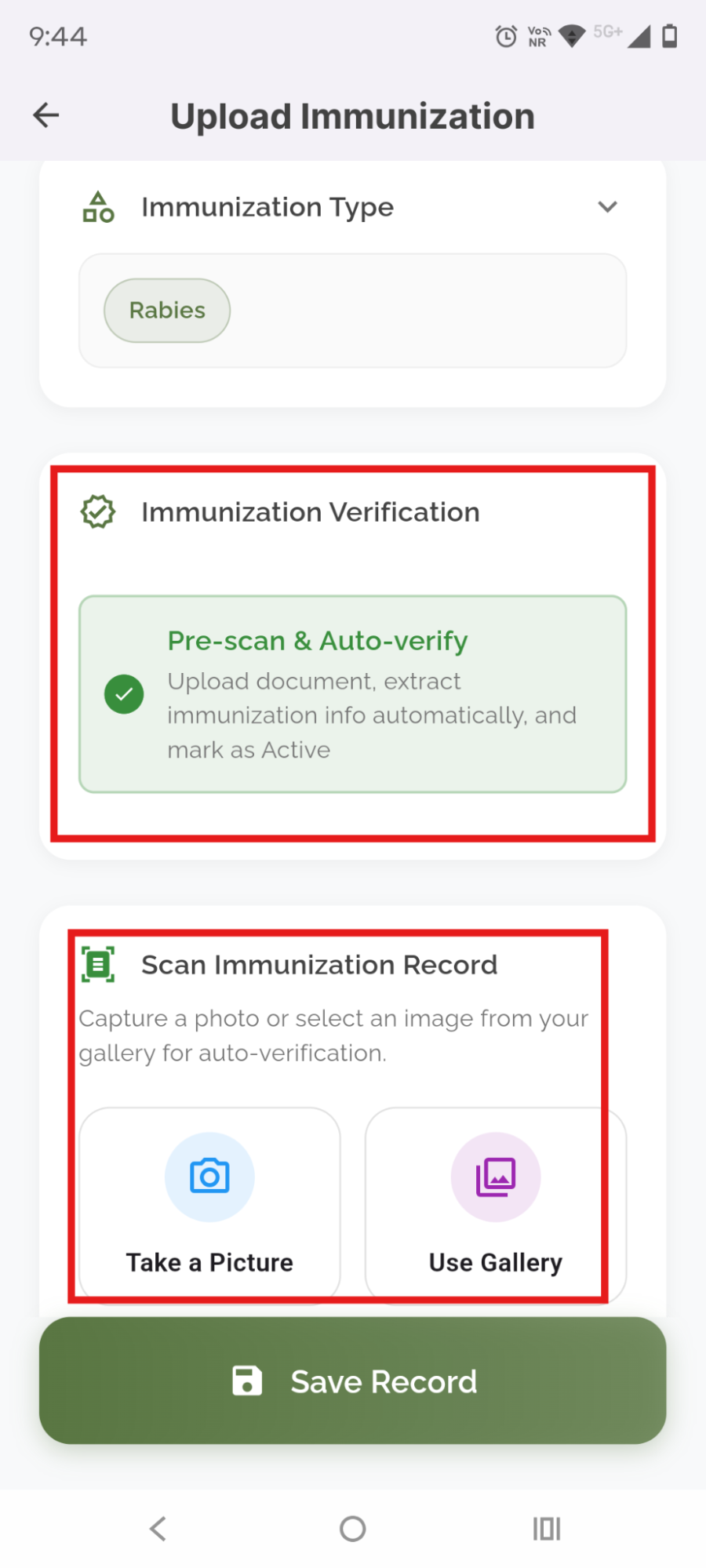
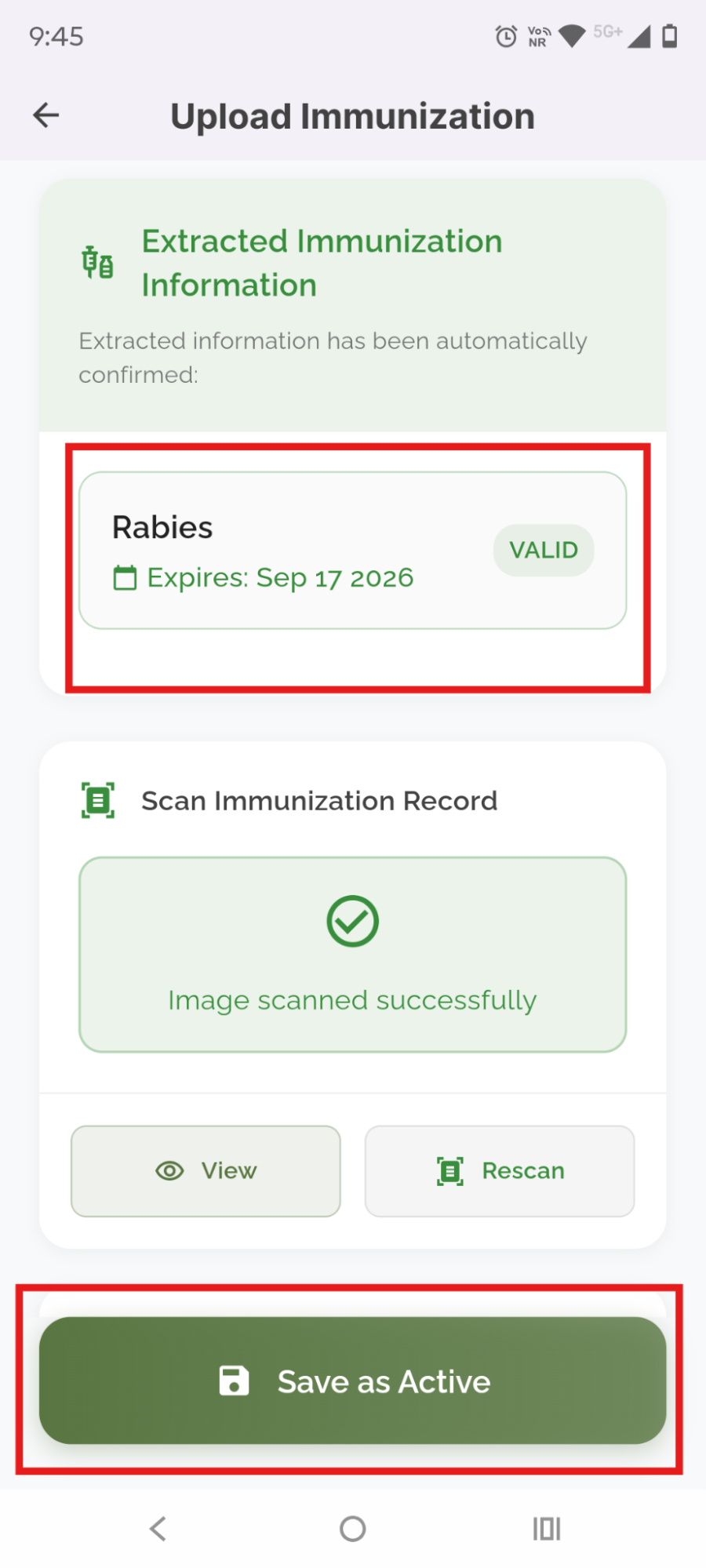
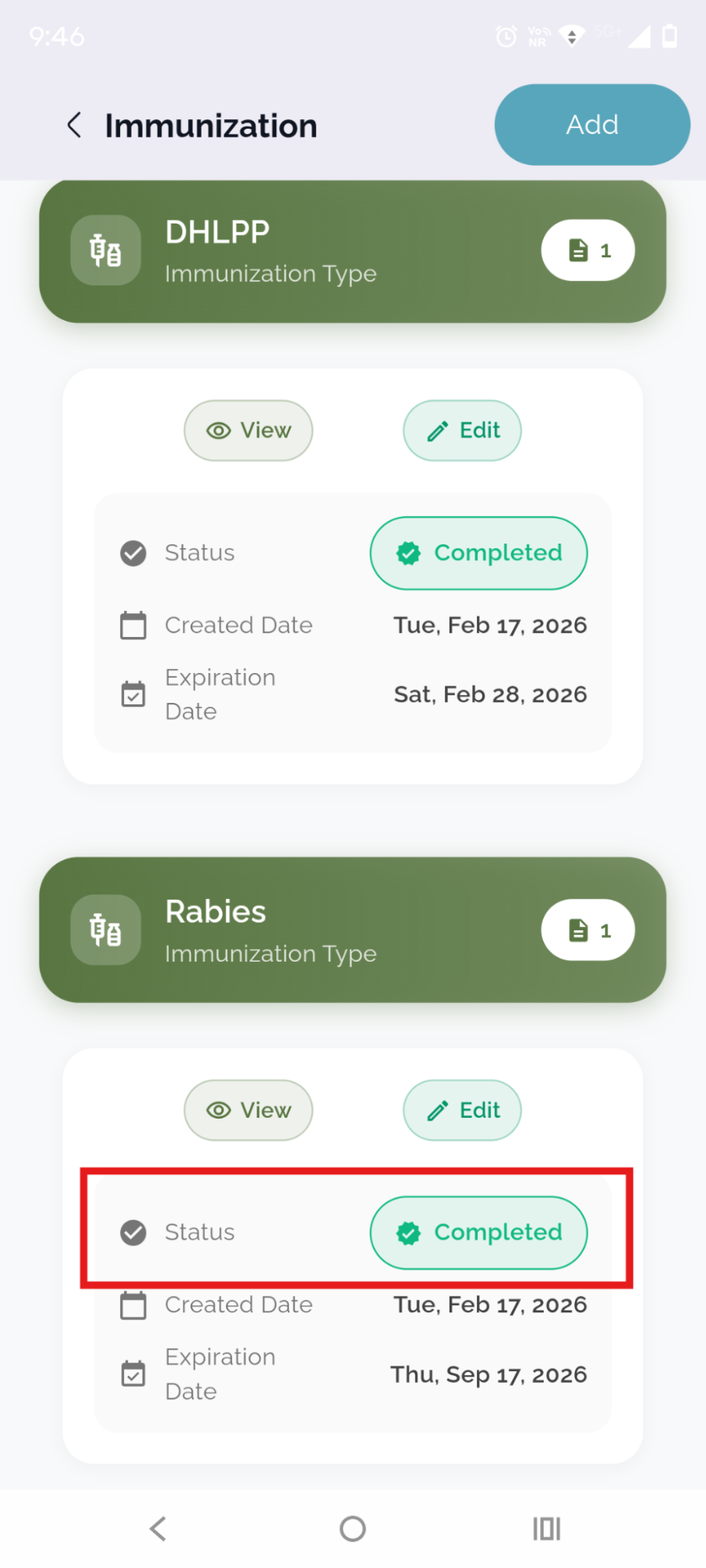
- ScoutAI Verified Icon: In the Pet Profile section under the Immunization, you will now see a 'Verified by ScoutAI' icon next to records that have been validated using this automated feature. This ensures quicker and more accurate updates for pet vaccination data.
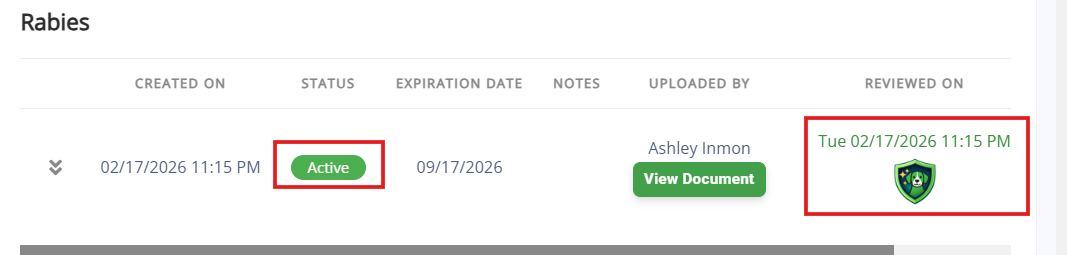
- New Tab for Scout AI Verified Records: A new tab titled "ScoutAI Verified" has been added to the Immunization section to provide easy access to AI-verified vaccination data.

- This feature requires an app release and will be available in March. If you would like this prioritized, please contact puppylove@runloyal.com.
Price book - View Service, Membership, Package, and Training Service Pricing
 :
- The Price Book allows you to view pricing for all services, memberships, packages, and training services directly without navigating to the appointment booking screen or settings.
- The Price Book displays estimated prices for services like Dog Boarding, Grooming, Memberships, Packages, and Training Services.
- You can quickly access and check pricing details from the Price Book interface.
- The Price Book option is available in the header of the Business Portal for easy access.

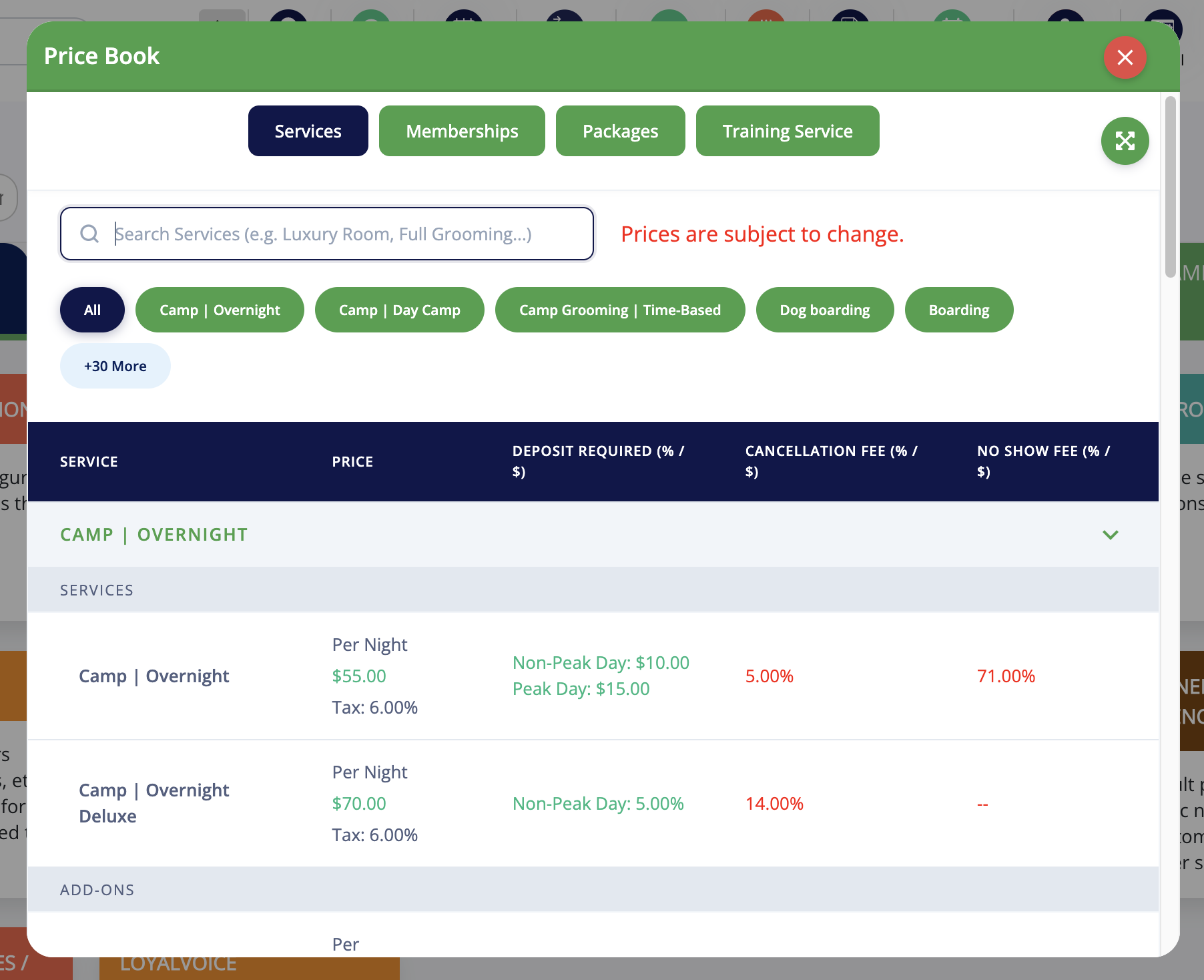
- The same will be available in the Pet Owner App and Booking link in the coming weeks.
Card - Manual Payment Option
- A new payment method, "Card – Manual," has been added for walk-in customers.
- Staff can manually enter card details directly on the payment screen without saving the card.
- This payment option is also available in Appointment Invoice.
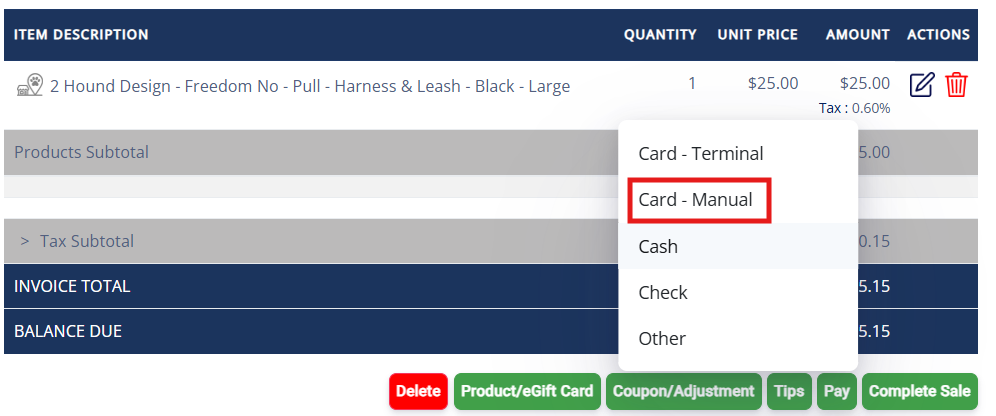
Credit Card Management
- Mark Default Credit Card: When multiple cards are added, you or your staff can mark one as the default (primary) card upon the Pet Owner's request for easier payment processing.
- Automatic Renewals: If a card is set as the default (primary) card, membership and package auto-renewals will be processed using that card.
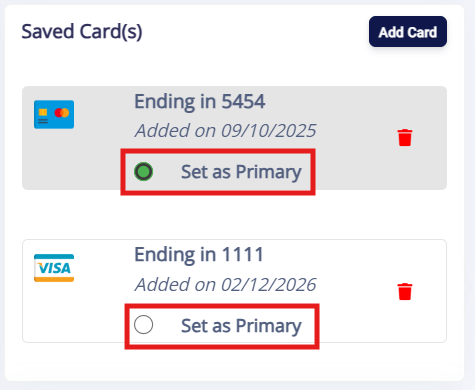
- This feature will be available in the Pet Owner app in March.
Push Marketing Enhancements
- Add Images in Push Marketing Campaigns: You can now add images to Push Marketing campaigns. This new feature helps to enhance the visibility and engagement of the campaigns by including visuals directly within messaging.
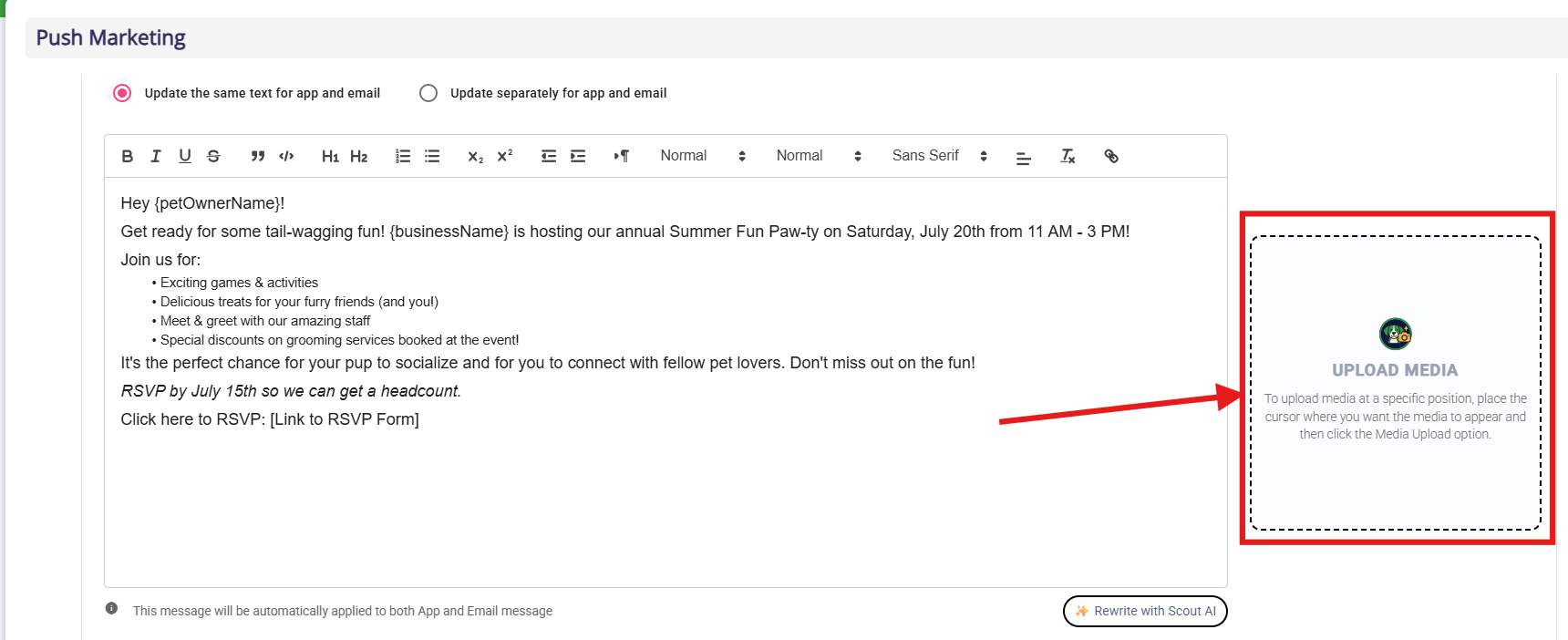
- Pre-Populated Prompt Options: In the "What are we creating today?" section, you now have pre-populated prompt options to streamline campaign creation. Select from a list of predefined campaign types like social interaction, training programs, special care packages, etc., to make your campaign creation faster and more efficient.
- Upload Media from Gallery and Device: You can now upload images for your campaigns directly from your gallery or device. This provides flexibility in selecting and using images that best represent your campaign.
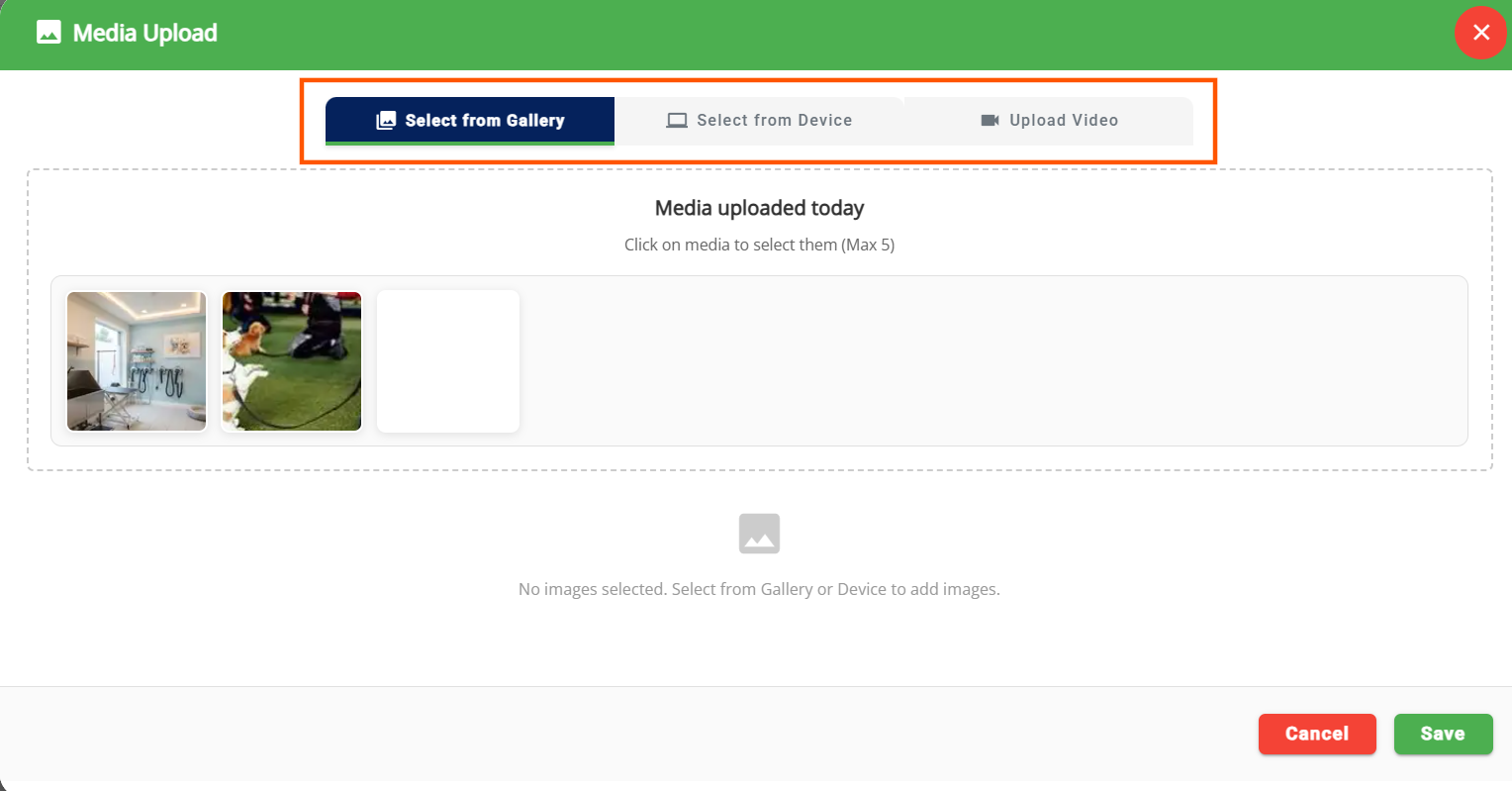
- Video Upload Available (Add-On): The ability to upload videos has been added to further enhance campaign engagement. Please note, video uploads are part of a paid add-on feature.
Quick Add-ons Edit
 :
- We've enhanced how add-ons can be quickly edited, providing staff with more control over managing add-ons during appointments.
- Where Quick Edit Is Allowed: Add-ons can be adjusted directly from:
- Daily Snapshot
- Appointments List
- Pet Profile
- Pet Owner Profile

- What's New:
- Searchable Add-ons: Staff can search and select add-ons to be applied to the appointment.
- Bundled Add-ons: Ability to quickly select bundled services and add-ons.
- Editable Dates: Modify add-on dates directly from the Quick Edit screen.
- Primary Services and Add-ons: Easily edit both primary services and add-ons within the same interface.
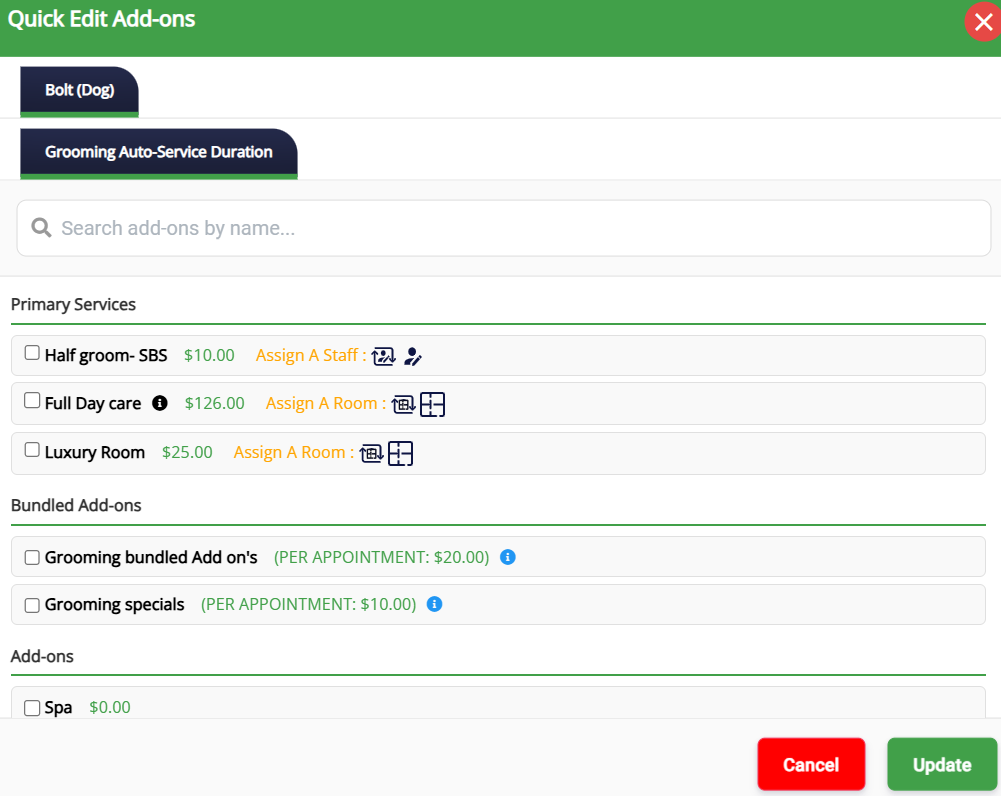
Customize Home Screen Display (Pet Owner App)
- You can now rearrange the display order of sections on the Pet Owner App home screen.
- Sections such as Attention Needed, Make Appointment & Group Based Training, Memberships & Packages, Pets, etc., can be reordered as needed.
- Configuration path: Settings → Operations → Customize Pet Owner App → Customize Display Order.
- This requires an app release and will be available in March. If you would like this prioritized, please contact puppylove@runloyal.com.
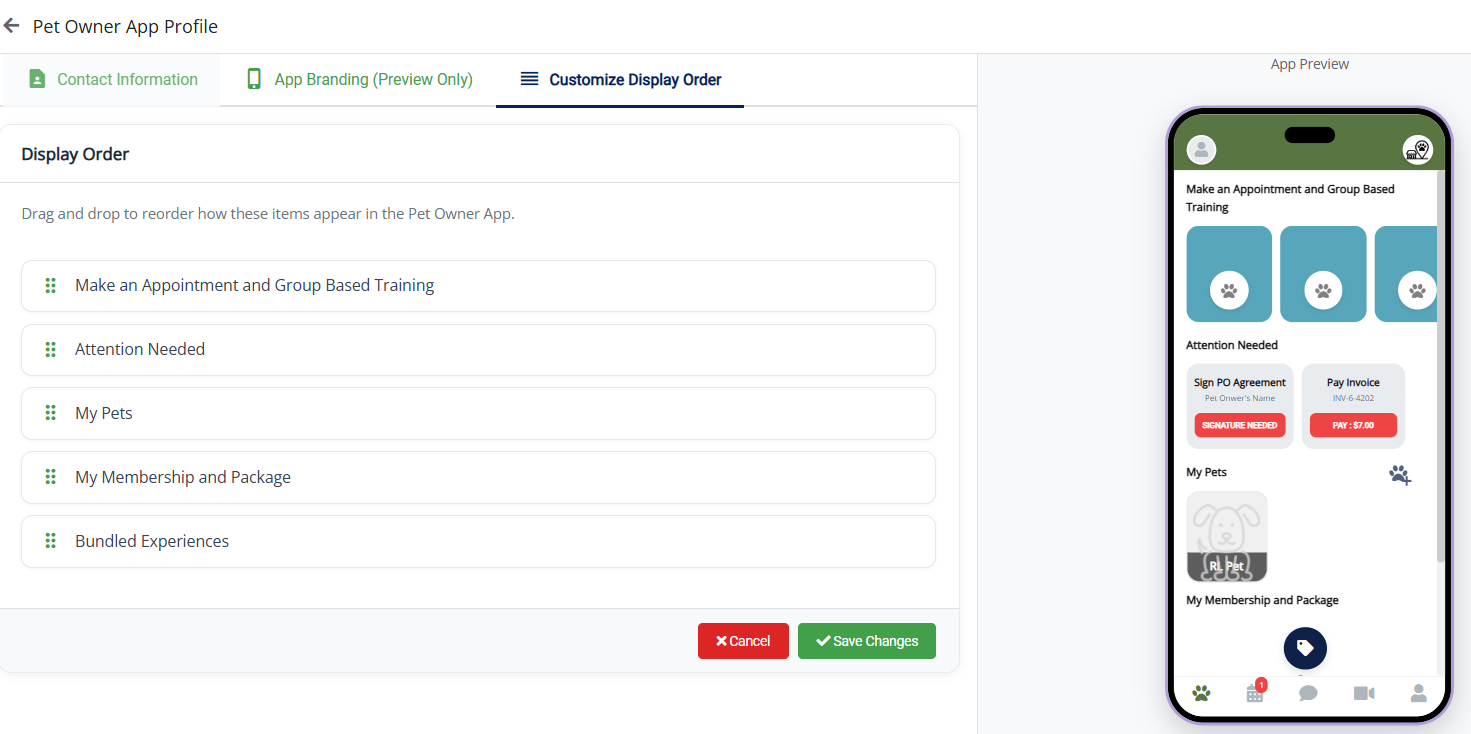
Staff Schedule Visibility
 :
- Non-Admin Staff Access: The Staff Schedule is now visible to non-admin staff in the header of the Business Portal by default.

- Staff Access: This enables staff members to access the Staffing Schedule and view shift details without requiring admin permissions.
- Personalization Settings: The visibility can be controlled through Personalization Settings → Operations → Personalization → Portal → Display Staff Schedule in Header (default: OFF).
- You can also print the Staff Schedule for easy reference.
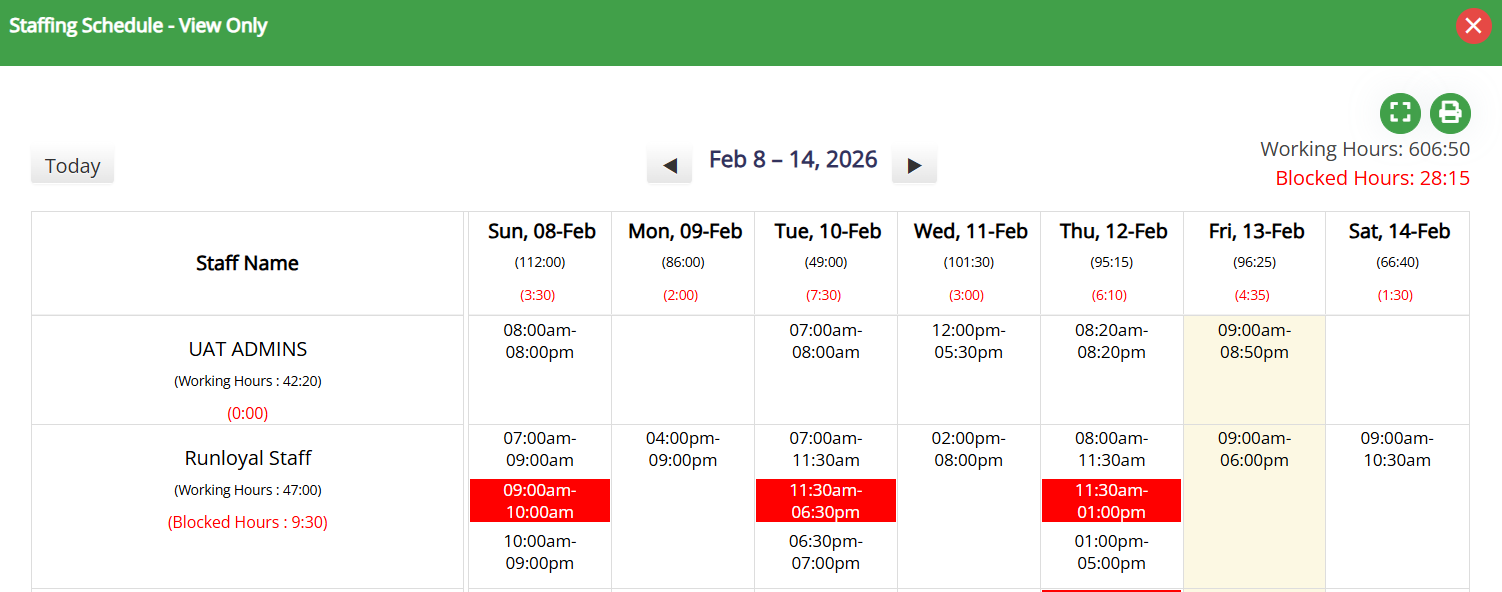
Staff Timesheet Access Restriction Enhancement
- You can now restrict View, Create, Edit, and Delete access to timesheets for both default and custom staff groups.
- Admins will continue to have default access to all staff timesheets.
- To update the access navigate to Settings → Business Setup → Staff Group → Access Related page → Time Sheet.
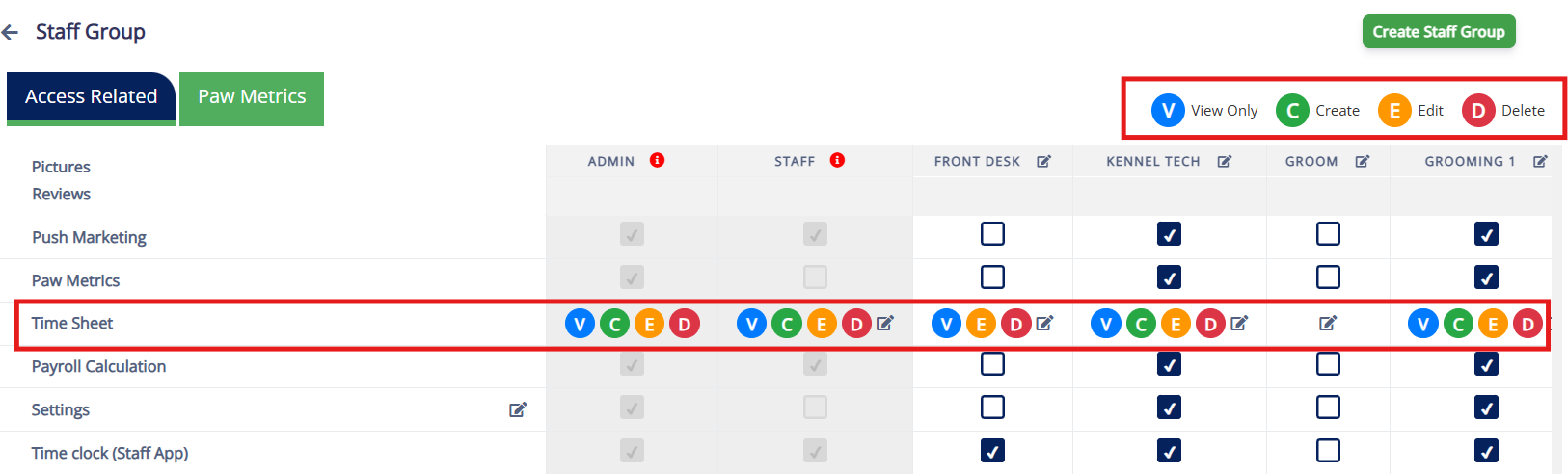
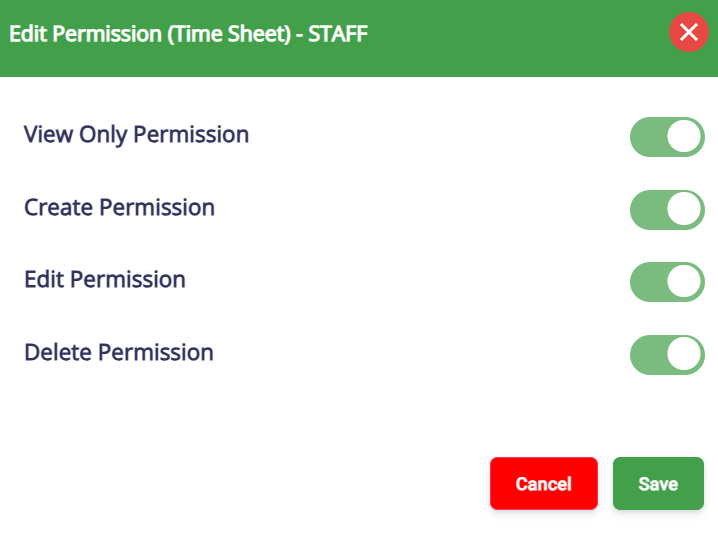
Staff Invitation for App access
- When Staff App, Staff App Plus Groomer, or Kiosk access is granted through Staff Management → Edit Staff Access, an App link is now sent via email to the staff.
- This behavior mirrors that of Pet Owner email invites.
Signature in Terminal
- Capture Pet Owner's signatures directly during terminal payments for secure digital record-keeping and improved transaction verification.
- What's New:
- Signature on Screen: Pet Owners can now sign directly on the terminal's touchscreen, capturing the signature digitally for your records. This signature will not appear on the physical receipt but is electronically stored to protect against chargebacks.
- Where to Configure:
- Navigate to Settings → Pricing → Point of Sale Terminal Configuration to enable the "Ask for signature during terminal payment" option.
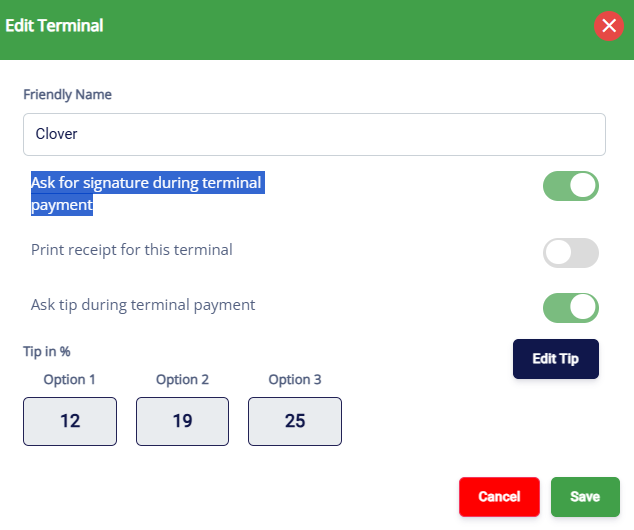
Retail Product Search New Filter
- A new filter has been added to the Product Listing page to display both active and inactive products under Settings → Retail → Product Inventory.
- Filter Options:
- All
- Active (default)
- Inactive
Family Member Validation for Capacity-Based Services
- Family Member Room Warning: A warning will appear when pets from different families are booked for the same room in capacity-based services (e.g., Daycare).
- You can control it through Settings → Operations → Personalization → Portal → Show only family member room warning for capacity-based services (default: OFF).
New Reports
- Booking Utilization Report: Added a new report that shows daily utilization across Lodging (unit occupancy), Capacity (pet-days), and Staff workload (appointments), including utilization percentages where applicable, with filters for date range and booking model type.
Enhancements
- Birthday Report: Added pet age and a separate birth year column to make birthday lists easier to review, sort, and filter.
- Monthly Sales Report: Enhanced adjustment visibility by showing coupon/discount names with clearer, detailed deduction breakdowns.
- Feeding, Medication, and Roll Call Report: Added a Pet Count column to help staff quickly validate daily totals at a glance.
- Revenue Reports (Date Selection): Added a date selection option so Total Revenue and Revenue by Service can be generated using either Payment Date or Invoice Created Date.
- Lodging Occupancy Report: Added a "Confirmed Occupied" column to make it easier to see which areas already have pets assigned while creating appointments.
- Active Pet Owners with Memberships Report: Expanded the report to include historical membership activity (not just currently active memberships) and added a linked detail view from the membership count showing pet owner, pet, membership, and expiration details.
V1.149.20260114.0101/14/202615 updates
Your RunLoyal portal has been updated with new features and enhancements!
LoyalVoice (add-on) - LoyalVoice Click & Call in Business Portal
- Call with LoyalVoice :

- You can now place phone calls directly from the RunLoyal portal using Call with LoyalVoice, making it faster and easier to connect with pet owners.
- You can also make calls to other numbers using Dialer.
- What's New:
- Make calls directly from the web without switching devices.
- One-click call access from:
- Global Search
- Daily Snapshot
- Appointments List
- Pet Owner List
- Pet Profile
- Pet Owner Profile
- Membership In House
- Calls use your configured LoyalVoice business number.
- LoyalVoice in Message Hub :
- Similar to inbound calls, you can also see the outbound calls made by your staff to the pet owners in the Message Hub
- You can also filter pet owner conversations by LoyalVoice in the Message Hub, making it easier to identify and manage voice-related messages.
- LoyalVoice Dialer :

- The LoyalVoice Dialer allows your front-desk and staff to quickly search and call pet owners directly from within RunLoyal or by entering phone numbers — without switching apps or copying phone numbers from your computer or from a mobile browser.
- This is enabled by default in the business portal where it'd show up in the bottom right corner.
- You can disable it by navigating to Settings → Operations → Personalization → Portal → Show LoyalVoice Dialer
- LoyalVoice Click & Call and Dialer is coming soon for Staff App + Groomers in the coming weeks.
Pet Owner and Pet Profile Mini Hub
- For quicker navigation, we have introduced a mini hub icon below the names in both the pet owner profile and the pet profile.
Peak Days, Early/Late Fee Pricing Rules enhancement
- We've enhanced Peak Days, Early/Late Fee pricing rules to better handle multi-pet appointments (default option is Aggregate).
- What's new:
- Added Multi-Pet Pricing options when creating pricing rules:
- Aggregate – Apply the rule based on the combined pricing logic.
- Least Price Only – Apply the rule to the lowest-priced pet or service.
- Per Pet – Apply the rule individually for each pet.
- Added Multi-Pet Pricing options when creating pricing rules:
Membership Pricing Rules Enhancement
- We've enhanced Membership Pricing Rules to give you more control over when and how membership pricing is applied. Currently, you can only select service categories and the rules apply to all the services and add-ons under that service category.
- With this release:
- After selecting 'Service Category', either you can select 'Services' option to select specific primary services and add-ons from the drop-down
Service Fee Tax Enhancement
- We've enhanced the Service Fee configuration to support tax calculation on service fees in states or areas where service fees are considered as taxable revenue.
- What's New:
- Added support to apply tax on service fees (default OFF)
- New "Tax on Service Fee" toggle allows businesses to enable or disable tax calculation on service fees
- Introduced a configurable Tax Percentage (%) field for service fees
- Tax on service fee is calculated separately from item and service taxes
Need Attention (Pet Owner App)
- Now you can control whether important pet owner alerts appear on the Pet Owner App home screen using a new Personalization setting.
- Navigate to Settings → Operations → Personalization → Pet Owner App → Show attention needed on the home screen.
- When Show attention needed in home screen is enabled, the app will surface key items that require action, including:
- Open invoices
- Agreement signature required
- Missing or expired immunizations
- Missing emergency contact
- 📝 Note: This new setting replaces the previous "Show open invoices in home screen as a banner" option and expands it to include multiple types of attention-required items in one place. This feature requires an app release and will be available in early February. If you would like this prioritized, please contact PuppyLove.
- This feature requires an app release and will be available in early February. If you would like this prioritized, please contact PuppyLove
Enter as Guest Option (Pet Owner App)
- A new setting has been introduced to allow the option to enter as a guest in the Pet Owner App.
- Navigate to Settings → Operations → Personalization → Pet Owner App → Show enter as guest option in pet owner app to enable or disable this option.
- When enabled, pet owners can choose to access the app as a guest, allowing them to view available services without the need to log in.
- This feature requires an app release and will be available at the end of January. If you would like this prioritized, please contact contact PuppyLove.
New Reports
- Daily Service Counts and Revenue Report – A unified report combining daily service usage counts and revenue in a single, consolidated view.
- Loyal Voice (add-on) Utilization Report – Introduced voice call usage tracking, similar to SMS utilization reporting.
Enhancements
- Revenue by Add-On Services Report – Added Customer Count column for clearer insight into add-on adoption and revenue contribution.
- eGift Card Report – Fixed date filtering, added gift card code, product name, card type, and PO email
- Customer Spend Report (Pet Owners) – Added Address and Phone Number fields to support better customer analysis and outreach.
- Lodging Unit Details – Linked Report - Enabled drill-down functionality from lodging area view to individual unit occupancy details
Several powerful upgrades will be rolling out over the coming weeks to enhance grooming and front-desk workflows in Staff App+ for Groomers.
Now Available
- Scout AI in Report Cards – Generate smarter, more meaningful report card notes automatically using Scout AI — saving staff time while improving communication with pet parents.
- Message Hub with Scout AI – Use Scout AI to help draft, improve, and personalize messages to pet owners directly from Message Hub.
- LoyalVoice Audio in Message Hub – Playback audio messages sent through LoyalVoice right inside Message Hub for easy review and follow-ups.
- Staff Chat – Real-time chat between staff members to coordinate grooming, care, and front-desk operations.
- Easy Check-In for Staff-Based Appointments – A simplified check-in flow designed specifically for groomers and staff-based services to reduce front-desk clicks and speed up arrivals.
- We are excited to announce the upcoming release of RunLoyal Front Desk Kiosk, featuring a more user-friendly and modern UI designed to greatly improve the experience for pet owners.
- This version makes pet owner sign-up, pet profile creation faster and easier than ever.
- A major new highlight is the introduction of the "Walk-In" feature, which allows pet owners to instantly create walk-in appointments based on kennel availability, select personalized services, and complete the process seamlessly with integrated invoice payment.
- Introducing a refreshed, ultra-modern UI for the RunLoyal Client Portal, delivering an enhanced experience for pet owners to manage their bookings, pets, payments, immunizations and messaging from their web browser without having to use the pet owner app!
- This beta release is designed to enhance usability, increase conversions, and deliver a premium, seamless booking experience for pet owners. If you are interested in participating in this beta, please email us at puppylove@runloyal.com.
V1.148.20251218.0112/18/202515 updates
Your RunLoyal portal has been updated with new features and enhancements!
Staff Chat (Beta) 
- We've introduced Staff Chat, a built-in messaging tool that allows Admins and Staff to communicate instantly inside the RunLoyal portal — without needing any external messaging apps. This feature is turned on by default; however, you have the option to turn it off.
- This feature can be controlled through Personalization - navigate to Settings → Operation → Personalization → Show staff chat icon (default: ON).
- Free for All Admin & Staff
- Instant Messaging Anywhere - Chat directly from any page in the portal.
- Quick Access Icon - Staff Chat opens from the bottom-right corner.
- Last 3 Days of Messages - View recent conversations with automatic live updates.
- System Groups Included - Admin Group and Staff Group available by default.

- New Message Alerts - A notification pop-up appears on the top-right corner whenever a new message is received.

- You can also see new staff chat messages under Notifications → Staff Chat if the pop-up notification is missed.
- The notification bubble will only be shown to the Pet Owner related count.

- Paid Add-On Feature
- Chat With Existing Custom Staff Groups - Outside of the default Admin and Staff group, you can also chat with the existing custom staff groups you have created (Grooming, Training, Front Desk, etc.)
- Create Custom Chat Groups - Build your own custom chat groups (such as a lead groomer, your general manager and a front desk etc..)

- Unlimited Message History - No more 3-day limit.

LoyalVoice (add-on)
- Now you can use your existing 2-way text number as a business number to receive phone calls and have them:
- Forward to any number (up to 3 numbers)
- Time based routing based on your business hours and then to forward or to voicemail
- Sent directly to Voicemail
- You can customize the default greetings and voicemail message based on your convenience.
- You will be notified about the incoming calls through notifications.
- You can receive these voicemails and play them in the Message Hub with the pet owner context (if the incoming phone number is the same as pet owner's profile number).
- In the coming weeks, you can receive the voicemails in the StaffApp and StaffApp+Groomers as well.
- In early 2026, LoyalVoice will be extended to support voice based reminders to your pet owners as well with the customized messages based on your preferences.
Appointment Quick Edit 
- We've enhanced how appointment times can be updated quickly, giving staff better control over schedule updates.
- This enhancement can be controlled through Personalization - navigate to Settings → Operation → Personalization → Allow editing start/end time for capacity based services and editing start time and early pick up date/time for lodging based services (only for checked in appointments) (default: OFF).
- Where Quick Edit Is Allowed
- You can adjust appointment times directly from:
- Daily Snapshot
- Appointments List
- Pet Profile
- Pet Owner Profile
- What's New
- Same-Day Only Editing : Only checked-in, same-day appointments can be edited using Quick Edit.
- Capacity-Based Services : Staff can update start and end times only for checked-in appointments, ideal for hourly or daycare-based services.
- Lodging-Based Services : Staff can update both start and end times only for checked-in lodging appointments.

This enhancement provides faster adjustments, and keeps daily operations running smoothly.
Lodging Based Assignment Enhancement Split Booking with Auto-Assign (Portal Only)
- We've introduced smart split-room booking when a single room isn't available for the guest's full stay. The system now automatically checks multiple room options, applies all kennel rules, and creates a seamless booking with clear visual guidance.
- This enhancement can be controlled through Personalization — navigate to Settings → Operations → Personalization → Portal → Enable split booking & shared-room auto assignment for lodging services.
- What's New
- Automatic Split Room Assignment : If no single room is available, the system intelligently finds two rooms that can cover the full stay and assigns them automatically.
- Time-Based Room Availability : Time-based booking is supported — for example, if a dog checks out at 10:00 AM, another dog can be assigned to the same unit at 10:05 AM ET.
- Manual Room Selection Required :
- Split booking will not work if there is a family pet configuration, friend/enemy compatibility, or room weight limits that prevent the assignment.
- When this happens, staff will need to manually select appropriate rooms to complete the booking.
This enhancement ensures maximum occupancy, fewer booking rejections, and complete clarity for staff managing multi-day stays.
Custom Unavailability Message (Pet Owner App)
- You can now customize the message shown to pet owners when no appointment slots are available. This setting is managed through Personalization and allows you to control the exact message displayed in the Pet Owner App.
- Navigate to Settings → Operations → Personalization → Pet Owner App → Customize your message for no slot available.
- This requires an app release and will be available in early January. If you need to be prioritized, contact PuppyLove.
Message Hub
- Mini Hub

- We've introduced a new Mini Hub, making communication with pet owners faster and easier.
- You can now access messaging directly from the places you use the most :
- Daily Snapshot
- Appointment List
- Pet Owners List
- Pet Owner Profile Page
- Invoice
- What's New
- Go to Message Hub : You can jump to the full Message Hub directly from the Mini Hub pop-up whenever deeper conversation history or advanced actions are needed.
- Quick Messaging Anywhere : Open and send messages directly from Daily Snapshot, Appointments, Pet Owner page, and Invoice - no screen switching.
- Instant Delivery Status : See App / SMS / Email delivery icons at a glance to know whether the message reached the pet owner.
- Streamlined Workflow : Reply, review history, and send updates instantly, helping staff communicate faster during busy operations.
- Direct Navigation to Pet Owner Profile : You can now jump straight to the Pet Owner's profile from Mini Hub by clicking on the Pet Owner's name—making it easier to review details or take follow-up actions without leaving the conversation.
- Fully Synced : Mini Hub stays in sync with the main Message Hub, ensuring all conversations remain up to date.
- ScoutAI : can also be used within Mini Hub for creating a personalized communication to the pet owner

- App Message Deliverability Status in Message Hub
- Now you can also see app-message deliverability under Message Hub (requires an app release and will be available in early January. If you need to be prioritized, contact PuppyLove).
- Message Hub Update – Last Message Time
- The Message Hub now shows the last message time in the left-side conversation list.
- This makes it easier for staff to scan conversations, identify recent activity, and respond faster.
Advanced Staff Calendar(ASC) Enhancement
- Direct upload of Immunization in Advanced Staff Calendar
- You can now upload vaccination documents directly from the Advanced Staff Calendar (ASC) while viewing or editing an appointment.
- This makes it faster for staff to update immunizations without navigating away from the booking.
- What's New
- Upload pet vaccination documents straight from the appointment view in ASC.
- Add expiration dates, notes, and files in one step.
- Saves time and keeps records accurate during check-in or grooming appointments.

This enhancement streamlines daily operations and improves staff efficiency when updating immunization records.
Retail enhancements
- Order Physical Gift Card through a partner portal
- You can now easily order physical gift cards directly from the eGift Card module.
- Navigate to Settings → Retail → eGift Card → Order Gift Card.

- What's New
- Order Physical Gift Cards in Bulk : Select any existing/newly created eGift card design and choose the quantity you want to order.
- Automatic Code Generation : The system instantly creates unique codes for each card and downloads them in an Excel file.
- Seamless Printing Workflow : After downloading the file, select Upload Downloaded File to be taken to the printing partner's site to complete your physical card order.


This enhancement simplifies the process of ordering professionally printed gift cards with unique, trackable codes for your business.
- Apply eGift Card and Physical Gift Card Credits Directly from the Invoice Screen
- You can now view and apply eGift Card credits directly from the invoice screen.
- This enhancement ensures staff can immediately see available eGift Cards during checkout, preventing missed redemptions and avoiding situations where a pet is checked out without applying the customer's gift balance.

- Retail Sales Commission (Part of Advanced Staff Feature Add-On)
- You can now track sales commissions for retail sales as part of the Advanced Staff Feature (ASF). Staff can be assigned to a retail product during checkout in the portal, and commissions are automatically calculated.
- What's New
- Per-Product Commission Setup : Enable commissions at the category level and individual product level, and configure percentage or dollar commissions within each staff profile.
- Automatic Commission on Sale : When a retail item is sold, the system applies the assigned commission to the staff.
- Integrated Reporting : Retail commissions appear in the Staff Commission Report alongside service commissions, with product-level detail and visibility in invoice history.
- Staff Assignment at Checkout : When adding a product to the cart, select the staff member for the sale. This ensures the correct commission is applied and shown in the invoice history after checkout.
- Multi-Select Staff Assignment : You can now assign or multi-select staff for both service and retail sales commissions from a single assignment flow during checkout.
- Retail Commission icon :
 Retail products with sales commission enabled now display a sales commission icon, making it easy to identify commission-eligible items at a glance.
- Where to Configure
- Category Level: : Settings → Retail → Category → Enable sales commission
- Product Level : Settings → Retail → Product Inventory → Enable sales commission
- Staff Profile : Settings → Staff Management → Edit Staff → Services, Tips & Commissions → Retail → Add commission (Percentage / Dollar)
Quick Checkout enhancements
- Multiple Quantity Purchase for Same Packages in Quick Checkout (Non-Recurring)
- You can now purchase multiple quantities of the same non-recurring package directly through Quick Checkout (Portal only). This allows staff to sell several numbers of a package in one transaction without repeating the process.
- What's New
- Multi-Quantity Support : Staff can check and sell more than one quantity of the same package at Quick Checkout before completing the sale
- Streamlined Workflow : No need to add the same package multiple times — one action handles all quantities.
- Accurate Tracking : Package balances update correctly based on the number of packages purchased.

This enhancement makes package sales faster and more flexible for both staff and pet parents.
- Add Pet Owners During Quick Checkout (Walk-In Customers)
- While searching in Quick Checkout for walk-in customers, you can now directly add a new pet owner on the spot.
- This makes it easier to complete retail, package, or membership sales without leaving the checkout flow.
Report Cards
- Quick Preview & Navigation
- You can now quickly preview report cards using the eye icon under the Actions column
- This preview option is available only for report cards in the "Ready to Send" status, allowing staff to review the final layout, photos, and notes before sending.
- This enhancement streamlines the review process and ensures accuracy before delivery.

- Smart Update – New Checkout Filter for Report Cards
- You can now filter pets by Checked Out status directly inside Smart Update, making it easier to prepare and send report cards right after appointments are completed.
- Checkout Filter Added : Quickly show all pets that have already checked out for the day.

Support for mapping multiple areas to one camera and multiple cameras to one area (Only for Camera add-on customers)
- Now you can map a more than one camera to a single unit in the visual map (under Settings → Camera → Camera Map)
- This enhancement gives more flexibility when setting up camera layouts inside the portal on what cameras the pet owners can see in the app.
Gallery Enhancements
- The Gallery has been upgraded for a smoother and more flexible media experience.
- You can now upload multiple pictures at once from your computer or phone browser.
- Pet photos can be modified using Scout AI directly from the gallery.
- Any image enhanced by Scout AI will be marked with an AI icon for easy identification from Message Hub, Report Card etc.

Business Address on Receipt
- Business address and contact information are now displayed on receipts and included when printing.
New Reports
- New Customer Acquisition by Service Type : Displays the number of new customers grouped by service category and service name, highlighting which services first attracted new customers for a selected date range.
- Daily Service Counts & Revenue Report : Displays the number of services provided and the revenue generated per service category for a selected date range.
Enhancements
- Discount Report : Added a radio button that allows customers to choose the date basis for the report: Invoice Created Date or Payment Date.
- Overdue Immunization Report and Immunization Status Report : Added a Mobile Number column for better customer visibility.
V1.147.20251119.0111/19/202511 updates
Your RunLoyal portal has been updated with new features and enhancements!
New Report Cards Workflow
- The report card process has been improved with a new workflow for better tracking and management. Now, your staff members can update the report card during the day and save it (shows under 'In Progress') and once done, mark it as 'Ready to Send' for your front office to review and send it in the evening.
You can also preview the report card easily from the 'Ready to Send' status before sending it.
Status filters added with new categories:- Not Started: Report cards that are yet to be worked on.
- In Progress: Report cards being processed.
- Ready to Send: Report cards ready to be sent to pet owners.

- Smart Update Button: Now provides an improved user experience by offering enhanced options.
- Report Card Actions: Added functionality to Add & Ready to Send, alongside the existing Add to Report Card and Add & Send Report Card buttons for better workflow.

- Report Card Preview:
- You can now preview report cards that are in the "Ready to Send" status before sending them.
- Now, you can easily check the content by clicking the Preview icon under the Actions column for any report card.

Scout AI Integration for Push Marketing
- AI-Powered Content Generation: The system now supports AI-assisted message creation for both App and Email campaigns.
You can choose to update the same text for both App and Email, or customize messages separately for each platform.
Ease of Use: The Generate with Scout AI button allows quick generation of campaign messages, streamlining the process of marketing communication.

Scout AI Integration in Message Hub
- AI Image Editing: Automatically enhance images with features like background removal and artistic styles (e.g., holiday themes).
- Personalized Messaging: Generate dynamic, AI-powered text messages based on pet mood and situation, reducing manual input.
- Simplified Workflow: Scout AI now handles both image enhancement and text generation, streamlining the process for kennel owners.

This update makes creating personalized, engaging messages faster and easier for kennel owners.
Message Deliverability (comming soon)
- Now, in the Message Hub, you can view the status of messages sent to the Pet Owner's App, SMS, or email.
- Refer to the legend to quickly identify the status. In upcoming releases, these status icons will also be displayed next to the Pet Owner's name if the message is undelivered, allowing you to quickly review and update the correct information or notification preferences.

Customizable App Branding (Preview Only)
In Settings→ Operations→Customize Pet Owner App:
- Custom Branding: Kennel owners can preview and request primary and secondary colors, app name, display name, and app logo.
- Real-Time Preview: Changes are instantly reflected in the app preview screen for easy review before finalizing logo and branding.
As app branding may require a new app release, additional fees may apply.

External Link Sorting under Service Configuration for Pet Owner App and WebLink
This is only applicable to kennel owners who use the external link feature to display links such as events or restaurant menus in their Pet Owner app. If you're interested in learning more about using external links, please contact puppylove@runloyal.com.
- External links can be sorted in the service configuration list, making it easier to organize and manage.
- Events are now visible under Settings → Business Setup → Service Configuration.
- Add External Links: Reach out to PuppyLove to add any desired external links to the database for easy integration.

This feature improves the organization and management of external links within the service configuration settings.
Dynamic Notes for Appointment Cancellation
- Appointment Cancellation UI for Kennel Owners:
- When canceling an appointment, kennel owners can select a predefined cancellation reason from a list or manually enter one.
- Predefined options include Pet Not Eligible, Health Concerns, Incomplete Vaccinations, System Scheduling Error, Staff Shortage, Unpaid Balance, and more.
- Kennel owners also have the option to notify the pet owner about the cancellation directly from the UI.

- Dynamic Cancellation Reasons Configuration:
- Cancellation reasons can be customized and managed by kennel owners under Settings → Operations → Dynamic Notes → Appointment.
- New cancellation options can be added and configured to better suit the business needs.

To-Do
- Feeding and Medication To-Do List (View & Print):
- Feeding Quantity & Schedule and Feeding Instructions are now grouped together for easier review and printing by your kennel staff
- This grouped information will be displayed consistently in both list view and print view for easy reference.


- Sorting of Area and Unit in Visual Map reflecting in To-Do List:
- The Area and Unit details from the Visual Map list sorted view based on your preferences, now will now be displayed in the To-Do List in the same order.
- This ensures that kennel owners and staff can track areas and units consistently in their preferred sorting order.
Pet Owner Agreement Enhancements
- Pet Owner Agreement prompt during sign up in the app:
Now you can set up an agreement to pop-up during the pet owner signup in your pet owner app (in client portal coming soon). You can set this up under Settings→Business Setup - Agreements (Same for Membership customers under Membership → Membership agreements). - Auto-send agreements to pet owners:
When your staff adds a new pet owner in RunLoyal Business Portal, if you have the 'Per Household' and 'During Pet Owner Signup' settings enabled, it will automatically send a notification based on the notification preferences to the pet owner to streamline the process.
New Reports
- Daily Feeding, Medication, and Roll Call Report : This report provides a simple overview of the daily activities for pets, including their feeding times, medication administered, and roll call check-ins, all for a selected date range. It's designed to help staff track and manage pet care efficiently.
- Notes Report : This report shows pet owner and pet details along with any notes related to their appointments, including the type and description of each note. It helps staff easily track important information for a selected time period.
Enhancement
- Membership Sales by Staff : Added a 'Type' column to identify whether the membership sold is a first-time purchase (one-time purchase), a first-time purchase (recurring), or a renewed membership.
V1.146.20251106.0111/06/202517 updates
Dear RunLoyaler,
We've launched new features, usability improvements, and bug fixes. Please review the updates below.
Some of the features below require a new update to your pet owner app to function. Please reach out to puppylove if you'd like to get your app added to the top of the list!
To simplify, anything marked in orange is related to your staff and internal operations.
RunLoyal Bark (Promotions)
RunLoyal Bark: Automated Promotions for Your Pet Owner App
We are excited to introduce RunLoyal Bark that allows kennel owners to easily create and manage promotional messages that can be sent to your Pet Owner App triggered by specific events that you configure.
- Target Platform : Kennel owners can now create new promotional messages for Pet Owner's App (Requires an app release and reach out to puppylove to prioritize your app!)
- Event-based Triggers : Create messages that appear based on selected events, such as when the app opens, after creating an appointment, after sign-in, or on adding a card etc.
- Message Composition : Kennel owners can compose their desired message directly or leverage ScoutAI to auto-generate the message body. A message preview is displayed on the right-hand section for easy review.
- Customizable Styling : Customize the message's text color, background color, and the appearance of the "OK" button. Option to include action buttons (e.g., "Open URL" or "Dismiss") for enhanced interactivity.
- Push Notifications : Messages can also be sent as push notifications by simply checking the respective option. The same message text will be used for the notification.
- Scheduling Options :
- Schedule Type : Choose between immediate sending (Send Now) or scheduling for later.
- End Date : Define when the message should stop being sent, either never or by a specific end date.
- Per-device Frequency Limit : Choose to send the message only once per device, or allow recurring sends based on the frequency of the event in the given schedule.
RunLoyal Bark Creation Workflow: You can set this up under the Settings → Promotions section.
- Step 1: Target Platform – Choose where the message will appear. With this release, only the Pet Owner App is supported and it's coming soon to other platforms.
- Step 2: Message Content – Create your message content, including text, images, and button actions.
- Step 3: Scheduling – Define the schedule and frequency of your message.

RunLoyal Bark is designed to make promotional communication seamless and effective, allowing you to reach your customers with timely updates and promotions across multiple platforms.
📝 Note: RunLoyal Bark will be available in the coming weeks to our StaffApp, New Client Portal and Kiosk. Stay tuned!
Report Cards - Smart Update with Scout AI
How to Create and Send AI-Enhanced Pet Report Cards  We've launched Smart Update for report cards powered by Scout AI to simplify and speed up report card creation for both Appointments and Training Services using Scout AI Writer and Scout AI Media.
- Now you can easily select pictures from Gallery and select single or multiple pets, filter them by service or membership and use Scout AI to generate a cool new picture of the pet or generate text to update Report Cards.
- You can use pre-generated prompts or type your own text and use AI to generate new prompts. You could use the AI to enhance the existing image quality as well.
- Pre-generated prompts with the pet names automatically get updated with the selected pet name automatically.

What's New:
- Smart Update Workflow : Easily upload media and generate report cards in bulk for all checked-in pets. Filter pets by: Specific Pets, Checked-in Pets, Services, Memberships, and Filter by Training Classes for Training Services.

- Seamless Media Selection : Choose multiple images from your gallery or upload directly from your device. Preview and tag photos for each pet before sending.
- AI-Powered Text with Scout AI : Instantly generate friendly, professional, and personalized report card notes using Scout AI — or write your own.
- Step-by-Step Guided Flow : Every step is clearly marked: Filter Pets → Select Media → Add Notes → Review & Send. You can skip steps or review before sending to stay in full control.


- Confirmation and Bulk Send : Confirm uploads with one click and apply media or notes to multiple report cards at once.
- Benefits:
- Speeds up daily report card creation.
- Ensures consistent, high-quality communication with pet owners.
- Combines AI text with personal touch.
- Reduces repetitive work for your staff.
This update improves efficiency, ensures consistency in communication, and gives every pet a polished, personalized report card experience.
For example a picture on the left side could be made into a Thanksgiving theme one-click using Scout AI!

Customize Pet Owner App Colors and Your Business Information
We've introduced a new option to personalize the Pet Owner App, allowing kennel owners to align the app with their business identity. This can be accessed under Settings → Operations → Customize Pet Owner App.
- Business Information Setup : Add or update key details such as Business Name, Contact Manager, Email, Mobile Number, and Address. Supports Google auto-complete for faster and accurate address entry.
- Business Hours Configuration : Define and display operating hours by day to keep pet owners informed of your availability.
- App Branding (Preview Only) : Preview the app's appearance by selecting your Primary and Secondary colors. Once the preview is done, you can notify puppylove on requesting the changes as these may require an app release.

This enhancement enables businesses to easily update branding and essential contact details — ensuring consistency and a more personalized experience for pet owners.
📝 Note: This requires updates to the Pet Owner App which will be released in the coming weeks.
Staff Notification Preferences by Staff Group
We've added powerful new notification management options for kennel owners and admins to control how staff receive notifications. Under Settings → Business Setup → Staff Notification Preferences, kennel owners can now enable or disable email and in-app notifications for specific roles or groups across multiple event types — including appointments, memberships, payments, and messages. This update allows admins to decide which staff roles receive notifications for key events such as Appointment Requested, On The Way, Payment, and more — ensuring each team only receives alerts relevant to their function.
New Pet Owner Notification Preferences
- Membership & Package Renewal Reminder Enhancements : Now you can disable the notifications and receipts being sent to Pet owners when a recurring package or membership renewal happens. You can also manage the notifications related to membership and package successful renewals and failures under Pet Owner Notification preferences with custom messages. This only works with email notifications. Navigate to Settings → Business Setup → Operation → Personalization → Portal
- Membership/Package Renewals Notifications : Added new Pet owner notification preferences for membership/package renewal receipts, failures, and cancellations by kennel owner. Navigate to Settings → Business Setup → Pet Owner Notification Preferences:
- Package Subscription Renewal Receipt
- Package Subscription Renewal Failure
- Membership Subscription Renewal Receipt
- Membership Subscription Renewal Failure
- Package Subscription Cancelled by Kennel Owner
- Membership Subscription Cancelled by Kennel Owner
Business Portal Notifications Are Now Staff-Specific
With this release, the notification bubble at the top right of the business portal will now be staff-specific. This means that if one staff member reads a message, it will still appear as unread for other staff members using separate logins—ensuring that no messages are missed. However, staff members can choose to mark all messages as read by clicking on "Mark all as read."
Easy Agreement update with Re-sign and managing previous agreements
- Agreement Editing and Re-sign Options : Now you can easily make changes to your existing agreement and pick one of the options below for your pet owners:
- No changes needed (Pet Owners will not be notified or required to take action).
- Require Pet Owners to acknowledge changes while booking an appointment.
- Require Pet Owners to re-sign the agreement while booking an appointment.
- Agreement Versioning : Agreements now supports keeping track of the previous agreements of the pet owners (Signed, Expired, Requested, Request) for Appointment, Memberships, and Training Services Agreements.
- Agreement Expiry Management : Agreements auto-expire based on the configured expiry date, with statuses automatically updating to "Expired".
- New Agreement Type: Pet Owner Sign Up : The "Pet Owner Sign Up" option has been added under "Agreement Applicable For," allowing KOs to apply agreements specifically when new pet owners sign up.
- Agreement Access : System-wide UI elements (popups, status indicators) reflect agreement status.

Daily Snapshot
- "Message Client" Option : Staff can now quickly message Pet parents directly from the Daily Snapshot. A new "Message Client" option has been added to each row. Available on both Portal and Staff App views. No impact on existing actions like Edit, Check-in, or Check-out.

This update makes communication faster and more convenient without leaving the snapshot view.
- View Report Card : Staff can now view and send a pet's report card directly from the Daily Snapshot using the new Update & Send Report Card option in the overflow menu. This feature allows quick access to report card details without leaving the snapshot, improving operational efficiency.
- Checked-In Pets : "Update & Send Report Card" option is available.
- Checked-Out Pets : "View & Resend Report Card" option is available.


This streamlines the process of managing pet reports and saves time during daily operations.
- Add-On Service Visibility : We've enhanced the Daily Snapshot to display Add-On Services directly beside the main service. A new
 icon now appears next to the service name. Hovering over this icon shows all associated Add-On Services for that appointment. This improvement helps staff quickly view every service scheduled for the day - including add-ons - without opening individual appointments, ensuring smoother operations and no missed tasks.

- Reduced Horizontal Scrolling for Daily Snapshot:
- We've enhanced the daily snapshot by stacking services vertically, reducing horizontal scrolling for easier viewing when there are more than three services
- Navigate to Settings → Business Setup → Operation → Personalization → Reduces horizontal scrolling in the daily snapshot by stacking services vertically for easier viewing when there are more than three services.
Message Hub (All Tab)
- Default Date Range : The All tab in the Message Hub now defaults to display messages from the last 6 months. Users can still customize the view using the date range selector to filter messages by any desired period.

This update improves performance and ensures quicker access to recent communication history.
- Text Formatting Options : We've enhanced the Message Hub to support rich text formatting when composing messages for the Pet Owner App. Staff can now format messages using bold, italic, link, strikethrough, numbered list, and bullet points for clearer and more structured communication.

Waitlist management in Advanced Staff Calendar(ASC)
The new Waitlist Management feature in the Advanced Staff Calendar (ASC) allows staff to efficiently manage waitlisted staff based appointments easily by dragging and dropping to the calendar and also move the confirmed appointments to the Waitlist.
- Waitlist Icon : A new icon in the top-right corner of ASC indicates the waitlist.
- Appointment Sorting : Waitlisted appointments are sorted by creation time (oldest first) for efficient handling.
- Deposit Filter Sorting : Added sorting functionality for the Deposit filter in the Waitlist Management view, improving sorting of appointments based on their deposit status.
- Drag-and-Drop Functionality : Staff can quickly move appointments to available time slots by dragging and dropping.
- Conflict Alerts : Conflict warnings appear if a staff member is already booked, with the option to override.
- Auto-Refresh : The waitlist queue auto-updates with new unassigned appointments.
- Audit Tracking : All appointment assignments are logged for traceability.


These features streamline appointment management and ensure fairness in workload distribution.
Streamlined Access to Appointment Specific Questions & Answers(Q&A) and Feeding/Medication Information
We've added a new enhancement to make it easier for Kennel Owners to access answers to questions and Feeding/Medication details provided by Pet Owners during check-in and for confirmed appointments.
- Overflow Menu Access : Now, Kennel Owners can view answers to questions directly from the Appointment View using the Overflow Menu. This allows for quick access to Feeding/Medication and Question/Answer details without navigating to the Pet Owner's page.
- Prompt for Q&A and Feeding /Medication : During appointment creation in the portal, staff will be prompted to fill in Q&A and Feeding/Medication details, ensuring they are recorded upfront based on personalization.
- Pet Owner App Notification : Kennel owner/staff can request Pet owners to fill in Q&A.

This new feature helps streamline the check-in process by providing Kennel Owners with easy, on-the-spot access to important information, enhancing operational efficiency.
📝 Note: These updates require changes to the Pet Owner App which will be released in the coming weeks.
To-Do
- Display Description in List View : Descriptions are now visible in the To-Do list view, providing better context and clarity for each item.

- Search by Pet's First Name and Pet Owner's Second Name in To-Do section : Improved search and print view in the entire To-Do section to support filtering and displaying records using the Pet's first name and Pet Owner's last name.
- Rooms Displayed in To-Do List based configured Visual Map order : Rooms in the To-Do list are now shown in a chronological order, including Full Run Card, Add-on, Roll Call, Feeding, and Medication, helping staff easily follow the daily schedule.
- Reduce Font Size in Print View : The font size in the print view has been reduced for a more compact and readable layout. This change helps reduce the number of pages when printing, improving efficiency and making printed documents more manageable.
"Other Active Memberships" Column Added in Membership Status
We've enhanced the Membership Status view by adding a new "Other Active Memberships" column across all tabs — including Active, Expired, Frozen, Canceled, and Auto Renewal in Progress. This update allows staff to easily see if a pet owner has additional active memberships, improving visibility and reducing duplication during review or renewals.

Additional Emergency/Authorized Contact Slots on Pet Owner Profiles
Kennel owners can now add more emergency/authorized contacts to each Pet owner profile. The maximum number of contacts has been increased from 3 to 5. Each contact entry allows the inclusion of Name, Mobile, and Email (optional).

Tooltip for Leaving Time in Boarding Appointment and Visual Map Menu
We've added a tooltip feature for displaying the "Leaving" time for pets assigned to boarding appointments, based on the scheduled end date. This feature is visible in both the boarding appointment assigned screen and the visual map menu. Pets with scheduled "Leaving" times will be shown with the appropriate color-coded tooltip for easy tracking of their departure times. These updates streamline the appointment assignment process, ensuring better coordination and reducing errors during the check-in/check-out workflows.

Enemy Dog Alert During Calendar Drag-and-Drop (Capacity based booking such as Daycare)
- Soft Alert for Enemy Dog Conflicts : When staff drag and drop appointments in the calendar (capacity & lodging based), a non-blocking alert will appear if an "enemy" dog is already booked in that time slot.
- The alert message: "⚠️ We see some of the pet(s) in this appointment may not get along with the following pet(s): [Dog Name]."
- The alert will be non-blocking, allowing staff to proceed with the booking after acknowledging the message.
- Available in the business portal for your staff during capacity & lodging based booking.
- Available for easy check-in and membership check-in also.

Deletion of Draft Price Lists
Now Kennel owners and staff admins can now delete price lists that are still in Draft status. This allows for cleaner pricing setup by removing unused or incorrect drafts without publishing them. To delete, navigate to Settings → Pricing → Price List, where draft lists will display a Delete option. A confirmation pop-up will appear before deletion, and any dependencies (e.g., unpublished workflows) will block deletion until resolved. This action is logged in the Audit Log for traceability.

V1.145.2025093009/30/202518 updates
Your RunLoyal portal has been updated with new features and enhancements!
RunLoyal Scout AI (Beta)
We're excited to introduce RunLoyal Scout AI — smart tools to help your team save time and focus more on pets and provide a personalized update to your pet owners.
- RunLoyal Scout AI Insights :

Get insights on daily operations, scheduling efficiency and personalized experience for your pet owners. Access RunLoyal Scout AI Insights at the below screens and selecting the relevant prompts to get insights.- Daily Snapshot
- Calendar
- Advanced Staff Calendar
- RunLoyal Scout AI Studio :

- Use RunLoyal Scout AI Studio in Message Hub by clicking on the attach media icon and using Editor studio to pick the images from the Media Gallery and use the pre-existing prompts or type your own prompts (such as " Put Zuzu in a halloween costume and make it fly with a broom") to personalize the image to send it to your pet parents.
- Scout AI Studio will be launched in Report Card sooner!
- RunLoyal Scout AI Writer :

- Create personalized custom notification messages to the pet owners by using Scout AI Writer under Settings → Business Setup → Notification Preferences.
- You can also use AI Writer to create marketing-ready descriptions for your retail products under Settings → Retail → Product Inventory.
- Part of our beta launch, you have free access to monthly credits and daily credits to enjoy the AI features. Start using RunLoyal AI today and spend less time on tasks, more time with pets 🐶🐾.
Loyal Cart (Add-on) : Add Retail Products While Booking Appointments
You can now add retail products as service add-ons when booking appointments!
- This makes it easier for staff (and optionally pet parents) to attach retail items—like shampoo, treats, or special products—directly to services such as grooming, daycare, or training.
- How to Configure
- Go to Settings → Business Setup → Service Configuration.
- Select a Service Category (e.g., Grooming).
- Click LoyalCart Add-On.
- From here, you can :
- Click on the Add button
- Search for a product, OR
- Filter by category to find products.
- Add the product to the service.
- Define the Usage Type :
- Internal
 → Only staff can add this product when booking.
- Pet Owner
 → Product appears in the Pet Owner App/Portal for booking.
- Internal + Pet Owner → Available for both staff and pet parents.
- Internal
- Once saved, the add-on product is linked to that service.

- How It Works :
- When booking an appointment, staff can add the configured retail products as add-ons
- The system will show the available inventory quantity for each product.
- Retail products added appear as separate line items on the invoice if purchased by pet parents.
- ⚠️ For staff "internal" usage, no invoice is generated—these are recorded as internal use only.
- If the add-on was marked as Internal only, the product will not appear in the Pet Owner App—only staff can use it.
- If marked Internal + Pet Owner, both staff and pet parents can select it.
- On the Appointment List, retail icons will now show whenever retail add-ons are included.


- Example Use Case :
- Staff configures 10 Loyal Cart add-on products under Grooming Services.
- Usage Type: Internal + Pet Owner.
- When staff books a grooming appointment, they can add (e.g., 4 units of shampoo).
- The invoice will automatically include these retail items if purchased by the pet owner.
- Internal-only add-ons do not create invoices.
- Pet parents booking through the app will also see these add-ons available for purchase.

- 📝 Note : This feature requires a Pet owner app release which is expected in the coming weeks. If you'd like to prioritize yours, please email us at puppylove@runloyal.com
Cash Drawer Integration
(Requires RunLoyal certified Receipt Printer and Cash Drawer from our vendor )
- Overview :
Staff can now open the configured cash drawer directly from the invoice when collecting cash, collecting payments faster and easier. - Key Features :
- When you click on 'Pay Cash' in an invoice, it triggers the cash drawer to open without an invoice.
- You can see when and by which staff the cash drawer opened under Payment History in Invoice.
- Benefit :
- Faster, smoother cash collection at the front desk.
- Reduces manual steps and simplifies payment workflow..
- Provides an audit trail for compliance and accountability.
Smart Composer for Push Marketing
Now live - a fully upgraded Push Marketing Message Composer designed to help Kennel Owners and Staff create powerful, personalized, multi-channel campaigns with ease.
Key Capabilities :
- Advanced Editor for App, Email & SMS :
- Format text with bold, italics, underline, headings, and bullet/numbered lists.
- Change font styles, sizes, and alignment effortlessly.
- Insert hyperlinks, emojis, icons.
- App/Email Sync Options :
- Two flexible options for message editing :
- Update the same text for App and Email (default): Write once, publish twice.
- Update separately for App and Email: Personalize your message tone by channel.
- Two flexible options for message editing :

Bulk Media Upload in Report Card
- Now you can select and upload multiple pictures that were taken on a given day from the Media menu (uploaded from the business portal or taken from StaffApp) and tag the pets from the list of checked in pets and easily upload to save you time.
- Click on the Bulk Media Upload button to get started under the Report Card Menu.
Advanced Staff Calendar booking with add-on options
- We've upgraded the Add Appointment flow in the Advanced Staff Calendar:
- Included Primary, Bundled, and Additional Add-ons:
- You can now select Primary Add-ons, Bundled Add-ons, and Additional Add-ons directly while booking appointments from Advanced Staff Calendar – no need to switch screens.
- Improved Appointment booking screen :
Cleaner layout, smarter dropdowns, and better organization of services and add-ons make scheduling faster and easier for your team.

Move Appointments to Any Staff Member in Advanced Staff Calendar
- We've added a new feature in the Advanced Staff Calendar that allows you to move appointments to any staff member, regardless of their assigned services in the staff management settings
- Key Features:
- Appointments can now be reassigned to any staff member within the Advanced Staff Calendar, even if they aren't assigned to the specific service in the staff management module.
- This provides more flexibility, especially for last-minute coverage or schedule changes.
- Improve operational efficiency by quickly redistributing appointments based on staff availability.
- Benefit :
Easily manage scheduling changes and ensure that no appointments are missed, even when staff schedules need to be adjusted quickly.
Easy filters for report card views including Today filter
- The "Today"filter is now the default selection when viewing report cards.
- You can now easily see all report cards created today without having to adjust any filters.
- You can also switch to other filters like Yesterday, Tomorrow, Last 7 days, or Last 30 days for different views.
- This new filter provides quick access to the most recent activity for Kennel Owners, Staff, and Pet Parents alike.
Retail Product Multimedia Support for pet owners in the app – Multiple Images and Videos(needs video add-on) Upload
- New Feature :
To promote your product, now, you can upload multiple images and videos for each retail product in your inventory that the pet owners can see in the app. - Simple Upload :
Navigate to Settings → Retail → Product Inventory → Click on the product → Easily upload images and videos using the new "Add Image" and "Add Video" options.
- Benefit :
This feature provides a more engaging experience for your pet parents by enhancing product visibility and providing detailed multimedia content for each item. - 📝 Note : This feature requires a Pet owner app release which is expected in the coming weeks. If you'd like to prioritize yours, please email us at puppylove@runloyal.com .
Enemy dog alert during capacity booking (such as Daycare) during appointment edit
- oft Alert for Enemy Dog Conflicts :
- A new soft alert feature has been introduced for staff while editing already booked appointments in capacity-based slots.
- If a dog with a conflict tag (e.g., "Enemy") is already booked in the same time slot, staff will see an alert:
"⚠️ We see some of the pet(s) in this appointment may not get along with the following pet(s)[Dog Name]." - The alert will be non-blocking, allowing staff to proceed with the booking after acknowledging the message.

- Benefit :
Conflict Awareness :
Avoid accidental conflicts by notifying staff when an enemy dog is booked in the same capacity slot. - Where it Applies :
Available in the business portal for your staff during capacity-based booking.
New 5-Minute Interval Feature for Staffing Calendar
- 5-Minute Time Interval :
The staffing calendar now allows selecting time slots with 5-minute intervals for more precise scheduling. - Benefits :
- Enhanced Flexibility :
Staff can now schedule appointments with greater precision, ensuring optimal utilization of time and resources.
- Enhanced Flexibility :
- Where It Applies :
This feature is available in the Settings → Staffing Calendar → Staffing Schedule for both working hours and block hours configurations. - How It Works :
Select the start and end time with 5-minute intervals for better appointment management and smooth staff scheduling.

Staff Access Management Visibility Update
- What's Changed :
- The visibility of which access types (e.g., Staff App, Staff App+ for Groomers, Kiosk Access, Admin Emails) each staff member has is now more easily visible directly under the Permission column in the staff list view.
- Navigation: Settings → Business Setup → Staff Management → Permissions Column
- What's New :
Access types assigned to staff members are clearly displayed, eliminating the need to navigate to the Manage Access action icon to check each staff member's access. - Benefit :
Improved staff management by allowing quick visibility of all access assignments at a glance, without needing to open individual staff profiles.
Control Automatic Sending of Invoice Receipts to pet parents
- l Automatic Sending of Invoice Receipts to pet parents You can now control whether invoice receipts are automatically sent to pet parents by enabling or disabling the receipt notifications for app, email, or SMS.

- What's New :
- The "Send Invoice Receipt" option has been added under Notification Preferences.
- You can now enable or disable automatic sending of invoice receipts for App, Email, and SMS.
- This feature provides more control over when and how invoice receipts are delivered to your pet parents.
- Navigation: Settings → Business Setup → Notification Preferences → Enable or Disable Invoice Receipt for App, Email, or SMS.
- Benefits :
- Allows pet care businesses to choose if they want receipts to be automatically sent or if they prefer to handle receipt distribution manually.
- Ideal for businesses that need to review or customize receipts before sending them to pet parents.
Personalization Settings – Now Grouped + Searchable
- We've made it easier than ever to manage your personalization settings under Settings → Operations → Personalization.
- Grouped by Product Area Across All Tabs
Settings are now organized under clear, collapsible groups based on the product area :- Appointment
- Business Hours
- Calendar
- Invoice
- Others…
- Search Functionality Across All Tabs
- A universal search bar is now available within each tab (Portal, Pet Owner App, Web Links, Kiosk) to help you.
- Instantly find toggles by name or keyword.
- Reduce time spent scrolling through long lists.

Auto-Assign Single Available Room for Lodging based appointments
- Auto-room Assignment: When only one room is available for a service, the system will automatically assign it once the date and time are selected.
- Reduced Manual Steps: No need for staff to manually assign the only available room.
- Improved Booking Efficiency: Speeds up the booking process by eliminating extra clicks.
- Benefits :
- Faster Workflow: Streamlined process with fewer clicks.
- Increased Efficiency: Staff can complete bookings faster.
Multiple Image Upload in the Gallery(Old name -Pictures menu)
You can click on the Bulk Media Upload button to select multiple pictures from your phone or take pictures using the camera.
New Reports
- Active Members Without Recent Membership Area Visits : Identifies active members who haven't visited recently.
- Membership Activation & Freeze Fee Report : Tracks activation and freeze fees for memberships.
- Retail Sales by Staff : Breaks down retail sales by staff members.
- Membership Check-Ins : Presents pet owner counts by membership check-ins.
- Membership Sales by Staff : Shows membership sales performance by staff member.
- Customer Re-engagement Report : Highlights customers who may need re-engagement.
Enhancement
- Revenue by Zip Code : Displays Gross Revenue, Adjustments and Net Revenue.
- Revenue by Service : Provides the Average Appointment Count per Day.
- Pet Service Compliance Report : Includes a Checked-In/Checked-Out filter with Appointment Start & End Dates.
- Monthly Sales Report / Monthly Sales Report Accrual : Presents Number of Appointments, Pet Nights and Pets.
- Projected Revenue Report : Shows Paid Amount, Deposit and Balance Due.
- Checked-Out Pets : Shows Unique Appointment Count.
- Confirmed Appointments : Includes Pet Owner Notes.
- Deposit Report : Displays Appointment Start & End Dates.
- QuickBooks Sales Receipts Detail Report : Displays the "Item Category" column.
- Retail Inventory Report : Displays the "Category" column.
- Checked-In Pets : Displays Pet Owner Email and Mobile Number.
- Pet Owner Appointment Log : Displays Client Since (Year) and Services in First Visit; "No. of Appointments" renamed to "Total Completed Appointments."
- Discounts Report : Added a new "Adjustment Type" column to categorize adjustments, including Package Adjustment, Coupon Adjustment, and PO Credit Adjustment for clearer reporting.
V1.143.20250813.0108/13/202520 updates
We've launched new features, usability improvements, and bug fixes. Please review the updates below.
Membership Activation Fee: (For Membership add-on customers only)
- A new, optional one-time Activation Fee has been introduced for memberships. This fee helps kennel owners to reduce the churn of recurring memberships and recover onboarding costs associated with new member signups such as account setup and vaccination reviews etc..
- Key Highlights
- Configurable Activation Fee:
- Kennel owners can now define a flat-rate activation fee for both recurring and non-recurring memberships.
- Activation Membership settings can now be fully configured for recurring and non-recurring memberships by navigating to Settings → Membership services → Membership Pricing → Membership Price list → Active → Configure activation fee.
- Invoice for Pet parent(s)
- You can personalize how the activation fee shows up in the pet parent(s) facing invoices and receipts under Personalization by navigating to Settings → Operations → Personalization → Portal → Customize the display of adjustments and fees on both invoices and receipts → Customize label → Save.
- The activation fee is automatically added to the customer invoice and displayed with a clear description.
- Coupon & Tax for activation fee:
- You can allow pet parent(s) to use coupons during membership purchase.
- You can enable tax for activation fee if required.
- Returning Pet parent(s):
- If a recurring or one-time membership is purchased, cancelled, and later re-purchased (as either recurring or one-time), the activation fee will apply based on the configured settings for each membership type.
- You can now configure whether to re-apply the activation fee when a Pet parent(s) repurchases the same membership — whether it's recurring or one-time. Both options are disabled by default.
- Configurable Activation Fee:
Freeze Membership: (For Membership add-on customers only)
- Kennel owners and staff can configure the Freeze Membership feature to give pet parent(s) the flexibility to temporarily freeze their membership instead of stopping it entirely. You can define your own freeze duration, and apply a fee based on the selected freeze type. (This feature is turned off by default. Enable it in your settings to start offering freeze options to your members.) Freeze Membership settings can now be fully configured for recurring memberships by navigating to Settings → Membership services → Membership Pricing → Membership Price list → Active → Configure Freeze fee.
- Key Highlights
- Supports two freeze duration:
- Weekly Freeze: 1–4 weeks
- Monthly Freeze: 1–12 months
- Freeze Fee: Set a custom freeze fee for frozen memberships with respect to the pets, helping recover value during inactivity periods.
- Flexible Freeze Duration: Define the maximum allowed freeze periods in either weeks or months based on your business needs.
- Pet Owner App: Pet parent(s) can now freeze their active recurring memberships directly from the app, if enabled by you.
- Open the Pet Owner app → membership → membership listing → membership details → settings → freeze membership.

- You can personalize how the freeze fee shows up in the pet parent(s) facing invoices and receipts under Personalization by navigating to Settings → Operations → Personalization → Portal → Customize the display of adjustments and fees on both invoices and receipts → Customize label → Save.
- Open the Pet Owner app → membership → membership listing → membership details → settings → freeze membership.
- Supports two freeze duration:
Unfreeze Membership: (only Kennel owner or staff can do)
- Kennel owners and staff can manually unfreeze a frozen membership at any time. Upon unfreezing, the membership will be reactivated immediately with auditing.
- Go to the membership status
 and click the
 unfreeze icon to unfreeze the membership.
- Refunds, if applicable, are subject to your kennel's policy and discretion.
Per Minute Pricing for Staff-Based Add-On Services
- We're excited to introduce Per Minute Pricing, a powerful and flexible billing option designed for staff-based services for groomers. This feature enables real-time service tracking and accurate billing based on actual time spent — bringing greater transparency and trust to your operations.
- Key Highlights
- Configurable Pricing Options
- Settings → pricing → price list → grooming services →
- Flat per minute: Charge a fixed amount per minute of service (e.g., $2/min). Ideal for straightforward, time-tracked services where cost increases steadily with duration.
- Range Based pricing: Fixed price for time range (e.g., 0–20 min = $30). If time exceeds the last range, overflow is charged per minute.
- Step-Up: Set a base price for initial minutes (e.g., 10 min = $20), then charge per step (e.g., every 10 min = $10).

- Service Timer:
- Staff members are required to enter their PIN to perform secure and trackable actions.
- Staff can start and stop service timers from :
- Daily Snapshot, Advanced Staff Calendar, Appointments, To-Do, Pet Owner Profile, and Pet Profile.
- The timer icon is visible only for appointments where the pet is already checked in.
- Service Timer Status Icons:
- Red – Not started

- Orange – Started
- Green – Completed
- Red – Not started
- Invoice Calculation:
- Charges are automatically added to the invoice based on the time tracked.
- Manual time entry is supported for cases where a timer was missed.
- Every timer action is logged with staff identity and timestamp for full tracking.
- Invoices and receipts now display key service details such as Total Duration and Pricing Rate Applied, providing greater billing clarity for both staff and pet parent(s).
- Configurable Pricing Options
Loyal Cart – Advanced Retail Add-On Now Available
- We're excited to introduce Loyal Cart, a paid add-on designed to help you grow retail revenue by making it easy for pet owners to browse, purchase, and pick up products from your facility — directly through the Pet Owner App, Portal, and Weblink (coming soon). This release also introduces BOPIS (Buy Online, Pick Up In Store), allowing pet owners to order ahead and collect their items during check-in, check-out, or at a scheduled pickup time.
- Key Highlights
- How to Configure a Loyal Cart (Kennel Owner)?
- Go to Settings → Retail → Loyal Cart Configuration.
- Enable the options you want:
- Allow purchase of retail product(s) in the Pet Owner App.
- Allow pet owners to purchase retail product(s) while booking an appointment in the Pet Owner App.
- Set up your retail business hours by managing business hours.
- Allow pet owners to pick up the product(s) during check-in and/or check-out.
- Allow purchase of retail product(s) while booking an appointment.
- Allow purchases in Weblink (coming soon).

☝🏻 When you open the configuration page for the first time, you'll see the default settings applied.- Save your changes and settings take effect immediately.

- How Pet Owners Can Use Loyal Cart?
- During Appointment booking: Select products → Add to cart → Choose pickup during check-in or check-out → Submit appointment request.
- From the Pet Owner App: Go to Profile → More Menu → Retail Products → Browse products → Add to cart → select the time for pick up (based on retail business hours) → Complete payment.
- This feature enables seamless product browsing, in-app/portal purchases, and appointment-based and quick check-out pickups — fully integrated and easy to use.
- How Can Kennel Owners & Staff Use Loyal Cart?
- Quick Check-Out (Walk-Ins or Existing Customers): Quick check-out → Product/eGift card button → Product inventory → Add to cart → Update pickup status → Process payment.
- For walk-in customers, products can be sold instantly via Quick Check-Out — no need to select a customer.
- During Appointment Check-Out: Add products → Update pickup status → Process payment.
- Invoice & Appointment Sync:
- Retail purchases are automatically linked to the existing appointment or invoice.
- Retail items appear as additional line items on the same invoice.

- Full support for tax, discounts, and payment processing.
- Portal Integration:
- Visual indicators (e.g., BOPIS) appear in the invoice for pickup orders.
- Pickup order statuses now have color-coded icons in the appointment list for quick identification:
- Grey – Pending
- Blue – Processing

- Orange – Ready for Pickup

- Green – Picked Up

- Grey – Pending
- These visual cues make it easier for staff to track and manage pickup orders at a glance.
- Staff can view pickup status during check-in/check-out with clear icons and alerts.
- Inventory Reporting:
- All retail transactions are included in inventory and order reports, whether placed via the Pet Owner App and portal.
- Retail Order insights:
- Kennel owners and staff can access the "Retail Order" module from the left-side menu.
- View insights such as All Orders, Pending, Processing, Ready for Pickup, and Completed.
- In the list view, see retail order line items at a glance.
- Use the Action (View) icon to update an order's status → Pending, Processing, Ready for Pickup, Picked Up.
- Click the Invoice icon to open the related invoice, where staff can create or update it.
- Filter orders by date or invoice number.
- Click the Create Order button to start a new retail order.
- 📝 Note: Previous retail orders will not appear under the new Retail Orders section. Only new purchases made after the module is enabled can be managed through the Order Status menu.
- How to Configure a Loyal Cart (Kennel Owner)?
📝 Note:
- Previous retail orders will not appear under the new Retail Orders section. Only new purchases made after the module is enabled can be managed through the Order Status menu.
- This feature requires a Pet owner app release which is expected in the coming weeks. If you'd like to prioritize yours, please email us at puppylove@runloyal.com
First Appointment Highlighting for Pets 
- A pet's first appointment is now marked with a green background and icon in the Appointment List, Pet Page, and Pet Owner Page.
- Key Highlights
- Visual Highlighting:
A pet's first appointment is now marked with a green background and icon in the:- Appointment List
- Pet Page
- Pet Owner Page
- Filter by First Appointment:
Easily filter and view pets with first-time appointments across:- Appointment List
- Pet Page
- Pet Owner Page
- New Service Filter: A Service Filter has been added to improve appointment filtering and navigation.
- Visual Highlighting:
Pet Owner ability to manage their notification preferences for all emails
- We've made it easier for pet parent(s) to manage how they receive communication emails. With this update, every email now includes a direct unsubscribe link, giving pet parent(s) full control over their notification preferences.
- Key Highlights
- One-Click Unsubscribe: Pet parent(s) can now click a link in the email footer to access their notification preferences page.
- Channel-Specific Control: Pet parent(s) can choose to opt in or out of:
- Emails
- SMS promotions
- In-app notifications
- Real-Time Updates: Any changes made are instantly saved, and pet parent(s) will stop receiving communications from the selected channels.
- Confirmation & Transparency: After updating preferences, pet parent(s) receive an on-screen confirmation message for added assurance.
Immunization Workflow Enhancement for kennel owners
- We've improved the immunization workflow to make it easier to manage vaccination records and track changes over time. Vaccination documents are now organized by type (e.g., Rabies, Parvo), with all previous uploads grouped as versions — giving you a complete and traceable history.
- Key Highlights
- Grouped by Vaccine Type Vaccinations are now grouped under a single entry (e.g., "Rabies") in the pet profile. Every time a new document is uploaded — whether by a Pet Owner or staff — it's saved as a new version within that vaccine type with auditing.
- Clear Status Tracking Each version shows a color-coded status:
- Yellow - Pending 🟡
- Green - Active 🟢
- Red - Expired 🔴
- Email Notifications Kennel Owners now receive automatic email alerts whenever a vaccination document is added or updated by a Pet parent(s) via the Pet Owner App or Web Link.
- Audit Log for Tracking A new "Reviewed By" column in the Active Immunizations tab displays who approved the record and when — improving internal clarity.
Managing Staff Permissions Easily
A new  icon has been added to simplify staff permission management. You can now easily control staff access by navigating to: Settings → Business Setup → Staff Management → Actions column.
- Admin email access
- Staff App access
- StaffApp+ for Groomers access (paid add-on)
- Kiosk access (paid add-on)
All permissions are disabled by default.
Time Sheet Delete functionality
Staff timesheet entries can now be deleted with full audit logging for accountability by navigating to the Staff Engagement left side menu → Timesheet → Search by Start date and End date → Expand Staff timesheet → Delete.
Display Staff Name for Service Duration-Based Scheduling in Pet Owner App and Weblink
A new toggle has been added to control staff name visibility for services using Service Duration-Based Scheduling. When enabled, pet owners will see the staff member's name during appointment booking in the app and portal — helping create a more personalized experience.
- Navigation: Settings → Business Setup → Service Configuration → Schedule Type → Service Duration Based → Display Staff
- The toggle can be enabled or disabled for each service as needed, and will be off by default.
Easy Navigation Between Pet(s) and Pet Owner
- You can now easily navigate between pets and their owners using the new breadcrumb UI at the top of the page.
- On the Pet Profile, a "Navigate To: Pet Owner" button appears for quick access to the pet owner's profile.
- On the Pet Owner Profile, you'll see "Navigate To: [Pet Names]" buttons — making it simple to switch between pets under the same owner.
Invoice Audit Tracking
You can now view all invoice changes and updates in one place. Any edits made to an invoice — such as amount, line items added or removed, payable total etc — are now tracked and displayed under Settings → Operations → Audit Details → Invoice. This gives you full visibility into who updated what and when, ensuring better control and transparency in billing.
App Review from Your Branded App – Now with Reply Option: (Requires External reviews add-on)
- Kennel Owners and staff can now view and reply to app reviews from both iOS and Android directly in the RunLoyal Portal — no need to leave the system.
- Navigation: Engagement → Reviews → App Reviews → Reviews Column → Reply Button
- Simply type your response and click Reply to submit instantly.
"Remit To" Address on Invoices and receipts
The kennel name and address provided during onboarding will now be displayed by default on the pet owner invoice and receipts for insurance and other claim purposes.
Enhancements
- Multi-Pet Appointment:
- Recurring Appointments: You can now schedule recurring appointments for multiple pets.
- Edit Appointment: Update appointment details after booking.
- Book Again: Quickly rebook past appointments with just a few taps.
New Features
- Add & Manage Saved Card: Pet parent(s) can now add and manage cards directly from their profile, allowing for quick and secure payments — no need to re-enter card details every time. Cards can be securely stored and accessed when making payments. This simplifies the payment process and improves the pet parent(s) experience.
- Terminal Payments: Terminal payments are now supported, allowing pet parent(s) to make payments easily.
- Rewards & Loyalty: We're excited to introduce the Rewards & Loyalty in the StaffApp+ for Groomers App — making it easy for staff to apply pet parent(s) credits and reward points during payment.
- Key Highlights
- View Available Credit Dollars & Points Staff can now see each Pet parent(s)'s credit dollar balance and reward points during invoice payment.
- Apply at Invoice Easily apply credits and/or redeem reward points to lower the total amount due.
- Combined Payments Use credits, points, and card payments together in one seamless transaction.
- Transparent(s) Invoicing All deductions are clearly shown on the invoice before and after payment, ensuring accuracy for both staff and pet parent(s).
- Key Highlights
New Feature
- Rewards & Loyalty: We're excited to introduce the Rewards & Loyalty in the StaffApp — making it easy for staff to apply pet parent(s) credits and reward points during payment.
- View Available Credit Dollars & Points Staff can now see each Pet parent(s)'s credit dollar balance and reward points during invoice payment.
- Apply at Invoice Easily apply credits and/or redeem reward points to lower the total amount due.
- Combined Payments Use credits, points, and card payments together in one seamless transaction.
- Transparent(s) Invoicing All deductions are clearly shown on the invoice before and after payment, ensuring accuracy for both staff and pet parent(s).
New Reports
- Service Revenue with Coupon Attribution - Detailed report showing service-level revenue with applied coupon adjustments, enabling tracking of which services in each invoice had discounts or offers applied.
- Loyalty and Reward Redemption Summary - Summary report of reward redemptions, helping track usage and trends in loyalty point application.
- Monthly New Customer Retention Report - Displays customer onboarding and appointment behavior for a selected date range, including total new customers, appointment counts, and retention metrics based on repeat visits. Useful for analyzing customer engagement trends.
- Active Members Without Saved Cards - Identifies pet owners who have active memberships but do not have any saved payment cards on file.
- Loyal Cart KPI Reports - We're introducing new KPI reports within Paw Metrics to help you monitor and grow your retail performance. Track the numbers that matter most: Customer Count, First-Time vs. Repeat Customers, Visit Frequency, Retention Rates, Pre-Booking %, and more — unlocking the insights you need to boost sales, increase loyalty, and keep customers coming back.
Enhancements
- Package Details Report - Added Services Remaining column alongside Credits Remaining to provide a clearer view of available services per package.
- Open Invoices Report - Added Checked Out column to indicate whether a pet has been checked out (Yes/No).
- Staff Commission Report - Added Cancel/No-Show Fee column to include commissions from applicable cancellation or no-show fees.
- Pets with Appointment Report - Added Pet Breed column for more detailed filtering and reporting.
- Pet Service Compliance Report – Added Checked-In status for more precise filtering and reporting.
V1.142.20250710.0107/10/202512 updates
Your RunLoyal portal has been updated with new features and enhancements!
Rewards & Loyalty Program

- We're excited to introduce the Rewards & Loyalty Program designed to help you recognize and retain your most loyal pet parents!
- Kennel Owner Features
- Kennel Owners can now create and manage reward programs to incentivize pet parents purchases and improve loyalty under Settings → Promotions → Rewards & Loyalty
- Key Configuration Options :
- By Spend : Assign points for invoice payments within specific amount ranges (e.g., $250 = 0.5 points).
- By Type : Enable points only for specific categories like packages, memberships, training, or retail items.
- Redemption Rules : Define how points are converted to $ by the pet parents(e.g., 50 points = $10).
- Expiry Settings : Optionally set reward points to expire after a custom duration or never.
- Credit Logs : Reward transactions are auto-recorded in the pet owner's credit history for transparency.
- Currently, all pet owners will be enrolled in the rewards and loyalty program once it is set up by you.
- You can customize the name of this Rewards and Loyalty on how it is displayed in the pet owner app buy using app label personalization under Settings → Operations → Personalization → Pet Owner App → Customize app labels
- Pet Owner Experience :
- Pet Owners can view and manage their loyalty points directly from the app.
- Key Features :
- Earn Points Automatically for eligible invoice payments based on the setup done by you (Kennel Owner).
- Redeem Points at checkout to reduce invoice totals.
- Rewards : Located in the app via Profile → Rewards & Loyalty.
- View Total Points, Earned, Redeemed, and Remaining balance.
- Redemption value is clearly displayed.
- Rewards Icon on Profile : A tooltip appears showing reward status from the Pet Owner profile.
- Reward points are awarded only after the pet is checked out or once the invoice is closed for Quick Checkout transactions.
- 📝 Note : This feature requires a Pet owner app release which is expected in the coming weeks. If you’d like to prioritize yours, please email us at puppylove@runloyal.com
App Review from your branded app
- Now you can see the reviews you are receiving from your branded app from the Google Play Store and Apple App Store in the portal under Engagement → Reviews → App Reviews
- In the upcoming releases, with the external reviews add-on, you’d be able to respond to these reviews.
Quick Add/Update for Missing Vaccinations
- Clickable "Missing Vaccination" Icon You can now directly click on the missing vaccination icon in the Attention column to quickly add or update vaccination records without navigating away from the current page.
- Now You Can Add Vaccinations from the Following Pages :
The missing vaccination icon is now clickable and allows you to add or update vaccination details directly from the following areas :- Daily Snapshot
- Appointments
- Members In House
- Daily training
- Training Request
- Pet Owners page
To-Do Section Printing Customization
To reduce paper usage, we've introduced new customization options when printing the To-Do list.
- Kennel staff can now customize the columns included in printed To-Do lists using an intuitive checkbox-based modal. This gives you complete control over what information is shown and whats left out for a cleaner, more space-efficient layout.
- Key Features :
- Column Selection for Printing : You can now choose which fields to include in the print view.
- Sticky Selections :
- Your column choices are saved for future use, so you don't have to reselect every time you print
- Ensures consistent print output tailored to your preferences.
- Print with or without Icons:
- Option to include or exclude tag icons in the printout.
- Tag icons are now formatted to appear on the same line to conserve space and improve clarity.
- An additional setting lets you remove tag icon labels/text to further compress the layout.
- Improved Layout for High-Volume Days :
- More pets per page.
- Reduced unnecessary spacing.
- Column Selection for Printing : You can now choose which fields to include in the print view.
Add/Edit Pet and Pet Owner Tags from Advanced Staff Calendar (Edit Appointment)
- You can now add or update Pet and Pet Owner tags directly while editing an appointment from the Advanced Staff Calendar.
- Quickly tag pets or owners without navigating to separate profile screens
- Streamlines workflows for front desk and staff during busy scheduling hours
- Ensures tags stay up-to-date with minimal effort
- When you open an appointment in edit mode from the Advanced Staff Calendar, you'll now see the option + to add tags for both the pet and the pet owner.
App Label Customization
- We have introduced the ability to customize app labels for various modules in the Pet Owner App.
- This allows businesses to personalize terminology to better suit their service offerings.
- A new option "Customize app labels" has been added under : Settings → Operations → Personalization → Pet Owner App → General
- How to Use?
- Navigate to: Settings → Operations → Personalization → Pet Owner App.
- Click "Edit values" for the Customize App Labels module.
- Enter your desired names for the sections listed.
- Click Save to apply changes. These updates will reflect in the Pet Owner App interface immediately.
- Benefits :
- Helps in aligning app language with your brand and services.
- Improves clarity and user experience for pet owners.
- 📝 Note : This feature requires a Pet owner app release which is expected in the coming weeks. If you’d like to prioritize yours, please email us at puppylove@runloyal.com
Access to Clover Capital to the business owners(BO) 
- We’re excited to introduce Clover Capital integration to empower eligible businesses with fast access to working capital!
- Key Highlights :
- New Role Introduced :
A new user role called Business Owner (BO) has been added. This role will have exclusive access to funding-related insights and actions. - Clover Capital Integration :
Business Owners can now view their pre-qualified merchant cash advance directly from their dashboard. Clover Capital converts future credit card sales into upfront cash to help grow the business. - Pre-Qualification Visibility :
BO users will see a personalized message showing their pre-approved amount (e.g., "You are pre-qualified for up to $74,513"). - Simple Repayment Model :
Payback is handled automatically through a fixed percentage of monthly sales, giving business owners flexibility without traditional loan burdens. - Quick Action Options :
Apply Now button redirects the user to the Clover Capital application page. - Where to access :
- Click on the Clover Capital Icon or
- Notification → Click on View – visible only to users with the Business Owner(BO) role.
- New Role Introduced :
Add Credit Button in the Pet Owner profile
- Now as a Kennel owner you can control which staff group can see the "Add Credit" button and default is enabled.
- Now the Kennel Owner can enable or disable this access via Settings → Staff Group → Access Related → Pet Owner Detail → Add Credit.
Pet Owner Profile : Auto-Renewal Orange Colour Indicator for Expired Packages and Memberships
- An orange auto-renewal icon
 is now displayed next to expired packages and memberships in the Pet Owner Profile to clearly indicate their expired status.
New Reports
- Membership Anniversary Report
This report shows customers who have continuously renewed their memberships for at least the past one year. - Pet Medication Reference and Usage Guide
Displays the list of medications used at your facility. This list can be downloaded, and usage details can be updated manually to help educate the staff.
Enhancement
- Pet Service Compliance Report
- The report can now be generated based on a date range.
- A new "Pet Birthday" column has been added.
- Confirmed Appointments Report
Introduced a clickable Appointment Q&A column that allows you to view customer responses, if any were submitted. . - Checked-in Appointments Report
A new Appointment Q&A column has been added. It is clickable and reveals customer responses when available. - Rejected Appointments Report
Added "Action Done On" and "Action Done By" columns. - Revenue by Staff with Add-ons
The linked report now includes the Pet Name along with Invoice details.
We've updated OTP (One Time Password) delivery flow for Weblink login
- For Kennel Owners without an SMS number :
- Sign Up – One Time Password is sent via SMS from the RunLoyal phone number.
- Sign In – One Time Password is always sent via email.
- For Kennel Owners with an SMS number :
Sign Up & Sign In – One Time Password is sent via SMS from their own registered phone number. - For Pet Owners without a phone number :
An One Time Password is sent via email, and the system prompts them to update their phone number for future use.
V1.141.20250611.0106/11/20257 updates
Your RunLoyal portal has been updated with new features and enhancements!
Membership Credit Edits Available in Pet Owner Profile
You can now edit or adjust membership credits directly from the Pet Owner profile, similar to how package credits are managed. This gives staff greater flexibility and control when updating a client’s membership usage.
Export Membership Status
- In the Business Portal > Membership Status - Export button
- Easily export memberships by status for offline review.
Advanced Staff Calendar(ASC)
- Pet Owner Tags Now Visible in Advanced Staff Calendar (Edit Appointment View) When editing an appointment in the Advanced Staff Calendar, you can now view pet owner tags directly within the appointment details panel. This enhancement allows staff to quickly access important client context—such as behavior warnings, special instructions, or preferences—without having to navigate away from the calendar. It streamlines workflows and improves communication across the team.
- Enhanced Appointment Drag & Drop Functionality in Advanced Staff Calendar - Checked-In Appointments
- You can now move appointments (drag and drop) for both Primary and Add-on Services even after the appointment has been checked in.
- Applies to current and future dates.
- These changes help streamline last-minute adjustments and improve staff scheduling flexibility without compromising appointment accuracy.
- Visual Enhancements in Advanced Staff Calendar – Day View
- To improve scheduling clarity and visibility, we've introduced background color indicators in the Day View of the Advanced Staff Calendar :
- Business Hours : Displayed with a distinct background color to clearly highlight standard operating times.
- Outside Business Hours : Shown in a separate background shade to help avoid accidental scheduling during unavailable times.
- Holidays : Highlighted with a unique color for easy recognition when planning appointments.
- These visual cues help staff quickly identify optimal scheduling windows and avoid conflicts or off-hour bookings.
- To improve scheduling clarity and visibility, we've introduced background color indicators in the Day View of the Advanced Staff Calendar :
- Personalized Display Hours in Advanced Staff Calendar (Day View)
- You can now customize the display hours in the Advanced Staff Calendar - Day View to align with your business hours.
Using the personalization option 'Modify business hours display in Advanced Staff Calendar', staff can choose to view only relevant time slots during operational hours, reducing visual clutter and focusing on active scheduling periods. - This enhancement improves usability and efficiency, especially for locations with fixed or non-standard operating hours.
- You can now customize the display hours in the Advanced Staff Calendar - Day View to align with your business hours.
Training Based Services
- Improved Time Selection for Group Training
- We've enhanced the Group Training setup experience to allow more flexible time and duration settings:
- Duration Field Update
The minute selection in the Duration field now mirrors the Services setup, supporting 5-minute intervals (e.g., 5, 10, 15 minutes), allowing for more accurate scheduling. - Start Date & Time Enhancement
The minute selection in Start date and Time, supporting 15-minute intervals (e.g., 15, 30, 45 minutes), allowing for more accurate scheduling. This update accommodates more precise appointment timing based on business needs.
- Duration Field Update
- These changes provide better control and flexibility when setting up Group Training sessions.
- We've enhanced the Group Training setup experience to allow more flexible time and duration settings:
- Date and Time Now Included in Training Services Invoice
- When purchasing training services, the requested date and time are now automatically included on the invoice.
- This ensures greater clarity for both staff and clients, making it easier to reference scheduled sessions directly from the invoice.
- The update improves transparency and helps avoid confusion around booking details.
- Automatic Homework Sending at Checkout Based on Personalization
- A new personalization setting, 'Send homework by default', has been added to streamline the checkout process.
- When enabled, homework will be automatically sent at checkout without requiring staff to manually select it for each training.
- This is especially useful for Kennel Owners who want a consistent experience and prefer not to select the homework option individually every time.
- This enhancement helps save time and ensures that clients consistently receive their post-visit training materials.
Message Hub
- Send Multiple Image Files at Once in Message Hub
The Message Hub has been enhanced to support uploading and sending multiple image files in a single message.
This update allows staff to efficiently share several pet photos or other relevant images at once, improving communication and reducing the need for multiple messages.
New Reports
- Pet Service Compliance Report : Documents pet and service details for state compliance, with filters for date and service.
- QuickBooks Sales Receipts Detail Report (Accrual-Based Accounting) : Shows a breakdown of sales receipts, including open invoices, deposits, adjustments, and itemized transactions.
- Pet Count Summary by Day : Displays daily unique pet check-outs over a selected date range.
- Email Utilization Report : Reports the number of emails sent and delivered within a specified date range.
- Total Revenue Summary with Gross and Net Breakdown : Summarizes gross revenue, net revenue after adjustments, and transaction details across services and products.
Enhancement
- Checked-In / Checked-Out Pets and Confirmed Appointments Reports : Now include add-on services with filters to view add-on specific data.
- Projected Revenue Report : Now includes a "Paid" column to track paid amounts against estimates.
- Appointments by Source Report : Now includes web link, iOS, Android, and portal appointments, with updated appointment source filtering.
- Membership Sales Revenue Report : Now shows an "Auto Renewal" column with statuses like Auto Renewed, New/Auto Renewed, and New/Non-Auto Renewal.
- Veterinary Clinic and Associated Pet Count Report : Linked report now includes the vet's email address and mobile number.
- Groomer Loyalty Report : Now includes Capacity and Capacity Rate columns to evaluate staff performance.
V1.138.20250422.0104/22/202536 updates
Your RunLoyal portal has been updated with new features and enhancements!
Introducing Chat AI
You can now ask our Chat AI anything at any time. It's built to deliver instant, AI-powered responses to help you find answers fast. While it's still learning, it's a great go-to for common questions.
You'll find Chat under your profile dropdown. Once opened, it stays conveniently at the bottom of your screen for easy access. To close it, simply select "Close Chat" under your profile menu. Still need help? Reach us anytime at puppylove@runloyal.com or call 404-999-3285. We are here for you!
Quick Contact to Support
Click on Contact support for easy submissions of questions/comments so we can help faster
Knowledge Base Articles and Videos
Search several articles that are filled with information, how-to pictures, and videos
Quick Login Tip for RunLoyal
For easy access, you can click the RunLoyal logo onto your desktop to create a shortcut to your software.
eGift Card
You can now sell eGift cards to walk-in customers who aren't yet registered. Enter the purchaser's name and the recipient's email or mobile number. The gift card will be saved under the purchaser's account for record-keeping and to store the gift code, but it can only be redeemed by the intended recipient. Choose from available designs. You can create your designs by uploading them to your system under Settings → Retail → eGift Card. Click here to watch the video on how to purchase/view/use, and set up
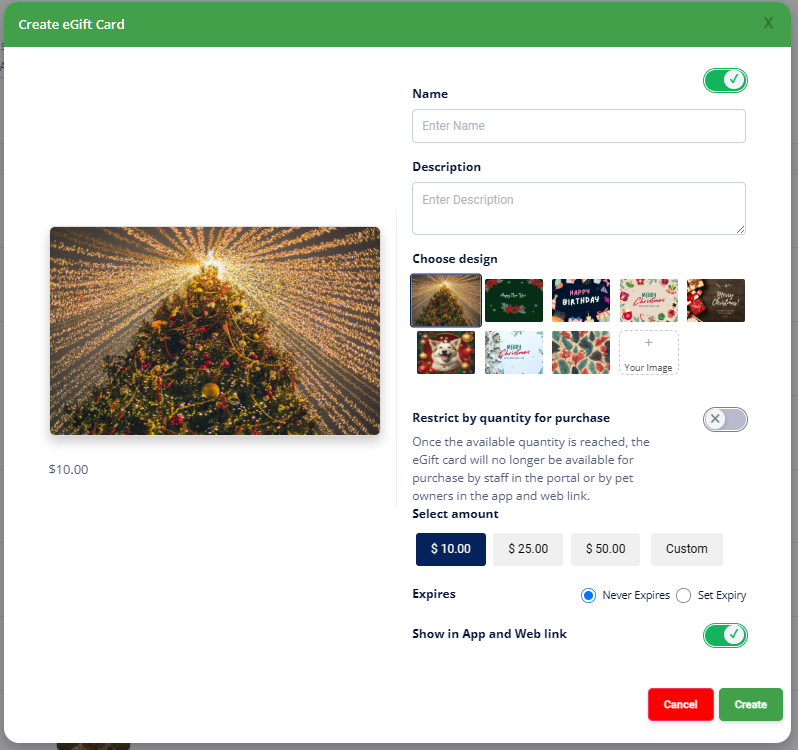
Now Optimized for Mobile & Tablet
- The RunLoyal Business Portal now works even better on tablets and mobile browsers with Chrome. Have a device-specific request? Let us know!
Push Marketing:
You can now mark messages as emergencies, pause/resume campaigns, and view delivery status. Enjoy a new design and now push messages won't be sent between 9 PM and 6 AM.

Display Icon for original appointment creation time
 This icon displays the exact timestamp of when the appointment was originally confirmed by staff to the pet owner. This is especially helpful since staff may adjust the appointment time internally based on availability.
You'll find this icon in the Appointment List, Pet Owner Profile, and Pet Profile. This will also be available in the Pet Owner App and Weblink by April 2025.
Customize the Time slot by service category or service
Custom Timeslot Duration Setup for Lodging Capacity-Based Services
You can now set custom time slot lengths for capacity-based and lodging services under both Service Category and Services. This will also be available in the Pet Owner App and Weblink by April 2025.
Example is 15mins
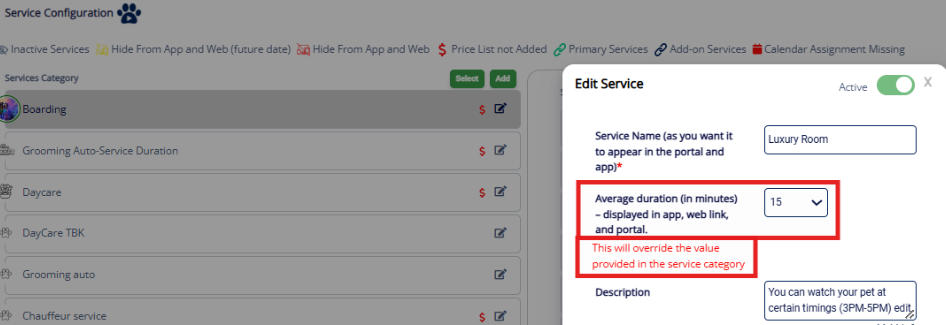

To-Do Section
We have enhanced the printing feature in the To-Do section to provide better clarity on breeds and tags
Responses by pet owners while booking
For the questions and responses defined at the Service Category is now available under Pet and Pet Owners notes section
Accessing the Pet Owner Agreement to print
You can now download the agreement directly from the Pet Owner's profile for easy viewing or printing

Quick Checkout : Coupons, Adjustments, & Credits Now Available
Credits from pet owner accounts can't be used when purchasing Packages or Memberships. Manual adjustments and coupons also can't be applied at checkout. To apply a discount to all recurring purchases, set up the coupon as a recurring one under Settings → Coupons. Otherwise, discounts will only apply to the first purchase.
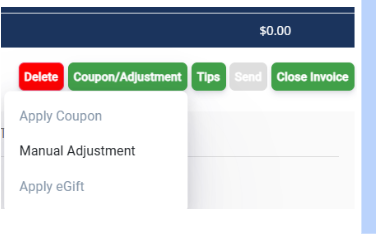
Print QR Codes for purchase
You are able to print the QR codes for your staff to quickly purchase memberships or Packages.
- Print the label, add it to the quick reference document, and use your scanner to select it under the Quick Checkout section.

New options added to Personalizations
Personalization SectionThis section of the software lets you customize both staff and customer experiences across the Business Portal, Custom-Branded App, Website Booking, and the Quick Check-In Kiosk.
Interested in the Quick Check-In Kiosk? Contact us for a quick demo!
Personalization - Portal Tab updates :
- Choose to view belonging or not : You can now choose to hide the belongings prompt during appointment check-in by toggling off the “Show belongings during appointment check-in,” currently defaulted to ON.
- Staff-based Alerts to customers : You can now choose whether to notify pet owners when the staff updates a staff-based service after check-in. “Allow notifications to Pet Owners when staff-based services are updated.”This is Defaulted to OFF
- No-show alerts : Staff Notification for Pet Owner's No-Show History Staff will now see a pop-up alert for past no-shows by a pet owner when scheduling or confirming appointments. You can set how many past no-shows trigger the alert “Display previous No-show alert.” Currently Defaulted OFF.
- View Staff Name on invoices : To show staff names on invoices and receipts for staff-based services, enable “Display Staff Name on Invoice Receipt,” currently defaulted to OFF. This requires an upcoming Pet Owner App update—email puppylove@runloyal.com to prioritize yours.
- "How Did You Hear About Us" with Personalization : You can now enable a pop-up to ask your customer how they heard about you
- Pet Owner App – Sign-Up Options : Allow Facebook, Google, and Apple Sign-Up: You can now allow pet owners to sign up using Facebook, Google, or Apple accounts. Enable the “Allow social sign-up” toggle in settings to offer this option in the Pet Owner App. This is currently defaulted to OFF.
Training-Based Services
Register more than once for Group Classes : You will now be able to allow the customer to sign up for the same group class more than once for different dates. (i.e., puppy class for 4/1, 4/2, 4/3, then be able to sign up again for the remaining class dates of 5/1, 5/2, 5/3)
Memberships
Search by Pet Name at Dog Park Check-In : You can now search by the pet's name, not just the owner's, when checking in Dog Park members. Want to learn more about Dog Park memberships in our software? Email us at puppylove@runloyal.com
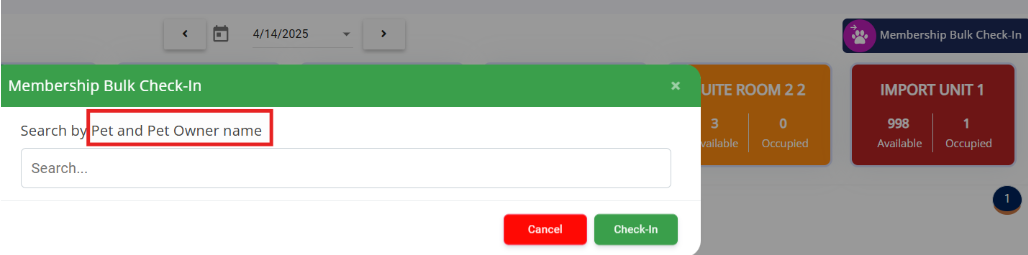
Filter by next billing under the Active Tab
When you are under Membership status, you can not sort to the Next billing expiration.

Membership Setup Enhancements
Choose Between by pet count or by membership, You can now select how pets are grouped under a membership :
- By Pet Count : You can define the maximum number of pets allowed under one membership. The system automatically adjusts based on how many pets the customer selects during purchase.

- By Membership : Offer a shared membership tied to an exact number of pets (e.g., 5 pets). The number of pets is fixed and cannot be increased or decreased.
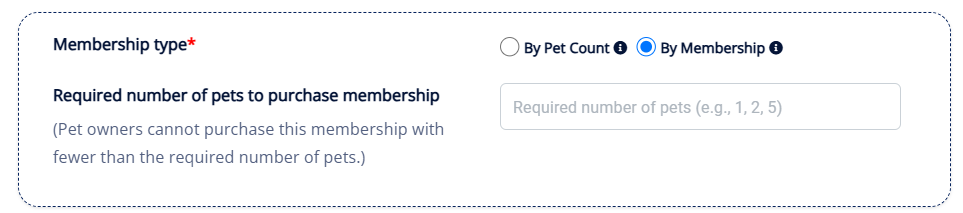
Check-In Flexibility for Memberships
Set Unlimited or Count-Based Check-Ins, You can now define how check-ins are tracked :
- Unlimited Check-Ins : You can allow unlimited check-ins during the membership period.

- Count-Based Check-Ins : You can define a fixed number of total check-ins (e.g., 10 visits) and set how many pets can check in per visit.
- Limit Pets Per Visit : You can now define how many pets can check in together during a single visit.
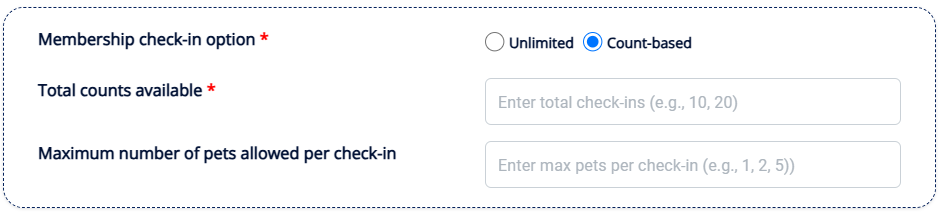
Membership Renewal Logic
Auto-Renew by Date or Usage,You can now set up automatic membership renewals based on :
- By Expiration Date : Membership will renew after a set period (e.g., 30 days).
- By Usage Count or Expiry – Whichever Comes First : Membership will renew either when all check-ins are used or when it expires — whichever is earlier.

Define Which Pets Can Use a Membership
Set Basic or Advanced Restrictions, You can now control which pets can buy or use a membership :
- Basic Restrictions : Apply a single rule based on age, weight, or sex.
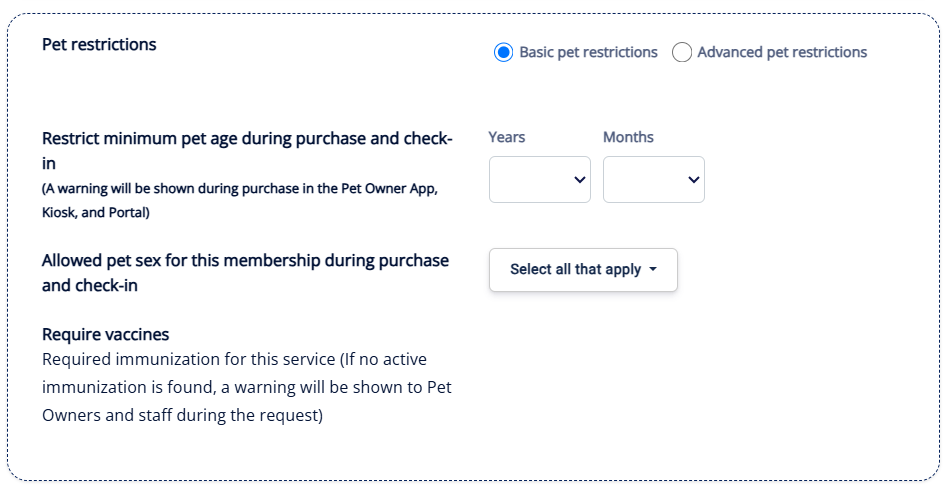
- Advanced Restrictions : Combine multiple conditions (e.g., age range + weight range + sex).
- Example : Only Male Neutered pets aged 6–36 months and weighing 5–36 lbs.
- Restriction Enforcement: You can choose to enforce these restrictions either during membership purchase or at the time of check-in. This ensures only eligible pets can be linked or allowed access.
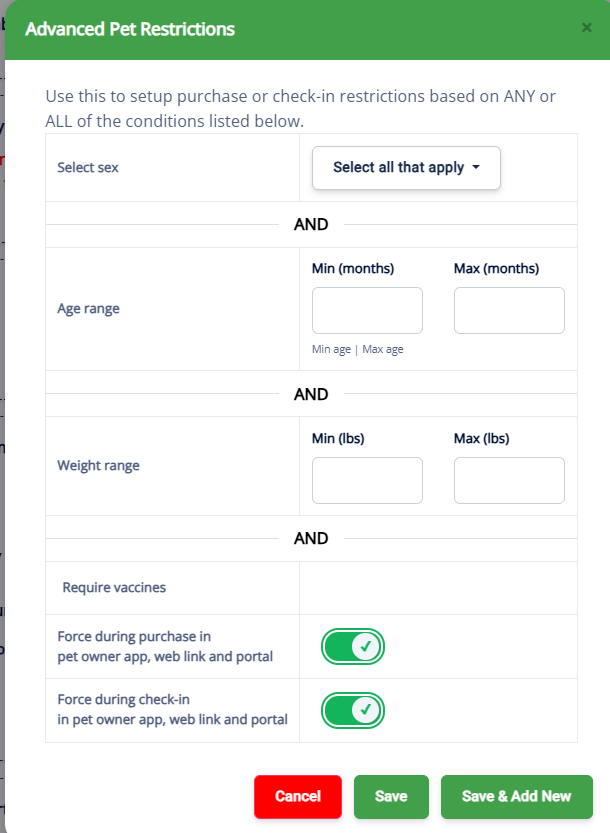
Flexible Pricing Options for Memberships
Pricing Based on Pet Setup,You can now configure pricing in two ways :
- By Membership : You can set a flat price for a fixed number of pets. Tax is calculated on the total amount.
- By Pet Count :
Single Pet Pricing : A fixed price per pet is applied, and the total cost increases as more pets are added.
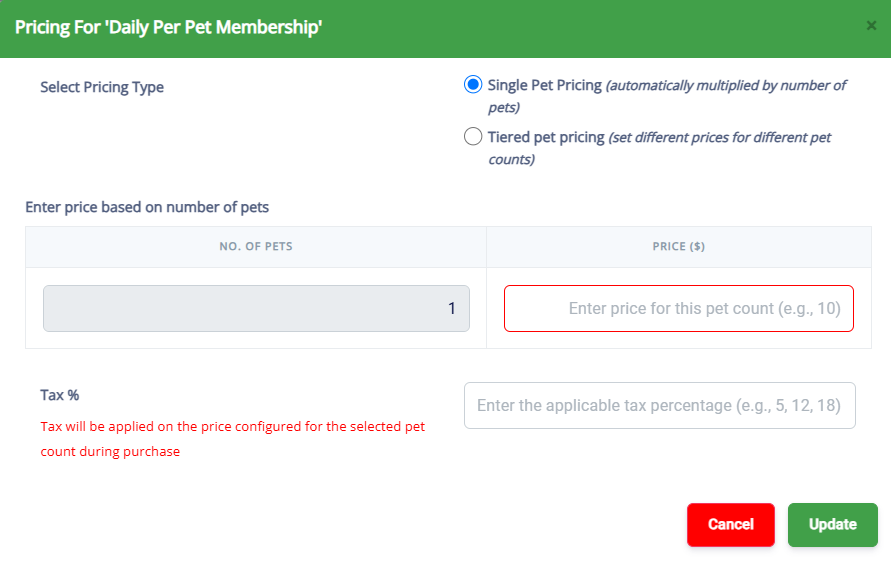
- Tiered Pricing : Different price tiers are applied based on how many pets are selected. Tax is calculated on the final tiered amount.
View Gallery
Staff can now view all uploaded pet photos and upload images as well.
Feeding/Medication notes in To-Do
You can now view appointment notes during booking or check-in on the To-Dos
Ability to manually assign a room for lodging
Previously, you could accept a reservation for Lodging and it would auto-assign the room, now you can choose the room you would like the pet to stay in.
- Currently, add-on services can not be assigned to a staff or a room at the approval stage. Would have to be completed in the portal view only
New Reports
- Customer Spend - Year over Year Comparison (Beta) : Enables year-over-year comparison of customer spending trends to analyze growth and retention.
- Service Revenue Summary with Invoice Details : Provides a comprehensive breakdown of service revenue, including invoice-level details for deeper financial insights.
- Refund Report : Helps track all refund transactions, offering better visibility into revenue adjustments and customer reimbursements.
- Retail Product Sales Summary : Summarizes retail product sales, allowing for better analysis of product performance and revenue contribution.
- Staff Blocked Hours : Tracks staff blocked hours to provide better scheduling insights and optimize workforce management.
- Total Revenue Report (Detailed) : Offers a granular breakdown of total revenue, helping businesses gain a clearer financial overview.
- Veterinary Clinics and Associated Pet Count : Displays a list of veterinary clinics for the selected tenant along with the number of associated pets.
Enhancement
- Staff App Utilization : Includes a "Device Type" column to improve tracking and analysis of staff app usage across different devices.
- Pet Owner Appointment Log : Now features a service filter, a "Days Since Last Visit" column, and a "Last Service" column, making it easier to track appointment history and customer engagement.
- Birthday Report : The "Last Visited" column helps provide better insights into customer interactions leading up to birthdays.
- Invoice Register : PO Credits are now displayed as negative values, improving clarity in financial records and reporting.
- The Total Revenue Report : Refund tab has been included alongside deposits, offering a more comprehensive view of revenue tracking.
- Pet Details Report : A breed filter has been implemented, allowing for more refined search and analysis of pet records.
Coming Soon
Calendar integration for appointment reminders
E-Gift Card Purchase
- Pet owners can now buy e-gift cards for themselves or as gifts, making it easier to share the joy of pet care services.
Coupon Code for Deposits
Package Credit redemption for invoices
Prevent duplicate appointments
When booking an appointment in the staff App and you are on the latest version of 2.2.95, you will now see if you are making a duplicate booking with a pop-up notification
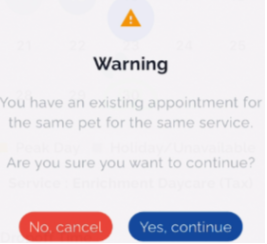
Configurable time slot duration for lodging and capacity services via the Pet Owner app
Personalize in the Pet Owner App
- Include assigned staff on invoices in the pet owner app
- Feature Packages and Memberships prominently on the home screen
- Streamline booking by suppressing package promotion pop-ups
- Bundled Experiences, Services, and add-ons
Customers can now book the Bundled Experience services on the Web Booking Link. If you would like to learn more about how to bundle services together at a discounted price for the customer.- Bundled Experiences : Create customized pet care packages by combining specific services and add-ons into a single offering.
- Bundled Services : Group multiple services together, such as "Board and Train" or "Daycare While Boarding," for a seamless booking experience.
- Bundled Add-ons : Offer bundled add-on packages at a discounted price, making additional services more accessible for pet owners.
Alongside these updates, we've made various usability enhancements and resolved issues you flagged.
V1.137.20250201.0102/01/202527 updates
Your RunLoyal portal has been updated with new features and enhancements!
Service-based Custom Appointment Reminders
Ability to set multiple reminders by service with advanced customization for email. Setting Up Custom Service-based Reminders in RunLoyal Business Portal
RunLoyal Knowledge base
On the top right corner, under My Profile, now you can access RunLoyal Support Knowledge base articles.
Keyboard shortcut navigation
For quicker navigation, you can use keyboard shortcuts in the business portal. Pressing 'R' will bring the shortcut key options and you can see the full menu on the top right corner, under My Profile → Keyboard shortcuts
Recurring appointments
- Now you can add a primary add-on to capacity and staff based recurring appointments in the business portal.
Package Related
- In the Pet owner profile under Packages, there are new filters introduced to see the status of packages as Active, Inactive and ALL.
- Under Packages, if the auto-renewal is in progress, you can easily click on the 'Renew Now' button to renew the package.
- If a package auto-renewal is in progress, you will see a pop-up informing the staff.
- In pet owner profile, appointment list you can see the package renewal count

 visibly to follow-up with the pet parents
eGift Card
Now, you can offer eGift Cards with the pre-build designs in App and Web Link . You can define this under Settings → Retail → eGift Card.
- This feature requires a pet owner app and web link which is expected in the coming weeks. If you'd like to prioritize yours, please email us at puppylove@runloyal.com
ToDo
- Lodging Area is added a column in print view.
- You can now print the list of Full Runcard grouped by staff members.
How did you hear about us
In the portal, if you have the How did you hear about us defined in Settings → Promotions, while adding a pet owner in the portal, your staff will be prompted to select this. Using personalization, you will be able to do the same in the pet owner app and web link in the coming weeks.
Responses by pet owners while booking
For the questions and responses defined at the Service Category is now available under Pet and Pet Owners notes section
Refund a terminal payment
If you are using our new payment partner (FiServ), you can refund a transaction paid through the terminal, to the same card if it's shared in the pet owner profile.
Report Card
Now you can see the Unsent and Sent Report Cards up to 30 days from the Report Card menu using the filter.
Message Hub
Message hub now has a new filter - Today | Yesterday | Last 7 days | All
Quick checkout
A new shortcut for Quick Checkout is added next to Appointments view in Pet and Pet Owner profile.
Per hour based pricing rules
You can use per-hour based services in pricing rules based on amount.
Multiple active Price List
Now, you can create and activate multiple price list based on future dates.
Displaying pricing to pet owner
Now you can choose to display a service , add-on, bundled experience and bundled add-on pricing in the Pet Owner app and Web Link by enabling “Display price next to services in Pet Owner App and Web link” toggle in Settings → Service Configuration for individual services.
- This feature requires a pet owner app, web link and kiosk release which is expected in the coming weeks. If you'd like to prioritize yours, please email us at puppylove@runloyal.com
Personalization in Portal
- Now you can hide the prompt for adding belongings while checking in an appointment in the business portal by using the personalization "Do not show belongings during appointment check-in"
Personalization in Pet Owner app
- Feeding and Medication Customization : Introduced a feature that allows you to hide feeding and medication details through personalized settings.
- Veterinarian Information Display : Added the option to display or hide the veterinarian option while adding the pet, giving you control over vet information visibility and prompt.
- Pick-Up Times for Staff-Based Services : Implemented the ability to display pick-up times for staff-based services appointments
- Independent Scheduling for Multi-Pet Appointments : Enabled separate scheduling for services within multi-pet appointments, offering greater flexibility.
- Some of the above features require a pet owner app release which is expected in the coming weeks. If you'd like to prioritize yours, please email us at puppylove@runloyal.com
Calendar Drag and Drop
- For lodging based appointments that are in confirmed status, now you can drag and drop to different lodging units with a warning even though they are not mapped in the Settings.
- For lodging based appointments in the confirmed status, when you move for 'ALL' days, now you have an option to update the new pricing in the invoice or not update the pricing in the invoice.
For lodging based appointments in the confirmed status, when you move for 'ALL' days, now you have an option to update the new pricing in the invoice or not update the pricing in the invoice.
Pet Owner Profile
You can see when the pet owner who has signed up or created by your staff in the top right on the pet owner profile.
Staff Slot based scheduling
Now, you can avoid overbooking of the slots in the app and web link with the new option "Do not allow overbooking in web and app" (Default toggle is ON) under Staff-based → Slot based scheduling → Slots by Staff.
Will be available in early Feb 2025
New Features
- E-Gift Card : Pet owners can now purchase E-Gift cards to buy for themselves or gift to others, making it easier to share the joy.
Enhancements
- Membership Check-in History : A new enhancement designed to improve tracking and provide better visibility of pet activities.
- "How Did You Hear About Us" with Personalization : New options are available to personalize feedback on how pet owners discovered the facility.
- Service Fee Display : Service fees are now visible when scheduling an appointment, offering more transparency for pet owners.
- Current Pet Name Display : The current pet's name is now displayed both at the top and bottom of the appointment summary screens for clarity.
- Renew Now Option : Pet owners can now easily renew memberships for failed memberships with a simple "Renew Now" button.
- Manage Card Sections : The "Manage Cards" section is now split into two sections :
- Saved Cards : Displays all currently active saved cards.
- Add Card Status : Shows cards that are inactive or have errors (e.g., denied cards).
- Improved Error Handling for Add Card Functionality : Error messages have been enhanced for a smoother experience when adding cards.
- Warning Popup for Duplicate Membership Purchases : Pet owners will now receive a warning when buying an auto-renewal membership for the same pet with different purchase dates.
- Membership Per Pet-Based Pricing : Memberships can now be customized with pricing tailored to each pet, ensuring more flexibility.
- Feeding and Medication Customization : Introduced a feature that allows you to hide feeding and medication details through personalized settings.
- Veterinarian Information Display : Added the option to display or hide the veterinarian option while adding the pet, giving you control over vet information visibility and prompt.
- Pick-Up Times for Staff-Based Services : Implemented the ability to display pick-up times for staff-based services appointments.
- Independent Scheduling for Multi-Pet Appointments : Enabled separate scheduling for services within multi-pet appointments, offering greater flexibility.
New Reports
- Membership Won and Loss Summary : Displays a summary of membership activity, including active, expired, and won memberships, along with detailed insights on cancellations, revenue, and purchases for various categories and statuses within a selected date range.
- Recurring Appointments : Displays recurring pet appointments, including owner details, pet details, service categories, and the recurring schedule for a selected date range.
- Package Cancellations Report : Displays a detailed report of cancelled packages, including package details, and notes, for a selected date range.
Enhancement
- Membership Monthly Subscribers : Added three new columns — New | Auto Renew, New | Non-Auto Renew, and Auto Renewed — to provide an exact count of membership purchase types in the Membership Monthly Subscribers section.
- Membership Details : Updated the Auto Renew column to include the New | Auto Renew, New | Non-Auto Renew, and Auto Renewed categories, offering improved clarity on customer purchase details.
- Pets with Appointments Report :
- Added a Staff Filter and a Staff Name column to identify which services are assigned to specific staff members.
- Added the following columns: Start Date, End Date, Start Time, End Time, and Staff Filter.
- Credits Column Updates : "Added the Credits" column to the following reports :
- Invoice Register
- Invoice Register – Accrual
- Daily Transaction
- Invoice Register Details Report
- Monthly Sales Report
- Pet Owner Details : Added the following columns :
- Created By
- Created On
- Device
- Membership Won and Loss Summary :
- Added a filter for Cancelled and Auto-Renewal in Progress.
- Auto-Renewal in Progress includes the following columns – Attempted On (replaces Cancellation On), Number of Retries in Progress & Failure Category (replaces Cancellation Reason)
- Cancelled is created based on a date range, but Auto-Renewal in Progress does not involve a date range.
- Total Revenue Report : Added a Deposit Details tab to provide more detailed revenue insights.
New Features
- Training-based : Training-based facilities can now manage training requests, including approvals. Staff can also perform actions such as check-ins, check-outs, cancellations, marking no-shows, and executing bulk operations within daily training activities. Facilities can also manage sending homework to the pet owners
- Add/Edit Pet Owners & Pets : The StaffApp now supports adding and editing pets as well as their owners.
Enhancements
- QR Code Generation : A QR code is now generated for each staff, enabling staff/employees to scan it for clocking in and clocking out using RunLoyal Express Check-in Kiosk for smoother operations.
- Appointment List : Tagged pet/pet owner icons are now displayed with colors indicating their status. Clicking an icon reveals its title and associated comments.
- While adding or editing a pet, users can now add or edit pet notes.
We have fixed several other issues and bugs that were reported.
V1.136.20241228.0112/28/202422 updates
Your RunLoyal portal has been updated with new features and enhancements!
Staff Notes
You can now add staff notes for appointments on the pet page, pet owner page, appointment list overflow menu, and in the Daily snapshot.
Incidents to appointments
You can now add incidents specific to a checked in and checked out appointment by clicking on 'Add Incidents' in the Daily Snapshot, Appointment menu, or the pet and pet owner's profile appointment list.
For checked-in pets for a single staff based service (such as grooming), you can send Ready for Pick up messages from the Daily Snapshot.
Daily Snapshot
- For checked-in pets for a single staff based service (such as grooming), you can send Ready for Pick up messages from the Daily Snapshot.
- For lodging based services, now you can see the already checked-in pets by clicking on the "In-house" tab
- Using personalization, now you can choose to display the appointment start and end time (Settings→ Operations → Personalization → Display appointment start and end date/time in Daily Snapshot)
Advanced Staff Calendar
- Now you can book appointments from the Week view by clicking on the date for a given staff. If the staff has working hours defined it would display with the color background
- Added warnings when booking appointments, if a staff member has reached their maximum allocated slots.
- In the Day view, staff availability slots are now displayed showing the booked count against the total available slots for a given day.
- Appointment status filter added to the top of the calendar for all the views
- Easily navigate to appointment invoices from the Advanced Staff Calendar by clicking on the 'Open Invoice button'
- Now you can search for a pet owner while creating an appointment and if not found, you can easily add a pet owner pet without leaving an advanced staff calendar . You can do the same outside of calendar in the global pet owner and pet search in the portal
- You can now adjust the staff assigned to the service up to 3 weeks after the pet has been checked out. This can be adjusted by selecting the appointment and under the assigned edit button on the pop-up.
ToDo
- Customers with Advanced Staff Feature (paid add-on), assistants can now be added in ToDo menu, in Full RunCard. Advanced Staff Feature
- While printing as a list in ToDo, now you can sort the primary and secondary staff by their names
- In Print as List view, for lodging based and capacity based services, the area name also has been added along with the unit name.
Service End Times for Staff based services
Using personalization, in the portal as well in pet owner app (Requires app release) and web link, you can control the display of the appointment end time by configuring 'Display pick up time for staff based service on appointment'. Default this is enabled.
Bulk Messaging in Daily Training
For customers with Training based services (paid add-on), now you can send messages to all the pet owners under each class in daily training.
Add Card Status
Errors occurring while adding a card by staff in the portal or while being attempted by the pet owner in the app as well as web link, are now listed on the pet owner's profile next to the list of saved cards as 'Add Card Status'
Now the logged admin users of RunLoyal, can view their RunLoyal subscription under My Profile → My Subscription on the top right corner.
Advanced Staff Features (Beta) (Paid add-on) Coming soon
- Wages and Skills : Now you can define staff type, their wages and skills in Settings → Business Setup → Staff Management → Wages & Skills. You can define the staff skills under Settings → Operations → Dynamic Notes → System → Skills
- Payroll Calculation : Once the wages are defined, now under Staff Management→ Calculate Payroll, you can view the payroll for a given time period by staff ,the total payroll and you can export it as a spreadsheet. Payroll Management Setup
RunLoyal Digital Wall (Paid add-on)
- Birthday wishes for pets displayed during check-in in both the portal and the kiosk.
- You can select multiple services across service categories into a single digital wall such as boarding, daycare and grooming
Membership Related Enhancements (Paid add-on)
- Membership Renewals :
- Visual indicators have been added next to the pet owner's name in the appointment list, pet owner profile, pet profile, and daily snapshot to show failed renewal attempts
- Alert pop-ups have been added to pet and pet owner profiles to notify about failed membership renewals
- Visual indicators
- Active Memberships : Warning messages appear when attempting to delete, archive, or block a pet owner or pet with an active auto renewal membership(s)
- Duplicate Membership Purchases : Warnings for duplicate membership purchases have been added to the quick checkout process.
- Deleted Memberships : Deleted memberships now appear under a "Deleted" tab in the memberships section in pet owner profile
Enhanced Media Display
Show images and videos for reservations, memberships, and training.
Booking Policies
Enable booking until the minimum number of stays is met via personalization.
Service Handling
Personalized handling of booked services.
Customizable Displays
Control the display of feeding and medication details based on personalization settings.
Service End Times
Show staff-based service end times based on personalization settings.
New Reports
- Service Sales Statistics : Displays service sales, add-on sales, and grooms by service type for a selected date range.
- Add-On Rate : Provides insights into total grooms completed, grooms with add-ons, and the add-on rate (%) per staff member.
- Advanced Staff Commission : Displays detailed commission data for staff, including service and assistant commissions, with breakdowns of performed services.
- Sales Commission : Shows sales commissions by staff for services, memberships, and packages, based on configured setups.
Enhancement
- Retail Report : Added adjustment columns for improved reporting.
- Tax Report Enhancements : Added columns for Invoice Total and Payments Total.
- Membership Cancellations : dded a "Membership Continuation" (Yes/No) filter and a bracket to indicate whether the customer, pet, or subscription was inactive.
New Features (a new app release is coming out in the next few weeks)
- Training-based features are now available in the Staff App.
- Add pets and pet owners directly in the Staff App.
- Snippets available in the Message Hub for quicker communication.
Enhancements
- QR Code Generation : There is a unique QR code for each staff member in the staff app that can be used to clock-in and out using RunLoyal Express Checkin
- Manual Staff Assignments : Staff can now be manually assigned to lodging-based services.
New Feature
- Employee Clock-In and Clock-Out : Now staff members can clock in/clock out using the Kiosk by tapping on the logo 3 times on the login screen. They can use QR code in the staff app (requires a new release in the coming weeks), or enter their email or mobile number.
Enhancement
- Making pet owner review optional during check out : Now you can personalize the review requests during appointment checkout by using personalization (Settings → Operation → Personalization → KIOSK → On/Off Review Requests)
- Forgot Password/PIN : Now the staff members can do a password reset and PIN using the KIOSK by clicking on the Forgot/Password PIN in the login screen.
- New Version Available : A new button labeled 'Latest Version Available 1.35' will appear on the bottom for the staff member to prompt to update the version when RunLoyal releases a new kiosk version to make sure you are running an updated version.
- Show or Hide QR code for Appointment/Membership Check In/Check out : Now you can decide to enable/disable QR code based check-in for both appointment and membership using personalization from business portal. (Navigate to Settings → Operation → Personalization → where you can toggle the Hide/Show settings. 'Show QR code for membership' and 'Show QR code for appointment'
We have fixed several other issues and bugs that were reported.
V1.135.20241121.0111/21/202418 updates
Your RunLoyal portal has been updated with new features and enhancements!
RunLoyal Digital Signage
The RunLoyal Digital Wall is a configurable display feature that enables you to show the pet check-in and check-out details on any internet-enabled TV screen of your choosing.The ability to create one digital wall is included with every subscription. Creating and Configuring a Digital Wall in RunLoyal Portal
With our new Advanced Digital Wall paid add-on, you gain the ability to do the following:
- Create multiple different digital walls that could be used for both back of house and/or the store front for customer facing promos or price boards.
- Include pictures and videos (add-on required for video) as a slideshow.
- Send alerts and create banners from the business portal to display on a specific Digital Sign for any daily or critical updates (back of house) or for any customer promotion (front office).
Minimum Stay
You can now set a minimum stay timeframe for lodging services (e.g., boarding) at the service category level.
Service Configuration
Services or add-ons that are part of a bundled experience, bundled services, or bundled add-ons will now be shown, even if they are hidden from the pet owner app and web link in the Service Configuration.For lodging based services, now you can define the price for an add-on as per night and per-appointment.
Pet and Pet Owner Profiles
We have added quick filter buttons for appointment viewing in the pet and pet owner profiles, including Next 7 Days (Default), Today, Show Recurring, Canceled, Checked-In, Confirmed, No-Show, and Completed. You can now set a minimum stay timeframe for lodging services (e.g., boarding) at the service category level.
Agreements
- We have added the ability to define agreements to be either per pet, or for the entire household.
- All newly signed agreements will have the pet names added above the pet parent name, signature, and timestamp.
Hourly Pricing
We have added 5, 30, and 45-minute intervals to the hourly pricing capabilities.
Search
In global search on the top left corner of the portal and also in the Pet owner menu, and advanced staff calendar, if a result is not found for a pet owner name, you can add the new pet owner from the search window itself.
Deposits
If you require a 100% deposit while booking, taxes on the full amount will now be collected with the deposit. This prevents you from having to collect the tax amount as a separate transaction after the appointment is completed.
Advanced Staff Calendar
- You can add new appointments and manage working hours directly from the calendar. Three new options will appear when you click on a staff member’s scheduled hours:
- Add a single service appointment
- Add a multi-service appointment
- Manage working hours
- In the Day view, now you can adjust the duration of an appointment by clicking the bottom border of the appointment and dragging it to the desired end time.
- A new "Add Appointment" button has been introduced in the top-right corner, allowing staff-based service appointments to be scheduled.
- You can now replicate an appointment by clicking on an existing appointment, then selecting "Copy and Create Appointment".
- Appointments can now be marked as "no-show" and cancel an appointment directly from the appointment screen in theAdvanced Staff Calendar.
- You can now print staff's appointments for easy reference and record-keeping by day, week, and month.
- Staff names and profile pictures are now displayed in the Advanced Staff Calendar. You can now upload staff profile pictures by navigating to Settings -> Business Setup -> Staff Management.
Multi-Location User Management
For customers with multiple locations, we have created a corporate hierarchy for staff entitlement. You can designate staff members as one of the following: Creating a New Staff Profile Configuring Staff Permissions and Access
- Organization Admins (OA):
- Can create and manage Service and Pet Configurations for all locations.
- Can add or select configurations under different locations. Can create Location Admin users and assign them to a location(s).
- Location Admins (LA):
- Limited Access: Can only select options defined by OAs and make changes for their assigned location(s).
- View Only: Can see all settings for their assigned location(s), but cannot make changes.
- Staff:
- If Staff is mapped by default to the legacy 'STAFF' which provides access to everything in the portal except Settings and PawMetrics.
- Staff can have customized permissions by creating and selecting a custom Staff Group.
Advanced Staff Features
We have added several advanced options for managing tips and commissions. The features below are available as a monthly bundled add-on. Contact sales@runloyal.com for pricing details Advanced Staff Feature
- Automated Tips (Only for staff based services):
- In Staff Management, you can set up tip calculations as a percentage or fixed amount for each service or add-on.
- Once set up, tips will be automatically calculated based on your configuration when a tip payment is made using the terminal, saved card (in the portal, pet owner app, or web link), or any other payment method.
- You can still override the tip calculation by selecting the Assign Tip option in the invoice.
- Automated tip calculations or manual edits will be visible in the invoice under the Invoice History tab.
- Assistants Commission and Tips (Only for staff based services):
- You can add assistants at the service level and define how many assistants can be assigned to a service.
- In Staff Management, you can configure assistant commission and tip calculations as a percentage or fixed amount, either globally or for each service.
- Assistants can be added to an appointment from the Appointment Menu, pet owner profile, pet profile, or the Full Run Card by using the Add Assistant icon

- If assistants are added, both commissions and tips will be calculated automatically based on your setup and displayed in the invoice.
- You can view assistant commission and tip calculation details in the invoice under the Invoice History tab.
- Sales Commission:
- Sales commissions can be set up at the individual service level and for add-ons.
- Commissions can also be configured for packages, memberships, and training services during setup when selling via Quick Checkout.
- 📝 Note: This is not applicable for pet owner app or web link purchases. However, you can add a sales commission when using Quick Checkout.
- Sales commission can be added or edited for confirmed and checked-in appointments by using the Add Sales Commission button in the Edit Appointment section.
- The calculated sales commission will be shown in the invoice under the Invoice History tab.
- A new report, Sales Commission, will be available in the coming weeks.
- The below features will require a new app release, which is expected to be available for all customers in the coming weeks. If you’d like to be prioritized for the app release, please email puppylove@runloyal.com
- Service Pictures and Videos: You can now add pictures or videos (add-on required for video) for each of your services, memberships, and advanced training offerings as part of the configuration.
- Advanced Booking: You can now limit how far in advance customers can see availability in your calendar with 6, 12 (default),18, and 24 months options.
Favorites
We have added a new "Favorites" tab for easy access to your most frequently used reports. You can now favorite any report by clicking on the star icon located next to the report title.
New Reports
- Invoice Register Report based on Checkout Date: Lists payables and payments by checkout date.
- Training Based Report: Displays group training sessions and class details.
- Overdue Vaccines: Lists overdue vaccines for pets with confirmed and checked-in appointments.
- Total Revenue - Previous Year vs Current Year: Compares monthly revenue year-over-year to show the trends and growth.
- Membership Monthly Growth: Displays membership purchase counts for the past 12 months, including the current month, with a month-by-month breakdown for trend analysis.
Advanced Staff Feature Reports
(Requires Add-on) Under Management tab, you can now see the following reports:
- Groomer Score Card: Tracks groomer metrics like average sales, add-ons, completed grooms, and customer ratings for performance insights
- Salon Score Card: Comprehensive report of grooming sessions, sales, tips, customer ratings, and performance for a selected period.
- Salon Loyalty - Capacity: Monitors customer loyalty by location with metrics on completed grooms, new customers, and loyalty rate.
- Groomer Loyalty - Capacity: Tracks monthly grooms, new customers, loyalty rate, and service capacity with a staff filter.
- Average Sales Price: Calculates average groom sales price to track revenue trends over a selected period.
- Average Add-On Price: Shows average sales price for add-ons, highlighting revenue from extra services.
New Features
- Forgot PIN: We have introduced a "Forgot PIN" feature to easily recover a forgotten or lost PIN.
Enhancements
- Appointments: You can now view responses to custom questions for appointments.
- Message Chat: Customers with the Advanced Training add-on can now use the "View Homework" option within the message hub.
- Appointment Assignment Sorting: Appointments in the booking window are now sorted based on a portal for the daycare service.
- Calendar Page : You can now see a shaded background color in the appointment status and checkout sections for improved visibility.
New Features (coming out in the next few weeks)
- Clock-in/ Clock-out: Staff members can now clock in and clock out using the Express Check-In/out app by double tapping the logo in the pet parent check in and check out screen. They can use the QR code in their staff app or enter their email with password and PIN to login.
- Forgot PIN: We have introduced a "Forgot PIN" feature to easily recover a forgotten or lost PIN.
V1.134.20241009.0110/09/202413 updates
Your RunLoyal portal has been updated with new features and enhancements!
Automated Custom Pricing
You can now automate breed and weight, size-based pricing to invoices. Staff members still have the ability to override the automated pricing as needed by clicking the  icon. This feature can be configured in Settings > Pricing > Custom Pricing by enabling "Auto apply to invoices" for each custom price (by default it is turned off).
Advanced Calendar View
You can now access multiple workflow items directly from the Advanced Staff Calendar, including:
- Setting up recurring appointments.
- Ability to check-in and check-out pets.
- Viewing, adding, and editing service profile notes
- Checked-out appointments now appear crossed out on the calendar for easier visual identification.
Training Homework/Curriculum Training
Configuring Training services in RunLoyal
- You can now set up a custom curriculum with practice and homework assignments, along with pictures and videos (requires Video Send & Store ad-on), at both the session level and individual class level. These items are automatically assigned to your enrolled pet owners at the end of each group training class. You can create and manage your curriculum and associated homework by navigating to Settings → Training Services → Training Services Homework/Curriculum.
- You can also assign Homework/Curriculum to a Pet Owner at the end of each class through the Daily Training menu while checking them out. Pet Owner receives the assigned homework via email/app and SMS.
- Pet Owners can send pictures and videos (with our Video send and Store add-on) as part of their homework. If you're interested in using the video add-on, please email puppylove@runloyal.com to activate this feature.
- Completed homework is stored in both the pet and pet owner profile next to the associated training classes for reference.
Add-on duration for services
Now you can define a duration for add-ons and assign staff to them during the appointment booking process. In all appointment screens where an appointment is shown, you will now see the add-on staff assignment with time assigned . This is also visible in the Calendar, Appointment List View, Pet Page, Pet Owner Page, and To-Do sections. The duration of these add-ons can be managed in Settings → Business Setup → Service Configuration.
Auto-assign staff to primary add-ons
For multi-day appointments, such as boarding, where a primary add-on is included, you can now assign a specific staff member with a single click during the booking process. First, select either all dates or specific dates, then click the  icon. Based on availability, you can assign a staff member, or the system can automatically assign staff to the selected add-on.
Daily Snapshot
We have added a few quick action menu items related to appointments, such as View Estimate, View invoice, View Run Card, Mark as No-Show, and Cancel Appointment to the Daily Snapshot menu. You can access them by clicking on the vertical three dots.
Modifications to Existing Reports
- Confirmed Appointments : We have added a new column which displays invoice amount.
- Retail Inventory Report : We have added a new column which displays vendor details.
New Features
- Biometric Login for Staff (only supported in iOS today) : Now you can log in using your iPhone's biometric functionality, such as Face ID or Touch ID.
- For New Users : After a successful sign-up, new staff app users on iOS will be prompted to set up their biometrics (Face ID or fingerprint).
- For Existing Users : You can enable biometrics on your iOS device by navigating to Staff Profile → Setup Biometric → Face ID or Fingerprint Setup, which you can access by clicking on the top right corner next to your name.
Enhancements
- Play Groups : The Play Group menu is now accessible in the Staff App. In-app functionality for play groups includes:
- You can view the pets in the assigned playgroup area.
- You can now assign a playgroup to a pet directly from the pet page if no playgroup has been previously assigned.
- You can assign staff to the playgroup by clicking on the staff assign icon.
- You can move pets between different play groups across areas, similar to the portal functionality, with added validation to ensure pets that don’t get along are not assigned together.
- You can now move play groups to different areas with ease, allowing for greater flexibility in managing group activities.
- You will now see the designated playgroup's icon in the Appointment view, and movements of each playgroup will be reflected in the Appointment list view.
Calendar
- Now you can see training sessions in the Staff calendar.
- You can also now filter the calendar view :
- "View My Calendar" : Shows only your schedule.
- "View All Calendar" : Displays the schedule of all staff members.
Message Hub
- Now you can expand the message text box to accommodate longer messages, providing more space for detailed communication.
Training-Based Services
Pet Owners can now purchase training-based services via the web link. You can control the display of Training based services in Settings → Operations → Personalization → Web Link.
Data Fields
You can now make the Pet and Pet Owner fields mandatory when purchasing services, memberships, or training through the web link. This can be managed in Settings → Operations → Personalization → Web Link.
V1.132.20240912.0109/12/202417 updates
Your RunLoyal portal has been updated with new features and enhancements!
Advanced Training Features
Configuring Training services in RunLoyal
We are excited to announce a new comprehensive set of advanced training features and functionality, including group class capabilities. This new feature set provides enhanced capabilities beyond the existing service definition capabilities. These new features are available as a monthly add-on to your base subscription and includes:
- Options for fixed schedule, open enrollment, and private training.
- Simple class and recurring schedule configuration and management.
- Automated per class homework.
- Optimized training area scheduling and management.
- Automated validation of class requirements (pet age, sex, and weight) during the purchasing process.
- In app or web link purchase options for group classes, training packages, and all other training services.
Advanced Calendar View
We are also excited to introduce a new advanced calendar view for staff-based services to the main left-hand navigation. This new view is designed for staff that rely heavily on the calendar for their daily workflow. You can now view and access several workflow items directly from the calendar, including:
- To-do's
- Report Cards
- Message a Pet Owner
- View previous appointments
- Notes
- Service profile
- Ready for pickup
RunLoyal Analytics (Beta)
We are excited to announce a beta version of a new RunLoyal Analytics. This beta release lays the foundation for a fully comprehensive suite of analytics that is already under works. You will see a new tab for these in the Reporting section of the business portal.
While we have some initial reports currently available, we are currently working on enhancing these initial reports and we need your input to make sure we create the data, views, and reports that you need. As you start to use these, please send your feedback and suggestion right to our tech team at PuppyLove RunLoyal . The initial reports include:
- Membership Monthly Trends and Comparison - Displays key membership trends through various visual reports, including active POs, revenue over time, renewal counts, and check-in pet count for the selected date range
- Revenue by Service Category - Displays the top 10 service categories and their appointment counts for a given time period.
- Revenue by Services - Displays the top 10 services and their appointment counts for a given time period.
- Monthly Sales Report - Trends & Comparison - Displays a comprehensive overview of monthly sales trends and comparison charts within a specified date range.
- Invoice Summary - Displays an overview of the invoice summary, highlighting sales tax, tips, total payments, and payment types for a selected date range.
- Total Revenue - Displays a comparison of revenue between the previous year and the current year.
Recurring Appointments
You can now edit all remaining recurring appointments in a series for capacity and staff-based services. We have added by clicking on the new edit recurring appointment icon directly from the appointment menu, as well as from the appointment lists in both the pet and pet owner profiles. The following can be modified:
- The day of the week for the entire series.
- Appointment frequency.
- End date for the recurring series.
- Staff assignment and area selection.
- Add-on services can be added or removed.
Appointment View
- You can now view a separate 'Checked Out' tab in the appointment list, showing pets that have been checked out today.
- We are now highlighting overdue check-ins with a light yellow shading on the appointment list view, as well as on the pet and pet owner appointment pages.
Lodging and Capacity-based Services
- In the lodging-based appointment booking workflow, the grayed out time slots indicate times that are outside of your defined business hours and the white indicate a time within your defined business hours for that service. These gray timeslots are now clickable and allow you to override your defined business hours to book an appointment outside of your defined business hours. When clicked, a warning message will pop up to alert that you are selecting a time outside of your business hours.
- By default, we display time slots from 6 am to 9 pm (or later if your defined business hours are later than 9m) in the booking process. Now, using Personalization, you can have the system display a full 24 hour period in the time options to provide you with the option of booking for any time of day. This can be enabled in Settings → Operations → Personalization → Show 24-Hour Time Slot for Lodging and Capacity-Based Services.
Quick Checkout
- You can now add tips in the Quick Checkout menu for packages, memberships and training based services.
- Now as part of refunding a membership purchase, the staff will be prompted to remove the membership from the pet owner profile.
Pet Owner Profile
With regards to saved credit cards on a pet owner profile, we are now displaying the card type and the date the card was added. (Auditing of who added is coming soon)
Push Marketing
We have added a new filter to include or exclude archived campaigns in the list view of existing campaigns.
Check Availability
You can now easily identify a unit's availability :
- Neon green border : Indicates that all pets in that unit are scheduled to "Leave Today"
- Yellow border : Indicates that only some pets are leaving ("Partially Leaving Today")
Pets
On the main Pet list, we have added new status filters to show Deleted Pets and Deceased Pets.
Modifications to Existing Reports
- Staff Service Details Report : We have added appointment status, add-on services, a date filter, and appointment times to this report.
Calendar
In the Staff App calendar, clicking on an event will now offer three options : "View Invoice", "View To-Do" and "View Report Card".
Checkout
Staff can now view belongings in the Staff App during checkout.
Pet and Pet Owner Profile
You can now add notes directly in the Pet and Pet Owner profiles.
Appointment View
- The Appointment status shading in the portal is also now applied in the Staff App: Pink for check-in overdue, yellow for check-in overdue, and green for first time appointments. This feature is also available on the Pet and Pet Owner appointment pages.
- The home page and appointment list tab names in the Staff App can now be customized via personalization.
- Details for "Primary Services as an Add-on" and "Assigned to" can now be viewed via the (i) information icon
- For each appointment, when you click the down arrow, you will now also be able to access:
- An Appointment Notes link for easy access to any notes related to that appointment.
- An Appointment Status link that displays the details for the appointment and changes made.
- A "Ready for Pickup" button to notify the Pet parent their pet is ready to be picked up.
- A "Report Card" option to easily access and update the report card.
Bundled Experiences/Services/Add-ons
With the new bundling capabilities in the last release, you can now make those bundled experiences, services, and add-ons available for purchase in the app.
- Bundled Experiences : You can create customized pet care experiences by bundling specific services and specific add-ons as a single offering.
- Bundled Services : You can group multiple services into a single service offering, i.e. "board and train" or "daycare while boarding".
- Bundled Add-ons : This allows you to group several add-on services into a single add-on package at a discounted price.
These in-app features require a new app release. We will be rolling this feature out across all customers in a rolling fashion. If you are interested in using below feature immediately, please email puppylove@runloyal.com and we will prioritize your app release)
We have fixed several other issues and bugs that were reported.
V1.131.20240813.0108/13/202413 updates
Your RunLoyal portal has been updated with new features and enhancements!
Visual Map
These Visual Map features may require an app release. We will be rolling app releases out across all customers in the coming days. If you are interested in using below feature immediately, please email puppylove@runloyal.com and we will prioritize your app release.
- You can now easily take a visual map unit out of service for a specific date range by marking it as "unavailable". You can mark a unit as unavailable either in the Visual Map view or in Settings → Visual Map
- Now you can also designate a visual map unit's capacity for internal use only, meaning that that unit's capacity will not be considered as an option for the auto-assignment nor will it be counted in the overall capacity numbers. The main use case for this feature is to provide an elegant overflow capacity option.
- We have added the ability to control how Visual Map units can be utilized with regards to "same family only" or if a unit can house non-family pets together (open boarding, for example). Units defined as "same family only" will now display a "same family" icon Visual Map and in the appointment assign screen.
To-Do
Appointment Notes are now published in list views for Full Run Card and Additional Services.
Appointments
While booking a lodging based appointment, we have added additional options for viewing available units. The default view now shows those units that are available or partially available for the dates you selected. The "Show All" is still an option that you can toggle on.
Calendar
We have improved the loading performance of the calendar.
Drop-off time only for Capacity based Services
Using personalization 'Make pickup time as optional for capacity based services', in Settings → Business Hours, you'd be able to setup Drop-off time only for capacity based services such as Daycare.
Reviews
Now you can send review requests for checked out appointments by clicking on the overflow menu (3 dots) if you missed requesting reviews during the checkout process. This is available for RunLoyal native reviews and also for customers using the External reviews add-on features that drive reviews in Google and other review sites.
New Reports
- Membership Cancellations : Displays membership cancellations by date range and also displays the reason for cancellation.
- Membership Sales Revenue : Displays membership revenue details based on payment date for a selected date range.
- Daily Membership Purchase Details : Displays the membership purchase count for a selected date.
- Active Pet Owners with Memberships Count : Displays the total count of active memberships purchased by pet owners.
- Checked-In Appointments and Immunization Status : Displays the list of checked-in appointments with immunization status by date range.
Modifications to Existing Reports
- Pet Owner Details : We have removed the date range so the report now displays all pet owners. We have added pagination to enhance loading speed and detail viewing.
- You can now enable Pet owners to purchase memberships and packages on the web. You can enable this in Settings → Operations → Personalization → Web Links → Allow membership purchase and/or Allow package purchase.
- You can now add or assign tips to specific staff members or the Tip Pool on the invoice page.
- Payment history is now accessible on the invoice page.
- Image and Video file upload speeds have been improved in Message Hub.
We have added the ability for Pet Parents to login using their phone's biometrics functionality (Face ID and Fingerprints).
- New app users will be prompted the option to set up their biometrics (Face ID and fingerprints) after a successful sign up.
- Existing app users can enable biometrics by going to the "More" menu → Face ID or Fingerprint setup
- We will be rolling this feature out across all customers in a rolling fashion. If you are interested in using below feature immediately, please email puppylove@runloyal.com and we will prioritize your app release.
You can now display a Pet Parent's open invoices on the app home screen. You can enable this feature in Settings → Personalization → Pet Owner App → Show open invoices in home screen
Membership Renewal Mode
Now you can control if Pet Parents are given the option to opt out of auto-renewal of their membership
- Open Invoices will be displayed in home screen :
- When you use the 'Send Invoice' request from the business portal
- After the pets are checked in
- After the pets are checked out without a payment
We have fixed several other issues and bugs that were reported.
V1.130.20240725.0107/25/202410 updates
Your RunLoyal portal has been updated with new features and enhancements!
Time Sheet
- We have added the ability for you to edit staff clock-in and clock-outs. You will see a new option "Time Sheet" on the left side menu and this icon
 under the Staff Management category.
- By default, Admin Users will have the ability to view and edit the timesheets of staff members, but who can perform edits is also configurable in Staff Groups settings. Timesheet data is also exportable as a summary timesheet by a time range or by individual staff members for payroll purposes.
Price Engine Rules
- Under Settings → Pricing → Price Engine, you can now choose between "Calculate Per Pet" and "Least Price Option" (Currently available option) options when setting up a price rule. If the "Calculate Per Pet" option is selected, the discount will apply to all pets in the appointment. If the "Least Price option is selected, the discount will be calculated based on the pet with the lowest dollar amount).
- We have added a new discount structure based on how often a Pet Owner visits for services.The price rule now includes a frequency-based discount based on new “Appointment Frequency” and “Booking Count” factors for Price Engine rules. Using this rule, you can setup a rule where you can provide a discount if a pet visits “x” times within “x” weeks. For example, a discount of 10% for 2 or 3 daycare visits in a given 1 or 2 weeks timeframe.
Appointments Related
- Add/Edit appointment :
- After selecting a pet for an appointment under the pet name, vaccination details are now shown with current status indicated by color: red for expired, green for active, and orange for expiring within a month.
- You can now view the pet owner's open invoice history while adding or editing appointments by clicking the invoice icon.
- You can now view your pricing details for each service in the add/edit appointment screen. This feature can be enabled or turned off in Settings → Operations → Personalization → "Display Price in Appointment Screen".
- You can now book appointments during blocked hours in the portal by enabling "Allow Booking during block hours" in Settings → Operations → Personalization.
- You can now add or view a pricing estimate after adding a new single appointment by clicking the 'Add & View Estimate' button in the 'Add Single Appointment' view.
- When booking a new lodging and capacity based appointments, you will now see a new "Assign Last Room Assignment" button. Selecting this button will book the pet's last assigned room to the current booking appointment. If that room is unavailable, a pop-up will appear, and you'll be redirected to the visual map for assigning another room.
- Appointment View and Pet and Pet Owner profiles :
- A Pet Owner's first appointment is now highlighted in green on the Appointment View.
- Now you can easily add requested appointments to the waitlist by clicking the Waitlist icon
 in the Appointment View.
- Now you can view belonging details even after a Pet has checked out by clicking the belonging icon
 .
Calendar
We have extended the drag and drop capability to now include add-on services in the Calendar view.
Quick Checkout
Now you can send quick checkout invoices to Pet Owners for payment via email for packages and products.
Pet Owner Profile
Now a Pet Owners' addresses can be viewed in Google Maps by clicking map icon  in their Pet Owner profile.
To-Do's and Report Cards
Now you can delete pictures uploaded in To-Do's and Report Cards by clicking the "Delete Image" button.
Visual Map
We have added an Orange border to units on the Visual Map that were occupied today, but have been checked out.
Service Configuration
You can now add both Staff-based and Capacity-based primary add-ons to Staff-based services.
Modifications to Existing Reports
- Confirmed Appointments (Future Dates Only) : A new service filter has been added to easily filter out the reports by services.
- Pet Owner Details Report : First Name and Last Name columns have been added.
We have fixed several other issues and bugs that were reported.
V1.128.20240626.0106/26/202423 updates
Your RunLoyal portal has been updated with new features and enhancements!
Bundled Experiences/Services/Add-ons
Managing Bundled Experiences, Services, and Add-Ons in RunLoyal
- We have added the following new bundling capabilities in "Settings" → "Business Setup" → "Bundled Experiences/Services/Add-ons"
 Bundled Experiences : You can create customized pet care experiences by bundling specific services and specific add-ons as one offering. offered by your business.
 Bundled Services : This new capability allows you to bundle multiple services that are then offered as one, i.e. "daycare while boarding".
 Bundled Add-ons : This allows you to group several add-ons as a group at a discounted price.
Pet Owner Profile
The new "Manage Access" icon  in the Pet Owner list view and/or the "Manage Access" button on the Pet Owner profile allows you to manage a Pet Owner's password and change their login type from a social login such as Facebook, Apple and Google to email based login if needed.
Payment Terminal (CloverConnect Customers Only)
Now, in appointment and quick checkout, under Pay → Pay by terminal, while selecting the appropriate terminal, you can see if the terminal is connected to the cloud before you attempt to process the payment.
Invoices
For all new invoices moving forward, we are adjusting the way pricing changes (such as coupons, manual adjustments, credits, price rules, package, and eGift cards) are applied to invoices. Now adjustments will need to be attached to a specific line item on the invoice to ensure accurate tax calculation when the adjustment is applied to the total.
Belongings
We have added the ability to add images and videos (video add-on required) of a pet's belongings during check-in process and the ability to view the images during check-out for visual confirmation on belongings.
Appointment View
We have added a new Feeding & Medication icon  to update the Feeding and Medication for the current Confirmed and Checked In appointments. (Note - Updating it on the Pet profile will only update for future appointments)
To-Dos
- Additional interval options (Weekly and Specific Dates) have been added for feeding and medication tasks in the To-Do list.
- In the Full Run Card view, you can now customize your view by clicking the new "Display" button and selecting which data fields you want to see and their order on the screen.
Editing an Appointment
In the add/edit appointment window of capacity-based services, the order of the areas and the units will show in the order they exist in the visual map.
Recurring Appointments
Previously, all recurring appointments were automatically displayed in the appointments list in both the Pet and Pet Owner profile. With this update, the recurring appointments are not shown by default. However, if you’d like to see recurring appointments along with regular appointments, you can click on the "Show Recurring" checkbox . This preference will be saved until you logout of the business portal.
Message Hub
Now you can visually differentiate between system generated messages (Dark Blue), messages sent from a Pet Parent (Grey), and messages sent to a Pet Parent (Green).
Audit Details
A new "Staff" tab has been added to "Settings" → "Operations" → "Audit Details" to show changes made to staff profiles
Pricing Rules
You can now set more than one condition for pricing rules in the Price Engine.
Calendar
Now you can view add-ons and appointment details in the calendar when you click on icon for each appointment.
MailChimp Integration
With our MailChimp integration, we have added the last membership visit date and last appointment date (requires MailChimp add-on).
New Reports
- Monthly Sales Report : This new report provides a summary of your sales for a given month based on accrual accounting.
Modifications to Existing Reports
- Staff Commission Report : A new column has been added to view the status of staff members (active/inactive).
- Membership Report, Membership Details & Membership Monthly Subscribers : A description has been added clarifying that these reports are "Based on Membership Effective Date.
- You can now view assigned tips for individual staff members and the Tip Pool in both the appointment and checkout views.
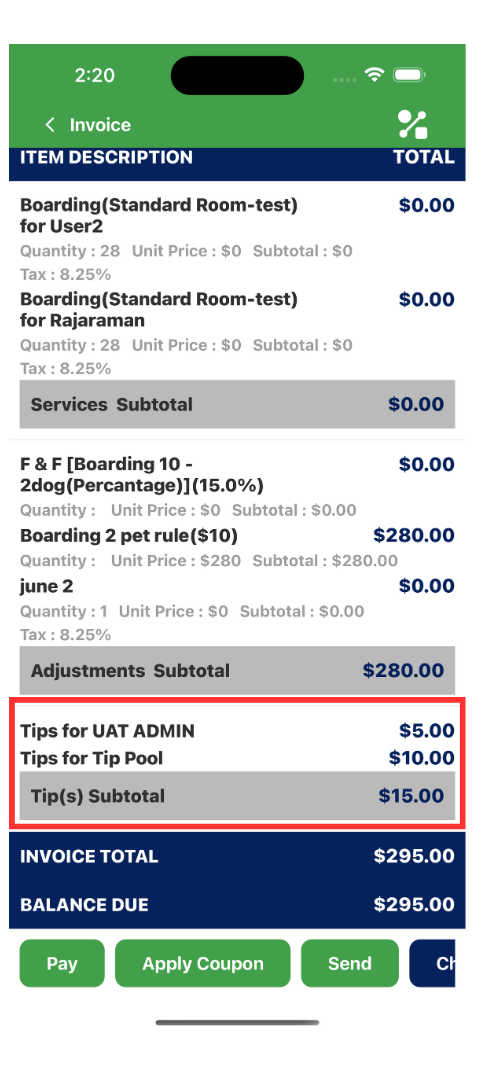
- You can now delete appointment notes directly in the Staff App.
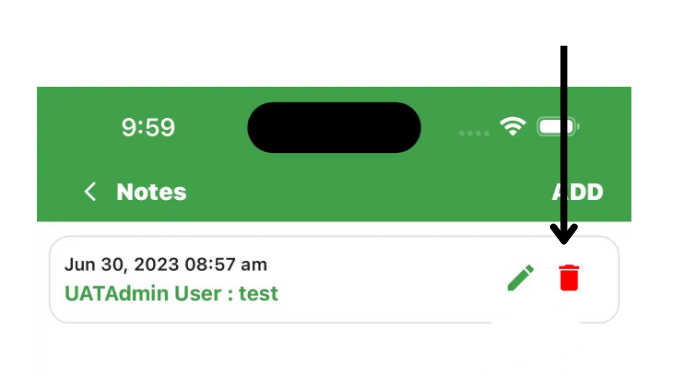
- We have added the ability to enable or disable the "Always Auto Apply" setting for invoices within appointments and checkout workflows.
- You can now send live URL links via the Message Hub.
Enhancements
Memberships
: We have added the ability to prevent membership purchases and check-ins based on the following settings for membership configurations
- Pet count : "Restrict pet count for purchase".
- Immunization Status : "Do not allow the purchase using kiosk or app without Immunization".
- Pet sex : "Allowed Pet Sex for this membership"
- Agreements : "Do not allow clients to purchase using kiosk or app without membership agreement"
Membership Effective Date
Now you can set an “effective date” for membership purchases by enabling the "Display the start date selection during purchase" toggle and selecting the effective start date option that best suits your needs.
Membership Renewal Mode
Now you can control if Pet Parents are given the option to opt out of auto-renewal of their membership
We have fixed several other issues and bugs that were reported.
V1.126.20240514.0105/14/20246 updates
Your RunLoyal portal has been updated with new features and enhancements!
Membership Related
- Now you can restrict minimum pet age during check-in in portal and kiosk . There will be a new warning while purchasing a membership with minimum pet age in the pet owner app (new app release required) and in portal and kiosk. You can force this condition to block a pet parent to check-in with a minimum age in kiosk.
- You can also manage the effective start date of a membership from the settings (Based on customer selection (like today), with 2 new options - Same as purchase date and select a custom date)
- Also, if you offer a recurring membership, you can manage if you want to allow the pet parents to unselect a recurring membership or not. This will allow you to offer a recurring membership where a pet owner cannot unselect the auto-renewal option at all.
- You can also multi-select the allowed pet sex for the given membership (the option to warn and not allow a specific pet sex is coming soon)
- In Pet owner profile, now you as the business owner can change the end date of a membership (the events will be recorded for auditing)
- Now you can request review (ask about our external review if you want to get more reviews in Google) during membership check-out.
External reviews
Now you can directly prompt the pet owner to leave a review to a 3rd party website like Google Reviews without prompting the RunLoyal review(which is recommended for filtering out negative reviews)
Appointment booking
- For lodging based services - The navigation has been improved where if you select a start date to be a future month, the end month automatically moves to that month.
- When you search a single pet in the search area, the pet automatically gets selected improving the workflow.
- Now you have the option to notify a pet owner while marking an appointment as No-Show appointment by selecting the toggle button (default off)
Calendar
There is new option (Full screen icon) on the top right corner, to view the calendar in full screen
New pet owner app
- In the coming weeks, we will be rolling out a new app for your pet parents with improved performance and experience. No action is needed from your end.
- This newer app would provide more personalization options allowing to customize the look and feel of the app (how you want to display packages and memberships) and more ways to collect critical information while the pet owners are adding a pet or while requesting an appointment. Please stay tuned for more updates.
- With the new version of staff app that is expected to be released this week, you can edit pet and pet owner tags.
We have fixed several other issues and bugs that were reported.
V1.125.20240502.0105/02/202414 updates
Your RunLoyal portal has been updated with new features and enhancements!
Mailchimp
With this release, we are introducing native integration with Mailchimp for enhanced email marketing capabilities. This powerful integration combines the customer, pet, and appointment data in RunLoyal to any new account or existing MailChimp account. This enhanced data enables you to create personalized marketing campaigns automatically, based on real customer data and behavior. This integration is available as an add-on service to your existing RunLoyal subscription. Contact us at puppylove@runloyal.com to learn more about integrating with Mailchimp.
Deposits
Now you can collect a deposit or send a deposit request to Requested or Waitlisted appointments from the Appointment view or in Pet or Pet Owner profile. You can do so by clicking on the new Collect Deposit (if the pet owner already has a saved card) or Request Deposit (to send them a request if they don't have a saved card on file) icon to collect the payment before confirming an appointment.
Pet Count
Now you can see the Pet Count and summary details for past dates as well as the current/future day capability.
Dynamic Notes
We extended our Dynamic Notes capabilities to Invoices. If an invoice has a Dynamic Note added to it, a new icon will also populate next to the pet owner's name in the Appointment menu and also in the Pet and Pet Owner profile to alert staff that there is an invoice-related note.
Memberships
- We have added the option to no longer show the Start/Effective date to Pet Parents when they are purchasing a membership. This may require a new app release, so please contact puppylove@runloyal.com if you'd like to enable this immediately.
- You can now duplicate an existing membership type by clicking into an existing Membership → three dots on the upper right hand corner.
Appointment View
- We have added a "Confirmed by Pet Owner" filter in the Appointment view, as well as in the appointment views within the Pet and Pet Owner profiles.
- You can now choose to display the pick up time in the Appointment view. The pick up time displayed will be the time selected by the pet owner in the app or web appointment, or the end of the defined pickup hours.
Push Marketing
We have added several additional filters for Pet Size, Weight, Breed, Membership Status (to market to checked in pet owners), Confirmed by Pet Owner (to send out a reminder if they haven't yet). You can also now use an Appointment Count value of '0' to target pet owners that have not yet booked any appointments with you
Appointments with primary add-ons
While creating or confirming an appointment with a primary service that is offered as an add-on (such as a groom while boarding), you can now see the primary appointment details by clicking on the (i) icon in the Staff assignment screen.
Merge invoices
A new warning prompt has been added merging invoices with packages, memberships, or retail items to ensure staff are aware that once that invoice is merged and payment collected, the package and memberships entitlements will become active.
Price Engine
When defining pricing rules, we have added an "Always apply" option so you can have the system automatically apply that price engine rule, even if there are more than one applicable pricing rule.
Feeding & Medication
Now, you view and print the modified feeding and medication information if they were edited for the current day.
Service Configuration
You can easily duplicate an existing Service Category by clicking into an existing Service Category → three dots on the upper right corner.
New Reports
- Monthly Sales : This new report provides a summary of your sales for a given month.
- Sales Tax Summary - With breakdown : This new report provides a view of your taxable and non-taxable services with the taxes collected.
Modifications to Existing Reports
- Daily transaction Report : Added "Service type" & "Services" filter.
- Invoice Register, Daily Transaction Report : "Credit Adjustment" renamed to "Pet Owner Credit adjustment" and :Refund" renamed to "Refunded as Credits".
We have fixed several other issues and bugs that were reported.
V1.123.20240411.0104/11/202422 updates
Your RunLoyal portal has been updated with new features and enhancements!
Reports Access
We have introduced the ability to provide role-based access to each report in Paw Metrics. In the Staff Group definition area, there is a new “Paw Metrics” column where you can allow access to specific reports for each Staff Group. The Guide to Configuring Role-Based Access for Reports
Staff Calendar
- You can now directly manage/edit your staff hours directly on the Calendar. A Guide to setup Block hours in Your Staffing Calendar
- You can now block off time on a staff members calendar, with configurable categories. These categories can be defined in Settings → Operations → Personalization → Portal → 'Staff block hour categories'
- Admin users can edit the calendar for all Staff, but a staff member can only edit their own schedule.
Dynamic Notes
We have extended the Dynamic Notes functionality to Invoices. This provides the ability to add notes specific to an Invoice . Invoice related Dynamic Note categories and types can be defined in Settings → Operations → Dynamic Notes → Invoice category. You can also set up alerts if you want to get notified while opening an invoice by going to Settings→Operations→Tag based alerting.
To-Dos
- We have added 5, 7, and 10 day interval options for Service Related To-Do's
- Service filters have been added to the Roll Call feature.
- We are now populating the primary add-on service details (room assignment, etc) in both the Assigned view and printed list.
- In staff and owner notes, we are now restricting words such as CBD, THC, weed, marijuana, cannabis, ganja, vapor, and vaporizer. If any of these words are entered, a pop-up message will appear on the screen that says "Messages that relate to cannabis or use cannabis-related terms are not allowed.” Similar alerts and pop-up will show up when you attempt to enter similar words in Message Hub as well.
- We have also optimized the performance of the To-Do feature.
Appointments
We have optimized performance when editing an appointment to provide faster loading and a smoother user experience.
Visual Map
We have added the ability to bulk edit components of an area within the visual map.
Calendar
- You can now go to a specific date by clicking on the new "Go to date" calendar icon.
- We have also optimized the performance of the Calendar.
Peak Days, Early/Late Fees
When defining or editing a pricing rule for Peak Days, Early Drop Off, or Late PIck Up, we have further enhanced the auto-apply rules. We have added a new option that allows the system to always apply the rule, even if another discount or pricing rule is present.
Invoice History
A new filter for 'Payment Status' has been added to enable filtering invoices by payment status.
Daily Snapshot
Now you can see primary services that you offer as add-on services in the Daily Snapshot. These primary services that were booked as an add-on will display a chain icon.
Push Marketing
- Draft push marketing campaigns now can be edited with the 'Edit Message' button.
- We have optimized the performance of the push marketing to provide faster loading and a smoother user experience.
- You can now edit a message before sending it.
Pet Sizes
In settings → Pet Configuration, you can now change the display order for items in Pet Type, Size, and Sex with drag and drop ease.
Custom Prices
We have added filters for services, weight, breed, and size.
Message Hub
We have optimized the performance of the Message Hub to provide faster loading and a smoother user experience.
Membership Check-ins
Now, you can see membership based check ins in Pet Owner Profile by clicking on the icon under Visits column
New Reports
- Credit Card Settlement Report (FiServ Only) : If you are with our new payment processor, you can now view all settlements done via Fiserv/CloverConnect
- Staff - Total Work Hours : This report shows the total hours worked by each employee within a chosen date range.
- Pet Owner Appointment Log: Recent & First Visits : Provides details on pet owners including their names, latest appointment, first appointment date, and total number of appointments.
- Revenue by Add-on Services : This report shows the income generated from additional services provided within a chosen date range.
- Pets with Zero Appointments : This report shows customers who are registered in the system but have never scheduled any appointments.
Modifications to Existing Reports
- Going home : Now you can generate single-day reports, with the option to choose between Confirmed, Checked-in, or all statuses, with Checked-in being the default option.
- Projected Revenue : This report now shows the data based on checkout and confirmed statuses, with the date range based on the appointment end date.
- Daily Transactions : The Tips column has been rearranged and service fees are now shown per transaction.
- Sales Tax Summary : A summary section to display the taxable items and tax-exempt items is added to this report.
- Invoice Register : Card not present and card present transactions are now grouped into a single filter titled "CARD".
- Retail : Now you can view the tax percentage for all products.
- Retail Inventory : We have added new columns for "Total Purchase Cost" and "Total Real Value".
- Staff Commissions : We have added multi-pet and multiple add-ons to this report.
- Pet Owner Details : We have added a new column for Full Address.
To-Do
You can easily view updated To-Do notes and dynamic notes in the list view.
Notes
Now you can see appointment notes entered by the pet owner in each Pet Profile in the Notes section.
Appointment View
You can now sort by Pet name.
- We have extended the "Block Pet" and "Block Pet Owner" functionality to the Express Check In/Check Out App. Blocked Pets or blocked owners will not be allowed to purchase, check in, or check out through the Express App for appointments nor for memberships.
- In the Quick Checkout view, you can now see the checkout details on the kiosk.
We have fixed several other issues and bugs that were reported.
V1.120.20240228.0102/28/202416 updates
Your RunLoyal portal has been updated with new features and enhancements!
New Credit Card Processor
- For those customers on our new payment platform, you can now customize the tip amounts for your terminals in Settings → Pricing → Point of Sale Terminals → Edit button. This same personalization for in-app tips is coming soon. Please contact us with any questions or for more information.
- Card Account Updater (CAU) Option : With this new offering, out-of-date debit/credit card information (card number, expiration date, etc.) is automatically updated to avoid recurring payment interruptions by reducing the frequency of declines.
- Please contact us with any questions or for more information on these new payment features.
To-Dos
- We have reorganized the left hand menu for To-Dos for better clarity, with specific groupings for to-dos and for status filters.
- The list print view now includes room assignments and secondary staff assignments.
- We have added new granular control on who can enter owner notes, upload media, and add to report cards in To-Dos. These new permissions are defined by Staff Group and can be configured in Settings → Business Setup → Staff Group → To-Dos.
Recurring Appointments
You can now include add-ons and define pick up and drop off times for recurring appointments.
Primary Add-on
Now you can add a capacity-based primary service as an add-on to another capacity based service.
Easy Check-in
This feature is now available for staff-based services in addition to capacity-based services.
Deceased Pets
If a pet was marked as deceased on accident, you can now reverse that is the pet profile.
Retail
In the inventory now you can see the sale price and tax rate in the list along with Restock history.
Appointments
While editing an existing appointment, now you have an option to notify (or not notify) the pet owner of the change.
Calendar
In the calendar print view, the text has been enlarged for better viewing.
Agreements
We have added a new option, called Manual Request to the Agreement definition page. This is designed for the unique use case where you may only want to request an agreement from a Pet owner when they are with you in the facility.
Staff
The Staff list in Settings has been enhanced with search and filter options.
Tags
Number icons from 0-100 were added for Pet and Pet Owner Tags.
Personalization
We have added a new option in Personalization to not display deleted pets in the common search and the search in the pet menu.
Pet Count
A new column has been added, called Overdue Pets, that shows the pets that are still checked in past their scheduled departure time.
New Reports
- Staff Commission Summary : Displays a summary of staff commission, including service totals, tips, and adjustments.
- Retail Inventory Report : Displays current stock levels and purchase price of each item. This report also includes an audit of changes, such as restocking and quantity edits.
- Retail Inventory Audit : Displays retail inventory audit details, including staff-restocked or edited quantities with date, time, staff info, product details, action type, and pricing.
- Cash Report : Displays only cash transactions within the selected date range.
Modifications to Existing Reports
- Incidents Report : We've added a new column to include the pet owners involved in incidents.
- Total Customer Spend : This feature enables you to view your customers based on their total spend.
- Visits Report : You can now see how often each customer visits and which services they use the most.
- Sales Tax Summary : All relevant records will be accurately displayed in the Sales Tax Summary, providing you with a comprehensive overview of your sales tax data.
- Pet With Appointments : Service Category and Service filter added and precision, allowing you to search for pets with specific appointments based on service categories or individual services.
We have fixed several other issues and bugs that were reported.
V1.118.20240120.0101/20/202420 updates
Your RunLoyal portal has been updated with new features and enhancements!
Payment Editing
You can now edit non-card transactions on closed invoices. This ability to enable this editing is controlled in Settings → Operations → Personalization → Portal, where you can define a timeframe for editing by your staff of up to 30 days after the transaction is recorded.
Calendar
You can now filter the 'Staff' view in the Calendar by Staff Group.
Pet Owner Details
You can now make the Pet Owner cell number mandatory while adding a pet owner in the business portal (coming soon to the App). You set this up in Operations → Personalization → Portal → Pet → "Do not allow the creation of a pet profile without providing the pet owner's mobile number".
Peak Day Pricing
We have added the ability to have the Peak Day rates automatically applied to an invoice, even while it is in confirmed status. To prevent pricing rule conflicts, the auto-apply will only take place when no other pricing rules are applicable to that invoice.
Retail
Now you can manually adjust quantities in Product Inventory.
Tax Rate
We have added the ability to bulk update the tax rates for Packages, Memberships and Retail products with one entry.
Staff
We have added a Staff Group filter to the Staff definition section in Settings → Business Setup → Staff.
To-Dos
We now record the staff name and time stamp in the Run Card grid when a To-Do item is marked as completed and when a Dynamic Note is entered.
Staff App
We now show in the appointment status and on the invoice if an action is done via the Staff app, the staff who did it, and the time/date the action was performed.
Service Configuration
Add-on services can be now entered once and linked across any Service Category and Service.
Portal
On the main left hand menu, we now highlight the selected menu item you are in for easier reference.
Appointment View
To make it easier to identify which appointment tab you are currently working in, we now highlight and enlarge the name of the selected tab.
Appointments
When adding, editing, or confirming an appointment, the Pet name and selected services are now highlighted for easier visual identification.
Settings
In Business Setup → Service Configuration, we have added status icons and a key to what each icon means.
Invoices and Receipts
When printing either a copy of the invoice or a copy of the receipt from the invoice view, both will print the appointment start and end date of the services.
QR Code
You can now scan the QR code of a Pet or Pet Owner and navigate to the respective To-Dos and Report Cards if they have an appointment in either the "Checked In" or "Confirmed" status.
Message Hub
We have updated the interface for sending pictures and videos (add-on).
Release Notes
We've added a new "What's new" button at the bottom of the app where you can view the latest new features and updates to the Staff App.
Data Refresh
If the Staff App is idle for more than 3 minutes, you will see a new "Pull to refresh" prompt to pull the latest data.
New Reports
- Sales Tax Summary Report
V1.116.20240104.0101/04/202417 updates
Your RunLoyal portal has been updated with new features and enhancements!
Merge Pet Owner
You will notice a new menu item in the business portal right below Pet Owners for Merging Pet Owners. This new functionality allows you to merge duplicate Pet Owner accounts. Instruction on how to merge pet owners
Memberships
You can now do bulk check-ins for membership areas
Audit Log
We have added the ability to see changes that have been made to Appointments, Invoices, Pets and Pet Owners - all in one place. These audit details can be found in Settings → Operations → Audit Details.
To-Dos
- We have added the ability to do a "bulk" Mark as Complete in To-Dos for Additional Services, Feeding, Medication, and both Facility and Service Related tasks.
- In addition to the viewing and/or the existing list view for additional services, medication and feeding details, you can now also print each in a Run Card format that contains only the additional services, medication, feeding information tracking cells.
Calendar
For Lodging-based services, we have enhanced the Drag and Drop capabilities to give you the option to have the system change the price to the new assignment's price or keep the pricing that was initially booked when moving animals between different service level units. If you have not mapped all lodging services to all units, you will need to enable the personalization feature "Allow appointments to be moved in Calendar to different services that are not mapped" under Settings → Operations → Personalization → Portal in order to use this feature. Directions on how to update room assignments in the Calendar by drag and drop
Account Balances
You can now record any payment as revenue (cancelation or no show fees, for example) without having to do a manual adjustment. We have changed the “Refund” button to now say "Balance Options" and add an "Add to revenue" option as well. When this is selected, you can choose to record the revenue as "Cancellation", "No-show", or "Other", with the ability to add notes that are only visible to you and your staff. Instructions on how to “Add as Revenue”
Service Configuration
We have further enhanced the "Display only for new pets" and "Display for existing pets" functionality by adding the option to mark pets as "existing" or "New" when adding them to the system.
Pricing
We have simplified the process of defining and/or updating your defined Tax Rate, Adjust Pricing During Check-in, Require Deposit, Set Up Appointment Cancellation Fee, and Appointment No-Show Fee by introducing the ability to do a bulk update these items by Service Category. Instructions on how to bulk update items in the price list.
Visual Map
We have matched the display order in the Visual Map view to the same order you set in the Visual Map setting. In Settings → Business SetUp → Visual Map, the tabs, or "Areas" can be arranged by a simple drag and drop.
eGift Cards
While selling an eGift Card, you can now choose to not send an email notification to the recipient (the purchasing pet owner will still receive a copy via email or it can also be printed).
Peak Days
You can now mark Holiday as Peak Days to enable any special pricing rules you may have defined.
Holidays
Using Personalization, you can now choose to allow appointments through holidays and the days that you marked as unavailable (may require an app release).
Appointment View
In each of the tabs in the Appointments view, (except Curbside) we have added a new column called “$ Details” that displays the total appointment value, amount paid, and balance due. If the invoice total has been paid in full, the icons will show in green. If money is owed to you, the icons will show in red.
Pricing Rules
In the Price Engine, you can now include add-ons part of your pricing rules.
Media
For those customers that have our Media add-on feature, you can now efficiently manage storage space with a new bulk delete option.
New Reports
- Customer Rank by Total Spend : Displays a complete list of your customers by total spend.
Modifications to Existing Reports
- QuickBooks Sales Detailed : We have added a column that displays "Used Credit/Dollars".
- Staff Commission : We have added a column for Pet name.
- Birthday pets : Date range issue fixed.
- Deleted Pet and Pet Owner : Date range issue fixed.
We have fixed several other issues and bugs that were reported.
V1.115.20231205.0112/05/202313 updates
Your RunLoyal portal has been updated with new features and enhancements!
Hourly Pricing
Now you can set up pricing for traditional services on an hourly basis. This functionality is based on a 0-24 hour logic for lodging-based services and a 0-12 hour logic for both capacity and staff based services. You can set several steps within each hourly price rule, such as the first 4 hours of daycare at one price and a different price for any time in excess of the first 4 hours. Hourly pricing rules cannot be set up for per hour based services.
Personalization
We have introduced the ability to control whether or not certain functionality is shown in your portal, pet owner app, online booking link, and the Express Check-in Kiosk App. In Settings → Operations → Personalization, you can configure a variety of General, Pet, Pet Owner settings based on your preference or operations. (Requires App release)
This new functionality can be combined with the Service Related To-Dos to create as many custom data fields on your Run Cards to track any data you need, while providing standard response options for you and your staff, including the ability to enter who prepared the food, who administered the meds, etc. directly on the Run Card.
To-Dos
Now you can print a summary (list view) for Additional Services, Feeding and Medication.
Using Personalization, now you can choose to display or not display deleted feeding and medication notes during a stay.
Price Engine
You can now configure pricing rules based on specific day(s) of the week.
Peak Day/Early Drop Off/Early Pick Up Fees
You can now set these pricing rules based on a specific time (clock hours).
First-time Appointments
In Service Configuration, you can now designate services (such as Meet and Greet, Temp test, etc…) to only be displayed for the first time appointment by a new pet owner. (Requires app release)
Coupons
You can now set Coupons to be applicable to only certain services, packages, membership, and/or retail items.
Add Customer or Appointment
We have added new "Add Customer" and "Add Appointment" buttons to the top right hand corner of the main header so you can access these functions from any page in the portal.
Appointments
When booking a new appointment in the portal, an alert will now pop up if the appointment requires any mandatory items, such as a deposit, agreement(s), card on file, and/or vaccines.
Curbside
In the Appointment view → Curbside, we have added the option to perform single or bulk check-ins for appointment based services directly on this tab.
Notes
Pet and Pet owner notes are modified to search and filter the notes easily
Report Cards
You can now choose to generate report cards for each day an appointment for lodging-based services. This setting is now part of Service Configuration → Show report card for every day.
- We have fixed several other issues and bugs that were reported.
V1.113.20231101.0111/01/202310 updates
Your RunLoyal portal has been updated with new features and enhancements!
Daily Snapshot
We have optimized the performance of the Daily Snapshot to provide faster loading and a smoother user experience.
Pet Owner Profile
We have added a quick link to all pets at the top right corner of a Pet Owner's profile for easier access.
Appointment View
We have added the 'Overstay' filter option in In House and ALL tabs to identify the appointments that are still in checked in status beyond their appointment end date. They are also highlighted for easier identification.
Report Cards
Report cards have been optimized to print in the Letter format and your business branding color has been added in both digital and print formats.
Tag-based Alerting
We have extended the tag-based alerting to membership-based services.
Playgroups
The pet information button in Playgroups now displays the friends with and doesn't get along with as you move the playgroups around.
Expiring Vax Icon
In Appointments, pet and pet owner profile, now you can see the immunizations that are going to expire before the appointment start date or during the appointment stay of the pets as a yellow syringe icon.
Membership
We have added the ability to offer a $0 membership in the portal and in the kiosk.
Modifications to Existing Reports
- Sales Report - Credit card : Receivable and Refunds added.
- Staff App Utilization Report : Column added for Action done by and Action done on.
We have fixed several other issues and bugs that were reported.
V1.112.20231017.0110/17/202320 updates
Your RunLoyal portal has been updated with new features and enhancements!
Daily Snapshot
Based on your feedback, we have made the following enhancements :
Status filter - when you click on each status (Arriving, Checked in, Checked out, etc) it will only show those appointments for easy viewing.
Easy Check-in - we have added the Easy Check-in functionality for quick and easy single or bulk check-ins. You can also assign playgroups during the Easy Check-in process through the Daily Snapshot.
Breed - We now also display the breed of each pet.
Date navigation - We have added the ability to see future dates.
Search - We have added a search feature on this view.
Settings
New Look - We have improved the design of the settings section to provide a more modern and simplified look and feel.
Search - We have added a search feature that is specific to the settings section.
Add-on Services
You can now select multiple existing add-ons to add to a new service.
To-Dos
For Service Related To-Dos, we have added several frequency options such as First Day, Last Day, Every Day Except First Day, Every Day Except Last Day, etc.
Pet and Pet Owner names will now be shown on all pages when printing. You can now choose to include emergency contact information on Full Run Cards.
For printing, the page setup has been formatted for better printing. We have added a "Back" button for easier navigation.
Staff
You can now add a profile picture to staff members via the Staff App. Now a Staff member's slot duration can be configured in 10 minute increments. We have also defaulted Staff App access to off for all new staff being added
Pet Owner Notes
You can now add photos to the Notes section. If you have the Media add-on, you can also upload videos.
We have added a filter for Notes based on where the note originated (from an appointment, staff entered or from To-Dos).
Invoice History
We have added several new filters based on invoice type, payment type and dates. We have also added a bulk delete option.
Performance
We have made several improvements in load times throughout the portal.
Refunds and Credits
You can now apply refunded deposits as a credit. Invoices: We have added an option to resend receipts
Staff Calendar (in Settings)
We have updated the default view to only show staff with a defined schedule. However, we have added a toggle option to show all staff.
Tags
We have added alphabet letters as icons that can be used as tags.
Reports
We have added a new option where you can request reports directly through the reports section.
Visual Map
To accommodate cageless boarding and daycare units, the maximum weight on the visual map has been increased from 3 digits to 4 digits.
Release later this week
To-Do's
We have added image/video upload and viewer capabilities.
Report Card
We have added image/video upload and viewer capabilities.
Message Hub
You can now choose to send messages via In App or SMS.
Staff App Profile
Added the ability to change password and PIN. You can also upload your profile image.
Appointment
Appointment filters are now available.
To-Do's
You can now add Facility and Service Related notes.
Modifications to Existing Reports
- Deleted/Archived Appointments : Shows “action done by” data in separate line items.
- Birthday Pets : Owner contact info added.
- Staff Commission : Shows totals for each staff separately.
- Membership Report : Email address added.
- Overnight Pets : Pet count and pet type added.
- Daily Transactions Report : Total for each column added.
- Pet Owner Details : Pet Owner Status filter added.
- Invoice Register Details Report : Packages/membership related quick checkout invoices are now shown.
We have fixed several other issues and bugs that were reported.
V1.109.20230923.0109/23/202310 updates
Your RunLoyal portal has been updated with new features and enhancements!
Daycare Playgroups
In settings → Operations, you can now define logical playgroups for daycare services. This new functionality allows you to assign a dog to a playgroup once a pet has a playgroup designation on their profile, they are automatically assigned to that playgroup when they check-in
You can also define each playgroup's default starting location and manage the rotation of playgroups throughout your facility during the day with drag and drop capabilities. You will see the designated playgroup's icon in the Appointment View and the movement of each playgroup will be reflected in the Appointment Status.
Memberships
We have simplified the membership purchase process through the portal via "Quick Checkout" with the ability to now check in the pet directly after the membership purchase.
You can now check-in your members from the portal without the need for the Express Checkin/Checkout kiosk app.
The colored membership icon is now populating in Appointments view, and in the Pet and Pet Owner profiles.
Weight-based alertings
We have added alerts that pop up if the pet weight is missing, it exceeds kennel/suite limits, or if the room isn't suitable for auto-pick due to weight restrictions.
Pet Count
We have added a high-level summary at the top of the page of the “All” view to provide an accurate view of totals, given that the same pet can be receiving multiple services on any given day.
We have also added a new column to display the Total Pets, which includes the Confirmed pets for future dates as well.
Early check-out
For appointments that are checked out before the scheduled checkout date/time, the system will now remove the remaining appointment days and assignment from ToDos and the calendar.
Saved Cards
In order to make sure the auto-renewals are not impacted, if a pet owner has only one card on file, you will need to enter a new card before deleting the current one. This same feature will be available in the app soon as well.
Coupons
We have added the ability to apply a coupon or adjustments when purchasing a recurring package or membership via Quick Checkout.
Staff App
We have improved the ToDo functionality in the Staff App with advanced filters for Feeding and Medication information and a simplified way to see and update items as needed.
New Reports
- Staff Service Details - List the services performed by staff with a timeline
Modifications to Existing Reports
- Pet Owner Details : Pet details are now in a single column.
- Quickbook Sales : Payment method column has been added.
- Tip Report : Now shows tips shared between staff.
- Sales Tax : Additional columns added to manually adjust sales tax accounting if adjustments are involved.
We have also fixed some issues with general tax reporting
We have fixed several other issues and bugs that were reported, including calendar views and filters, search, To-Do's, and other settings
V1.107.20230824.0108/24/202311 updates
Your RunLoyal portal has been updated with new features and enhancements!
Tag Based Alerts
You can now set up the system to generate a notification to you and your staff when certain actions take place for Pets or Pet Parents with specific tags you’ve designated. For example - You can create a “VIP” tag and have the system pop an alert in the business portal anytime you check in a pet parent that you have tagged as a VIP. These alerts are configurable by you and can be based on appointment confirmation, if/when an appointment is edited, appointment check-in or check-out, etc.
You will need to set up your Tag - based Alerts in Settings → Operations → Tag based Alerts. Alerts are currently being generated in the business portal and will also appear in the Staff App soon.
Frenemies
When checking in a Pet, the system will now generate an alert if there is a Pet in the same assigned area that has been tagged as “Does Not Get along With” on the Pet Profile. These alerts are applicable for all lodging-based(boarding) and capacity-based (daycare) services.
Notifications
While setting up a custom message in Notification Preferences (Settings → Business Setup), you can now personalize the messages using fields such as Pet name, Pet Owner name, etc.
Membership-based Services
We have expanded our membership capabilities to enable the creation of memberships that also includes service entitlements. For example, you can now create a monthly membership that includes unlimited dog park access, 2 days of daycare and a groom.
Multi-location customers
Now you can assign the same staff to multiple locations using the same email address in Settings Business Setup → Staff. Only an Organization Admin can assign a staff member to other locations. Once assigned to multiple locations, Staff members can easily switch locations on the top right corner of the business portal and in the top menu in the Staff App.
Tag Filter
You can now filter your view in the Appointment tab and in Pet and Pet Owner profiles, based on the Tags you have created.
Packages
When a package expires, Pet Owners will now receive an email notification.
Family Members
A new Family Member Icon has been introduced in the visual map while creating and assigning an appointment to easily identify if the kennel has other family pets assigned in that space.
Check Availability
We have added the ability to choose whether you'd prefer to view this from an "available" or "occupied" perspective.
New Reports
- Deleted pet and users
- Daily appointment details
Modifications to Existing Reports
- Tip report : Added Payment Mode column.
We have also fixed several other issues and bugs that were reported, including: Pricing adjustment during check-in when editing appointments. Issues with multiple filter combinations in Todo's confirmed/checked-in status. Archived Pet Owner - In "Add appointment" and "Pet page" is now grayed out.
V1.106.20230802.0108/02/202317 updates
Your RunLoyal portal has been updated with new features and enhancements!
Check Availability
We are excited to introduce a new feature designed to provide easy check availability of an appointment by date (staff and capacity based services) or date range (for lodging based services).
This feature can also be accessed in the Appointment view for Requested and Wait List tabs on each appointment next to the Assign/Reject button.
This feature also provides multiple view options with additional data when looking at partially available lodging or capacity based resources.
Security
We have introduced a new configurable "Automatic Session Logout" setting for enhanced portal security. At the top of the Settings → Business Setup → Staff page, there is now a toggle button titled “Enable time-based business portal automatic logout”. When toggled on, you can define how many minutes of inactivity triggers an automatic logout.
As this is a new feature, it is defaulted to “off”. You will need to toggle it on if you’d like to enforce a time out on logged in users.

Staff App
We have added the ability to pull up Pets and To-Dos in the Staff App by simply scanning the QR codes now being printed on Run Cards.
Just a reminder that all customers are entitled to a certain number of Staff App licenses, based on your subscription. To get started, simply download the RunLoyal Staff App to your smartphone and login with your existing credentials.
Dynamic Pricing Engine
For those driving additional revenue with this add-on feature, invoices will now group and display regular priced days and dynamically priced days separately with the daily rate for each.
Primary Services as Add-ons
Now you can add another Primary Service (such as Grooming) to a capacity based service (such as Daycare) and assign the staff from the same appointment window.
To-Do
For the Feeding and for the Medication print views, we have added general feeding and medication notes to the view.
We have added the ability to add a “Service Related” To-Do to the daily grid of Run Cards. This allows you to define and track any additional data points on a Run Card you'd like. The most common use case is for tracking and recording of pee and poop.
Push Marketing
This has a newer look and feel with new and enhanced filter options, including appointment status, Pet Owner spend, etc.
Waitlist Appointments
We have added the ability to edit appointments in Waitlist tab.
Appointment View Filters
We have added the ability to filter by Pet Owner and Pet Tags.
Appointment View
The system is now pulling your defined colors in Service Configuration for each service to the Appointment View.
Deposits
You can now collect a flat rate deposit amount.
You can also now collect deposits for only Peak Days. (Settings → Pricing → Price List → Non-peak day deposit)
Pet Sex
You can now select pet sex icons in Settings → Pet Configuration → Sex
Packages & Membership Auto-Renewal
When editing package credits or changing any membership auto-renewal, it is now mandatory to enter a note or comments for auditing purposes.
Dynamic Pricing Engine
Invoices with Dynamic Prices now show drooping of days by price, versus the dynamic price difference as a separate line item. Search: In the setting area, we have added a search function to Coupons, Packages and Memberships.
Agreements
In Settings → Business Setup → Agreements, we have added a “Preview” setting that allows quick document previews so you can verify the visual appearance of your agreements before finalizing them.
New Reports
- How did you hear about us? :
Modifications to Existing Reports
- Top 10 Customers : We have added service details.
- Deleted/Archived Appointment : We have added the date and the staff details who deleted or archived an appointment.
- Pet Tag : We have added a Pet Type filter.
- Checked in / Checked out / Confirmed Appointments : We have added a pet count to the report.
- Checked Out Pets : We have added immunization details.
- Pet Owner Tag : We have added an Appointment Status filter.
We have also fixed several other issues and bugs that were reported.
V1.105.20230715.0107/15/202311 updates
Your RunLoyal portal has been updated with new features and enhancements!
Check Availability
We are excited to introduce a new feature designed to provide easy check availability of an appointment by date (staff and capacity based services) or date range (for lodging based services).
This feature can also be accessed in the Appointment view for Requested and Wait List tabs on each appointment next to the Assign/Reject button.
Easy Check-in
You can now use this feature to easily check-in any confirmed appointments for capacity based services in addition to drop-in daycare.
Primary Services as Add-ons
Now you can add another Primary Service (such as Grooming) to a capacity based service (such as Daycare) and assign the staff from the same appointment window.
Waitlist Appointments
We have added the ability to edit appointments in Waitlist tab.
Appointment View Filters
We have added the ability to filter by Pet Owner and Pet Tags.
Appointment View
We are now pulling your defined colors in Service Configuration for each service to the Appointment View.
Dynamic Pricing
Invoices will now group and display regular priced days and dynamically priced days separately with the daily rate for each.
Deposits
You can now collect a flat rate deposit amount.
Pet Sex
You can now select pet sex icons in Settings → Pet Configuration → Sex
New Reports
- Top 10 Customers : We have added service details.
Modifications to Existing Reports
- Deleted/Archived Appointment : We have added the date and the staff details who deleted or archived an appointment.
- Pet Tag : We have added a Pet Type filter.
- Checked in / Checked out / Confirmed Appointments : We have added a pet count to the report.
- Pet Owner Tag : We have added an Appointment Status filter.
Staff App v1.1207/04/20238 updates
Your RunLoyal Staff App has been updated with new features and enhancements!
- Dark mode is now supported in Staff App
- QR code based scanning to access pet, Pet Owner profile and ToDo quickly
- Ability to restrict staff app login by staff group and by geofencing (distance from facility). Needs to be setup in the setup portal.
- Now you can send invoices and deposit request from staff app
- Now you can click on the Pet Owner email/phone number to contact them easily and click on the address to open up your phone's map app.
- Ability to add and review pet and Pet Owner notes
- Inbound message filter in Message Hub
- Ability to take and upload pet pictures from the Staff App
V1.104.20230702.0107/02/202314 updates
Your RunLoyal portal has been updated with new features and enhancements!
Online Reviews
We are excited to announce a new service add-on that links your reviews in the RunLoyal system to external sites, such as Google Reviews, Facebook, Yelp etc. The system can now prompt a Pet Owner, based on the star ratings they provide in the RunLoyal system, to share their review publicly and take them directly to your review pages for any site you define.
Based on parameters you define, the system can also be set up to send multiple reminders to pet parents to complete a review. Please contact sales@runloyal.com to learn more about this new add-on service and to enable it for you and your customers.
Role-based Access Control
You can now create different portal access levels for your staff, based on groups that you define and configure. Access is granted or denied based on the main menu items on the left hand menu in the RunLoyal business portal. You can create as many Staff Groups (such as Kennel Tech, Front Desk, Groomers etc..) as you’d like in Settings -> Business Setup -> Staff Groups. You would then assign existing or new staff members to the appropriate group you define.
Location-based System Access
You can now restrict access to the business portal and staff app to be only in or near your facility (default 500 meters). You can enforce these restrictions by individual staff members in Settings ->Business Setup ->Staff.
To-Do based QR Codes
Full Run Cards will have a QR code that can be used with a newer version of the RunLoyal Staff App. When a Staff App user scans the QR code, they will be taken directly to that pet’s To-Do. This functionality will be added to the RunLoyal Staff App in an upcoming Staff App release expected during the first week of July 2023.
Daily Snapshot
We've received tremendous positive feedback on this new feature. We have added even more functionality in the release including:
- Pet Owner name is now clickable to go to the Pet Owner profile
- Pet tags will now also show
- Appointment details are now viewable by clicking the new “i” icon to the right of the Pet name
- Fixed the color not changing for boarding checkouts.
Message Hub
- We have added a new “Unread” filter option
- We have added icons at the top of the message section where it displays the available options to send the message (App/Email/SMS). These options are based on your system preferences and what the Pet Owner actually has available in their profile so that you know how the message can be sent.
Invoices
- We have simplified and improved the way we display the tax amount on invoices moving forward for better formatting and clarity of the invoice
- We have modified the page format for Quick Checkout to enable quick scanning of retail items.
- We have resolved reported issues related to invoices.
Invoice Merging
While merging open invoices, we are now carrying the line items of the invoice forward to the erged invoice. We have also fixed a few bugs we identified with merging invoices
Receipt Printing
Now you can print a smaller receipt from the invoice screen using a RunLoyal approved receipt printer.
Multi-pet Belongings
For a multi-pet appointment, now you can capture belongings for Food/Medication/Toys/Others for each pet separately upon check in.
View Filters
We have enabled your selected filter to persist in the Pet or Pet Owner page after editing an appointment.
Immunization Search
Now you can search the Pending, Active and Expired Immunization list by pet or Pet Owner name.
New Reports
- No Show/Canceled Fees : Displays the fees collected for No Shows and Canceled appointments for a selected date range.
- New Customers Report (Pet Owners) : Displays new customers details for a selected date range.
- Service Fee Report : Displays the service fees collected by the invoice for a selected date range.
Modifications to Existing Reports
- No Show & Canceled Appointments : We added a Service Category and Service Filter for more granular reporting.
- Immunization Status : We have added a filter for appointment status - All, Checked in, Confirmed and Checked out.
- Pet Owner Details and Membership Report : Pet Breed, Age and Birthday has been added.
- Sales Report : "Non Revenue" will show E-gift, Service Fee & Tips
- We have added No Show and Canceled fees to the following reports :
- Invoice Register
- Invoice Register - Accrual
- Sales Report
- Daily Transaction Report
V1.103.20230603.0106/03/202314 updates
Your RunLoyal portal has been updated with new features and enhancements!
Robust Retail
We have introduced more robust features and functionality to the retail component of the portal. This includes inventory management, product images, and integration with a barcode/QR scanner, receipt printer and cash drawer.
Media
Now you can attach pictures and videos (video requires our Media add-on) to your ToDo (RunCard) and also to Report Cards and share with the Pet Owners via app and email.
Today at a Glance
We have created a new simplified daily overview that displays all the pets arriving and going home for that day. In addition to being able to quickly see a high-level view of your day, you can also easily check animals in and out from the new view.
Lead Source
Now you can capture how your Pet Owners found you with the new 'How did you hear about us?" data field on the Pet Owner profile. You can define the lead source options in Settings -> Promotions.
No-show Fees
We have added the ability to define a No-show and/or Cancellation fee in the price list for any of your services. While canceling or marking an appointment as a no-show, you are then presented with the option to charge those fees or not.
Vax Icon
Now when you mouse over the missing immunization icon (red syringe), you will see the missing immunization information on the appointment view as well as the pet and Pet Owner profiles.
Last Assignment
When creating a new appointment in the portal, the system now loads the assignment details from the most recent appointment by default, but those assignments can be edited or changed.
Pet Owner Profile
We have added the ability to add up to three emergency contacts and/or three authorized contacts.
Pass-on Fees
The ability to pass on fees has been extended to packages, memberships and retail products.
Calendar
- You can now choose to display or hide the Waitlist on your calendar views.
- In the Staff calendar, we have added a month view option.
Collars/Labels
- You can now define pet collar sizes by pet type in Settings.
- You can also add a pet collar size to any pet's profile.
Coupons
Now you can apply a coupon to an individual line item on an invoice.
New Reports
- Booking Summary by Staff : Some RunLoyal customers compensate their staff based on appointment bookings. This report displays the details of which staff created appointments in the portal, both by count and total appointment value.
Modifications to Existing Reports
- Package Details Report : We have added a separate line item for refunds.
- Membership Report : We have added the total number of membership purchased and the total number of memberships renewed for each Pet Owner.
V1.102.20230511.0105/11/202317 updates
A minor release went out today with the following enhancements to the RunLoyal platform:
Easy Check-in
We now display weight and tags for easy daycare assignments.
Creating Appointments
- When creating a new appointment in the portal, an alert will now populate if you are trying to book an appointment for an animal that already has an existing appointment for the same day and service.
- The "Assign" for Lodging and Capacity based services in the Visual Map now includes additional options for users to filter the results by availability, with choices for Show Only Available, Show Only Partially Available, and Show All Available.
Appointments view
- WThe name tabs have changed to the following to be more accurate.
- Arriving Today → Arriving, Checked In → In House, Going Home → Leaving, Confirmed → Approved
- You can sort your view by Pet name
- Pet and Pet Owner profiles can now be opened as a new tab with right click.
- A date range has been added to the quick filter options.
Immunizations
Multiple documents upload is now supported.
Visual Map
You can configure the display order of the various tabs in Settings → Visual Map
Price Engine
You can now define pricing rules at an individual service level.
Pet Belongings
- We have added categories, such as Food, Medication, Toys, and Other for easier categorization of belongings.
- The returning of belongings through the system can now be configured as mandatory or not.
To-Do's
- A new print feature has been added that allows users to print the pet details only on the first page for more efficient space utilization on subsequent pages.
- Assignment (Room or Staff) and appointment information is displayed in the To-Do List few and sortable as well.
Service Profiles
Now you can map a service profile to a specific service category or service. This allows the system to populate the associated service profiles on the appropriate Run Cards.
Packages
For the packages that renew on expiration date, now you can define a start date for those packages.
Agreements
We have added a field for Pet Owners to type in their name when signing agreements online
Frenemies
When adding Pets to the "Gets Along With" or the “Does Not Get Along With” feature, the pets are now cross-linked to each other's profile.
Cameras
A new camera can now be added in the Camera Module from the business portal.
PawMetrics
We have improved the search function and sorting of categories
Credits
When editing credits in a Pet Owner profile, a note as to why is now mandatory for auditing purposes.
New Reports
- Appointment by Source
- Booking summary by staff
- Projected Revenue by Invoices
- Bookings by Staff
Modifications to Existing Reports
- Invoice Register Details : Added payment mode and Invoice Status filter
- Daycare occupancy : Current occupancy rate added
- Invoice Register : Separate line item for all payments
Check-In v1.1905/09/20235 updates
A minor release went out today with the following enhancements to the RunLoyal Check-In:
- Force VAX, Agreement, Pet Owner questions and Card on File (appointments) configurable for memberships and appointments
- Customizable brand and theme for Kiosk (default customer primary color and theme attached)
- Agreement signature capture in the Kiosk itself
- Membership - Check-in Usability enhancement to skip the pet page, agreement during the Check-in process
- Membership - Usability enhancement to take the Pet Owner to the next screen after purchasing a new package
V1.101.20230425.0104/25/20239 updates
A minor release went out today with the following enhancements to the RunLoyal platform:
Appointment View
We have made several enhancements to the Appointment Views to provide a more efficient workflow, more information in some cases, and less in others. These improvements include:
- The action buttons have been moved to the left side of each appointment to provide easier access to them and eliminate the need to scroll right to get to them.
- There is a new “Summary View” toggle that provides a condensed list view for each tab that can also be easily printed.
- You can now check in pets from Arriving Today and check out pets from my On My Way.
- A new column has been added for Add-ons that displays the details for any add-on services, including times and assignments.
- There are two new options that have been added to the quick filters for all tabs: Checked In Today and Checking Out Today.
Appointments
- When creating, editing, or confirming an appointment, the Pet's tag(s) and weight will now be displayed under their name on the left-hand bar.
- A new warning will now pop up for staff-based and capacity-based services (grooming/daycare) if a staff member manually adds an appointment that would put you over your defined capacity.
To-Do
- In the print/view option for Feeding and Medication, the room assignment is now the first column.
- For Feeding and Medication during a lodging appointment, if a feeding and medication is deleted for any part of the stay, the deleted item will now show as deleted versus simply being stuck through.
Vaccines
We have added the ability to add/edit/change vaccines and their expiration dates for any uploaded vaccine(s) in the Pending Immunization tab.
Roll Call
We have created a new “Roll Call” view in the To-dos. This printable view also provides a digital list of all animals in house that can be filtered by service for quick and easy printing or digital tracking.
Visual Map and Pet Count
Both now display the start/end date and the time of appointments.
Reports
The reports have been organized into new tabs based on the type of report. The existing Compliance, Financial and Operations tabs are still there. The new tabs include: Pet Data, Pet Owners, System/Usage, Daily, Employee, and Accrual Accounting.
New Reports
- Average Check-in/Check-out Time by Service
- SMS Utilization
- Staff App Utilization
- Rejected Appointment
Modifications to Existing Reports
- No Show & Canceled: "Action By" column added to show which staff canceled or marked an appointment as a no-show.
- Checked-In Pets: Now also displays Pet tag(s) and Pet Owner tag(s).
- Pet Details: The report now also displays the pet status: Active, Deceased, or Deleted and can be filtered to show only a selected status as well.
- Immunization Status and Projected Revenue: We have added a status column and filter: Confirmed, Checked In, Checked out, or All.
V1.100.20230330.0103/30/202322 updates
Your RunLoyal portal has been updated with new features and enhancements!
*Some features listed below require an app release, which can take up to 7 business days, to enable the new functionality. If you are interested in enabling any of these new features right away, please send an email to puppylove@runloyal.com and we will prioritize your app for release.
Release Notes
We have added the running history of our releases notes to the portal. You can access past release notes under your profile tab -> Release Notes.
Keyboard Shortcuts
We have added several keyboard shortcuts for easier access to different areas of the portal that can be found by clicking on your profile icon, then “Shortcuts”.
Service Configuration
You can now configure each of the following items to be “hard requirements”: vaccines, agreements, card on file, feeding information, medication information and even custom questions.
Notification Preferences
We have added the ability for you to add your own custom text to each system generated notification. For every notification, you can specific unique messages for app, email and SMS.
Easy Checkin
We have added an Easy Checkin button in the upper right hand corner. This is currently applicable only to appointment-less, capacity-based (typically daycare) services. For example: walk-in/drop off daycare that does not require appointments in advance.
Easy Checkout
We will also be adding an Easy Checkout option in the coming weeks.
Packages
You can now set packages to renew on consumption, expiration date, or whichever comes first.
Snippets
We have added a “quick response” feature that provides the ability to quickly paste frequently used messages, responses or notes anywhere in the platform. To use a Snippet, simply click to copy the Snippet you want from new Snippet icon(#) in the top right corner, click to copy, then paste the text where you want it to go, such as Message Hub, ToDo, Notes, etc.
Service Configuration
We have added the ability to add a “Primary Service” as an “Add-on Service”. This is critical for services such as Board and Train, Daycare While Boarding, etc.
Service Configuration
Add-on service definition has been simplified You can also now group add-ons for easier viewing by customers.
Business Hours
For lodging and capacity based services, we have added the ability to designate specific times as “drop off” or “pick-up” hours.
Staff App Licenses
You can now manage your staff’s access to the staff app from the business portal.
Oversubscribe Kennels
We have added the ability for you to “overbook” a kennel, which provides you with an easy option for “family” boarding and other options for setting up your boarding capacity.
Multiple Location Customers
For pet and Pet Owners, in a multi-location environment, staff and location names are now location specific.
Pet Count
The numbers across the pet count view are now clickable and will populate a screen view of those pets.
Appointment View
In the 3 dot menu and in the pet /Pet Owner profile, we have added a quick link for “Ready for Pickup”, which includes the option to also send the invoice.
Appointment View
We have added advanced search filters to all tabs, including “Last 7 days”, “Next 7 days”, “Tomorrow” and additional filter options.
Report Cards
We have added a quick link to “View Report Card” in the 3 dot menu for appointments in the “Confirmed” and “All” tabs of the Appointment View, as well as in the pet and Pet Owner profile for “Checked In” and “Checked Out” appointments.
To-Do
You can now print a summary view for the Full Run Cards.
Service Assignments
We have made it easier to select /unselect the kennel units while editing a boarding appointment.
Packages
You can now sell a $0 package.
eGift Cards
You can now see the eGift Card code for Pet Owners in their profile.