
A new release! 🎉
Your RunLoyal portal has been updated with new features and enhancements!
Enhancements
- External Reviews 2.0 — Reputation Management (Opt-in Beta) :
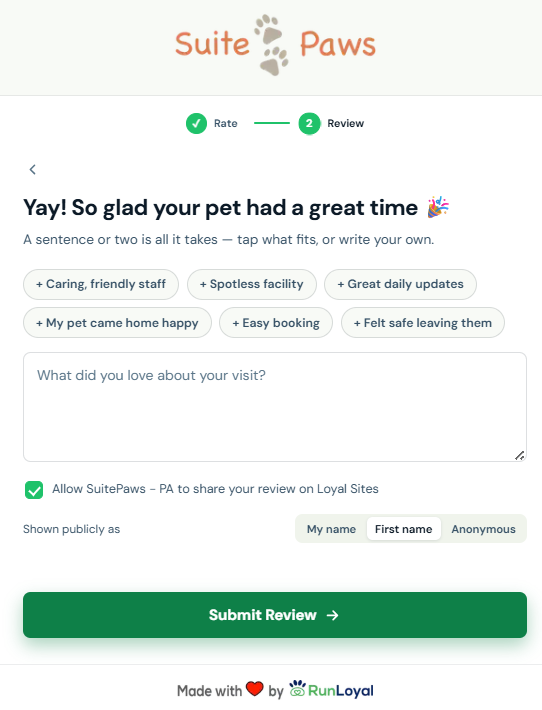
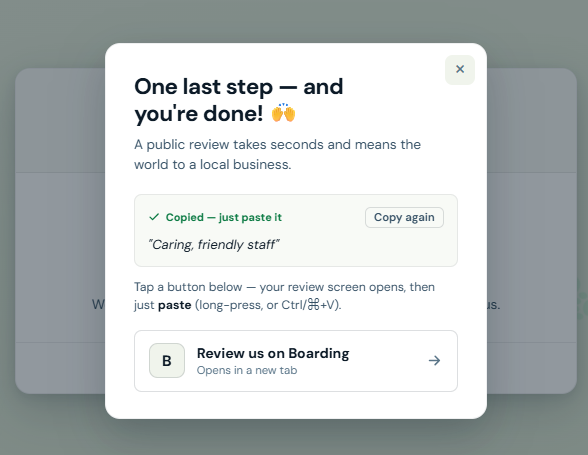
We've rebuilt External Reviews from the ground up into Reputation Management — a faster, smarter way to grow the public reviews that win bookings. Connect your review platforms in a few clicks, let RunLoyal send the right ask automatically off real checkout activity, and give pet owners a redesigned, conversion-optimised review flow.
If you'd like access to this beta, please contact us at puppylove@runloyal.com.- Automated, rule-based review requests :
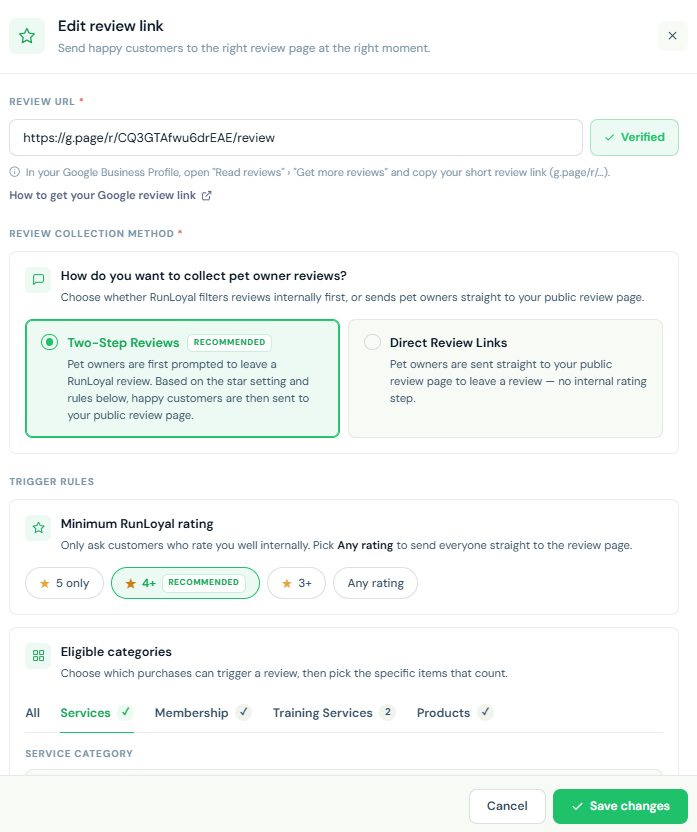
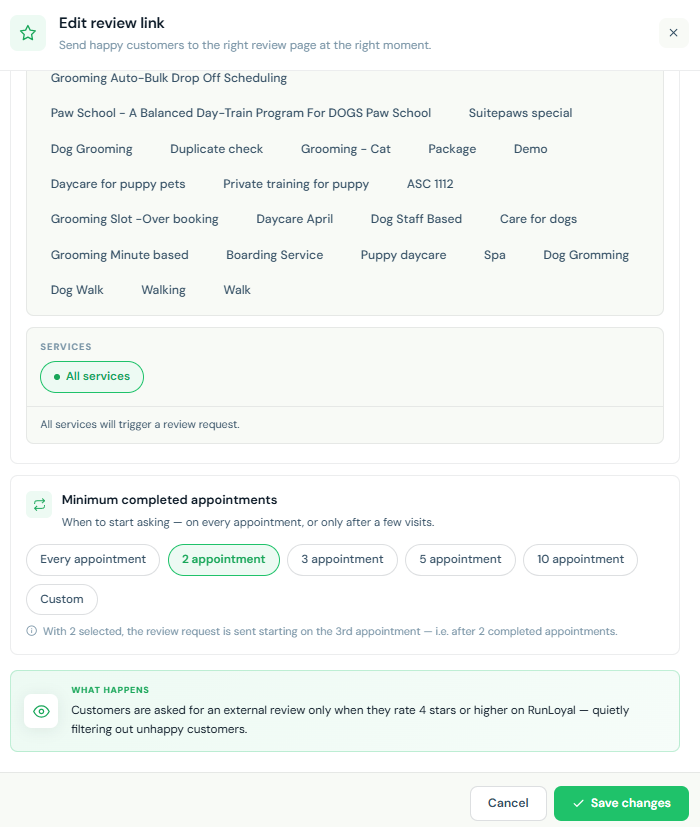
Stop chasing reviews by hand. Set your rules once and RunLoyal asks the right customer at the right moment — automatically, based on real checkout activity.
- Trigger requests by visit history (e.g. after 2+ or 3+ completed visits).
- Trigger requests by star rating (e.g. a minimum in-app rating of 4★ and above).
- Simpler multi-platform connection :
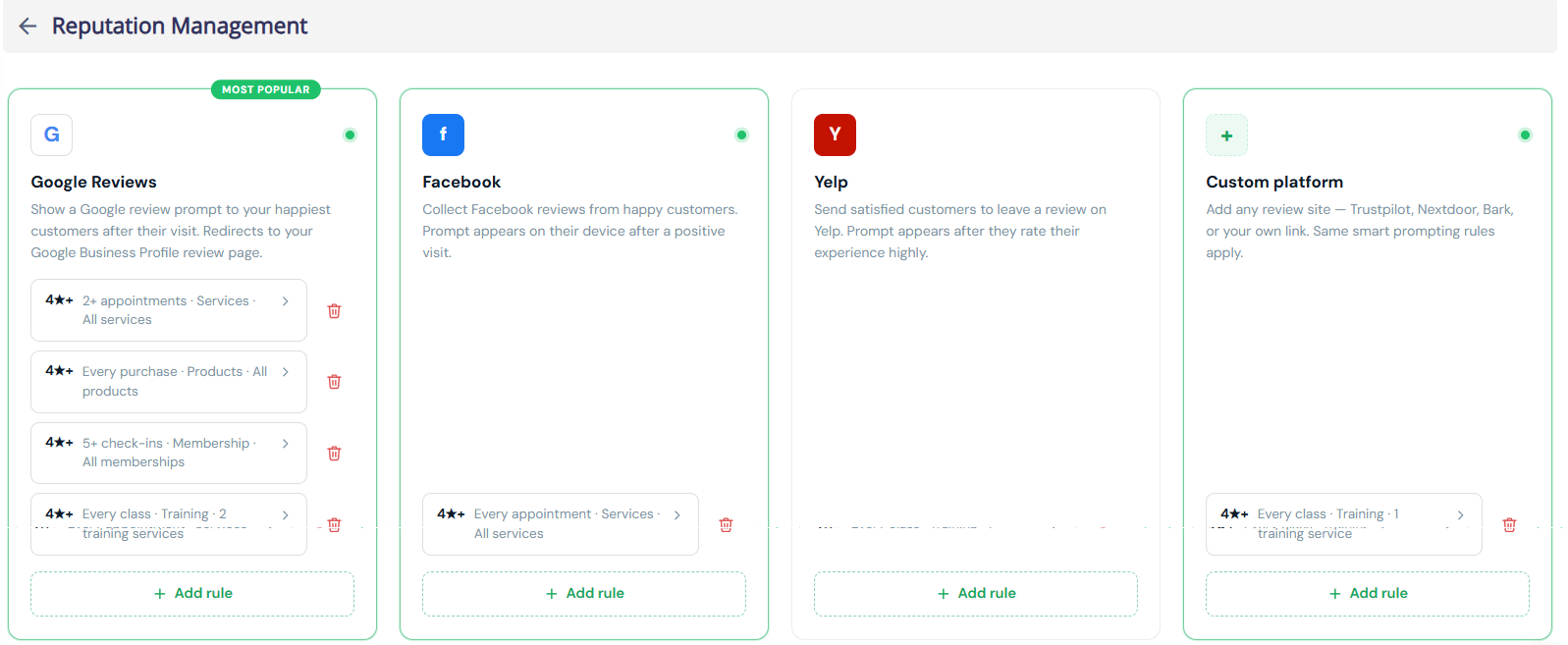
Connect Google, Facebook, Yelp or any custom review platform in a few clicks. No developers, no URLs to hunt down.
- Paste your review link — we handle the platform-specific path for you.
- Manage all connected platforms from one place.
- Track how many free review requests remain on your plan.
- A redesigned customer review flow :
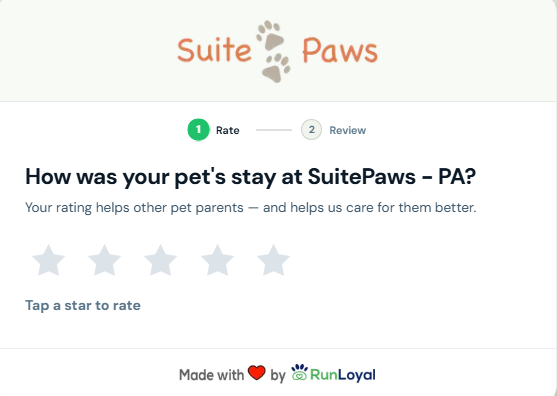
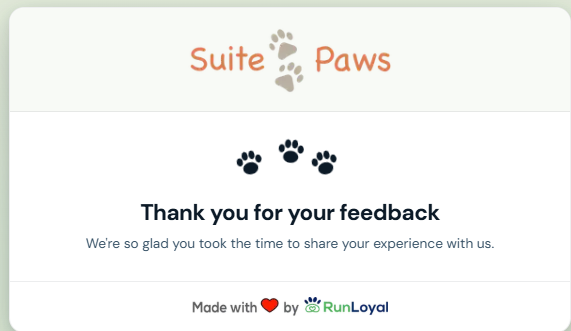
We rebuilt what your pet owners see — a clean, branded, mobile-first page tuned at every step to turn a recent visit into a posted public review.
- Step 1 — Rate the visit → Step 2 — Add a quick note → Step 3 — Share publicly → Done — Thank you
- Branded with your logo · one-tap posting to Google & Facebook · words pre-filled so owners just paste · social-proof throughout.
- Automated, rule-based review requests :
Stop chasing reviews by hand. Set your rules once and RunLoyal asks the right customer at the right moment — automatically, based on real checkout activity.
- Tips Support in Quick Checkout :
Staff can now add a tip directly from the Quick Checkout invoice page when processing payments for the following:
- Packages
- Training Services
- Retail Products
- Gift Cards
A Tips option is now available in the Quick Checkout invoice action bar alongside the existing Coupon/Adjustment, Send, and Pay options. Staff can click the Tips button before processing payment to add a tip amount on behalf of the pet owner — making it easier to collect gratuity at the point of sale without navigating away from the invoice.
Tips are not currently configurable in portal settings — this enhancement is available by default at checkout without requiring any setup, consistent with the existing Tips functionality in the appointment flow.
Note:- This enhancement is available in the Business Portal. Support for StaffApp+ for Groomers, StaffApp+ for Kennels, Pet Owner App, and Client Portal is expected by the end of July 2026.
- Tip options on other platforms (StaffApp+ for Groomers, StaffApp+ for Kennels, Pet Owner App, and Client Portal) are configurable via Settings → Pricing → Point of Sale Terminal, where up to 3 customizable tip percentages can be set — separate from the non-configurable Quick Checkout Tips button available in the Business Portal.
- ScoutAI Vax Verify — Background Scanning Enhancement :
Building on the Vax Verify feature introduced in the Business Portal, we've enhanced the experience with background scanning — so staff no longer need to wait for the analysis to complete before continuing their work.
What's Changed
Previously, when a staff member uploaded a vaccination document, they had to stay in the immunization modal and wait for Scout AI to finish analyzing before taking any other action. With this enhancement, the analysis now runs entirely in the background.
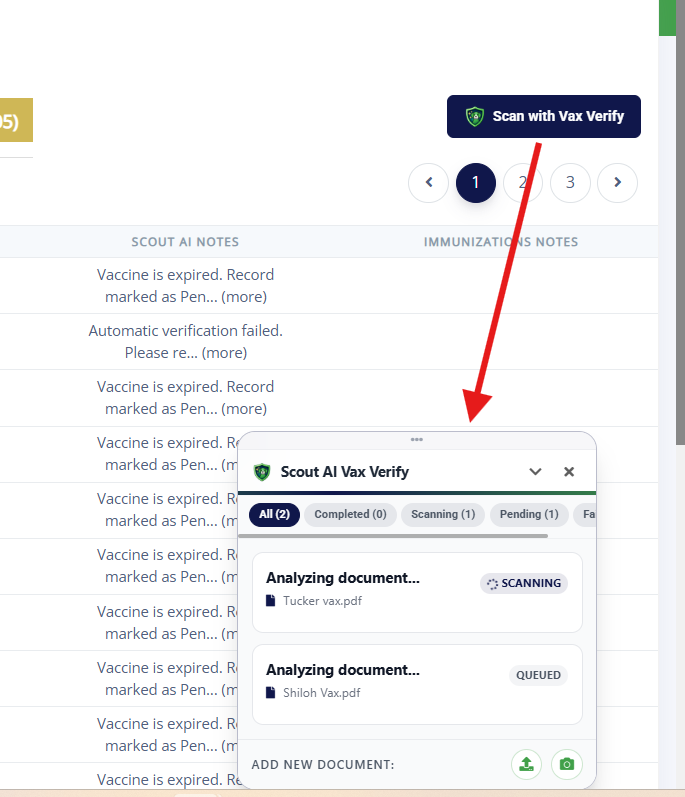
How It Works- Click Scan with Vax Verify from the top navigation bar or the Immunizations section.
- Upload vaccination documents one at a time or in succession — each document is automatically added to the processing queue.
- Once uploaded, the modal can be closed — Scout AI continues scanning in the background while staff freely navigate and use other parts of the portal.
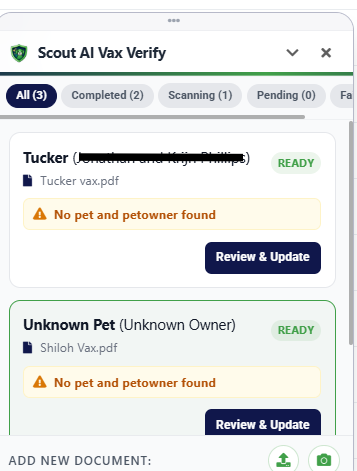
- A Scout AI Vax Verify floating panel appears, showing real-time progress — displaying counts for Completed, Scanning, Pending, and Failed documents.
- Documents are processed one at a time in the order they were uploaded.
Each document in the queue will show one of the following statuses:- Queued — Waiting to be analyzed
- Scanning — Scout AI is actively analyzing the document
- Ready — Analysis complete, awaiting staff review
- Failed — Analysis was unsuccessful
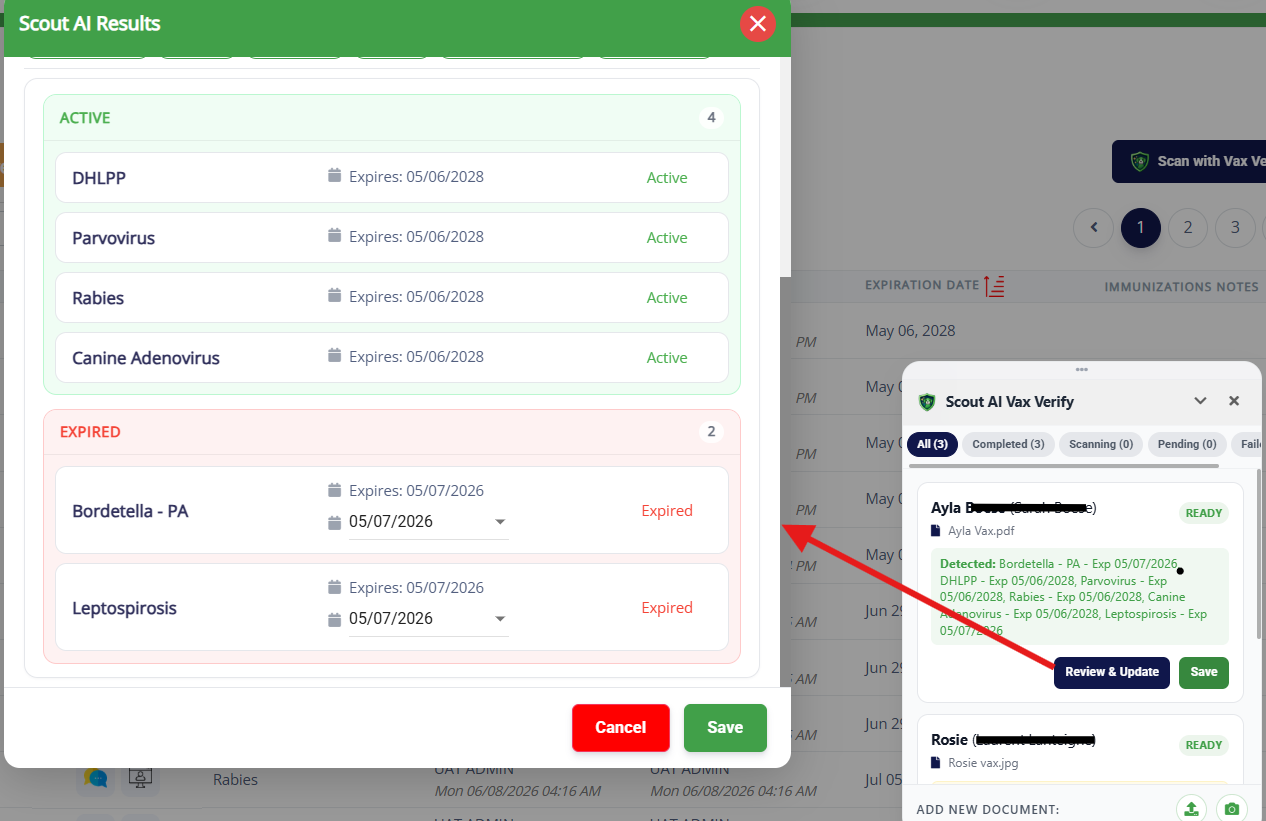
Once scanning is complete, staff can click Review & Update on any result to:- View the matched pet owner and pet details
- Review detected immunization types and expiry dates
- Select or deselect specific immunization records
- Edit dates if needed before saving
- Click Save to apply the records to the pet's profile
Note: This enhancement is available in the Business Portal. Support for StaffApp+ for Groomers and StaffApp+ for Kennels is expected by the end of July 2026. - Easy Check-In — Background Processing :
The Easy Check-In experience has been enhanced with background processing, allowing staff to continue using the portal while check-ins are completed automatically.
How It Works- Initiate Easy Check-In for walk-in pets as usual.
- Once started, the check-in process runs in the background — staff can freely navigate and use other parts of the portal without waiting.
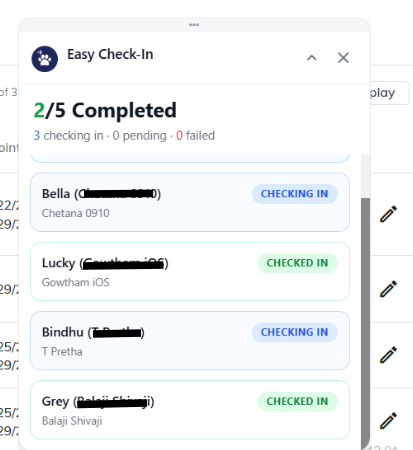
- A floating Easy Check-In panel appears, displaying real-time progress with counts for Completed, Checking In, Pending, and Failed.
- Each pet's check-in status is displayed individually, showing the pet name and owner name alongside their current status.
- Checking In — Check-in is actively in progress
- Checked In — Successfully checked in
- Failed (Retry) — Waiting to be processed
Note: This enhancement is available in the Business Portal. Support for StaffApp+ for Groomers and StaffApp+ for Kennels is expected by the end of July 2026. - Service Status & Incident Notifications :
We've launched a live service status page to keep you informed at all times.
Visit status.runloyal.com for:- Real-time system status — Know instantly if any services are affected
- Incident updates — Stay informed on any ongoing issues and their resolution progress
- Maintenance notices — Get advance notice of scheduled maintenance windows
- Multiple Unavailability Date Ranges — Visual Map Enhancement :
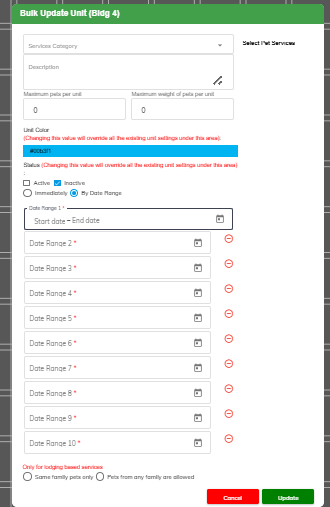
Building on the previous release, the maximum number of unavailability date ranges per unit in the Visual Map has been increased from 5 to 10, giving you greater flexibility to plan ahead for maintenance, holidays, or other closures across more periods without needing to update the setting repeatedly.
Note: This requires a Pet Owner app and Client Portal release. If you would like this prioritized, please contact puppylove@runloyal.com. - Cancel Appointment Request — Pet Owner App and Client Portal :
Pet owners can now submit a cancellation request directly from the Pet Owner App and Client Portal, giving them a convenient way to communicate cancellations without needing to call or message the kennel separately.
How It Works- From the Appointments section in the Pet Owner App or My Visits in the Client Portal, pet owners can tap the Cancel button on any upcoming or checked-in appointment.
- Pet owners can choose to:
- Keep Appointment — Dismiss the popup and retain the booking.
- Request Cancellation — Submit a cancellation request to the kennel.
- Once submitted, you will receive the request and follow up with the pet owner via Messages.
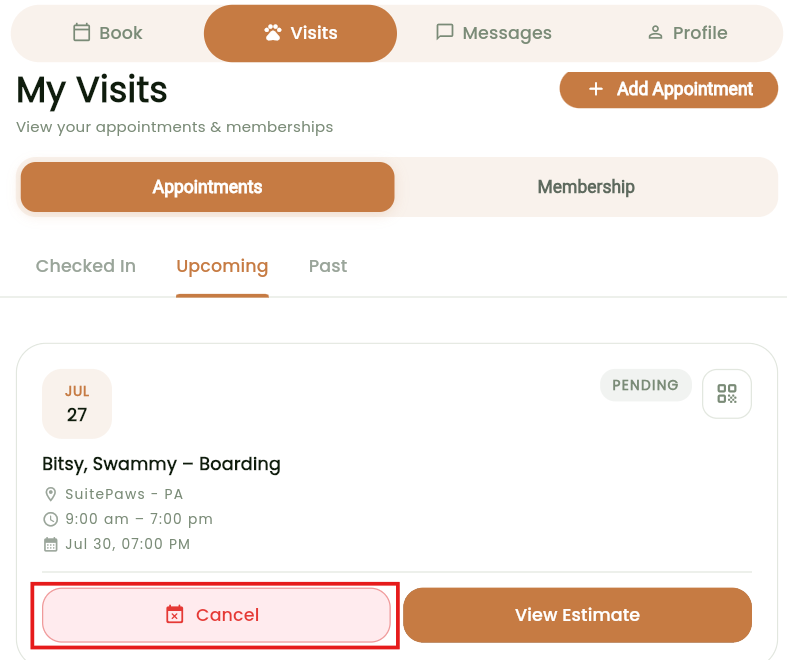
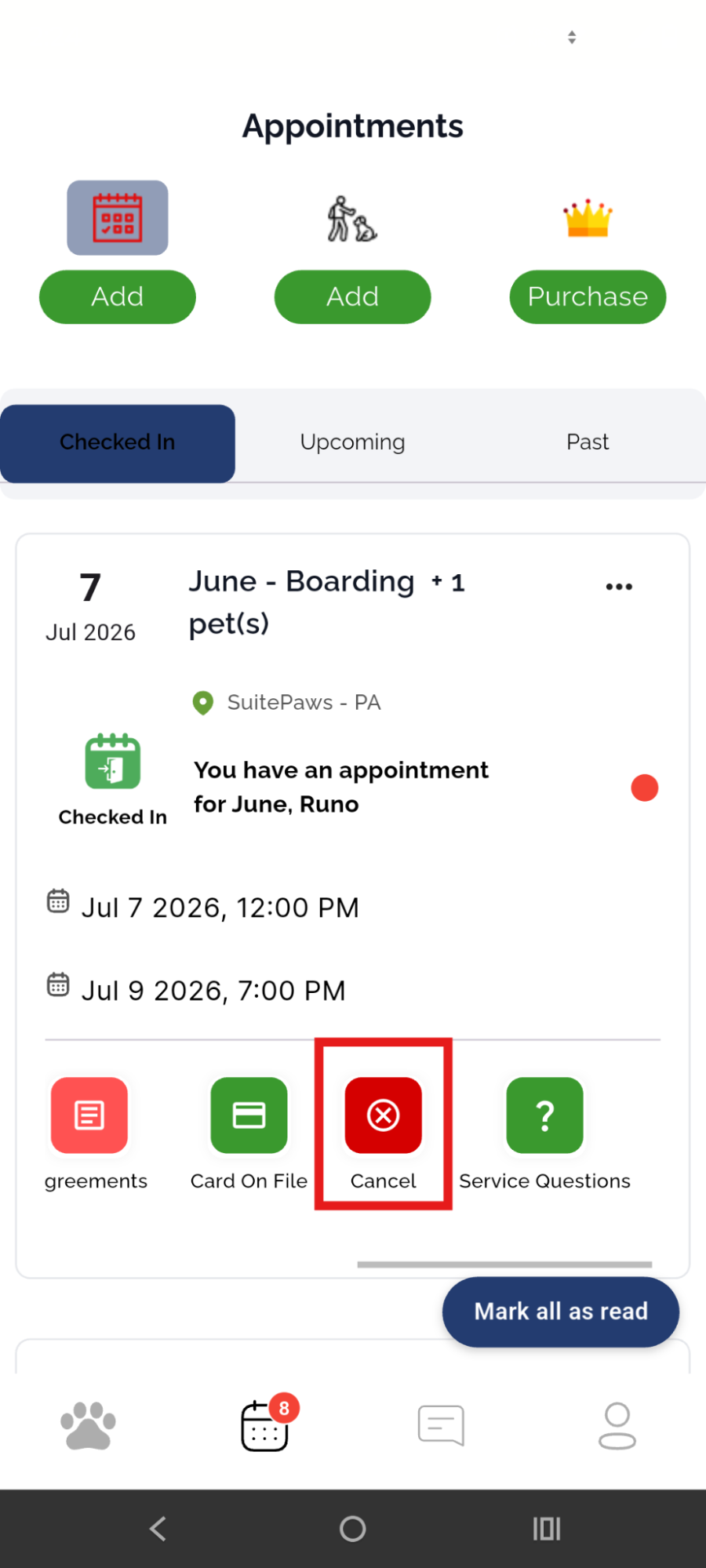
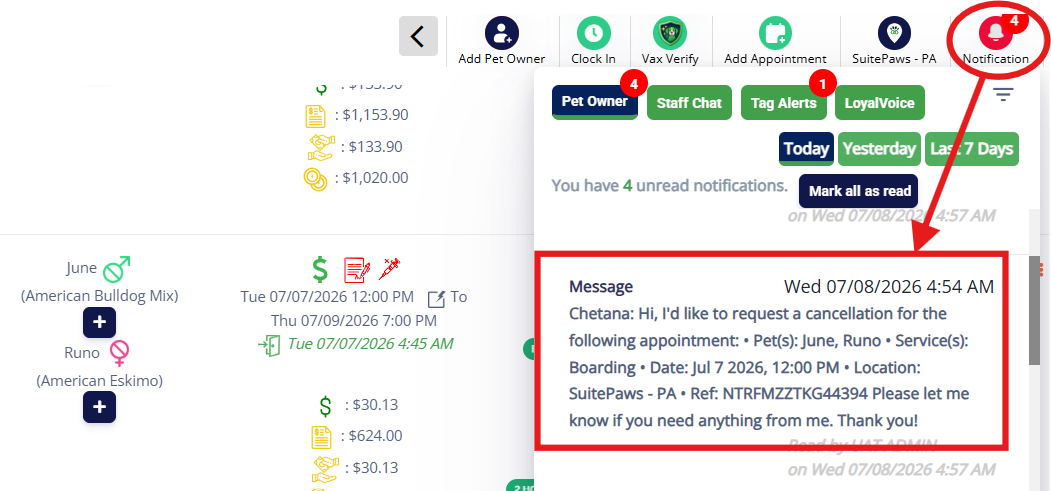
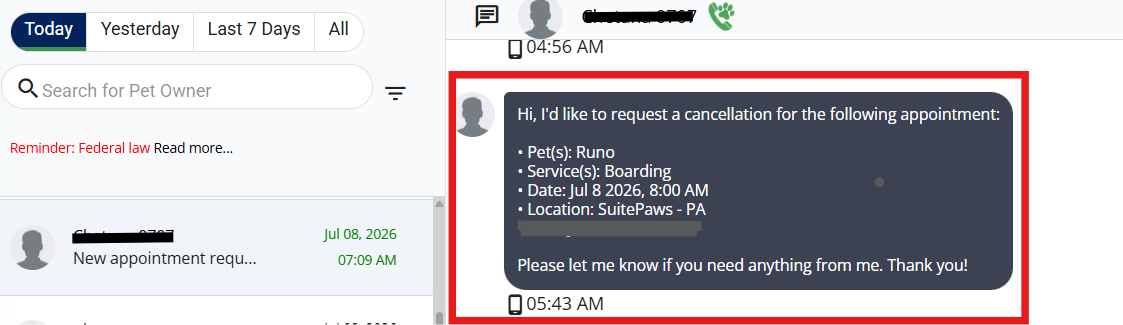
Note:- This is a cancellation request — not an instant cancellation. You or your staff can review and process the request, ensuring full control over the cancellation workflow remains with you.
- This requires a Pet Owner app and Client Portal release. If you would like this prioritized, please contact puppylove@runloyal.com.
- Direct App Support for Pet Owners — Pet Owner App (Coming Soon) :
To reduce unnecessary support overhead for kennel owners, we're introducing a "Having App Issues?" option in the Pet Owner App that allows pet owners to contact RunLoyal Support directly for app-related issues — such as login problems, app crashes, or performance errors — without needing to reach out to their kennel.
How It Works
Once available, pet owners will be able to access the Having App Issues? option from within the app, which will present the following support options:- Call Support — Reach RunLoyal Support directly during business hours.
- Email Support — Send an email to puppylove@runloyal.com. When emailing, the following details are automatically included to help resolve issues faster:
- App logs
- Facility information
- Issue description
- Cancel — Dismiss and return to the app.
Note: This feature is part of an upcoming Pet Owner App release. If you would like this prioritized, please contact puppylove@runloyal.com.
Reports
- Paw Metrics Enhancements :
- Invoice Register Report :
The Invoice Register Report has been updated with the following enhancements:
- Two new date basis options:
- Checkout Date — Recommended for accrual-basis financial reporting.
- Payment Date — Recommended for cash-basis financial reporting.
- Two new columns:
- Deposit — Shows deposits collected during the selected date range.
- Previous Payments — Shows non-deposit payments made before the invoice was closed, within the selected date range.
- Two new date basis options:
- Sales Tax Report :
The Sales Tax Report now includes two date basis options for more flexible tax reporting:
- Checkout Date — Recommended for accrual-basis tax reporting.
- Payment Date — Recommended for cash-basis tax reporting.
- Discount Report : Added a new Tax column to display the sales tax amount discounted alongside the adjustment or discount amount.
- Lodging Occupancy Report :
- Added the following new columns to both the main report and linked report:
- Appointments Checked In
- Appointments Checked Out
- Appointments In House
- The main report now displays unit-level details.
- The linked report now displays pet-level details.
- Added the following new columns to both the main report and linked report:
- Checked-In Pets Report : Added a new Pet Breed column.
- Retail Inventory Report : Added a new UPC column.
- Invoice Register Report :
The Invoice Register Report has been updated with the following enhancements:
Staff App+ for Kennels — Now Available
- We continue to expand StaffApp+ for Kennels with additional features and enhancements. Here's what's new since our last release:
-
New Features & Enhancements — Now Available
- Pet & Pet Owner Notes : View and add notes for pets and pet owners directly from the app.
- View/Add Belongings in Appointments : Staff can view and add belongings associated with an appointment.
- Add Vet Details for Pet : Veterinarian details can now be added directly from the pet profile.
- Pets Who Don't Get Along With : View and manage incompatible pet pairings from within the app.
- Send Deposit Request : Staff can now send deposit requests to pet owners, consistent with the existing Business Portal experience.
- Navigate to Current Date via QR Code Scan in To-Do : Scanning a QR code in the To-Do section now automatically navigates staff to the current date.
-
Coming Soon — Upcoming Features & Enhancements
- The following features will be available in StaffApp+ for Kennels in an upcoming release:
- Membership Purchase : Sell memberships directly from the app.
- Package Purchase : Enable package purchases from within the app.
- Edit Appointment : Edit existing appointments directly from the app.
- Book Again : Quickly rebook a previous appointment with a single tap.
- Recurring Appointments : Create and manage recurring appointment schedules from the app.
- RunLoyal Bark : Integration with RunLoyal Bark for enhanced pet activity updates.
- Dynamic Pricing : Support for dynamic pricing rules within the app.
- Multi-Image Upload : Upload multiple images at once from the app.
- Media Upload in Appointment Belongings, Service Profile & Incident : Attach media directly within Appointment Belongings, Service Profiles, and Incident reports.
- Note: The upcoming features and enhancements for StaffApp+ for Kennels are expected to be available by mid-July 2026.