
A new release! 🎉
Dear RunLoyaler, We've launched new features, enhancements, usability improvements, and bug fixes. Please review the updates below.
--------------------------------------------------------------------------------------------------------------------------
BUSINESS PORTAL
Features
- VAX Automation (Add-on) - Scout AI Verify
 : This feature saves hours of staff time by eliminating the need to manually review vaccination records and removes booking friction for pet owners by significantly speeding up the vaccination verification process.
- What's New:
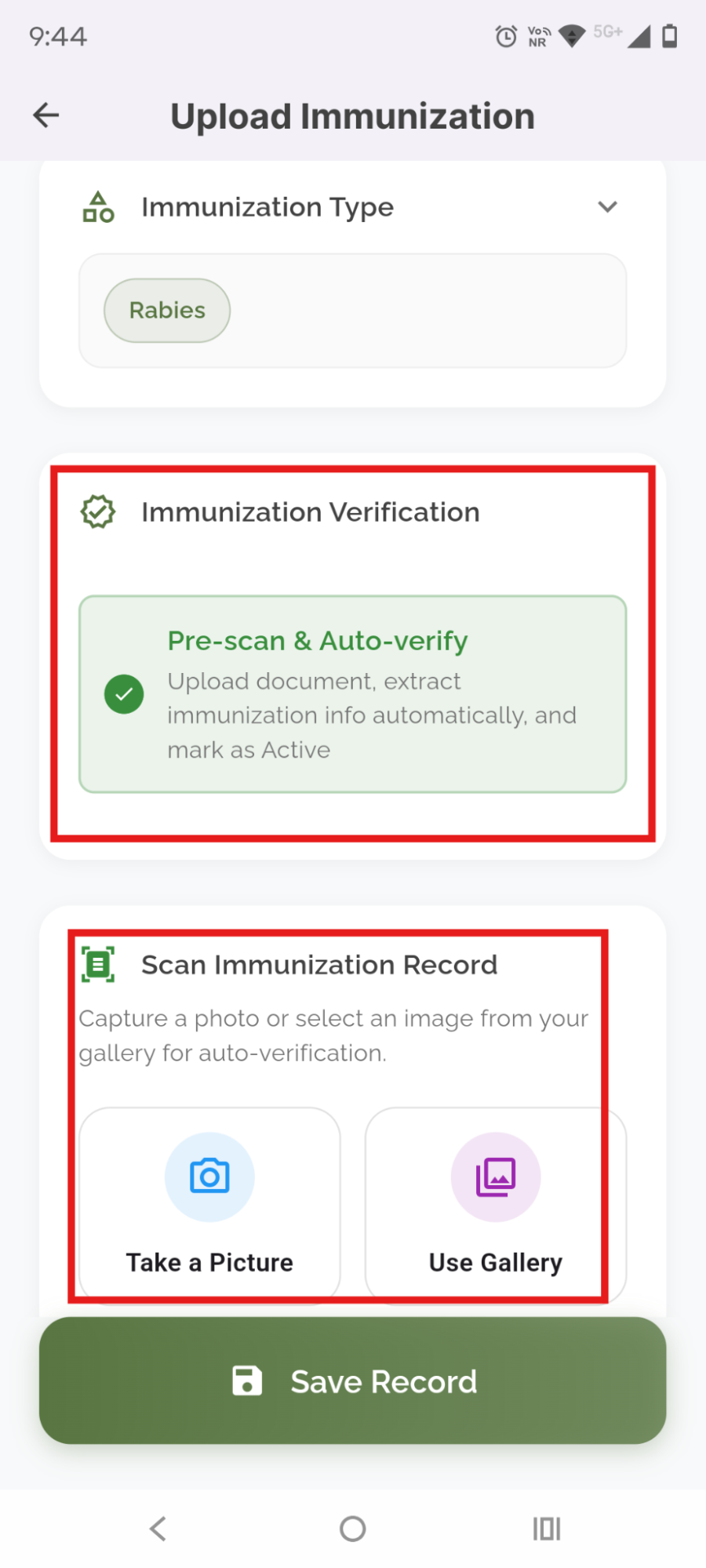
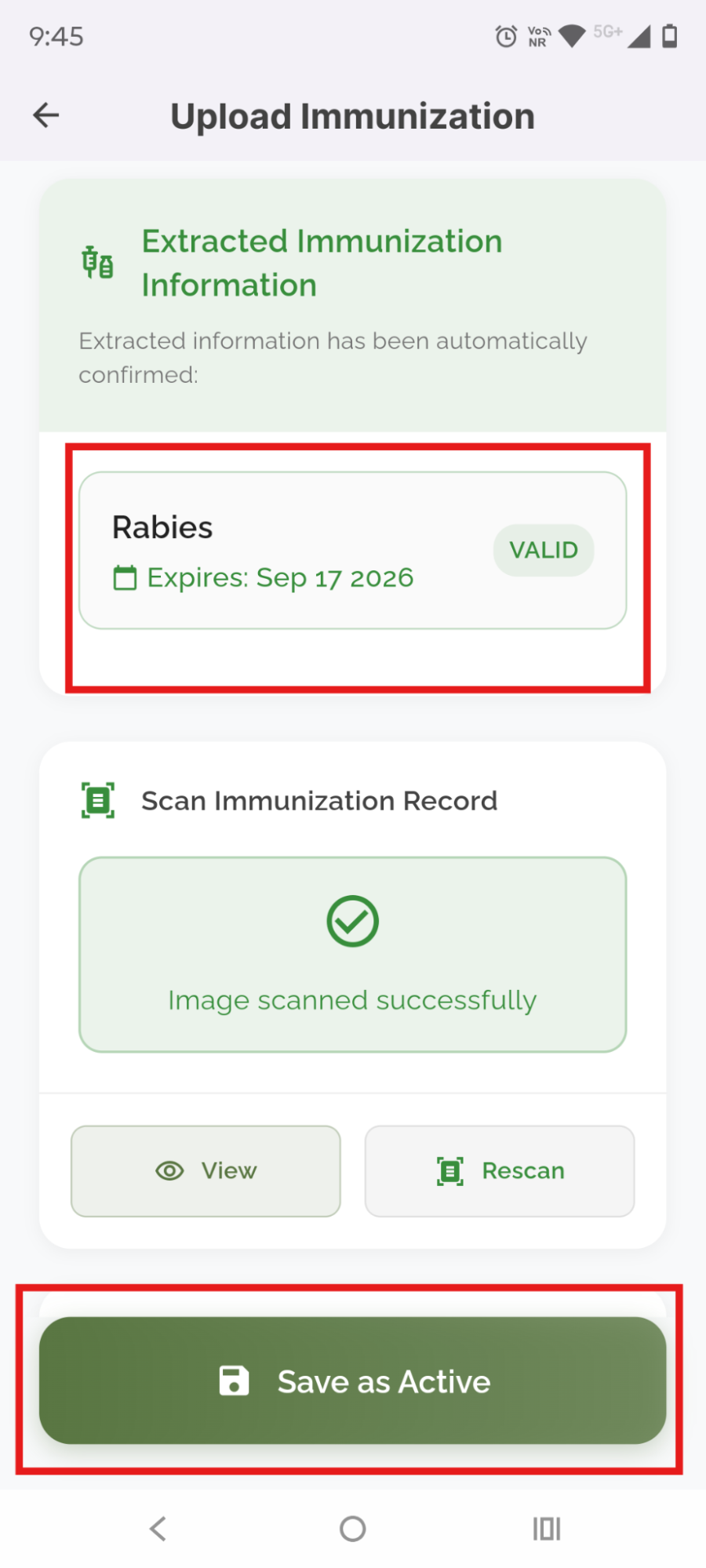
- AI-Based Pre-scan & Auto-verify: This feature automatically scans vaccination records and extracts structured data — including pet information, owner information, and vaccination expiration dates — from images of vaccination cards captured through the Pet Owner App on mobile devices. If the records are valid, ScoutAI automatically marks them as Active.
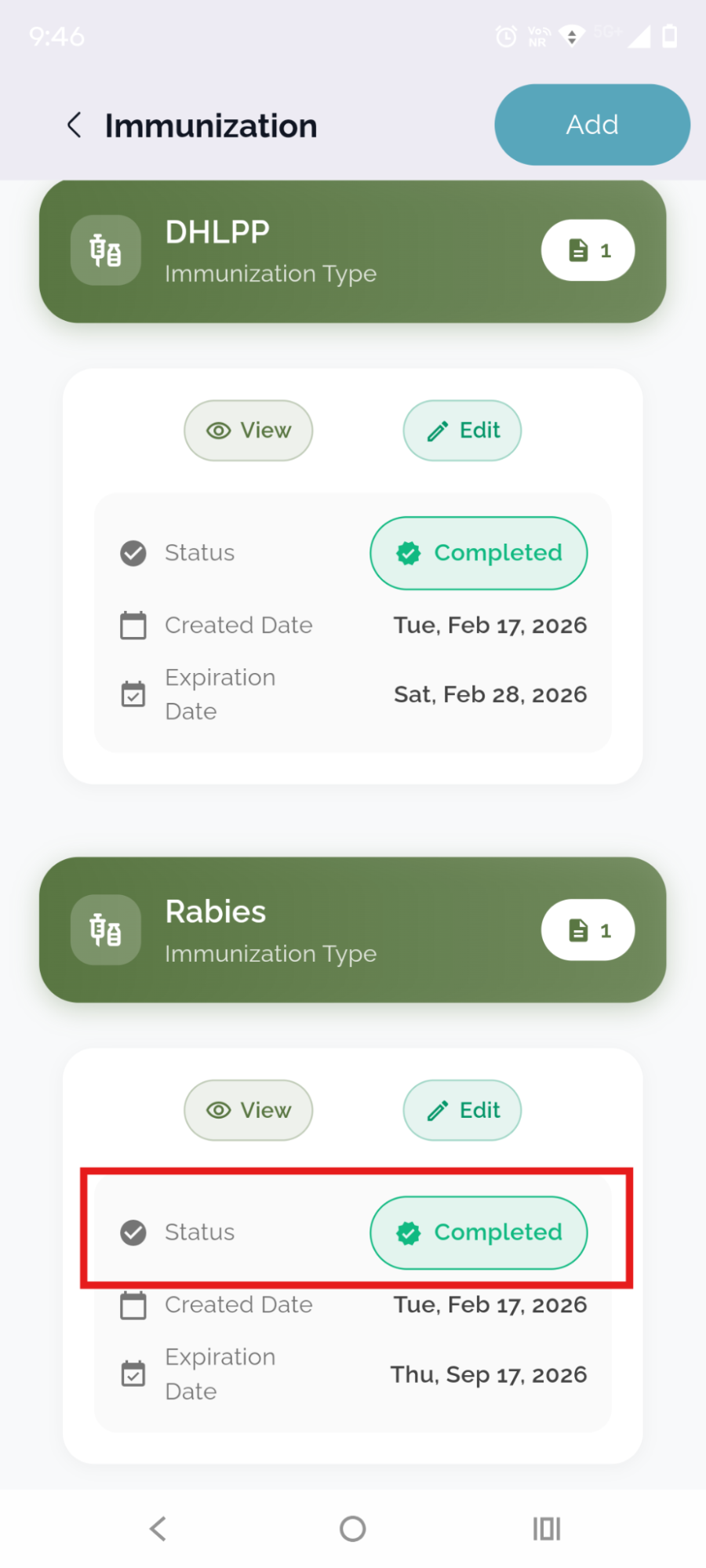
- ScoutAI Verified Icon: In the Pet Profile section under the Immunization, you will now see a 'Verified by ScoutAI' icon next to records that have been validated using this automated feature. This ensures quicker and more accurate updates for pet vaccination data.
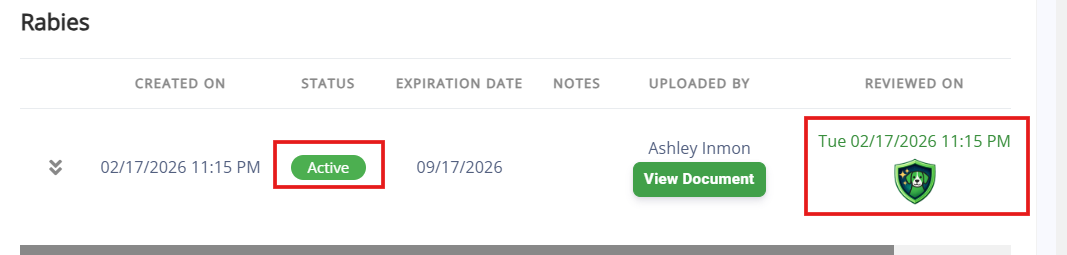
- New Tab for Scout AI Verified Records: A new tab titled "ScoutAI Verified" has been added to the Immunization section to provide easy access to AI-verified vaccination data.

- This feature requires an app release and will be available in March. If you would like this prioritized, please contact puppylove@runloyal.com.
- Price book - View Service, Membership, Package, and Training Service Pricing
 :
:
- The Price Book allows you to view pricing for all services, memberships, packages, and training services directly without navigating to the appointment booking screen or settings.
- The Price Book displays estimated prices for services like Dog Boarding, Grooming, Memberships, Packages, and Training Services.
- You can quickly access and check pricing details from the Price Book interface.
- The Price Book option is available in the header of the Business Portal for easy access.

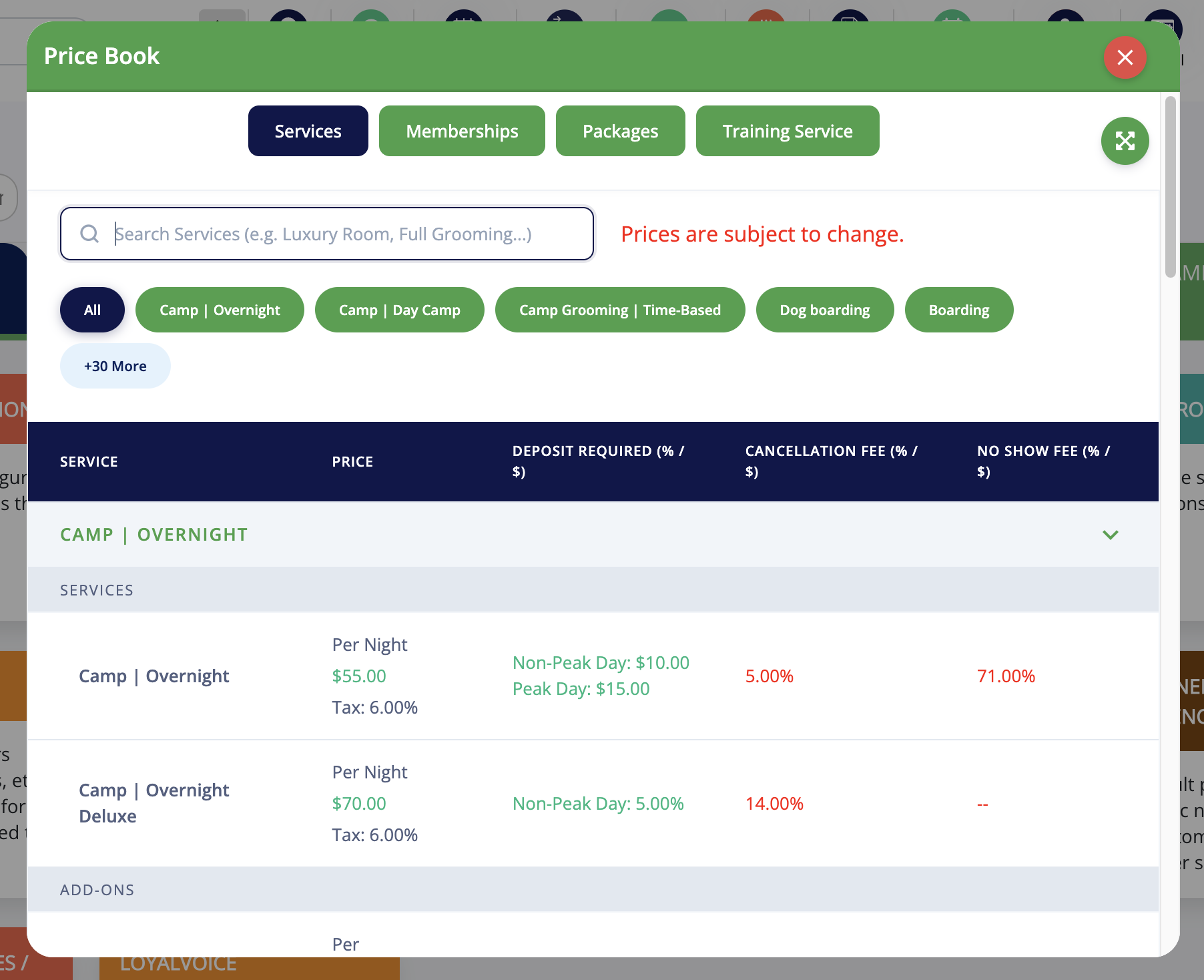
- The same will be available in the Pet Owner App and Booking link in the coming weeks.
Enhancements
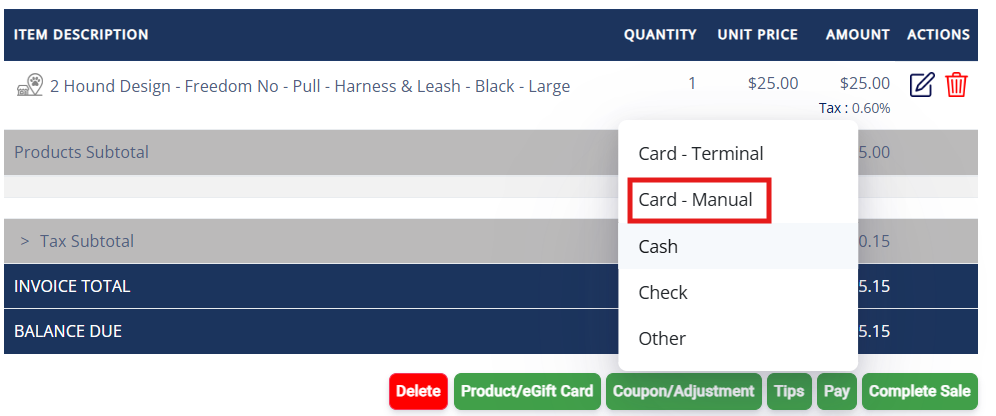
- Card - Manual Payment Option:
- A new payment method, "Card – Manual," has been added for walk-in customers.
- Staff can manually enter card details directly on the payment screen without saving the card.
- This payment option is also available in Appointment Invoice.
- Credit Card Management:
- Mark Default Credit Card: When multiple cards are added, you or your staff can mark one as the default (primary) card upon the Pet Owner's request for easier payment processing.
- Automatic Renewals: If a card is set as the default (primary) card, membership and package auto-renewals will be processed using that card.
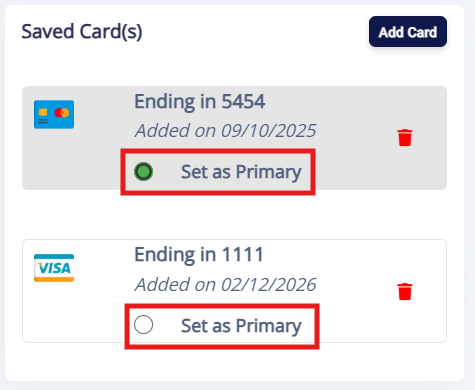
- This feature will be available in the Pet Owner app in March.
- Push Marketing Enhancements:
- Add Images in Push Marketing Campaigns: You can now add images to Push Marketing campaigns. This new feature helps to enhance the visibility and engagement of the campaigns by including visuals directly within messaging.
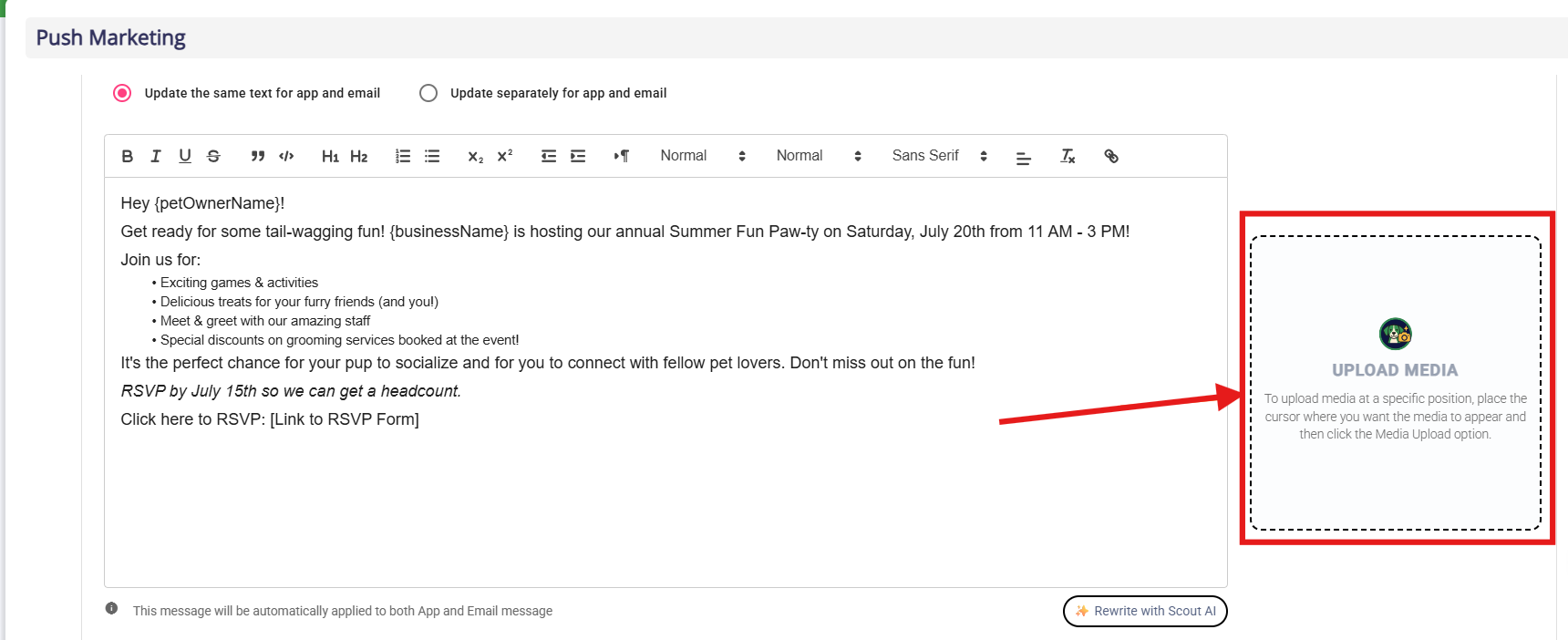
- Pre-Populated Prompt Options: In the "What are we creating today?" section, you now have pre-populated prompt options to streamline campaign creation. Select from a list of predefined campaign types like social interaction, training programs, special care packages, etc., to make your campaign creation faster and more efficient.
- Upload Media from Gallery and Device: You can now upload images for your campaigns directly from your gallery or device. This provides flexibility in selecting and using images that best represent your campaign.
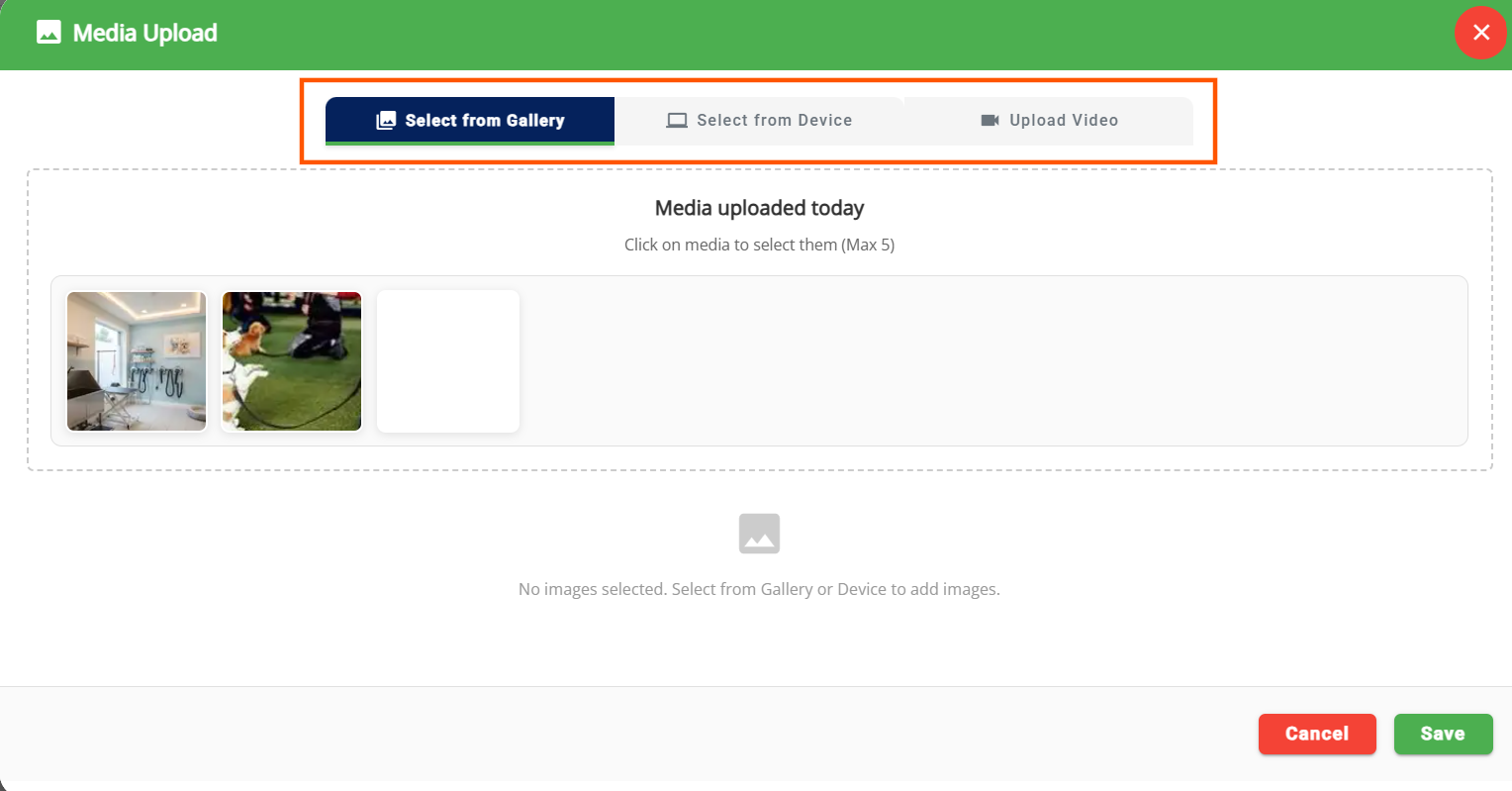
- Video Upload Available (Add-On): The ability to upload videos has been added to further enhance campaign engagement. Please note, video uploads are part of a paid add-on feature.
- Quick Add-ons Edit
 :
:
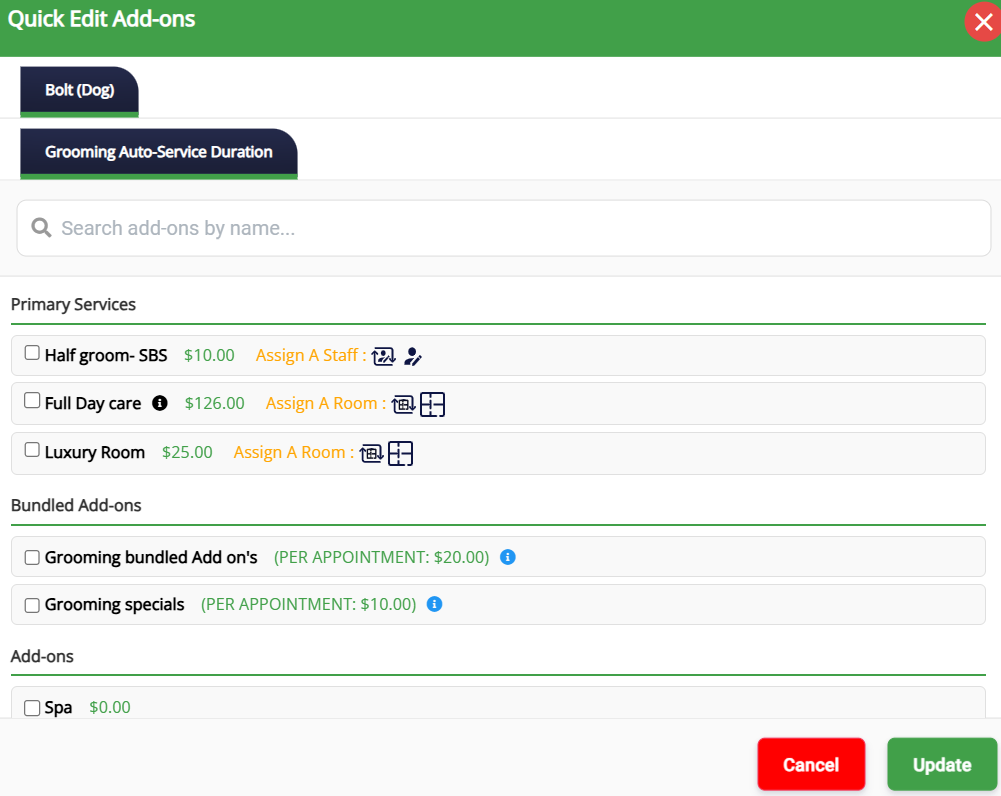
- We've enhanced how add-ons can be quickly edited, providing staff with more control over managing add-ons during appointments.
- Where Quick Edit Is Allowed: Add-ons can be adjusted directly from:
- Daily Snapshot
- Appointments List
- Pet Profile
- Pet Owner Profile

- What's New:
- Searchable Add-ons: Staff can search and select add-ons to be applied to the appointment.
- Bundled Add-ons: Ability to quickly select bundled services and add-ons.
- Editable Dates: Modify add-on dates directly from the Quick Edit screen.
- Primary Services and Add-ons: Easily edit both primary services and add-ons within the same interface.
- Customize Home Screen Display (Pet Owner App):
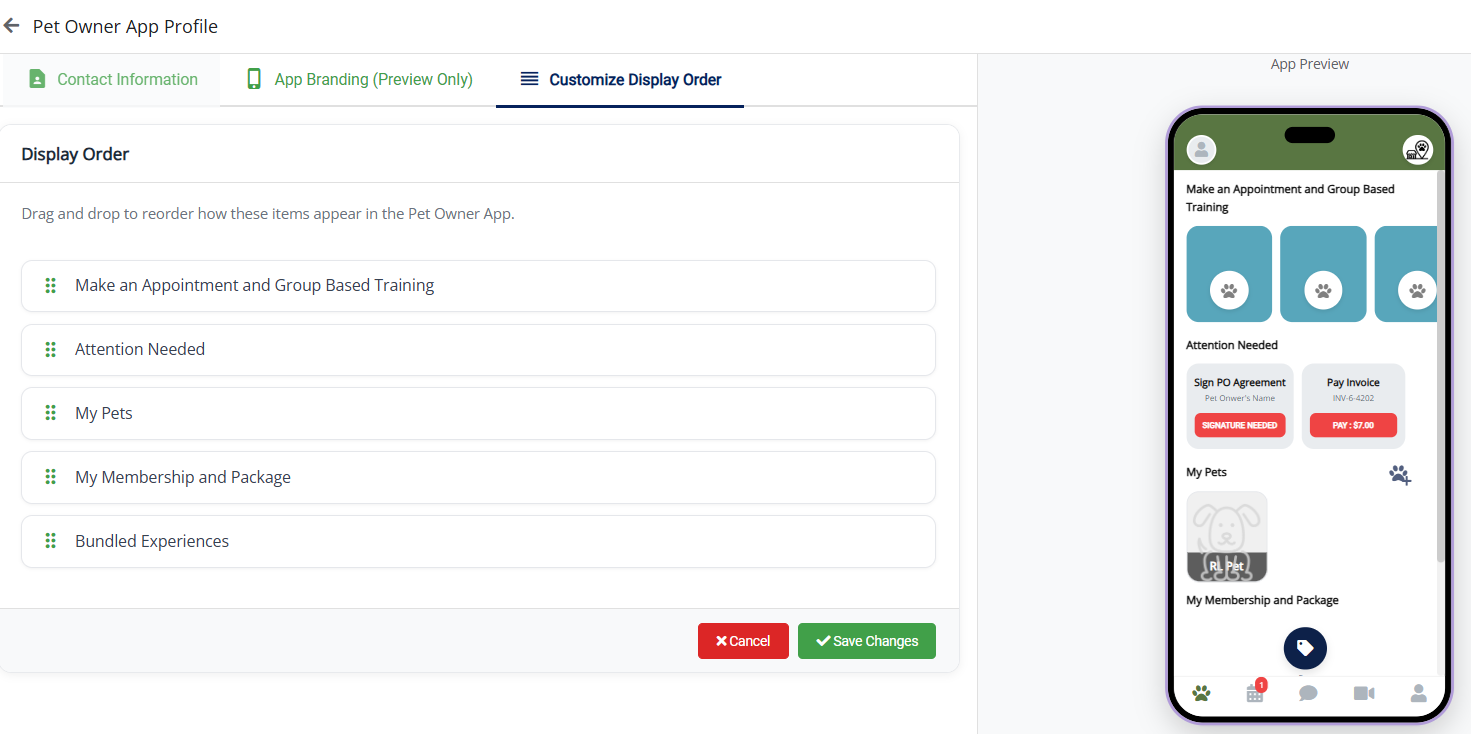
- You can now rearrange the display order of sections on the Pet Owner App home screen.
- Sections such as Attention Needed, Make Appointment & Group Based Training, Memberships & Packages, Pets, etc., can be reordered as needed.
- Configuration path: Settings → Operations → Customize Pet Owner App → Customize Display Order.
- This requires an app release and will be available in March. If you would like this prioritized, please contact puppylove@runloyal.com.
- Staff Schedule Visibility
 :
:
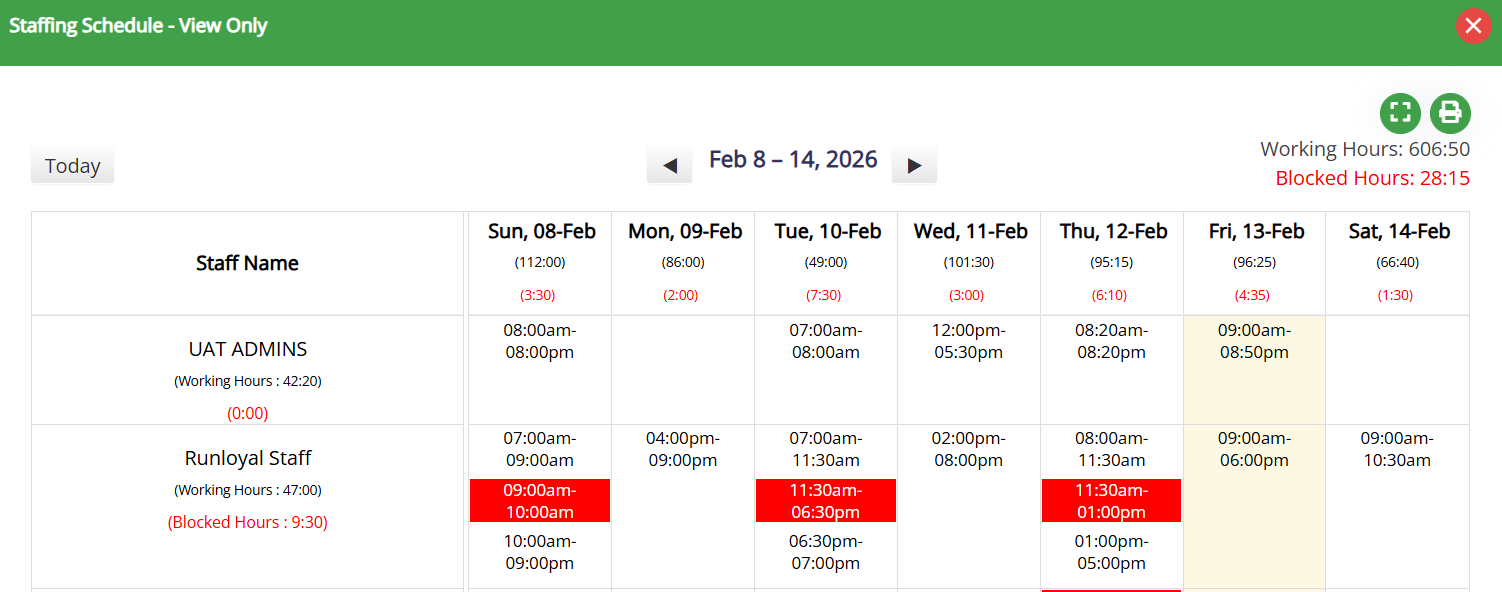
- Non-Admin Staff Access: The Staff Schedule is now visible to non-admin staff in the header of the Business Portal by default.

- Staff Access: This enables staff members to access the Staffing Schedule and view shift details without requiring admin permissions.
- Personalization Settings: The visibility can be controlled through Personalization Settings → Operations → Personalization → Portal → Display Staff Schedule in Header (default: OFF).
- You can also print the Staff Schedule for easy reference.
- Staff Timesheet Access Restriction Enhancement:
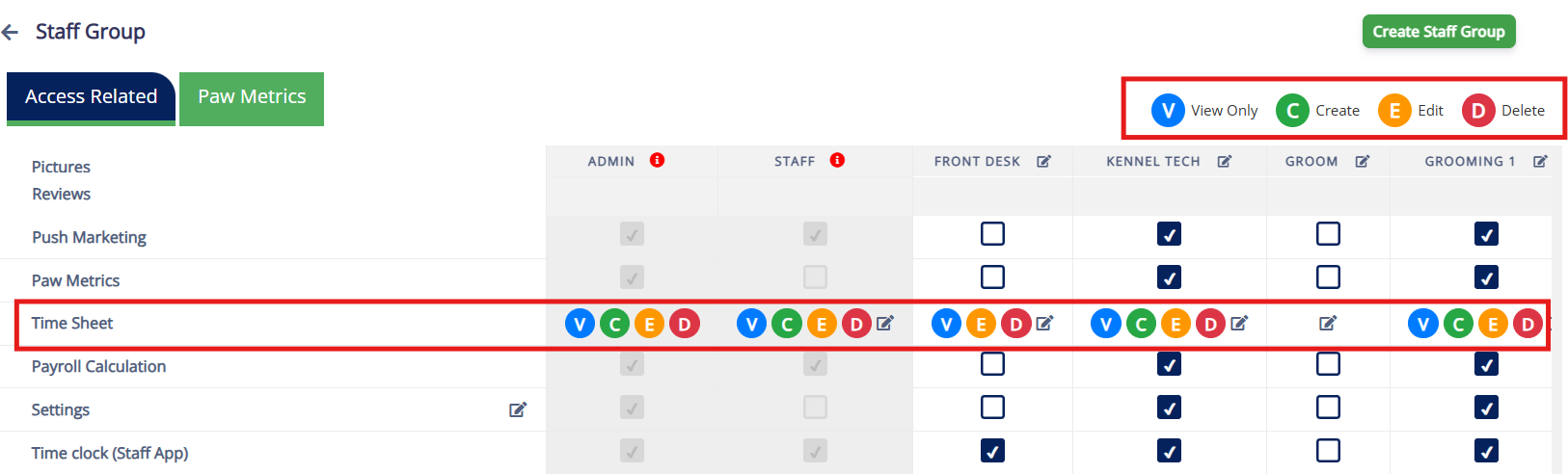
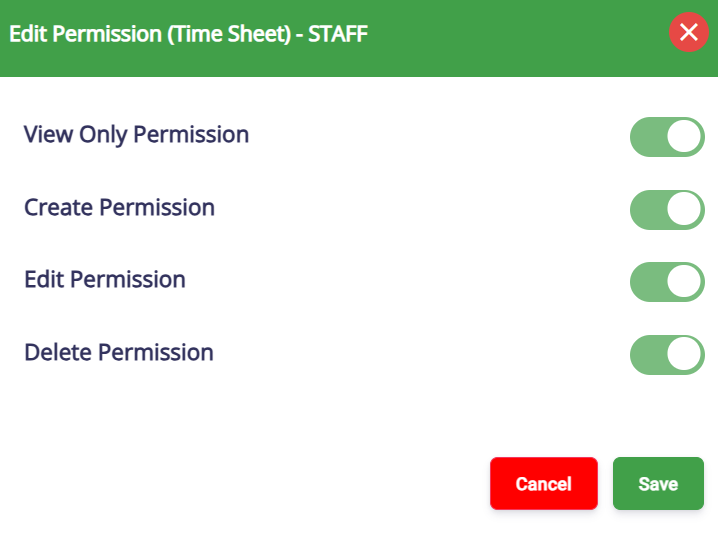
- You can now restrict View, Create, Edit, and Delete access to timesheets for both default and custom staff groups.
- Admins will continue to have default access to all staff timesheets.
- To update the access navigate to Settings → Business Setup → Staff Group → Access Related page → Time Sheet.
- Staff Invitation for App access:
- When Staff App, Staff App Plus Groomer, or Kiosk access is granted through Staff Management → Edit Staff Access, an App link is now sent via email to the staff.
- This behavior mirrors that of Pet Owner email invites.
- Signature in Terminal:
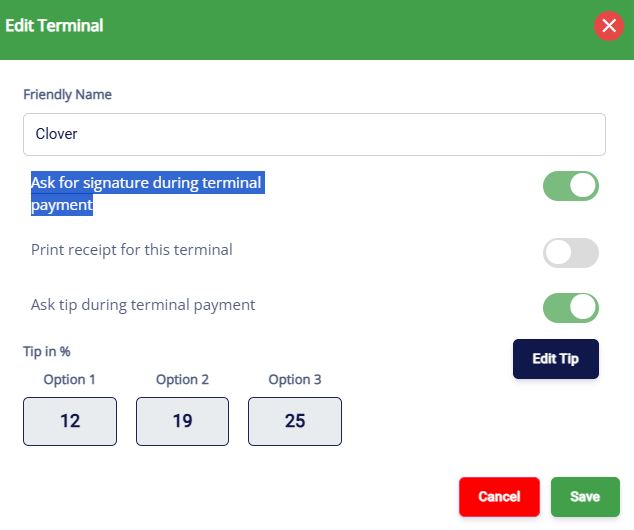
- Capture Pet Owner's signatures directly during terminal payments for secure digital record-keeping and improved transaction verification.
- What's New:
- Signature on Screen: Pet Owners can now sign directly on the terminal's touchscreen, capturing the signature digitally for your records. This signature will not appear on the physical receipt but is electronically stored to protect against chargebacks.
- Where to Configure:
- Navigate to Settings → Pricing → Point of Sale Terminal Configuration to enable the "Ask for signature during terminal payment" option.
- Retail Product Search New Filter:
- A new filter has been added to the Product Listing page to display both active and inactive products under Settings → Retail → Product Inventory.
- Filter Options:
- All
- Active (default)
- Inactive
- Family Member Validation for Capacity-Based Services:
- Family Member Room Warning: A warning will appear when pets from different families are booked for the same room in capacity-based services (e.g., Daycare).
- You can control it through Settings → Operations → Personalization → Portal → Show only family member room warning for capacity-based services (default: OFF).
Paw Metrics
- New Reports:
- Booking Utilization Report: Added a new report that shows daily utilization across Lodging (unit occupancy), Capacity (pet-days), and Staff workload (appointments), including utilization percentages where applicable, with filters for date range and booking model type.
- Enhancements:
- Birthday Report: Added pet age and a separate birth year column to make birthday lists easier to review, sort, and filter.
- Monthly Sales Report: Enhanced adjustment visibility by showing coupon/discount names with clearer, detailed deduction breakdowns.
- Feeding, Medication, and Roll Call Report: Added a Pet Count column to help staff quickly validate daily totals at a glance.
- Revenue Reports (Date Selection): Added a date selection option so Total Revenue and Revenue by Service can be generated using either Payment Date or Invoice Created Date.
- Lodging Occupancy Report: Added a "Confirmed Occupied" column to make it easier to see which areas already have pets assigned while creating appointments.
- Active Pet Owners with Memberships Report: Expanded the report to include historical membership activity (not just currently active memberships) and added a linked detail view from the membership count showing pet owner, pet, membership, and expiration details.